
Cookies are dying. Not completely — but the tracking paradigm built on third-party cookies is collapsing under browser restrictions, privacy regulations, and user opt-outs. Cookieless analytics isn’t a trend. It’s the new baseline.
Chrome’s “user choice” model now sees 60% opt-out rates. Safari and Firefox block third-party cookies by default. GDPR enforcement has teeth. If your analytics strategy still depends on traditional cookie-based tracking, you’re already losing 20-40% of your data.
What Is Cookieless Analytics?
Cookieless analytics refers to methods of collecting website data without relying on browser cookies — particularly third-party cookies used for cross-site tracking. This doesn’t mean eliminating all cookies. First-party cookies (set under your own domain) remain useful. The goal is removing dependency on third-party tracking that browsers now block.
The distinction matters. Third-party cookies track users across websites. First-party cookies track users on your site only. Privacy regulations and browser vendors target the former, not the latter.
Why Traditional Cookie Tracking Fails
Three forces are killing cookie-based analytics:
1. Browser Restrictions
| Browser | Third-Party Cookie Status | Additional Restrictions |
|---|---|---|
| Safari | Blocked by default since 2020 | ITP limits first-party cookies to 7 days |
| Firefox | Blocked by default since 2019 | Enhanced Tracking Protection enabled |
| Chrome | User choice model (60% opt-out) | Privacy Sandbox APIs replacing cookies |
| Edge | Tracking Prevention enabled | Balanced mode blocks known trackers |
| Brave | Blocked aggressively | Fingerprinting protection enabled |
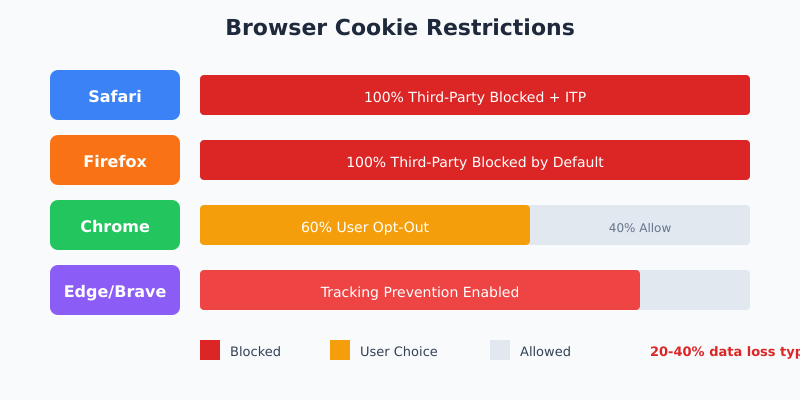
Safari alone accounts for 20%+ of web traffic. Firefox adds another 3-5%. That’s a quarter of your visitors invisible to traditional tracking — before accounting for ad blockers.
2. Privacy Regulations
GDPR, CCPA, PECR — the alphabet soup of privacy law requires explicit consent before setting tracking cookies. No consent, no cookies, no data. Consent rates typically hover around 40-60%. The math is brutal: you’re losing half your analytics data before any technical limitations kick in.
3. Ad Blockers
Roughly 30% of users run ad blockers. Most block Google Analytics by default. Your carefully instrumented event tracking never fires for these users.
GA4’s Approach to Cookieless Tracking
Google Analytics 4 was built with cookie restrictions in mind. It doesn’t eliminate cookies — it reduces dependency on them through several mechanisms:
Event-Based Data Model
GA4 tracks events, not pageviews. This architecture works with or without persistent user identification. You lose cross-session attribution, but individual session data remains intact.
Machine Learning Gap-Filling
When cookies are blocked or users decline consent, GA4 uses behavioral modeling to estimate metrics. The system analyzes patterns from consented users and applies them to fill gaps. It’s statistical inference, not direct measurement — accurate in aggregate, unreliable for individual user journeys.
Consent Mode
GA4’s Consent Mode adjusts data collection based on user consent status:
- Full consent — standard tracking with cookies
- Denied consent — cookieless pings sent, no user identifiers, modeling fills gaps
- No consent signal — configurable default behavior
This allows some data collection even when users reject cookies. But “some data” isn’t “complete data.”
GA4 Cookieless Limitations
GA4 still uses first-party cookies when available. True cookieless mode sacrifices:
- Cross-session user identification
- Accurate returning visitor counts
- Multi-touch attribution
- User Explorer functionality
- Cohort analysis accuracy
For aggregate traffic analysis, GA4 cookieless works. For user-level insights or conversion attribution, expect significant blind spots. If your GA4 data looks off after enabling Consent Mode, our Fix My Tracking troubleshooter can help diagnose whether the issue is consent-related or a tracking misconfiguration.
Server-Side Tracking: The Infrastructure Solution
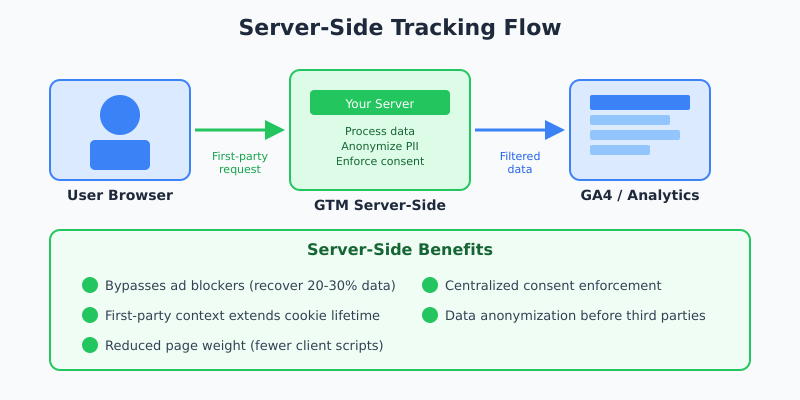
Server-side tracking moves data collection from the browser to your server. Instead of JavaScript sending data directly to analytics platforms, your server acts as intermediary.
How It Works
- User interacts with your website
- Browser sends data to your server (first-party request)
- Your server processes, anonymizes, enriches data
- Server forwards processed data to analytics platforms
This architecture bypasses most browser restrictions. Ad blockers typically don’t block first-party server requests. Safari’s ITP doesn’t apply to server-set cookies. You control what data flows to third parties.
Server-Side Tracking Benefits
| Benefit | Impact |
|---|---|
| Bypasses ad blockers | Recover 20-30% of lost data |
| First-party context | Longer cookie lifetimes, better accuracy |
| Data control | Anonymize before sending to third parties |
| Consent enforcement | Centralized control over what data flows where |
| Reduced page weight | Fewer client-side scripts, faster pages |
Implementation Options
Google Tag Manager offers server-side containers. Deploy on Google Cloud Run, AWS, or any container platform. Third-party solutions like Stape and JENTIS simplify deployment.
Server-side tracking isn’t free. You’re adding infrastructure costs and operational complexity. For high-traffic sites, the data quality improvement justifies the investment. For smaller sites, the ROI calculation is less clear.
Privacy-First Analytics Platforms
Not every site needs Google Analytics. Privacy-first alternatives offer GDPR compliant analytics without consent requirements — because they don’t collect personal data in the first place.
Top Cookieless Analytics Tools
| Tool | Hosting | Price | Best For |
|---|---|---|---|
| Plausible | Cloud / Self-hosted | From $9/mo | Simple sites wanting clean dashboard |
| Fathom | Cloud | From $14/mo | Privacy-focused businesses |
| Matomo | Cloud / Self-hosted | Free (self) / From $19/mo | GA4 alternative with full features |
| Simple Analytics | Cloud (EU) | From $9/mo | EU-based compliance requirements |
| Umami | Self-hosted | Free (open source) | Developers wanting full control |
| GoatCounter | Cloud / Self-hosted | Free / Donation | Personal sites, small projects |
What These Tools Sacrifice
Privacy-first tools achieve compliance by not collecting personal data. That means:
- No individual user tracking
- No cross-session identification
- No conversion attribution to specific users
- Limited or no integration with ad platforms
- Aggregate metrics only
For content sites, blogs, and marketing pages — this is fine. You need traffic trends, top pages, and referral sources. Individual user journeys don’t matter.
For e-commerce, SaaS, or any conversion-focused business — these tools aren’t enough. You need to connect marketing spend to revenue. That requires identity persistence that cookieless analytics specifically prevents.
First-Party Data Strategy
The most sustainable approach to cookie-free tracking isn’t avoiding data collection — it’s collecting better data with explicit user relationships.
First-Party Data Sources
- Logged-in users — Authentication provides persistent identity without cookies
- Email subscribers — Known contacts you can track across touchpoints
- Customer accounts — Purchase history, preferences, behavior — all first-party
- Form submissions — Lead data with explicit consent
- CRM integration — Connect online behavior to offline customer records
Building First-Party Data Infrastructure
Companies leveraging first-party data strategies see 2.9x better customer retention and 1.5x higher marketing ROI compared to those dependent on third-party cookies. The investment pays off.
Key components:
- Customer Data Platform (CDP) — Unifies data from multiple sources
- Identity resolution — Connects anonymous sessions to known users
- Consent management — Tracks what data you’re allowed to use
- Data warehouse — Central repository for analytics and activation
This isn’t a weekend project. First-party data infrastructure requires significant investment. But it’s the only approach that improves over time as privacy restrictions tighten.
Implementation Roadmap
Moving to cookieless analytics isn’t a single change. It’s a migration strategy.
Phase 1: Audit Current State
- Identify all tracking technologies in use
- Measure data loss from consent rejection and ad blockers
- Document which metrics require user-level tracking
- Assess current consent rates and compliance status
Phase 2: Implement Quick Wins
- Enable GA4 Consent Mode if not already active
- Configure data layer for server-side readiness
- Audit cookie consent implementation
- Review which reports actually need individual user data
Phase 3: Infrastructure Investment
- Evaluate server-side tracking deployment
- Consider privacy-first tools for non-conversion metrics
- Build first-party data collection points
- Implement identity resolution for logged-in users
Phase 4: Long-Term Strategy
- Develop CDP or data warehouse infrastructure
- Create authenticated user experiences that encourage login
- Build direct customer relationships reducing reliance on anonymous tracking
- Establish measurement frameworks that work without individual user identification
Choosing the Right Approach
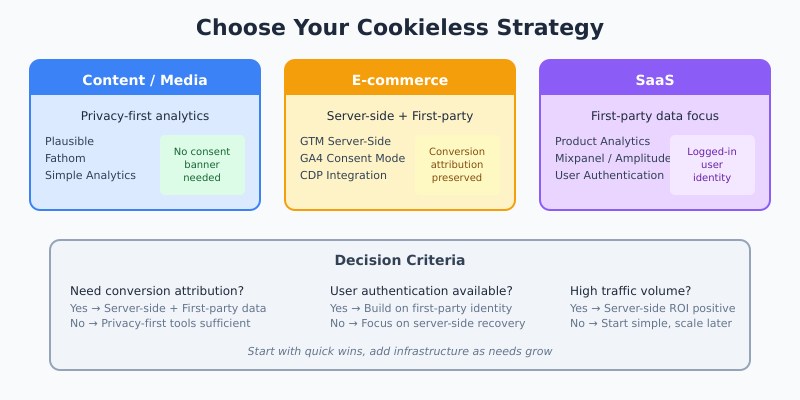
Your cookieless strategy depends on your business model:
| Business Type | Recommended Approach | Priority Tools |
|---|---|---|
| Content/Media | Privacy-first analytics | Plausible, Fathom, or Simple Analytics |
| E-commerce | Server-side + first-party data | GTM Server-Side, CDP, GA4 with Consent Mode |
| SaaS | First-party data focus | Product analytics (Mixpanel, Amplitude), CDP |
| Lead Generation | Server-side + CRM integration | GTM Server-Side, CRM, GA4 |
| Small Business | Privacy-first simplicity | Plausible, Fathom, or GA4 basic |
Common Mistakes to Avoid
1. Assuming GA4 Solves Everything
GA4 is more privacy-resilient than Universal Analytics. It’s not privacy-proof. Consent Mode modeling is estimation, not measurement. Server-side deployment improves data quality but doesn’t eliminate consent requirements.
2. Ignoring First-Party Cookies
The goal is removing third-party cookie dependency, not all cookies. First-party cookies under your domain remain essential for session tracking, user authentication, and basic functionality. Don’t throw out useful technology because of privacy theater.
3. Over-Engineering Too Early
Server-side tracking, CDPs, data warehouses — these are powerful tools. They’re also expensive and complex. Start with Consent Mode and privacy-first alternatives. Add infrastructure when your data requirements justify it.
4. Measuring the Wrong Things
Individual user tracking was convenient, not always necessary. Many business questions can be answered with aggregate data. Reframe your measurement strategy around what you actually need to decide, not what you used to collect.
Deep Dives: Cookieless Analytics Implementation
Each component of a complete cookieless analytics stack deserves its own focused walkthrough. The following guides extend this overview with implementation specifics, cost breakdowns, and code examples:
- Server-Side Tracking with GA4 — sGTM container setup, Cloud Run cost reality, consent handling, and when SST is the wrong call.
- Google Consent Mode v2: Step-by-Step — Basic vs Advanced Mode, the four required signals, GTM and gtag.js implementation, and CMP integration with Cookiebot, OneTrust, Iubenda.
- First-Party Data Collection for GA4 — Building the auth → CDP → warehouse stack, identity resolution without third-party cookies, and a phased quarterly roadmap.
- Cookieless Attribution & Modeled Conversions — How GA4 fills attribution gaps, data-driven attribution in a cookieless world, Conversion API, and the Privacy Sandbox roadmap.
Bottom Line
Cookieless analytics isn’t optional — it’s the reality of modern web tracking. Browser restrictions, privacy regulations, and user expectations have permanently changed the landscape. GA4 offers partial solutions through Consent Mode and modeling. Server-side tracking recovers significant data loss. Privacy-first tools eliminate consent requirements entirely. First-party data strategies provide the most sustainable path forward. Choose based on your business model, start with quick wins, and invest in infrastructure as your needs grow. The companies that adapt now will have competitive advantage as privacy restrictions continue tightening.
