
Most SEO reports throw numbers at you: sessions, clicks, rankings, and a mysterious metric called traffic value. It sounds nice. It looks good in a deck. But when your CEO asks, “Okay, and how much money did this bring?”, the room suddenly goes quiet.
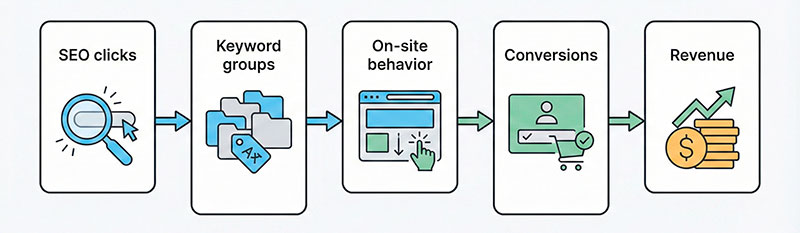
In this article I’ll show you how to connect SEO keywords to real conversions and revenue using a simple, event-based approach. We’ll walk from keyword intent and landing pages to micro-conversions, primary conversions, and actual money you can show in a dashboard.
You don’t need complex formulas or fancy tools. You need a clear funnel, a tracking plan, and a bit of patience.
What “Traffic Value” Really Means for Your Business
Let’s translate all this into normal language.
When people talk about traffic value, they usually mean “how much this traffic would cost if I had to buy it with ads.” Some SEO tools estimate this based on click prices and your current positions. It puts a price tag on your organic visitors.
That’s interesting. It’s a good way to compare keywords and pages. Pages with high seo value often get a lot of visits from queries that advertisers pay real money for.
But there are two big problems:
- This is still an estimate.
- It says nothing about what people actually do on your site.
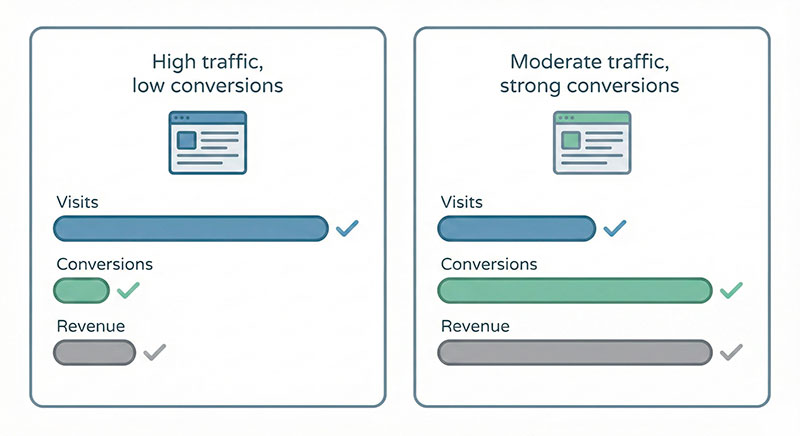
A page can look amazing in SEO reports:
- lots of sessions,
- strong positions,
- big “value” number.
And still bring almost no leads, signups, or sales.
So in this article, we’ll treat that value metric as a hint, not a final answer. The real story starts when we add conversions, events, and revenue on top of it.
Define What a “Conversion” Means for Your SEO Traffic
Before you try to “improve” anything, you must know what success is.
For conversion seo work, you first need to define what a conversion means for each important page type. On one page it might be a purchase. On another, it might be a lead form. On a blog article, it might be an email signup.
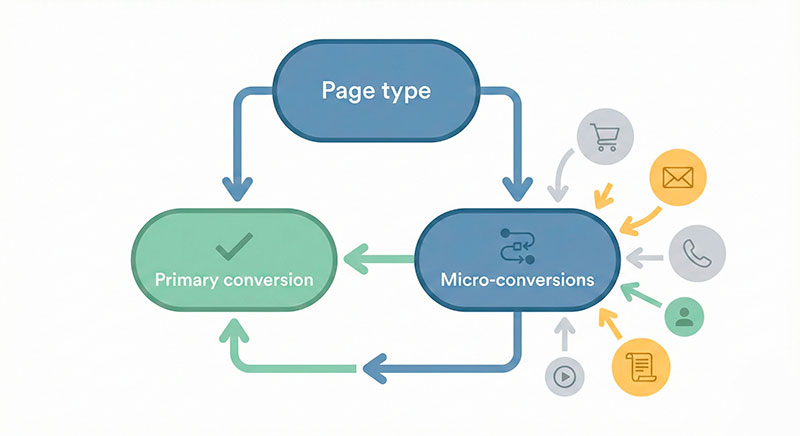
I like to split everything into two layers:
- Primary conversions – the main business outcome you really care about.
- Micro-conversions – smaller actions that show real interest and movement toward that outcome.
Examples:
- Online store product page
- Primary conversion: completed order
- Micro-conversions: add to cart, add to wishlist, start checkout
- Lead gen landing page
- Primary conversion: submit lead form
- Micro-conversions: click phone number, download brochure, start form
- Blog article
- Primary conversion: newsletter signup or lead magnet download
- Micro-conversions: scroll depth 75%, click internal CTAs, time on page over X seconds
Your blog posts can become real seo conversion content when you stop thinking “views only” and define a clear next step for the visitor.
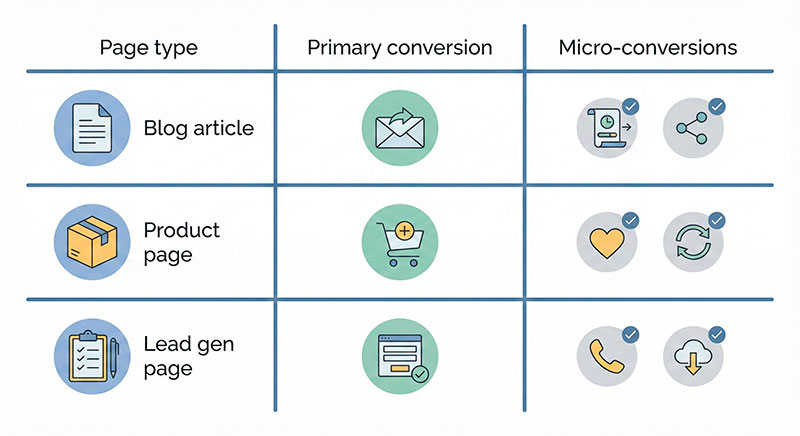
Here’s a simple mapping you might use:
| Page type | Primary conversion | Example micro-conversions |
|---|---|---|
| Blog article | Email signup | Scroll 75%, click “learn more”, time on page > 60 sec |
| Category page | Product view / lead form | Filter use, add to wishlist, click product card |
| Product page | Purchase | Add to cart, start checkout, view shipping info |
| Lead gen page | Form submission | Start form, click phone/email, download PDF |
If you ever read examples of micro-conversions in web analytics guides, you’ll notice they follow exactly this idea: small but meaningful steps on the way to the main event.
Map Your SEO Conversion Funnel from Keyword to Revenue
Now let’s connect the dots from search to money.
When someone types a keyword into a search engine, they have a goal in mind. That’s their intent. Your job is to guide them from that intent to the right page, then through a series of steps toward a conversion.
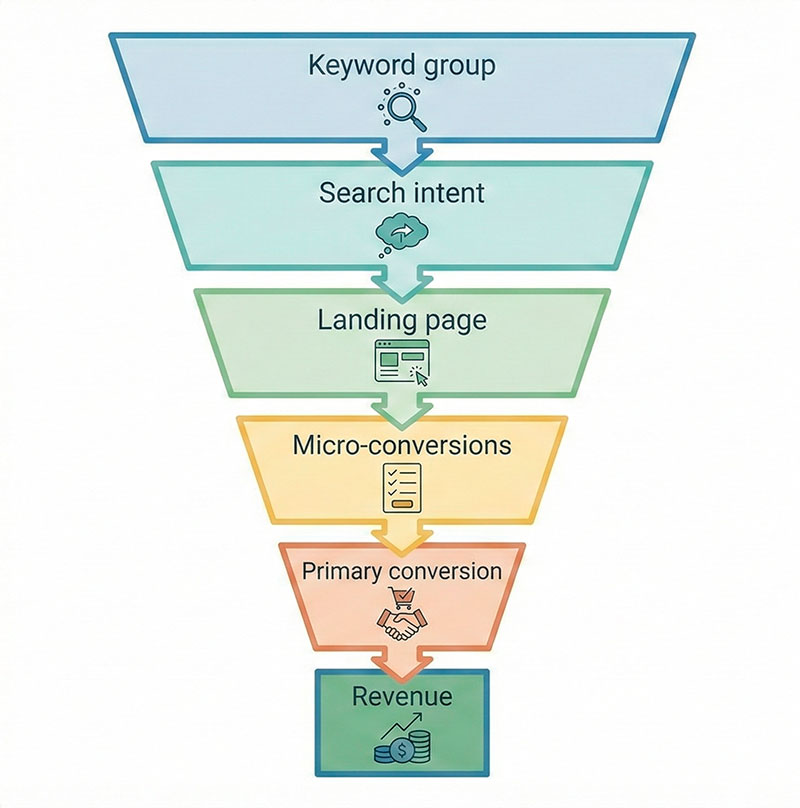
I call this full path your seo conversion funnel:
- Keyword (or keyword group)
- Intent (informational, comparison, transactional, etc.)
- Landing page
- Micro-conversions on that page
- Primary conversion
- Revenue (now or later)
You’ve probably seen charts of classic digital marketing funnel stages: awareness → consideration → conversion. Here we’re doing the same, just with a stronger focus on search terms and on-site events.
Let’s take two quick examples.
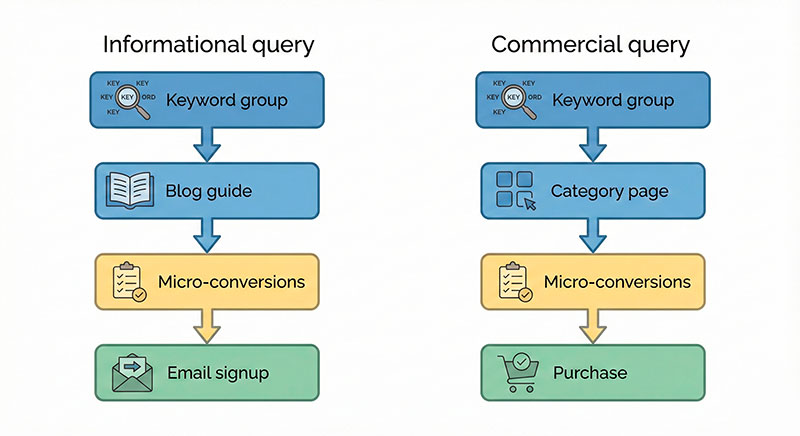
Example 1: Informational query
- Keyword group: “how to choose running shoes”
- Intent: learn and compare options
- Landing page: detailed blog guide
- Micro-conversions: scroll depth, clicks on product categories, clicks on “see collection”
- Primary conversion: email signup or click into category page
- Revenue: user later buys shoes or related items
Example 2: Commercial query
- Keyword group: “buy blue running shoes size 42”
- Intent: ready to buy soon
- Landing page: category or filtered product listing
- Micro-conversions: filter use, product clicks, add to cart
- Primary conversion: completed order
- Revenue: immediate purchase
To make this useful, write down your own funnels. A simple text list is enough at first. Later, you can turn it into a proper diagram or even into a customer journey analytics guide for your team.
Set Up Conversion Tracking That Actually Connects SEO and Analytics
Up to this point, we’ve been drawing maps. Now we need data.
Without solid conversion tracking with seo, you are basically guessing. You might see that organic traffic is growing, but you can’t tell which keyword groups or pages actually create value.
Let’s walk through the basic steps.
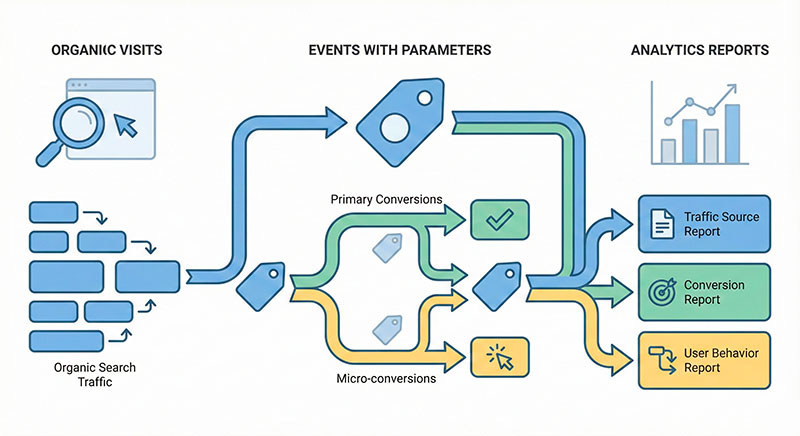
- Tag your traffic consistently
- Use a clear, consistent scheme to mark where visits come from.
- For organic search, make sure your web analytics tool can see: search engine, keyword (or keyword group), and landing page.
- Even if some queries are hidden, you can still group by landing page and by intent.
- Capture the right events
- Implement events for primary conversions and micro-conversions from Section 2.
- Add useful parameters to those events: page type, funnel step, keyword group (if available), and device type.
- This is where a good tracking plan template for web analytics becomes very helpful.
- Connect on-site events with SEO data
- In your web analytics tool, build reports that combine:
- landing page,
- organic sessions,
- events and conversions,
- revenue or value.
- If you have a BI or spreadsheet system, you can also join data from different sources for deeper analysis.
- In your web analytics tool, build reports that combine:
how to track conversion with seo
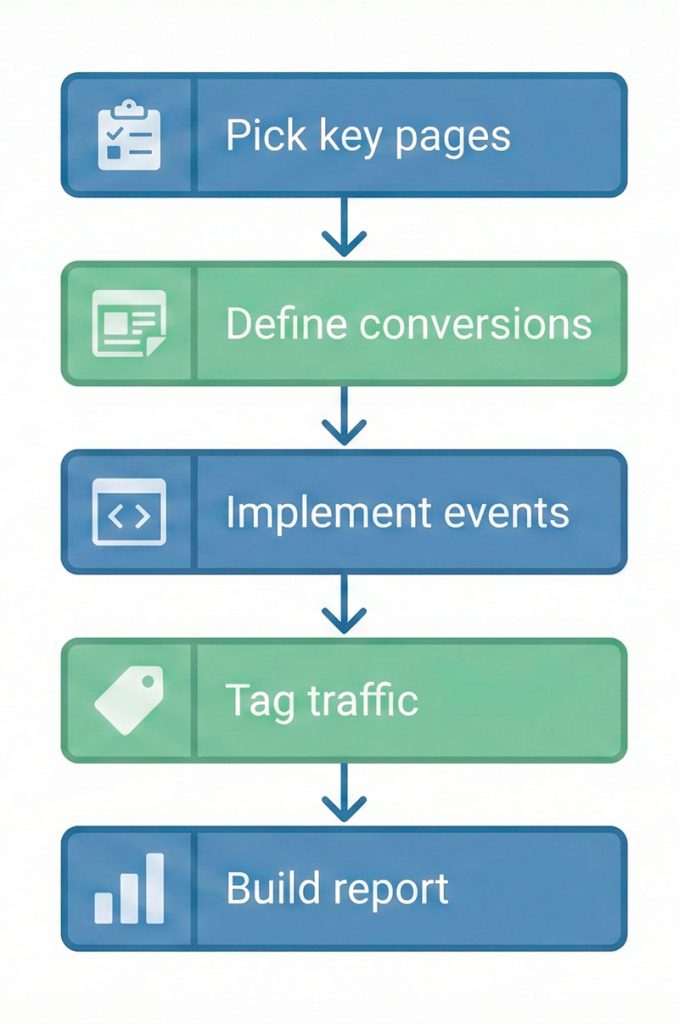
So, how to track conversion with seo in practice? Start small:
- Pick 3–5 important pages.
- Define primary and micro-conversions for them.
- Make sure all those actions fire clean events in your analytics tool.
- Then look only at organic traffic for those pages and see which queries and pages actually drive those events.
Once this works for a few pages, expand the same logic to more content.
You can read any best practices for UTM tagging guide for campaign links, and then apply the same level of discipline to your organic categorization and event parameters.
Calculate Conversion Rates and Revenue per Keyword
Now we finally bring in some numbers. Don’t worry, we’ll keep the math light.
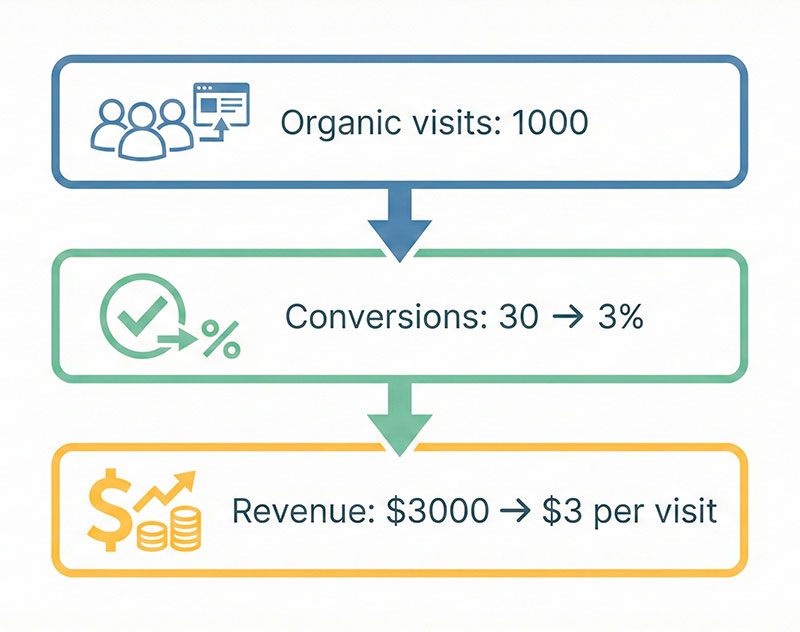
Imagine you have:
- 1,000 organic sessions to a landing page last month
- 30 primary conversions (for example, purchases or qualified leads)
Your conversion rate is:
- 30 ÷ 1,000 = 0.03 → 3%
You can do the same for groups of keywords or for whole funnels.
what is conversion rate in seo
So, what is conversion rate in seo? It’s the percentage of organic visitors who complete a specific action you care about. In practice, it’s:
(number of conversions from organic search) ÷ (number of organic sessions) × 100%
You decide what “conversion” means: purchase, signup, lead, demo request, and so on.
Now let’s add revenue. Here are three simple models:
- E-commerce
- You know the order value for each purchase.
- For a keyword group, you can sum revenue from orders that started on the relevant landing pages.
- Then you can calculate “revenue per visit” or “revenue per 1,000 visits”.
- Lead gen
- You know how many leads turn into paying customers and what the average deal size is.
- Example: 100 leads → 10 customers → $500 each → $5,000 revenue.
- You can assign an average value per lead ($50 in this example) and then use that in your SEO reporting.
- SaaS / product
- You might have a longer cycle and recurring payments.
- In this case, you estimate LTV for users who came from certain pages or keyword groups.
- Even a rough LTV number is better than ignoring value completely.
Here’s a tiny example comparing three keyword groups for an online store:
| Keyword group | Organic visits | Primary conversions | Conversion rate | Revenue | Revenue per visit |
|---|---|---|---|---|---|
| Running shoes guide | 2,000 | 40 | 2% | $4,000 | $2.00 |
| Blue running shoes | 800 | 35 | 4.4% | $3,500 | $4.38 |
| Cheap running shoes | 1,200 | 10 | 0.8% | $700 | $0.58 |
You can see that “Blue running shoes” brings less traffic but much more money per visit. That’s the kind of insight that helps with organic traffic forecasting methods and prioritizing work.
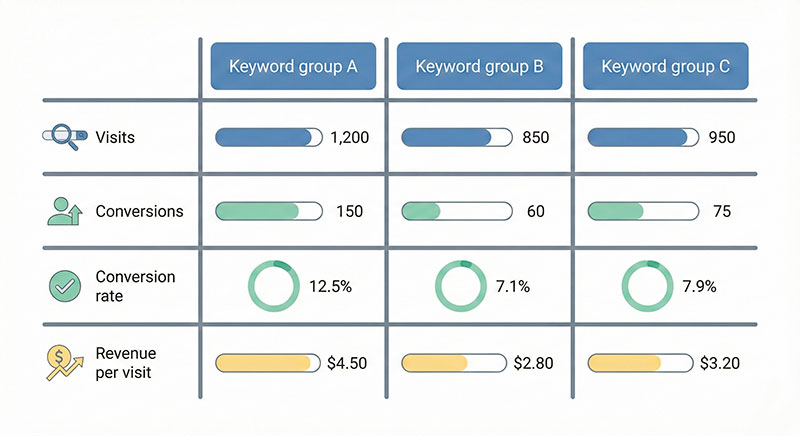
If you want to go deeper, you can look up how to calculate revenue per visitor and adapt the formulas to your own business model. Just remember: simple, transparent numbers are almost always better than a perfect but confusing model that nobody trusts.
Use the Data for SEO Conversion Optimization
Seo conversion optimization starts when you stop treating reports as the final step and start treating them as a to-do list.
With the data from your funnels and events, you can now:
- Find pages or keyword groups with high visits but weak conversions.
- Find hidden gems with low visits but strong conversions and revenue.
- Decide where to test new copy, new offers, new layouts, or new CTAs.
- Share clear stories with your team: “This group of pages brings X in revenue. If we improve the conversion rate by 1 point, we get Y extra per month.”
Let me give you a simple, anonymous mini-case from “our team”.
On one project, we saw that:
- A set of “how to choose X” guides drove a lot of organic traffic.
- People were reading, but few were clicking through to product pages.
- Conversion from those guides to orders was low.
We mapped the funnel and events and saw a big drop between the guide and the product category. We changed three things:
- Moved the main CTA higher and made it more specific.
- Added a short comparison block inside the article with clear “start here” links.
- Cleaned up the internal linking structure to reduce dead ends.
Over 8 weeks:
- CTR from the guides to categories grew by ~30%.
- The conversion rate to orders from this path grew by ~20%.
- Total revenue from this content segment increased, even though traffic barely changed.
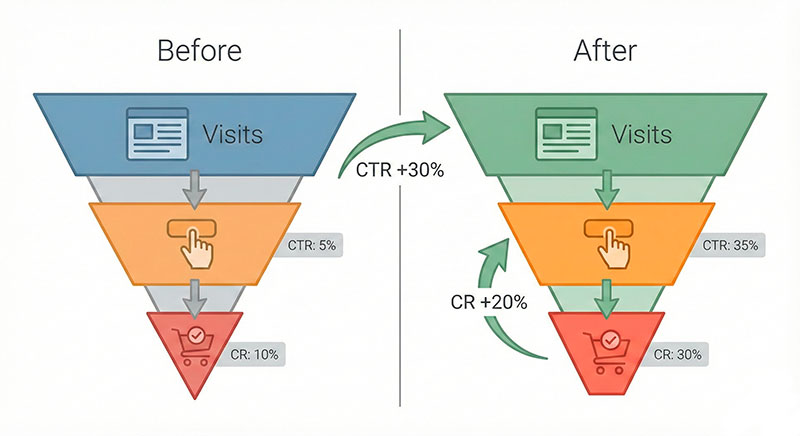
This is the essence of conversion rate optimization for SEO landing pages: you work not only on rankings but also on what happens after the click.
Putting It All Together: A Simple Checklist and Dashboard Idea
We’ve covered a lot, so let’s make it practical.
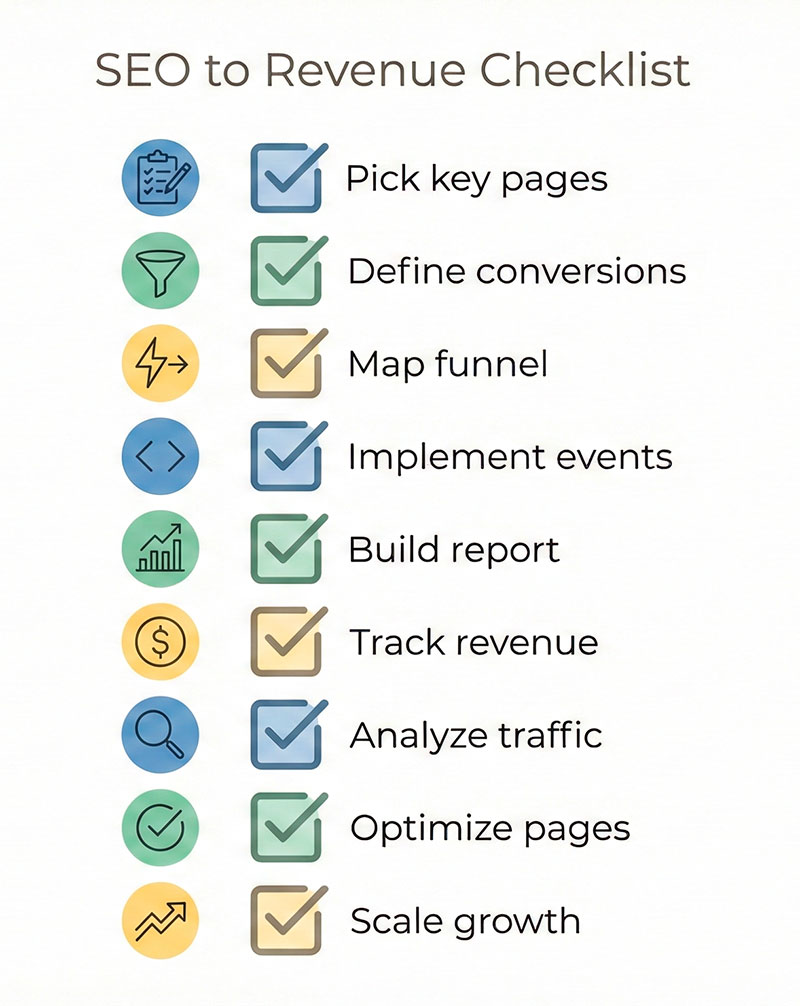
Here’s a simple checklist you can use as your roadmap:
- Pick your most important SEO pages and keyword groups.
- For each, define primary conversions and micro-conversions.
- Draw your keyword-to-revenue path as a funnel.
- Implement events in your web analytics tool for all key actions.
- Make sure events carry useful parameters (page type, funnel step, keyword group where possible).
- Build basic reports that show visits, conversions, and value side by side.
- Compare performance of different keyword groups and page types.
- Choose a few clear hypotheses and run changes on high-potential pages first.
- Review and update your funnels and events every few weeks.
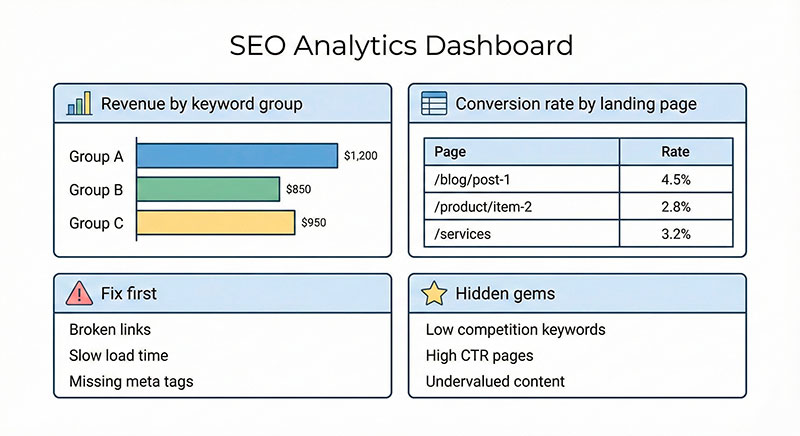
Now imagine a simple dashboard you could build, even in a spreadsheet:
- Top keyword groups by revenue – not just by visits.
- Conversion rate by landing page – organic only.
- Pages with high visits and low conversion – your fix-first list.
- Pages with low visits and high conversion – your promote-and-expand list.
- Trend of organic conversions over time – to see the impact of changes.
You don’t need a fancy system to start. One clear chart is often enough to spark better decisions than twenty noisy widgets. Later, you can look into a dedicated customer journey analytics guide or build something advanced in BI.
If you want more ideas, search for a keyword intent framework, a B2B lead scoring model, or a plain tracking plan template for web analytics and adapt what you find to your own stack.
The important thing is this: don’t let SEO live in its own bubble. When you connect keywords, conversions, and revenue, SEO becomes a real growth lever, not just a line in a report.
If you do only one thing after reading this, do this: pick one important SEO page, define its conversions, and make sure they are tracked as events. Once you see how that changes your view of “performance”, you’ll never look at SEO reports the same way again.