
A micro conversion is a small, measurable user action that signals progress toward a primary business outcome — a newsletter signup, a scroll past 50%, an add-to-cart, a video play, a PDF download. It is the leading indicator for a macro conversion: not the sale itself, but the step before the sale. Track them in GA4 events, mark only the most diagnostic ones as key events, and the funnel becomes legible. This guide covers what counts as a micro conversion, the macro relationship, the common examples, GA4 event setup, predictive audiences, funnel analysis, attribution risks, and the seven questions practitioners ask most.
What Is a Micro Conversion?
A micro conversion is a tracked user action that does not directly produce revenue but indicates intent or engagement on the path to a conversion. The distinction is purely about business value, not technical mechanics. Every micro conversion is just a regular GA4 event — what makes it micro is that it sits earlier in the journey and predicts whether the macro outcome will follow.
Think of it as the temperature before the boil. A pricing page view does not pay the bills, but 1,000 pricing page views per week at a 5% rate-to-demo tells you how much top-of-funnel traffic you need for revenue. Micros are diagnostic instruments — they reveal where the funnel leaks and which content moves people forward.
Useful micro events meet two tests: they are voluntary actions that reflect intent, and they correlate measurably with downstream macro outcomes. If neither is true, the event is noise — a pageview or nav click is not a micro conversion.
Micro vs Macro: The Funnel Relationship
Conversions sit on two tiers, and confusing them is the most expensive analytics mistake a team can make. Mixing micro and macro in the same dashboard makes “conversion rate” jump wildly when newsletter signups outnumber purchases 50:1.
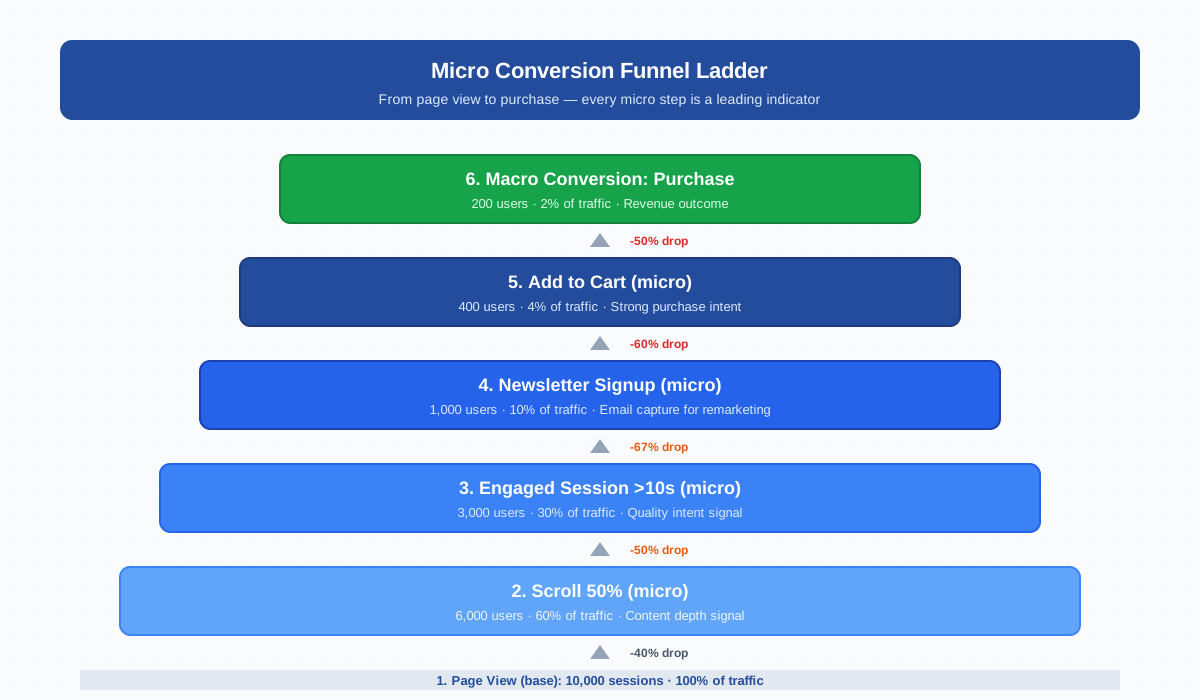
The practical rule: track both, treat them differently. Macro conversions drive bidding and revenue reports; micros feed funnel analysis, predictive audiences, and remarketing.
| Dimension | Micro Conversion | Macro Conversion |
|---|---|---|
| Purpose | Engagement / intent signal | Revenue or qualified-lead outcome |
| Volume | High (5-30% of sessions) | Low (0.5-5% of sessions) |
| Use in Smart Bidding | Avoid — pollutes signal | Yes — primary optimization target |
| Use in remarketing | Excellent — large audiences | Limited — small remarketing pools |
| Reporting tier | Funnel exploration, retention | Acquisition, monetization, ROAS |
| Examples | Newsletter signup, scroll, video play | Purchase, paid signup, demo request |
Common Micro Conversion Examples
The right micro conversions depend on your business model. The list below covers the most diagnostic events across e-commerce, SaaS, B2B, and content sites:
| Event Name | Why It Matters | Retargeting Use |
|---|---|---|
newsletter_signup |
Email capture; opens a long-cycle nurture path | Drip campaigns + lookalike seeds |
video_play / video_complete |
Strong attention signal; predicts brand recall | Mid-funnel video sequence |
scroll_50 / scroll_75 |
Content depth — separates skimmers from readers | Topic-specific remarketing audiences |
engagement_time_30s |
Quality signal beyond raw engagement rate | Lookalikes for “engaged users” |
file_download |
Whitepaper, PDF, syllabus — explicit interest | Sales outreach trigger |
account_created |
Free signup; SaaS activation precursor | Onboarding sequence + upgrade nudge |
add_to_cart |
Strongest purchase intent signal short of checkout | Abandoned-cart remarketing — see add to cart |
begin_checkout |
Last-mile signal; checkout abandonment optimization | Cart-recovery email + ad sequence |
pricing_page_view |
Late-stage research signal | Sales-qualified retargeting |
contact_form_view |
Lead intent without submission | Lower-friction CTA test |
Three rules: name events consistently so dashboards do not split signup and sign_up; tie each micro to one downstream macro; track both rate and volume.
Setting Micro Events as Conversions in GA4
GA4 treats every interaction as an event, which makes micro conversion tracking straightforward. The tricky part is deciding which to mark as a key event and which to leave as plain events. Most teams overshoot.
The setup sequence:
- Define the event. Use built-in Enhanced Measurement events where possible (
scroll,video_start,file_download). For everything else, build a custom event via GTM and push through your data layer with descriptive parameters. - Verify with DebugView. Confirm the event fires once per intended action and carries the parameters you expect.
- Mark as key event — selectively. Toggle “Mark as key event” only for the 3-5 most diagnostic actions. Reserve the toggle for events that materially predict revenue.
- Wait 24-48 hours. Marked events appear in Reports → Engagement → Conversions after a processing delay; historical data is included retroactively.
- Decide on Ads import. If a micro should drive Smart Bidding, import it into Google Ads and classify as primary or secondary. Most micros should stay secondary.
The biggest mistake: marking too many events as key events. A “conversion rate” inflated by newsletter signups and scroll events tells you nothing useful. Be ruthless about what earns the toggle.
Why Track Micro Conversions
Micros earn their place in three ways. First, they are leading indicators: a drop in add_to_cart rate predicts the revenue dip a week before macro conversion rate moves. Second, they enable diagnostics — when topline conversion falls 20%, micros show where the funnel broke (scroll fine, signup fine, but pricing_page_view collapsed). Third, they fuel audiences: macro converters are too few to remarket against efficiently, but users hitting two or three micros form large pools with proven intent that convert at multiples of cold-traffic baselines.
Predictive Audiences in GA4 Powered by Micro Events
GA4’s predictive audiences use machine learning to score users by probability of converting (or churning) within seven days. Purchase Probability and Churn Probability require at least 1,000 returning users who triggered the relevant event in the past 28 days, and 1,000 who did not.
Micro events are the engine that makes predictive audiences viable. Pure macro conversions almost never hit the 1,000-user threshold on small sites — micros do, easily. Google’s model uses them as features to predict downstream macro behavior. A site with 50 weekly purchases and 5,000 weekly add-to-carts will have a working purchase-probability model precisely because the micro signal feeds it.
Practical use: build audiences like “Likely 7-day purchasers” or “Predicted churners” in GA4 → Audiences → Predictive, then export to Google Ads for high-leverage remarketing. See the official predictive audiences documentation for thresholds.
Micro Conversion Funnel Analysis
Funnel analysis is where micros pay off. In GA4 → Explore → Funnel exploration, build a path through each micro step. A typical e-commerce funnel:
session_start(entry baseline)view_item(product page viewed)add_to_cart(intent signal)begin_checkout(commitment signal)purchase(macro outcome)
The exploration shows progression and drop-off at each step. The biggest drop is the highest-leverage fix. If 60% of view_item users add to cart but only 15% begin checkout, your cart page is the problem — not the product pages or the checkout itself.
For SaaS, swap to feature_view → trial_start → upgrade_page_view → paid_subscription. The mechanic is identical for content (newsletter funnels) and B2B (demo-request paths).
ROI of Micro Tracking — Signal vs Noise
Tracking micros costs almost nothing technically. The real cost is cognitive — every additional event on a dashboard splits attention. Teams that get value from micros track narrowly and deeply, not broadly and shallowly.
A useful filter: an event earns a place if a stakeholder would change a decision based on its movement. add_to_cart rate dropping 30% changes how product pages are designed. video_play rate dropping 5% changes nothing for most teams. Three questions before adding any micro: does it correlate with a macro outcome over a 28-day window? Does the rate vary enough by channel or content to inform action? Will anyone look at it monthly? If any answer is no, leave it as a plain event. HubSpot benchmarks reinforce the same lesson: focused metrics outperform exhaustive ones.
Common Pitfalls — Over-Flagging and Attribution Dilution
Five mistakes recur in every account audit:
- Marking everything as a conversion. When 25 events are flagged, “conversion rate” stops meaning anything because newsletter signups dominate the count. Limit primary key events to 3-5.
- Counting pageviews as micros. A pageview is the baseline, not a conversion. Use a custom event like
pricing_page_viewwith conditions (minimum scroll or time) to filter accidental clicks. - Inconsistent naming.
signup,sign_up, andnewsletter_subscribefor the same action split your data into three useless segments. Lock event names in a tracking spec before launch. - Importing micros into Google Ads bidding. Smart Bidding optimizes against the wrong target when scroll events are imported as conversions. Keep micros as secondary in Ads — or do not import them at all.
- Skipping the validation step. Events that fire twice, fire on every navigation, or fire from QA traffic destroy data quality. Always verify in DebugView before marking a key event.
One more pitfall: attribution dilution. Importing micros into attribution models without weighting gives every channel credit for newsletter signups it had no role in. Use position-based or data-driven attribution and score micros and macros separately. Neil Patel’s CRO write-ups cover the risk in depth.
Using Micro Events for Retargeting and Remarketing
The highest-leverage use of micros is remarketing. Cold traffic converts at 0.5-2%; users who triggered two or three micros convert at 5-15% when retargeted. The math: pay $5 to acquire a cold user, or $0.50 to re-engage someone who already added to cart and viewed pricing twice.
Build segmented audiences in GA4 → Audiences:
- Cart abandoners:
add_to_cartbut notpurchasein seven days — recovery emails and abandoned-cart ads. - Engaged readers:
scroll_75+engagement_time_60son a topic cluster — push toward gated content or webinar. - Pricing researchers:
pricing_page_viewtwice without converting — trigger sales outreach or a discount sequence. - Predicted purchasers: the GA4 predictive segment fed by all the micros above. The single most efficient remarketing audience on any site big enough to train it.
Export to Google Ads, Meta, or your email platform. Use frequency caps and measure incremental lift, not just attributed conversions, because some retargeted users would have returned organically. Used carefully, micro-driven remarketing is the highest-ROI channel most accounts have.
Frequently Asked Questions
What is a micro conversion in GA4?
A micro conversion in GA4 is a tracked event that signals progress toward a primary business outcome without producing revenue itself — examples include newsletter signup, scroll past 50%, add to cart, video play, and file download. Mark only the most diagnostic micros as key events under Admin → Events; leave the rest as plain events.
What is the difference between micro and macro conversions?
Macro conversions are direct revenue or qualified-lead outcomes (purchase, paid signup, demo request). Micro conversions are intent and engagement signals on the path to a macro outcome (newsletter signup, add to cart, video play). Track both, but only let macros drive Smart Bidding — micros pollute the bidding signal because their volume is too high relative to their value.
Should I mark every micro event as a conversion in GA4?
No. GA4 has no hard cap on key events, but only 30 per property feed Google Ads bidding, and a dashboard with 25 marked events makes “conversion rate” meaningless. Limit primary key events to 3-5 high-leverage actions tied to revenue, and keep the rest as secondary or as plain events for funnel analysis and audience building.
How do micro conversions feed predictive audiences?
GA4’s predictive metrics (Purchase Probability and Churn Probability) need at least 1,000 returning users who triggered the relevant event in the past 28 days. Pure macro events rarely hit that threshold on small sites — micro events do. Google’s model uses micro signals as features to predict downstream macro behavior, which is why a site with 50 weekly purchases can still have a working purchase-probability model if it has 5,000 weekly add-to-carts.
What are good examples of micro conversions for an e-commerce site?
The highest-signal micros for e-commerce are add_to_cart, view_item with engagement_time over 30 seconds, begin_checkout, add_to_wishlist, and view_promotion. Together they map the full pre-purchase funnel and feed strong remarketing audiences. Treat purchase as the only macro and the rest as secondary key events.
Can micro conversions hurt my Google Ads performance?
Yes, if imported as primary conversions for Smart Bidding. Smart Bidding optimizes toward whatever you mark as primary, so importing newsletter signups will bid up audiences that sign up for newsletters — not audiences that buy. Keep micros as secondary in Google Ads (Tools → Conversions → Conversion goals) so they enrich audiences and reporting without distorting bids.
How do I build a micro conversion funnel in GA4?
Open GA4 → Explore → Funnel exploration → New, then add each step from session_start through the macro outcome (e.g., session_start → view_item → add_to_cart → begin_checkout → purchase). The exploration shows the conversion rate between each step and the absolute drop-off. The biggest drop is the highest-leverage fix — focus optimization there before touching any other step.
Related Terms
- Macro conversion — the primary revenue or qualified-lead outcome that micros feed
- Conversion — any tracked event explicitly marked as a key business outcome
- GA4 event — the raw building block; every conversion is one
- Engagement rate — paired with micros to qualify session quality
- Add to cart — the canonical e-commerce micro
- CTR — the upstream micro for paid and organic acquisition
- Attribution — how channel credit is split across micro and macro events
- UTM — campaign tagging that ties micros to traffic source
