
Organic search in GA4 is the channel assigned to visits that arrive from unpaid search-engine results. When a user clicks a non-ad listing on Google, Bing, DuckDuckGo, Yahoo, Yandex, Baidu, or another recognized engine and lands on your site, GA4 reads the Referrer header, matches the hostname against its built-in search-engine list, and groups the visit under the Organic Search Default Channel Group. This guide covers how GA4 defines and detects organic search, which engines it recognizes by default, the difference between organic and paid search, where to read performance in reports, the Search Console link for query data, BigQuery export fields, common misclassifications, what to monitor, and an FAQ that answers what people actually search for.
What Organic Search Is in GA4
In Google Analytics 4, Organic Search is one of the default channel categories — the bucket where GA4 places any visit identified as coming from a free search-engine listing. Two values combined make a visit “organic” in GA4:
session_source— the search engine name (e.g.google,bing,duckduckgo).session_medium— the literal stringorganic.
GA4 then maps the source/medium pair to the Default Channel Group “Organic Search” using its built-in classification rules. That channel grouping is what powers the rows you see in Reports → Acquisition → Traffic acquisition. The same logic applies whether the click came from a Google SERP, a Bing answer card, a DuckDuckGo result, or any other engine on Google’s recognised list.
Two short examples make it concrete. A reader searches “ga4 attribution” on Google and clicks your tutorial — GA4 sets session_source = google, session_medium = organic, channel = Organic Search. The same visitor later searches the same query on Bing and clicks a different page on your site — GA4 sets session_source = bing, session_medium = organic, channel = Organic Search. Different source, same channel.
How GA4 Classifies Traffic as Organic Search
GA4 runs every incoming visit through a short decision sequence to assign source and medium. The rules execute in order, and earlier rules override later ones:
- UTM parameters or gclid first. If the URL contains
utm_medium,utm_source, or a Google Adsgclid, GA4 uses those values and ignores the Referer entirely. A search-engine link tagged with?utm_medium=cpcends up under Paid Search, not Organic. - Referer hostname check. With no UTM present, GA4 reads the HTTP Referer header sent by the browser and extracts the hostname.
- Match against the search-engine list. GA4 maintains a built-in list of search-engine domains (google.*, bing.com, duckduckgo.com, yahoo.com, yandex.*, baidu.com, ecosia.org, brave.com, and others). If the Referer matches, the visit is classified as Organic Search.
- Otherwise, fall through. If the Referer doesn’t match a search engine, GA4 evaluates the social list, then your unwanted-referrals list, before finally classifying the visit as Referral or Direct.
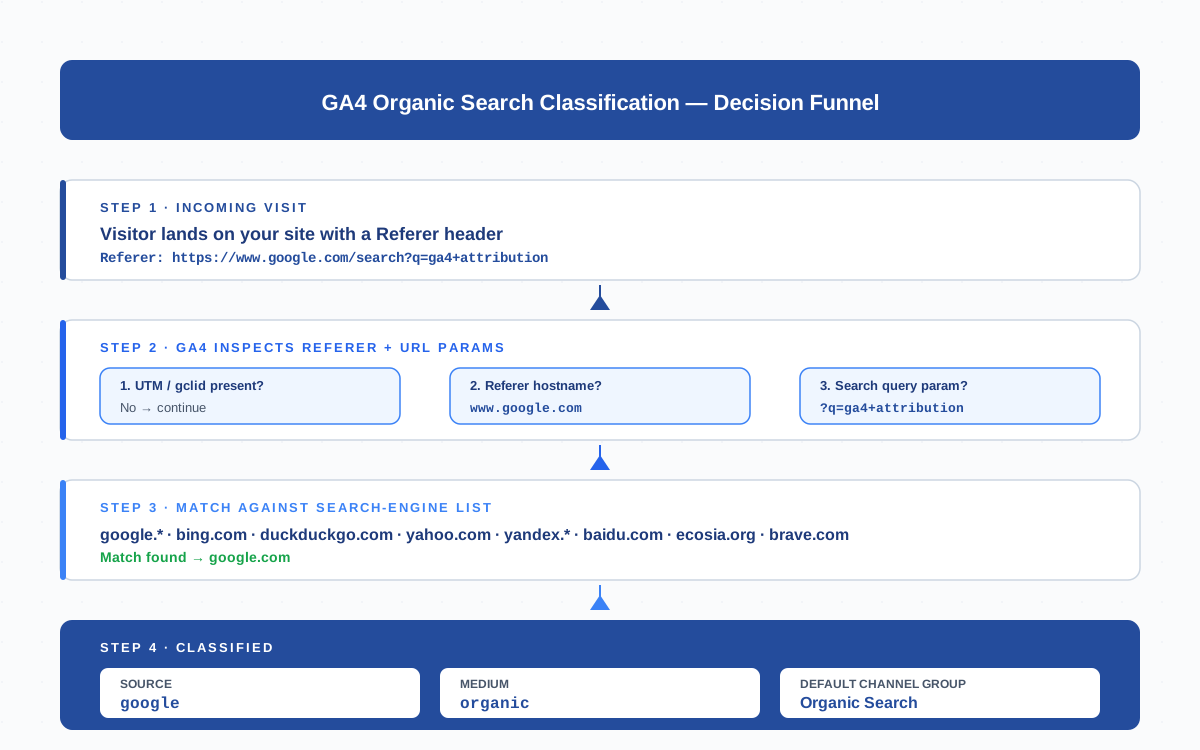
The practical takeaway: UTM tags always override Referer detection. If a search engine appends its own UTM parameters to a link, or if you accidentally tag organic links with UTMs, the visit will be classified by the UTM medium rather than as organic. This is the single most common reason organic numbers look wrong in GA4 reports.
Organic Search Engines GA4 Recognizes
GA4 ships with a maintained list of search-engine domains that automatically classify visits as organic. The exact list is updated by Google, but the major engines below have been recognised since GA4 launched and are unlikely to change:
| Engine | Domains matched | session_source | Notes |
|---|---|---|---|
| google.com, google.co.uk, google.de, google.* (all ccTLDs) | google |
Largest organic share for most sites; Search Console linkable | |
| Bing | bing.com, www.bing.com | bing |
Second-largest in many Western markets; powers Yahoo and DuckDuckGo |
| DuckDuckGo | duckduckgo.com | duckduckgo |
Privacy-focused; uses Bing’s index |
| Yahoo | yahoo.com, search.yahoo.com | yahoo |
Backed by Bing’s index since 2009 |
| Yandex | yandex.ru, yandex.com, yandex.* | yandex |
Dominant in Russia and CIS countries |
| Baidu | baidu.com | baidu |
Dominant search engine in mainland China |
| Ecosia | ecosia.org | ecosia |
Sustainability-focused; uses Bing’s index |
| Brave Search | search.brave.com | brave |
Independent index; newer addition |
| Naver | search.naver.com | naver |
Dominant in South Korea |
| Seznam | seznam.cz | seznam |
Czech Republic market leader |
If a visit arrives from a search engine that isn’t on Google’s list — say, a niche engine like Mojeek or Kagi — it falls through the classifier and ends up under Referral instead. The fix is to define a custom channel-group rule under Admin → Data display → Channel groups that captures the missing hostname and routes it to Organic Search. Google’s official channel grouping reference is published at support.google.com/analytics and is worth reviewing whenever the channel list changes.
Organic Search vs Paid Search (CPC)
The Organic vs Paid distinction is one of the most consequential lines GA4 draws — it separates free SEO traffic from money you spent on Google Ads. The classification logic is strict but easy to summarise:
| Signal | Organic Search | Paid Search |
|---|---|---|
| URL parameters | No gclid, no utm_medium=cpc |
Has gclid, gbraid, wbraid, or utm_medium=cpc/ppc/paidsearch |
| Referer match | Hostname is on the search-engine list | Hostname can be anything (Google ad, Bing ad, partner, redirect) |
| session_medium | organic |
cpc (or whatever the UTM/auto-tag sets) |
| Default Channel Group | Organic Search | Paid Search |
| Cost data | None — SEO is unpriced | Imported from Google Ads or manual cost upload |
One subtle case worth flagging: when Google Ads auto-tagging is enabled, every paid click carries a gclid parameter. GA4 honors that gclid regardless of whether the Referer happens to be google.com, so you’ll never see ad clicks polluting Organic Search numbers. Disable auto-tagging and you lose that safety net — paid clicks may then leak into the Organic bucket if their UTMs aren’t set correctly. Always keep auto-tagging on in linked Ads accounts.
Reading Organic Search Performance in GA4 Reports
GA4 surfaces organic search performance in three primary places. Bookmark the first two — they cover almost every question stakeholders ask:
- Reports → Acquisition → Traffic acquisition. Group by Session default channel group and locate the “Organic Search” row. Click through to break down by
session_source(google, bing, duckduckgo) to compare engine-level volume. - Reports → Acquisition → User acquisition. Same view but attributed to first-touch instead of last-touch — useful for understanding which engines discover new users vs reactivate returning ones.
- Explore → Free Form. Build a custom report with Session source/medium as the row dimension and event counts, conversions, and revenue as metrics. Filter by Session medium =
organicto isolate the channel for deeper analysis.
Add a Landing page dimension to any of these views to see which URLs catch the most organic traffic. Combined with Session source and a Conversions metric, this is the single most useful organic-performance view in GA4 — it shows which pages on your site rank, on which engine, and which actually convert. Engagement metrics like sessions, engaged sessions, and average engagement time per session sit alongside conversions for context. For per-event drill-down, layer in a custom data stream filter or a specific event name.
Connecting GA4 With Search Console for Query Data
GA4 by itself shows you organic volume but not the queries users typed. For query-level data you need to link GA4 to Google Search Console. Once linked, two new reports appear under Acquisition:
- Search Console → Queries — landing page, query, clicks, impressions, average position, click-through rate. This is your keyword-level scoreboard.
- Search Console → Google organic search traffic — engaged sessions, conversions, and revenue mapped to the queries that drove them.
Setup takes two minutes: Admin → Product links → Search Console links → Link. Choose the verified Search Console property that matches your GA4 property’s domain, pick the data stream, and confirm. Allow up to 48 hours for the first data to appear. The link is bidirectional — GA4 sees Search Console queries, and Search Console sees GA4 engagement data.
One caveat: Search Console data in GA4 is aggregated only at the page and query level, not at the user or session level. You can’t join it to a specific session, can’t add it to a Free Form exploration with other dimensions, and can’t compare it across attribution models. For analyst-grade query analysis, export to BigQuery or use the Search Console UI directly. Google’s documentation on the link is at support.google.com/analytics.
Organic Search in BigQuery — traffic_source Parameters
If you stream GA4 events to BigQuery, organic search data appears across two layers — the per-event collected_traffic_source struct and the session-scoped traffic_source struct. Both expose the same canonical fields:
| Field | Description | Example for organic |
|---|---|---|
traffic_source.source |
The session source (search engine name) | google |
traffic_source.medium |
The session medium | organic |
traffic_source.name |
The campaign name (usually (organic)) |
(organic) |
collected_traffic_source.manual_source |
Per-event manual source | google if first-page hit |
collected_traffic_source.manual_medium |
Per-event manual medium | organic |
session_traffic_source_last_click |
Last non-direct click attribution struct | Source/medium pair from last non-direct touch |
A simple SQL pattern to count daily organic sessions in BigQuery:
SELECT
  event_date,
  COUNT(DISTINCT CONCAT(user_pseudo_id, (SELECT value.int_value FROM UNNEST(event_params) WHERE key = 'ga_session_id'))) AS sessions
FROM `project.analytics_NNNNN.events_*`
WHERE _TABLE_SUFFIX BETWEEN '20260101' AND '20260131'
  AND traffic_source.medium = 'organic'
GROUP BY event_date
ORDER BY event_date;
BigQuery is the only place where you can join GA4 organic data with first-party user records, calculate custom cohort-analysis retention curves, or combine with Search Console exports for query-level attribution. The platform’s documentation on traffic_source fields is published in the official BigQuery export schema reference.
Common Organic Search Misclassifications and Fixes
Organic numbers go wrong for predictable reasons. Five misclassifications cover most of what I see in audits:
- Organic clicks counted as Direct. Cause: the user came from an HTTPS search result to an HTTP page, the browser stripped the Referer, and no
gclid/UTM was present. Fix: enforce HTTPS site-wide and verify the Referrer-Policy header isn’t set tono-referrer. - Organic clicks counted as Referral. Cause: a search engine isn’t on GA4’s recognised list (Mojeek, Kagi, Startpage, You.com). Fix: add a custom channel-group rule under Admin → Data display → Channel groups to capture the missing hostname.
- Paid clicks leaking into Organic. Cause: Google Ads auto-tagging is disabled and UTMs are missing or set to
utm_medium=organicby mistake. Fix: re-enable auto-tagging in Ads, audit any manual UTMs on paid landing pages. - Branded organic counted as Direct. Cause: the user typed your brand into the URL bar, the browser autocompleted to your domain, and no Referer was sent. Fix: nothing to fix — this is correct attribution. But it means brand-search Direct numbers can look inflated.
- Search Console queries showing zero clicks but GA4 shows organic sessions. Cause: the GA4 ↔ Search Console link is on the wrong property, or the data stream filter doesn’t include the canonical hostname. Fix: re-verify the link in Admin → Product links and confirm the linked property covers the same domain.
For any of these, the diagnostic workflow is the same: open Reports → Realtime, perform the suspect search yourself, click the result from another browser, and verify the Source/Medium that appears. If it’s wrong, the misclassification is reproducible — and reproducible problems are fixable.
Organic Search Trends — What to Monitor
Sessions and revenue are the headline numbers, but four secondary signals tell you whether your organic traffic is healthy or quietly degrading:
- Click-through rate (CTR). Available from the Search Console link or in Search Console directly. Falling CTR at stable position usually means the SERP layout changed (new ad slots, AI overview, featured snippet) and is eating clicks. See the CTR primer for context.
- Average position. Aggregate position across all queries that bring traffic. A drift from position 4 to position 7 won’t show up immediately in sessions because impressions usually cushion the fall — but it’s an early warning of declining ranking.
- Query intent mix. Are you ranking for informational queries, transactional queries, or branded queries? Track the share of branded vs non-branded traffic. A site overly dependent on brand search is fragile to brand-recognition shifts.
- Engagement rate by landing page. Organic landing pages with engagement rate below 50% usually have intent mismatch — the page ranks but doesn’t satisfy the query. These are reoptimisation candidates.
Build a single dashboard in Looker Studio combining GA4 organic sessions, Search Console clicks/impressions/CTR/position, and a 28-day rolling average. That single view replaces five separate report bookmarks and surfaces drift faster than any individual metric. Cookie-aware analytics platforms also need a cookie consent check — organic users who reject cookies still appear in Search Console but not in GA4, so the two numbers will never perfectly match.
Improving Organic Search Performance — The SEO Connection
GA4 measures organic search; it doesn’t improve it. The connection between analytics and SEO is diagnostic — GA4 tells you which pages convert organic traffic, Search Console tells you which queries drive impressions, and your SEO process closes the loop by improving the pages that have demand but underperform.
The four levers that actually move organic numbers:
- Page-query intent match. Find pages with high impressions but low clicks (low CTR) — usually the title or meta description doesn’t match the query. Rewrite. Find pages with high clicks but low engagement — the page doesn’t satisfy intent. Add the missing content.
- Internal linking depth. Pages buried 4+ clicks from the homepage rarely rank well. Use the GA4 Pages and Screens report to identify orphaned pages with organic potential and add internal links from your top-traffic pages.
- Schema and rich results. FAQ schema, How-To schema, Product schema — they don’t directly improve ranking but they expand SERP real estate and lift CTR. Audit with Google’s Rich Results Test.
- Backlink profile. Off-page authority is still the largest single ranking factor for competitive queries. Track new referring domains in Search Console’s Links report or a third-party tool monthly.
Use GA4 as the measurement layer, Search Console as the query layer, and your SEO toolkit (technical audits, content gap analysis, link building) as the action layer. Organic search performance compounds quarterly, not weekly — set 90-day improvement targets, not weekly ones.
Frequently Asked Questions
What is organic search in GA4?
Organic search in GA4 is the Default Channel Group assigned to visits arriving from unpaid search-engine results. GA4 reads the Referer header, matches the hostname against its built-in list of search engines (Google, Bing, DuckDuckGo, Yahoo, Yandex, Baidu, Ecosia, and others), and sets session_source to the engine name and session_medium to organic. The visit then groups under “Organic Search” in Acquisition reports.
Which search engines does GA4 recognize as organic by default?
GA4’s built-in recognised list includes Google (all ccTLDs), Bing, DuckDuckGo, Yahoo, Yandex (all ccTLDs), Baidu, Ecosia, Brave Search, Naver, Seznam, AOL, Ask, and several smaller engines. Niche or newer engines like Mojeek, Kagi, Startpage, or You.com are not on the list by default — visits from them appear as Referral until you add a custom channel-group rule.
What’s the difference between organic search and paid search in GA4?
Organic search visits have no gclid and no utm_medium=cpc; their session_medium is organic. Paid search visits have either an auto-tagged gclid from Google Ads or a manual utm_medium=cpc/ppc/paidsearch; their session_medium is cpc. The two map to different Default Channel Groups (Organic Search vs Paid Search) and only Paid Search has cost data attached.
How do I see organic search keywords in GA4?
GA4 doesn’t expose organic search keywords on its own — query data only appears after you link Google Search Console. Once linked (Admin → Product links → Search Console links), two new reports appear under Acquisition: “Queries” and “Google organic search traffic”. Both show clicks, impressions, CTR, and position by query. Allow up to 48 hours for first data to appear.
Why is my organic traffic showing as direct in GA4?
Three common causes: (1) the user came from an HTTPS search result to an HTTP page and the browser stripped the Referer; (2) the search engine isn’t on GA4’s recognised list; (3) a redirect dropped the Referer header. Fix HTTPS first, audit your Referrer-Policy header, and add custom channel-group rules for any unrecognised engines. Branded “Direct” traffic from URL-bar autocomplete is correct attribution and not fixable.
How do I track organic search conversions in GA4?
Open Reports → Acquisition → Traffic acquisition, locate the Organic Search row, and review the Conversions column. For deeper analysis build an Explore Free Form report with Session source/medium as the row, filter Session medium = organic, and add Sessions, Engaged sessions, Conversions, and Total revenue as metrics. Add Landing page as a secondary dimension to identify which pages convert organic traffic best.
What’s the BigQuery field for organic search in GA4?
Organic search data lives in two structs: traffic_source (session-scoped, populated on the first event of a session) and collected_traffic_source (per-event). For organic, traffic_source.source = google/bing/etc. and traffic_source.medium = organic. Filter on traffic_source.medium = 'organic' to isolate the channel in any GA4 events_* table query.
Related Terms
- Referrer — the HTTP header GA4 reads to detect organic search engines
- Referral — channel for non-search external traffic
- UTM parameters — tags that override Referer-based detection
- Attribution — how GA4 distributes credit across organic touchpoints
- CTR — click-through rate from search results
- Cookie — consent signal that affects organic session counting
- Data stream — GA4 input layer where channel rules apply
- Event — the unit of measurement underneath organic sessions
- Cohort analysis — retention view for organic-acquired users
