
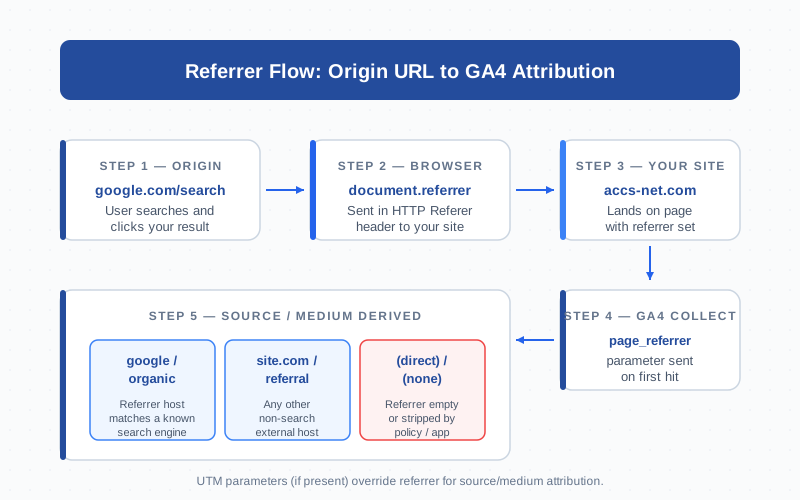
The referrer is the URL of the page a user was on immediately before they landed on yours. Browsers expose it through document.referrer in JavaScript and the HTTP Referer header on the network. GA4 reads it as the page_referrer parameter on the first hit of every session and uses it to decide whether the visit is organic search, a referral, or direct. When referrer logic breaks, attribution breaks: campaigns lose source, payment gateways trigger self-referrals, and “direct” inflates by 5–40%.
What a Referrer Is
A referrer is a single value: the URL of the previous page. When a user clicks a link on https://example.com/post pointing to your site, the browser tells your server “this visit came from https://example.com/post.” That string is the referrer.
The term is spelled two ways. The HTTP header is misspelled Referer — a typo from the 1996 spec that was never corrected. JavaScript fixed the spelling: document.referrer uses two r’s. Both deliver the same value but live in different layers of the stack. For GA4, the referrer is the raw input that becomes the source/medium dimension everyone stares at on Monday morning.
document.referrer (JS) vs HTTP Referer Header (Server)
The same data shows up in two places, but they are not interchangeable for tracking.
| Aspect | document.referrer (JS) |
Referer header (HTTP) |
|---|---|---|
| Where it lives | Browser DOM, accessed in client-side JS | Request header, sent on every navigation |
| Who reads it | Analytics scripts, marketing tags | Web servers, CDNs, security tools |
| Spelling | Two r’s (correct) | One r (legacy typo) |
| SPA navigation | Stays as the original landing referrer | Updates on every request |
| Empty when | Direct visit, in-app browser, strict policy | Same plus internal POSTs |
GA4’s tag reads document.referrer, not the HTTP header. That matters for single-page apps: client-side route changes do not refresh the header, but JavaScript still sees the original landing referrer for the entire session. The MDN reference for the Referer header documents the full grammar.
Referrer in GA4: page_referrer and Source/Medium Derivation
GA4 attaches the referrer as page_referrer on the first page_view of a session. It is automatic — the gtag.js library reads document.referrer and forwards it to Google’s collection endpoint.
From there, GA4 runs a derivation pipeline:
- UTM parameters? If the landing URL has
utm_source,utm_medium, etc., GA4 uses those and ignores the referrer. - Recognized search engine? If
page_referrermatches Google’s list of search hosts (google.*, bing.com, duckduckgo.com, yandex.*), source/medium becomes{engine} / organic. - External host? Any other non-empty referrer becomes
{hostname} / referral. - Empty? Source/medium becomes
(direct) / (none).
This pipeline runs once per session, on the first hit. Subsequent page views inherit the same source even though their referrer points to internal pages — intentional, so internal clicks do not overwrite acquisition. The Google docs on default channel groupings list which hostnames map to which channels.
Referrer vs UTM: Which Wins, and Why
UTM wins. Always. If a click lands with ?utm_source=newsletter&utm_medium=email, GA4 uses newsletter / email regardless of document.referrer. The referrer becomes informational metadata.
This is by design. A bare referrer of twitter.com does not tell you which campaign drove the click, which audience saw it, or whether it was organic or paid. UTMs add resolution; the referrer is a fallback. Order of precedence in GA4:
- UTM parameters on the landing URL — highest priority
- gclid / wbraid / dclid — Google Ads click IDs auto-resolve to
google / cpc - page_referrer — used only when no UTMs and no Google click IDs
- Empty — falls through to
(direct) / (none)
Tag every campaign you can. Untagged clicks from unrecognized hosts land in “referral” with no campaign-level resolution.
The Referrer-Policy Header
The Referrer-Policy response header lets a site control how much referrer information browsers send on outbound clicks. Strict policies reduce information; permissive policies preserve it.
| Policy | What gets sent cross-origin | Impact |
|---|---|---|
no-referrer |
Nothing | Always empty — visit looks direct |
no-referrer-when-downgrade |
Full URL on HTTPS→HTTPS, nothing on downgrade | Pre-2020 default |
same-origin |
Full URL same-site, nothing externally | You see no inbound referrer |
origin |
Origin only (host, no path) | Host visible, path hidden |
strict-origin |
Origin only on HTTPS→HTTPS | Privacy-respecting |
strict-origin-when-cross-origin |
Full URL same-origin, origin only cross-origin | Browser default since 2020 |
unsafe-url |
Full URL always | Maximum data, ignores privacy |
The 2020 default change to strict-origin-when-cross-origin is why “referral” reports got noisier — browsers now send only the host, not the path. You can tell a visit came from medium.com, but not which post. Per-link override is possible with rel="noreferrer" on individual <a> tags. The MDN Referrer-Policy docs cover every value with examples.
Referral Exclusion List in GA4 (and Why Payment Processors Need It)
The referral exclusion list tells GA4 to ignore referrers from specific hostnames so they do not start a new session. The classic use case: payment processors.
A user lands from google.com/organic. GA4 starts a session with google / organic. They check out, get redirected to checkout.stripe.com, then back to yoursite.com/thank-you. Without exclusions, GA4 sees the return click, breaks the session, and starts a new one with checkout.stripe.com / referral. Your purchase event now attributes revenue to Stripe. Multiply across thousands of orders — attribution is broken.
Adding checkout.stripe.com (and PayPal, Klarna, Mollie, Square) to the exclusion list preserves the original source through the round-trip. The GA4 referral exclusion docs walk through where to configure it. Other exclusion candidates: auth providers (Auth0, Okta, Google/Apple Sign-In), forgotten subdomains, embedded calculators or chat platforms hosted elsewhere.
Self-Referrals (Root Cause: Missing UTM on Cross-Domain) and How to Fix
A self-referral is when GA4 reports a visit’s source as your own domain. It is almost always wrong — something in your tracking made GA4 forget where the user came from.
Common root causes:
- Cross-subdomain navigation without proper cross-domain linker. User moves from
shop.yoursite.comtowww.yoursite.comand the GA4 client ID is not preserved. - Apex vs www inconsistency. Some links go to
yoursite.com, others towww.yoursite.com— separate origins from the browser’s view. - Missing payment domain in exclusions. See above.
- Sloppy hash-based SPAs that re-fire page_views with empty referrers, then later pick up your own URL.
Fix sequence: inventory every domain in your flow, add the same Measurement ID and enable cross-domain linking, add payment/auth/redirect hosts to the exclusion list, standardize on www or apex with 301s, and never UTM your own internal navigation.
Mobile App Referrers (Android Play Install Referrer, iOS Apple Search Ads)
On mobile, the equivalent of a web referrer is the install referrer — a token attached to an app install that survives until first launch. The mechanism is platform-specific.
Android Play Install Referrer API: when a user clicks a tagged Play Store link, the URL with UTMs is passed to the Play Store and handed to your app via the Install Referrer API. Firebase / GA4 SDKs read this automatically.
iOS Apple Search Ads attribution: Apple uses AdServices framework. Your app sends an attribution token to Apple’s API, which returns campaign and keyword data — separate from web referrer chains, integrated with SKAdNetwork and AdAttributionKit.
For deep links into installed apps, both platforms use Universal Links (iOS) or App Links (Android) to pass the originating URL to the app. If you run hybrid web + app, do not assume the same UTM strategy works on both — they are different transport layers.
Why Your Referrer Is Sometimes Empty
Empty referrers feed the “direct” channel. Some are legitimate (typed URLs, bookmarks). Most are tracking artifacts:
- HTTPS→HTTP downgrade. The default policy strips referrers on downgrade. Fix: serve everything over HTTPS.
rel="noreferrer"on inbound links. Source site stripped the referrer per-link. Common on aggregators.Referrer-Policy: no-referreron the source site. Strict privacy posture, destination sees nothing.- In-app browsers. Facebook, Instagram, TikTok WebViews may not pass referrers reliably.
- Email clients. Gmail, Outlook.com strip or modify referrers. Always UTM-tag email links.
- Bookmarks and direct typing. Genuinely no source.
- Privacy extensions. Privacy Badger, uBlock, Brave Shields can strip referrers globally.
- Mid-chain redirects. Some chains drop referrers, especially when traversing an HTTP hop.
If your direct share is unusually high — over 30% B2C, over 50% B2B — work this list before assuming brand strength. Most “direct” is referrer attrition.
Debugging Referrer Issues with Realtime + Network Panel
Three tools cover almost every referrer debugging scenario.
1. Browser DevTools Network panel. Open DevTools, Network tab, click any request, check Request Headers for Referer. Compare what you expect to what is there. Pair with console.log(document.referrer) for the DOM-level value.
2. GA4 DebugView. Enable debug mode (extension or ?debug_mode=1) and watch events arrive in real time. Click any page_view to see page_referrer. Filter by your test client ID.
3. GA4 Realtime report. The Realtime → Traffic source card shows session source and medium for the last 30 minutes. Click to your site from a known source and watch classification appear within 30 seconds.
The combination — Network panel for HTTP, console for DOM, DebugView for the GA4 parameter, Realtime for derived source — covers every layer where data can drop. Most issues localize to one layer, which makes the fix obvious once you can see where the chain breaks.
Frequently Asked Questions
What is a referrer in simple terms?
A referrer is the URL of the page someone was on right before they clicked through to your site. Browsers send it automatically so analytics tools and servers can tell where traffic came from. In GA4 it surfaces as the page_referrer parameter and drives source/medium on every session’s first hit.
Why does GA4 show traffic as “(direct) / (none)” when it shouldn’t?
The referrer reached GA4 empty. Common causes: HTTPS-to-HTTP downgrade stripped it, the source site uses Referrer-Policy: no-referrer or rel="noreferrer", the click came from an in-app browser, or the user came from an email client that rewrote the URL. Tag campaigns with UTM parameters so attribution survives.
Does UTM override the referrer in GA4?
Yes. If a landing URL has utm_source and utm_medium, GA4 uses those and ignores page_referrer for that session. The referrer is still recorded as a parameter but does not drive source/medium. Google Ads click IDs (gclid) also override referrers and auto-resolve to google / cpc.
What is the difference between document.referrer and the HTTP Referer header?
They carry the same data — the previous page’s URL — but live in different layers. document.referrer is a JavaScript property read by client-side scripts like the GA4 tag. The HTTP Referer header is sent on every network request and read by servers, CDNs, and security tools. The header keeps its 1996 misspelling with one “r”; the JS property uses two.
How do I fix self-referrals in GA4?
Self-referrals usually mean cross-domain or cross-subdomain navigation lost the GA4 client ID. Enable cross-domain linking in GA4 admin for every domain, add payment processors and auth providers to the referral exclusion list, standardize on www or apex with 301s, and verify the data stream covers all subdomains. Self-referral entries should drop to near zero within a few sessions.
What does the referral exclusion list do?
It tells GA4 to ignore referrers from specific hostnames so they do not start a new session. The classic use case is payment processors: when a user is sent to Stripe or PayPal and bounced back, the return click would normally be classified as a referral from the payment domain, breaking attribution. Adding those domains to the list preserves the original source/medium across the round-trip.
Why is my referrer showing only the hostname instead of the full URL?
That is the modern browser default. Since 2020, Chrome, Firefox, Safari, and Edge default to Referrer-Policy: strict-origin-when-cross-origin, which sends only the origin (host) on cross-site clicks, not the full path. You see medium.com but not the specific article. Sites can override with unsafe-url for full URLs, but most respect the privacy default.
Related Terms
- Referral — the GA4 channel populated when the referrer is non-empty and not a search engine
- Attribution — how GA4 assigns conversion credit across channels
- UTM — campaign tags that override referrer for attribution
- Data Stream — where the referral exclusion list is configured
- DebugView — real-time event verification including
page_referrer - Event — page_view carries the referrer parameter
- Session — the unit on which referrer-driven attribution is recorded
