
A session in Google Analytics 4 (GA4) is a time-bounded container of user activity that begins with a session_start event and ends after 30 minutes of inactivity. Sessions group pageviews, clicks, scrolls, and custom events into a single visit so you can analyze visit-level behavior, calculate engagement time, and attribute traffic to a campaign. GA4’s session model is fundamentally different from Universal Analytics — it does not restart at midnight, does not split on a new campaign click, and exposes a ga_session_id parameter on every event. This guide covers the GA4 session lifecycle, the 30-minute timeout, attribution scope, BigQuery export, and how to debug session counts that look wrong.
What a Session Is in GA4
A GA4 session is a user-scoped, time-bounded grouping of events that share the same ga_session_id. The session begins when the first event of a visit fires and the SDK simultaneously fires a session_start event; it ends silently 30 minutes after the last event. Every event in between — page views, clicks, form submissions, custom events — carries the same ga_session_id and session_number automatically, which is how GA4 knows which events belong to which visit.
Compared to Universal Analytics, the change is significant. UA counted sessions on hits (pageviews, events, transactions) and forcibly started a new session on a new UTM campaign click or at midnight. GA4 keeps a single session running across midnight, across campaign clicks within the inactivity window, and even across page reloads — as long as the user keeps interacting. The result: GA4 typically reports 10-20% fewer sessions than UA for identical traffic, and that gap is not a tracking error.
| Behavior | Universal Analytics | GA4 |
|---|---|---|
| New campaign click mid-session | Starts a new session | Same session continues |
| Midnight crossing | Starts a new session | Same session continues |
| Inactivity timeout | 30 minutes (configurable) | 30 minutes (configurable, max 7h 55m) |
| Session identifier | Not directly exposed | ga_session_id on every event |
| Counting model | Hit-based | Event-based (session_start) |
| Quality metric | Bounce rate | Engagement rate |
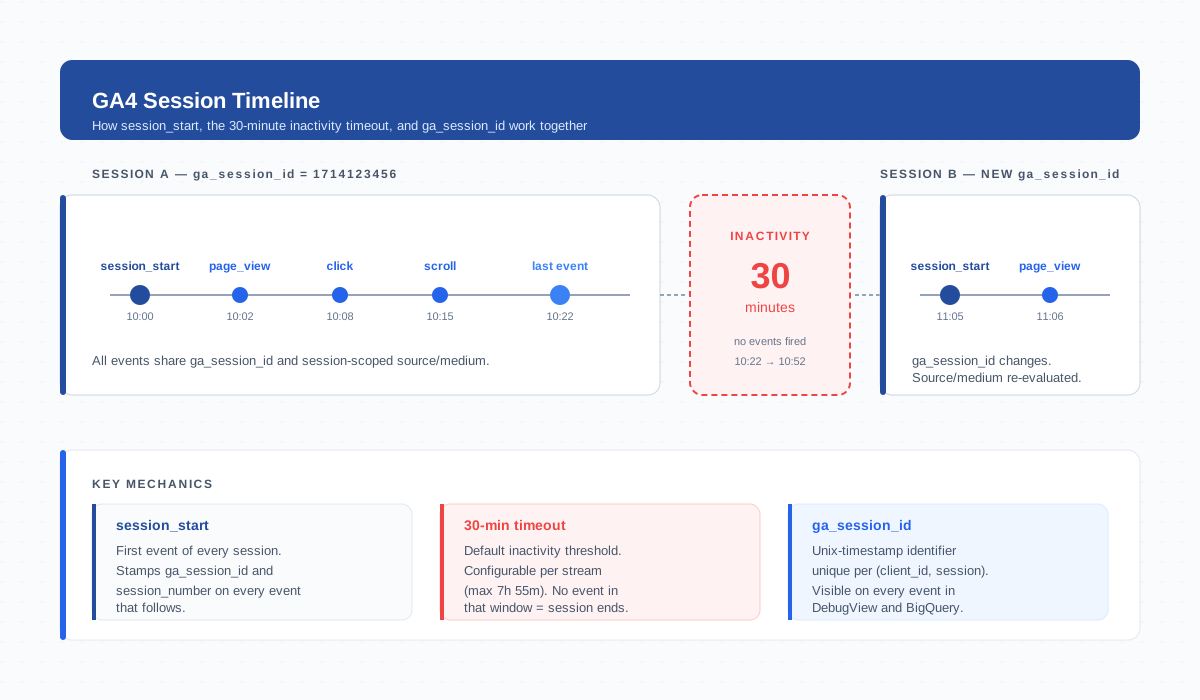
session_start stamps a new ga_session_id, every subsequent event carries it, and 30 minutes of inactivity triggers the next session.The 30-Minute Inactivity Timeout
The default GA4 session window is 30 minutes of inactivity. The timer resets on every interaction event — a click, scroll, page change, or any custom event you fire. If 30 minutes pass without an interaction, the session ends silently (there is no session_end event). The next event the user produces fires a fresh session_start with a new ga_session_id.
You can adjust the timeout per data stream in Admin → Data Streams → [stream] → Configure tag settings → Adjust session timeout. The valid range is 5 minutes to 7 hours 55 minutes. In practice:
- Increase to 60 minutes for long-form content, B2B research, or video — places where users naturally pause without leaving.
- Decrease to 15 minutes for kiosk or shared-device scenarios where sequential users should not be glued into one session.
- Avoid 4+ hours unless you have a specific reason. Inflated session lengths distort engagement time averages and hide the real moment users disengaged.
session_start and Session Boundaries
GA4 marks every session boundary with a single automatic event: session_start. This event fires once at the beginning of each session and carries the same ga_session_id that every subsequent event in the session will inherit. You do not need to configure or fire session_start manually — the GA4 tag handles it whenever a user lands on your site, returns after the timeout, or opens the app from cold start.
There is no matching session_end event. GA4 calculates the session’s end time retroactively from the last interaction event plus the timeout. This matters when you write BigQuery queries: to find session duration, you compute MAX(event_timestamp) − MIN(event_timestamp) for events sharing the same (user_pseudo_id, ga_session_id), not look for a closing event.
The session_number parameter increments per client_id — the user’s first session is 1, second is 2, and so on. Combined with ga_session_id, you can identify any session uniquely without joining other tables.
Sessions vs Engaged Sessions
GA4 introduced engaged sessions as the quality counterpart to total sessions. A session counts as “engaged” if it meets at least one of three thresholds: lasts longer than 10 seconds, includes 2 or more page views, or contains a conversion event.
This split has practical consequences:
- Engagement rate = engaged sessions ÷ total sessions. It replaced bounce rate as GA4’s primary visit-quality metric.
- The default “Users” metric in GA4 reports counts users with at least one engaged session — drive-by visits don’t make the cut.
- Attribution credit weights engaged sessions more heavily. Channels that ship shallow visits get less credit even if their raw session count is high.
When you read a GA4 acquisition report, always read engaged sessions and engagement rate alongside total sessions. A traffic source can post huge session numbers and still be useless if its engagement rate is 5%.
Session Source/Medium vs Event Source/Medium
GA4 has two attribution scopes that look identical until you interrogate them. Understanding the difference prevents a class of “GA4 numbers don’t match” bug reports.
Session-scoped attribution assigns a single source/medium to the whole session, taken from the first non-direct touch in that session. Reports under Acquisition → Traffic acquisition use this scope. Event-scoped attribution assigns source/medium per event using the attribution model you have selected in the property (data-driven by default). Reports under Advertising and conversion attribution use this scope.
The same purchase event can therefore appear under “google / cpc” in one report and “(direct) / (none)” in another, even though no tracking is broken. This is by design — GA4 lets you separate “where did this visit come from” from “which channel deserves credit for this conversion”.
Sessions in Standard Reports
Sessions surface across several GA4 report families:
- Reports → Acquisition → Traffic acquisition shows sessions by session-scoped source/medium/campaign. This is your headline volume report.
- Reports → Engagement → Pages and screens shows views and engagement metrics aggregated to the page level — sessions touch this report through engaged sessions per page.
- Reports → Engagement → Landing page shows sessions by their first
page_location— the entry page of the visit. Often more useful than top-pages for SEO analysis. - Realtime displays active users and recent events in a 30-minute rolling window — effectively a live view of in-flight sessions.
- Explorations let you build session-scoped tables, funnels, and path explorations using sessions as the row-level entity.
Sessions in BigQuery Export
If you have BigQuery export configured, sessions are reconstructed from raw events. There is no pre-aggregated sessions table — you build it yourself with a SQL query that groups events by user_pseudo_id and the ga_session_id event parameter:
SELECT
  user_pseudo_id,
  (SELECT value.int_value FROM UNNEST(event_params)
   WHERE key = 'ga_session_id') AS ga_session_id,
  MIN(event_timestamp) AS session_start_ts,
  MAX(event_timestamp) AS last_event_ts,
  COUNT(*) AS event_count
FROM `project.analytics_XXXXX.events_*`
WHERE _TABLE_SUFFIX BETWEEN '20260401' AND '20260428'
GROUP BY user_pseudo_id, ga_session_id
Two practical notes. First, always partition by event_date or use the _TABLE_SUFFIX filter — the events table is enormous and unfiltered scans get expensive fast. Second, sessions can span midnight, so a session that started on April 27 and ended on April 28 will have events in two daily tables. Either query a date range covering both or use the events_intraday_* table for in-progress sessions.
Cross-Device Sessions
By default GA4 treats each device as a separate identity. A user who reads a blog post on their phone in the morning and returns to the same site on a desktop in the evening produces two distinct client_id values — and therefore two separate sessions, two engaged users, two acquisition rows.
To unify those touches into a single user journey you have to feed GA4 a consistent identifier with the user_id parameter. Once you set user_id on at least one event per device (typically right after login), GA4 stitches sessions together via the User-ID identity space, available in the property’s reporting identity setting. Without user_id, GA4 may approximate cross-device behavior with signals from Google Signals — but session-level reports remain device-bound.
The takeaway: cross-device session counts are correct only if you’ve actually implemented user_id. Otherwise treat the session count as device-scoped, not user-scoped.
Common Reasons Sessions Inflate or Split Unexpectedly
If your session count looks wrong, the cause is almost always one of these:
- Cross-domain misconfiguration. When a user navigates from
shop.example.comtocheckout.example.comwithout linker parameters propagatingclient_id, GA4 sees a brand-new user starting a brand-new session. Configure cross-domain measurement in the data stream settings to fix this. - Tab parking. A user opens a tab, walks away for 45 minutes, comes back and clicks a link. The 30-minute timeout fired in the background; the click starts session 2 even though the user never closed the tab.
- Aggressive consent banners. If consent is granted only after the user takes action on the banner, the first
page_viewmay fire before consent and not be recorded — then a second event after consent starts a session that begins on page 2 instead of page 1. - Timestamp drift. Mobile devices with wildly wrong clocks can produce events GA4 places far in the past or future, creating phantom sessions in unexpected date ranges.
- Bot traffic. Self-identifying bots are filtered automatically, but headless browsers and scrapers that mimic real visitors will inflate session counts. Filter them with a custom dimension or IP exclusion.
- Duplicate tag firing. If both gtag.js and a GTM tag fire on the same page, you get duplicated
session_startevents and inflated counts. Audit with the DebugView.
How to Debug Session Counts
When sessions look off, work through this verification sequence:
- Open DebugView in GA4 (Admin → DebugView). Trigger a fresh visit in an incognito window. Confirm exactly one
session_startevent fires per session and thega_session_idmatches across subsequent events. - Open Realtime and watch the in-flight session — it should show your activity within seconds. If Realtime is empty but DebugView is firing, the
debug_modeparameter is leaking into production traffic. - If you have BigQuery, run the session-reconstruction query above against today’s events. Compare the row count to GA4’s session count for the same date — they should match within ~1% (sampling and threshold differences cause minor variance).
- For cross-domain issues, use the GA4 Tag Assistant Chrome extension and click between domains — it will warn you if
client_idis not propagating. - For consent-related splits, walk through the consent flow in DebugView and confirm
session_startfires after consent, not before.
Cross-check Google’s official guidance in the GA4 sessions reference and the developer documentation on session_start when the behavior you observe contradicts what the report shows.
Frequently Asked Questions
How long is a GA4 session by default?
30 minutes of inactivity ends a session. The next event after that gap fires a new session_start with a fresh ga_session_id. You can adjust the timeout per data stream from 5 minutes up to 7 hours 55 minutes.
Why does GA4 show fewer sessions than Universal Analytics for the same traffic?
GA4 does not restart sessions on a new campaign click or at midnight, while UA did. For identical traffic, GA4 typically reports 10-20% fewer sessions. This is a counting-model difference, not a tracking gap.
What is the difference between sessions and engaged sessions in GA4?
A session is any visit grouped by inactivity timeout. An engaged session is a session that lasted longer than 10 seconds, had 2+ page views, or included a conversion. Engagement rate equals engaged sessions divided by total sessions.
How does GA4 mark when a session starts?
GA4 fires an automatic session_start event as the first event of every session. It stamps a unique ga_session_id on that event and propagates the same id to every subsequent event in the session. There is no matching session_end event.
Can the same user have multiple sessions in one day?
Yes. Any 30-minute gap between events ends the current session, so a user who visits in the morning and again in the evening produces two sessions. Cross-device visits also produce separate sessions unless you have user_id set up.
Does session source/medium match event source/medium in GA4?
Not always. Session-scoped attribution assigns one source/medium to the whole session. Event-scoped attribution can assign different source/medium per event based on the property’s attribution model. Acquisition reports use session scope; conversion reports often use event scope.
How do I count sessions in BigQuery export?
Group events by user_pseudo_id and the ga_session_id event parameter. Use COUNT(DISTINCT CONCAT(user_pseudo_id, CAST(ga_session_id AS STRING))) to count unique sessions across a date range. Always filter by _TABLE_SUFFIX to control query cost.
Related Terms
- Pageview — the most common event inside a session
- Engaged sessions — quality counterpart to total sessions
- Engagement time — calculated within a session
- Event — the unit GA4 actually counts; sessions group them
- Attribution — how GA4 assigns credit to sessions and events
- UTM parameters — populate session source/medium
- Data stream — where session timeout is configured
- DebugView — verify
session_startin real time - BigQuery — reconstruct sessions from raw events
- Client ID — anchors sessions to a device
