
A pageview in GA4 is a single load of a page recorded as a page_view event. Unlike Universal Analytics, where pageviews were a dedicated hit type, GA4 treats every interaction — including page loads — as an event. The page_view event fires automatically when Enhanced Measurement is enabled on a web data stream, capturing the URL, page title, and referrer. This guide covers how the pageview model changed from UA, how to read pageview metrics in standard reports, how to track virtual pageviews on single-page apps, and how to debug double-fires and missed routes.
What a Pageview Is in Modern GA4
In GA4, a pageview is not a special metric type — it is the count of page_view events received by your property. Every time a user loads a URL on a tracked domain, the gtag.js or GTM container fires this event, attaches a handful of parameters, and sends it to GA4. The same architecture applies to apps, where a screen_view event plays the equivalent role for native screens.
Because the page_view is just an event, you can filter, exclude, or augment it the same way you treat any other GA4 event. That flexibility is the main reason Google moved off the legacy hit-type model — it removes the line between “pageviews” and “events” that confused so many UA users.
The page_view Event in GA4 (Auto-Fires with Enhanced Measurement)
When you turn on Enhanced Measurement for a web data stream, GA4 automatically collects six event types without any extra code: page_view, scroll, click (outbound), view_search_results, video_*, and file_download. The page_view event is on by default and listens for both initial loads and history-state changes.
You can verify it is firing in two minutes:
- Open your site with the GA4 Tag Assistant Chrome extension
- Switch GA4 into DebugView via Admin → DebugView
- Reload the page and watch
page_viewappear in the event timeline with its parameters expanded
If you do not see the event, the most common causes are an ad-blocker on the test browser, a missing Measurement ID in your gtag config, or a Consent Mode v2 setup that denies analytics_storage by default.
Pageview Event Parameters: page_location, page_title, page_referrer
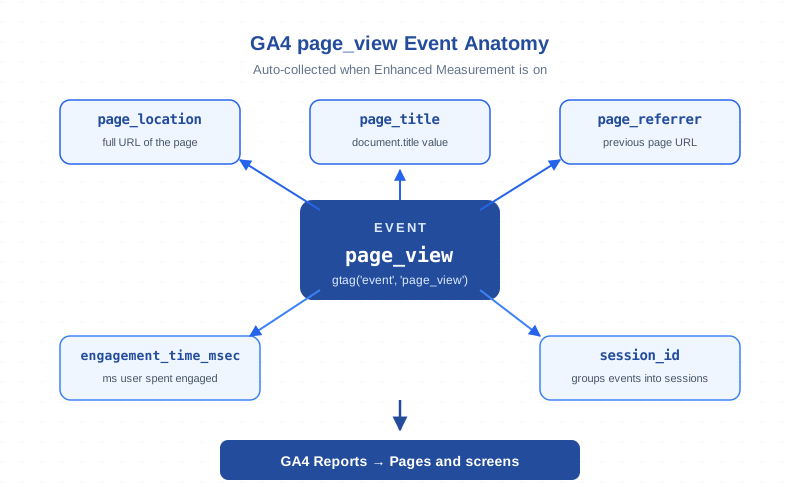
GA4 attaches several auto-collected parameters to every page_view event. The three you will reference most often:
page_location— the full URL of the page including protocol, hostname, path, and query string. This is what populates the Page location dimension in reports.page_title— the value ofdocument.titleat the moment the event fires. Drives the Page title dimension and the default report grouping.page_referrer— the URL of the previous page within the same session, or the external referrer that brought the user to the site.
Two other parameters travel with every event, including page_view: engagement_time_msec (milliseconds the tab was in the foreground and engaged) and session_id (groups the event into a session). These two are the foundation for engagement-based metrics like engaged sessions and engagement rate.
Pageview vs Unique Pageview: Why GA4 Dropped the Distinction
Universal Analytics reported two metrics: Pageviews (every load) and Unique Pageviews (one per page per session). GA4 reports only Views and Users — there is no “unique pageview” metric anymore. Google argued the unique-pageview definition was confusing because it mixed page identity with session state, and the same insight could be reconstructed from Views ÷ Sessions when needed.
| Concept | Universal Analytics | GA4 |
|---|---|---|
| Hit/event name | pageview (hit type) |
page_view (event) |
| Auto-collected on load | Yes, via ga('send','pageview') |
Yes, via Enhanced Measurement |
| Pageviews metric | Pageviews | Views |
| Unique pageviews metric | Unique Pageviews | Retired |
| Standard report | Behavior → Site Content → All Pages | Reports → Engagement → Pages and screens |
| SPA support | Manual ga('send','pageview') on route change |
Built-in history-change trigger in Enhanced Measurement |
| BigQuery field | hits.type = 'PAGE' |
event_name = 'page_view' |
Virtual Pageviews for SPAs: history.pushState and Hash Changes
Single-page applications (React, Vue, Angular, Next.js client-side routing) do not trigger a full page reload when the user navigates. Without help, GA4 would record only one page_view per session no matter how many in-app routes the user visits. Enhanced Measurement solves most of this automatically — its “Page changes based on browser history events” toggle listens for pushState, replaceState, and popstate.
For sites using hash-based routing (#/dashboard, #/settings) you can enable the matching toggle in the same panel. If your framework uses neither pattern — for example, a custom client-side router that mutates the DOM without changing the URL — you need to fire a manual page_view:
gtag('event', 'page_view', {
  page_location: window.location.href,
  page_title: document.title,
  page_referrer: document.referrer
});
If you do this, also disable the auto page_view on initial load (see the last section) so the first navigation does not double-count.
Pageview-Based vs Event-Based Metrics in GA4
Some GA4 metrics derive directly from page_view events; others are computed from the broader event stream and only loosely correlate with pageviews. Knowing which is which prevents misreading reports:
- Views — count of
page_view+screen_viewevents. Pure pageview-based. - Views per user / per session — Views divided by the relevant denominator.
- Engaged sessions — sessions with >10 seconds engagement, >1 page_view, or a conversion. Page_view contributes but does not dominate.
- Engagement rate — engaged_sessions / sessions. Independent of total pageviews.
- Bounce rate — 1 minus engagement rate. See bounce rate; the GA4 definition is fundamentally different from UA’s single-pageview-session formula.
If your page_view is misfiring (firing twice on every load, missing on SPA routes) all five of these metrics drift. That is why pageview tracking accuracy is the foundation for every other engagement number you trust.
Pageviews in Standard Reports (Pages and Screens)
The default home for pageview data in GA4 is Reports → Engagement → Pages and screens. Out of the box this report shows:
- Page title and screen class (default primary dimension)
- Views, Users, Views per user, Average engagement time
- Event count, Conversions, Total revenue (right-hand columns)
Switch the primary dimension to Page path + query string when titles are duplicated across templates (a common Shopify/WordPress problem) — paths will deduplicate cleanly. For deeper analysis, build a Free-form Exploration with page_location as the dimension and Views, Engaged sessions, and Conversions as metrics; this is the closest GA4 equivalent of the old “Behavior → All Pages” report.
Pageview Parameters in BigQuery Export
If you export GA4 to BigQuery, every page_view event lands as one row in the events_* table with event_name = 'page_view'. The parameters live inside the event_params RECORD as key-value pairs, accessed via UNNEST:
SELECT
  event_date,
  (SELECT value.string_value FROM UNNEST(event_params) WHERE key = 'page_location') AS url,
  (SELECT value.string_value FROM UNNEST(event_params) WHERE key = 'page_title') AS title,
  (SELECT value.int_value FROM UNNEST(event_params) WHERE key = 'engagement_time_msec') AS engaged_ms
FROM `project.analytics_XXXXXX.events_*`
WHERE event_name = 'page_view'
  AND _TABLE_SUFFIX BETWEEN '20260101' AND '20260131';
This is the cleanest place to deduplicate, dedupe by page_location + session_id, or join pageview data against your CRM. The official BigQuery Export schema reference documents every field, including newer additions such as session_traffic_source_last_click.
Common Pageview Tracking Issues (Double-Fires, Missed pushState, AMP)
Three problems account for the majority of pageview discrepancies in GA4:
- Double-fires on initial load. Usually a leftover manual
gtag('event','page_view')in the page template combined with Enhanced Measurement’s auto page_view. Fix: disable one or the other. - Missed routes on SPAs. The “history changes” toggle requires
pushState/replaceState; routers that mutate the DOM without changing the URL will not trigger it. Fix: fire manual page_view on each route change and disable the auto initial fire. - AMP and embedded views. AMP pages use the
amp-analyticscomponent, not gtag.js, so page_view events use a slightly different schema. Cross-domain AMP traffic can show up as duplicate “(direct)” sessions if linker is misconfigured.
Other smaller traps: query parameters inflating the page_location count (use a data layer-based normalized URL or strip UTM parameters in a custom dimension), and consent-denied users who never trigger page_view because analytics_storage is set to denied. Google documents both behaviors in the gtag.js reference.
Disabling Auto-Pageview When You Need Full Control
For complex apps where auto-tracking creates more noise than signal, you can opt out of automatic page_view collection and fire your own. Two ways:
- Via Enhanced Measurement UI: Admin → Data Streams → Web stream → Enhanced Measurement gear icon → uncheck “Page views”. The other Enhanced Measurement events (scroll, click, video) keep working.
- Via gtag config: pass
send_page_view: falsein the GA4 config call:
gtag('config', 'G-XXXXXXXXXX', {
  send_page_view: false
});
Either approach gives you a clean slate. From there, fire gtag('event','page_view', {...}) exactly when your app considers a route “viewed” — after content has loaded, after auth checks, or after any client-side guard. This is the right pattern for headless-CMS sites, gated content, and apps where the URL changes before the user sees anything meaningful.
For server-side pageview delivery (mobile apps, payment redirects, AMP), use the Measurement Protocol to send the event directly to GA4 from your backend. Google’s Measurement Protocol for GA4 documentation walks through the request format.
Frequently Asked Questions
Does GA4 still count “unique pageviews”?
No. GA4 reports Views and Users; the UA “Unique Pageviews” metric was retired. If you need the old approximation, calculate Views per session in an Exploration or in BigQuery.
Is page_view fired automatically in GA4?
Yes, when Enhanced Measurement is on for the web data stream. You can disable it in the data stream settings or by passing send_page_view: false in your gtag config call.
How do I track pageviews in a single-page app?
Enhanced Measurement listens for pushState, replaceState, and hash changes — those are tracked automatically. For routers that mutate the DOM without changing the URL, fire a manual gtag('event','page_view', {...}) on each route change and disable the initial auto fire to avoid double-counting.
What parameters does the GA4 page_view event collect by default?
The auto-collected parameters are page_location (full URL), page_title (document.title), and page_referrer (previous URL). Every event also carries engagement_time_msec and session_id.
Why are my GA4 pageviews higher than my server logs?
Most often it is a double-fire — a leftover manual page_view alongside Enhanced Measurement, or a tag that fires on both pageload and history-change. Open DebugView, reload the page, and check whether page_view appears once or twice in the event stream.
How do I see pageviews in BigQuery?
Filter the events_* table on event_name = 'page_view'. Each row is one pageview; parameters live in the event_params RECORD and are extracted via UNNEST(event_params).
Can I disable automatic pageview tracking in GA4?
Yes. Either uncheck “Page views” inside Enhanced Measurement on the data stream, or pass send_page_view: false when you load the gtag config. After disabling, fire gtag('event','page_view', {...}) manually whenever your app considers a route viewed.
Related Terms
- Event — every GA4 hit including page_view
- Session — groups page_views together
- Engaged sessions — >10s, >1 page_view, or a conversion
- Engagement rate — engaged sessions / sessions
- Bounce rate — inverse of engagement rate
- Data stream — where Enhanced Measurement is configured
- DebugView — verify page_view fires correctly
- Measurement Protocol — server-side page_view delivery
For deeper reading, Google’s Enhanced Measurement reference covers every auto-collected event including page_view, and web.dev’s Core Web Vitals guide explains why an accurate page_view fire is the prerequisite for valid CWV field data attribution.
