
An app event is a single user action recorded inside a mobile app and sent to GA4 via the Firebase SDK — the mobile-app counterpart to a web event. Same atomic unit (event name plus up to 25 parameters), different transport: instead of gtag.js on a web page, app events flow through FirebaseAnalytics on iOS and Android. App data lands in the same GA4 property as web hits, but it arrives via an app data stream, behaves differently for sessions, includes a unique catalog of auto-collected events, and exports to a separate set of BigQuery tables. This guide covers what makes app events distinct, the three event categories, parameters and limits, debugging tools, and the mistakes that quietly break mobile-app analytics.
What Is an App Event?
An app event is a structured payload — name plus parameters — emitted from a mobile app (iOS, Android, Flutter, or React Native) by the Firebase SDK. The SDK batches events on-device and uploads them to Google’s collection endpoint, which routes the data into the GA4 property linked to the Firebase project. As soon as you add the firebase-analytics dependency and initialize the SDK, dozens of events start flowing automatically.
The link between Firebase and GA4 is the data stream. Each Firebase iOS or Android app maps to one app data stream inside a GA4 property. Web traffic from your marketing site lands on a separate web stream in the same property — that pairing is what powers cross-platform tracking. The streams share user identity (when you call setUserId) but keep their own automatic events, debug tools, and BigQuery exports.
App Events vs Web Events — the Data-Stream Split
App and web streams collect events with the same shape, but the contract is not identical. The differences below explain why your web event taxonomy doesn’t translate one-to-one to your app — and why audiences and reports sometimes look different across the two surfaces.
| Aspect | Web event | App event |
|---|---|---|
| Transport SDK | gtag.js or GTM web container |
Firebase SDK (iOS / Android / Flutter) |
| Stream type | Web data stream | iOS or Android app data stream |
| Identifier | client_id from _ga cookie |
app_instance_id tied to the install |
| Auto-collected examples | page_view, session_start, scroll |
first_open, app_update, app_remove, in_app_purchase, os_update |
| Debug tool | DebugView via ?debug_mode=1 |
DebugView via Logcat / Xcode flag |
| BigQuery destination | events_* tables, platform = WEB |
Same tables, platform = IOS / ANDROID |
The trickiest difference is the identifier. On web, GA4 keys users by the _ga cookie, which can be cleared, blocked, or rotated by ITP. On apps, the SDK generates an app_instance_id that lives until the user uninstalls or wipes app data — much more stable, but completely device-bound. Stitching the two together requires an authenticated user_id sent from both surfaces, which is exactly the bridge described in cross-platform tracking.
Auto-Collected App Events (Firebase Analytics)
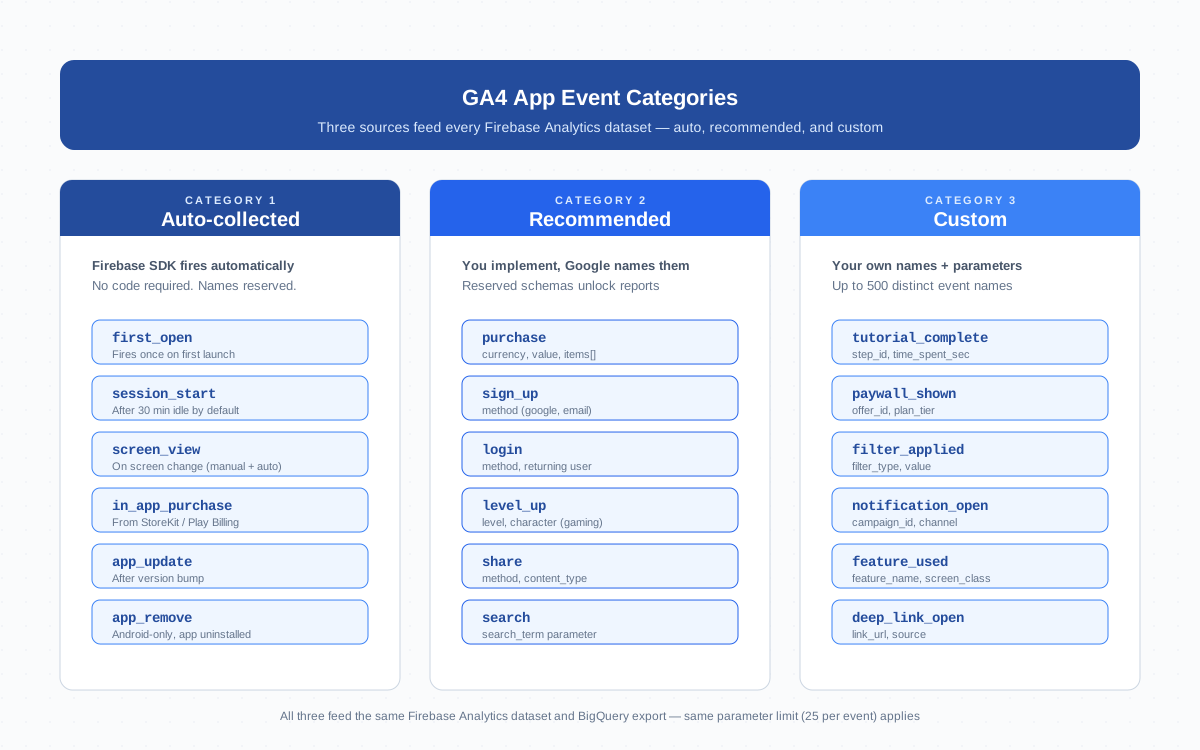
Firebase fires more events automatically than the web SDK. None of them require code beyond initializing the SDK. The events you’ll lean on most:
first_open— fires once per install, the foundation for install attribution and cohort retention. Resets only on uninstall + reinstall or app data wipe.session_start— fires when the app comes to the foreground after the inactivity timeout (30 minutes by default).screen_view— auto-fires on iOS via UIKit hooks and on Android via the v17.2.0+ SDK. SwiftUI and Compose apps still need manual screen view calls.in_app_purchase— populated automatically from StoreKit (iOS) and Play Billing (Android) withproduct_id,price,quantity,currency. Does not replace yourpurchaseevent for revenue reports.app_update— fires the first time a new build runs after a version bump. Useful for release health dashboards.app_remove— Android only, fires on uninstall. iOS does not surface uninstalls to apps.app_clear_data— Android only, fires when the user clears app storage. Often a leading indicator of churn.os_update— fires when the OS major version changes. Helpful when triaging crash spikes.
For the official catalog with parameter schemas, see the Firebase automatic events reference. Treat these as guaranteed signals — but not as a substitute for explicit instrumentation of the actions that matter to your business.
Recommended App Events
Recommended events are predefined names with parameter schemas that Google publishes for industry use cases (gaming, retail, education, travel). You write the code that fires them — Google fixes the names so reports light up automatically. The high-leverage ones for most apps:
purchase— your authoritative revenue event. Send it whether or notin_app_purchasealready fired. Required parameters:currency,value,transaction_id,items[].sign_upandlogin— pair with amethodparameter ("google","email","apple") to power identity attribution.level_up,level_start,level_end— gaming progression, required for the gaming reporting templates.share— content forwarding withmethodandcontent_type.search— in-app search withsearch_term.tutorial_begin/tutorial_complete— onboarding funnels.
The mistake to avoid is the same as on web: don’t reinvent a recommended event under a custom name. Logging order_paid instead of purchase means GA4’s monetization reports stay empty, the Google Ads SDK can’t auto-import the conversion, and Firebase Predictions models can’t train on revenue. Always check the Firebase recommended events reference before naming a new event.
Custom App Events — the gtag-equivalent in iOS and Android
Custom events are anything you fire with a name you invent. The pattern is identical across platforms — single function call, name plus parameter dictionary:
iOS (Swift):
import FirebaseAnalytics

Analytics.logEvent("paywall_shown", parameters: [
  "offer_id": "annual_pro_50off",
  "plan_tier": "pro",
  "trigger_screen": "settings_premium"
])
Android (Kotlin):
import com.google.firebase.analytics.ktx.analytics
import com.google.firebase.ktx.Firebase

Firebase.analytics.logEvent("paywall_shown") {
  param("offer_id", "annual_pro_50off")
  param("plan_tier", "pro")
}
Naming rules: snake_case, lowercase, max 40 characters, alphanumeric plus underscores, no collision with reserved or recommended names. Each app data stream supports up to 500 distinct event names. Once you cross 500, additional names are dropped.
For more on the broader event framework that custom events plug into, see the parent guide. The mobile-specific consideration: Firebase debounces low-frequency events on-device for up to an hour to save battery, so paywall_shown fired in a test session may take longer to appear than the equivalent web event.
App Event Parameters and the 25-Slot Budget
Each app event carries up to 25 custom parameters, plus a small set of standard ones Firebase reserves (firebase_screen, firebase_screen_class, engagement_time_msec, session_id). Parameters above the cap are silently dropped. At the property level, GA4 still enforces 50 event-scoped custom dimensions and 25 user-scoped dimensions across all streams combined, so app and web compete for the same registration slots.
Parameter types matter more than on web because of native typing. The most common bug: passing a price as "19.99" (string) when you meant 19.99 (double). The string version flows in, but you can’t sum or average it. Booleans are converted to 1/0 on the wire — register them as numeric.
Mobile-specific rule: register parameters in the GA4 admin before the next release goes out. Apps can’t be hot-fixed like web pages, so a missed registration costs you a release cycle of data.
App Events in BigQuery Export
If you turn on the BigQuery link in Firebase, every app event lands in the same analytics_<property_id> dataset as web events, but with platform and identity columns populated differently:
platform=IOSorANDROID(vsWEB)user_pseudo_idpopulated fromapp_instance_idinstead of the_gacookiedevice.advertising_idcontains IDFA / GAID if the user opted inapp_infostruct populated with id, version, install_sourcetraffic_sourcefrom Play install referrer or Apple Search Ads instead of UTM tags
Daily tables (events_YYYYMMDD) finalize about 72 hours after the day ends. Intraday tables (events_intraday_YYYYMMDD) update continuously throughout the current day with a few-minute lag — useful for near-real-time dashboards but they get rewritten constantly. For a wider tour of the export, see BigQuery.
Debugging App Events — DebugView, Logcat, Xcode
App events are harder to debug than web events because the SDK batches them on-device. By default, Firebase uploads in batches every hour or so. To see events in real time, enable debug mode — same destination (DebugView in GA4), different mechanism per platform.
Android — adb shell:
adb shell setprop debug.firebase.analytics.app com.your.package.name
adb logcat -v time -s FA FA-SVC
iOS — Xcode launch argument: Add -FIRDebugEnabled to your scheme’s launch arguments. Output appears in the Xcode console. Disable with -FIRDebugDisabled.
With debug mode on, events bypass batching and appear in DebugView (Admin → DebugView in GA4) within seconds. The Logcat / Xcode console output also shows the full payload Firebase is about to upload — invaluable when chasing type mismatches.
Common App Event Mistakes
- Event-name collision. Logging your own
session_startorpurchasewith the wrong parameters silently corrupts GA4 reports built on those names. Namespace ambiguous names — useonboarding_session_start, notsession_start. - Parameter type mismatches across releases. Logging
levelas a string in v1 and an integer in v2 means BigQuery has bothstring_valueandint_valuepopulated, and aggregation queries return mixed nulls. Lock types in a single source — typed enum or analytics module. - Late SDK initialization. Initializing Firebase in the splash screen instead of the app delegate / Application class means the first
screen_viewcan fire before the SDK is ready and the event is lost. Initialize Firebase indidFinishLaunchingWithOptionson iOS andonCreate()in your customApplicationclass on Android. - Sending the same event twice. Firing
purchasefrom both the client and a server-side webhook doubles revenue in monetization reports. Pick one source of truth per event and dedupe bytransaction_idin any BigQuery analysis. - Not registering parameters as custom dimensions. The data flows in, but your
offer_idnever appears in Explore reports. Always register in Admin → Custom definitions within the same release cycle that introduces them.
The Measurement Protocol exists as the server-side escape hatch when client-side instrumentation is unreliable, but most app event problems are solved by tightening the client implementation.
App Events for ASO and Revenue Tracking
Two business outcomes pull most of the weight in app analytics: install-to-revenue funnels (paid acquisition payback) and feature-engagement signals that influence the App Store / Play Store algorithms.
For revenue tracking, the canonical chain is first_open → session_start → tutorial events → purchase. Mark purchase as a key event in GA4, link to your Google Ads account, and the platform can optimize bidding for installs that produce paying users — not just installs. The purchase event reference covers the parameter schema. Pair it with the conversion framework so finance and growth share the same definition of a paying user.
For ASO, app events feed engagement signals that both stores reportedly factor into ranking. first_open rate, retention curves built from session_start day counts, tutorial_complete rates, and app_remove within 7 days all serve as health metrics.
One thing app events do not do: replace device-level enhanced measurement. The auto-collected list is fixed — there’s no app analog to the web enhanced measurement toggle for things like outbound clicks or scroll depth. Custom events fill that gap manually.
Frequently Asked Questions
What is an app event in GA4?
An app event is a single user action recorded in a mobile app and sent to GA4 via the Firebase SDK. It carries an event name plus up to 25 parameters, and arrives in the GA4 property through an iOS or Android app data stream rather than a web stream.
How are app events different from web events?
Same payload shape and limits, different transport and identity. Web uses gtag.js or GTM and identifies users by a cookie; apps use the Firebase SDK and identify users by a stable app_instance_id. Apps also auto-collect a richer set of events (first_open, app_update, app_remove, in_app_purchase) and write to separate BigQuery streams within the same property.
Which app events does Firebase collect automatically?
Firebase auto-collects first_open, app_open, session_start, screen_view, user_engagement, in_app_purchase, app_update, app_remove (Android), app_clear_data (Android), os_update, app_exception, and the notification_* and dynamic_link_* families. They fire as soon as the SDK is initialized, with no extra code.
How do I create a custom app event in iOS or Android?
Call Analytics.logEvent on iOS (Swift) or Firebase.analytics.logEvent on Android (Kotlin), passing a snake_case event name and a dictionary of parameters. Names must be under 40 characters, alphanumeric plus underscores, and must not collide with reserved names. Each app data stream supports up to 500 distinct custom event names.
How many parameters can an app event have?
Each app event can carry up to 25 custom parameters plus the standard ones Firebase reserves (firebase_screen, engagement_time_msec, session_id). At the property level, GA4 still enforces 50 event-scoped and 25 user-scoped custom dimensions across all streams combined. Parameters above the cap are silently dropped.
How do I debug app events in real time?
Enable debug mode and watch DebugView in GA4. On Android, run adb shell setprop debug.firebase.analytics.app your.package.name and tail adb logcat -s FA. On iOS, add -FIRDebugEnabled to the Xcode scheme launch arguments and watch the console. Events bypass on-device batching and appear in DebugView within seconds.
Where do app events appear in BigQuery export?
App events land in the same events_YYYYMMDD and events_intraday_YYYYMMDD tables as web events, in the analytics_property_id dataset. Filter by platform = IOS or ANDROID and group by stream_id to isolate app traffic. Daily tables finalize about 72 hours after the day ends; intraday tables update continuously with a few-minute lag.
Related Terms
- Event — the parent concept covering web and app events
- Screen view — the mobile-app counterpart to a page view
- Cross-platform tracking — bridging web and app identity in one property
- Data stream — the GA4 collection endpoint for web, iOS, or Android
- DebugView — real-time event verification for app and web
- BigQuery — raw event export shared across streams
- Purchase event — canonical revenue event for monetization reports
- Conversion — the key-event flag that promotes business-critical events
- Measurement Protocol — server-side event delivery for offline events
- Enhanced measurement — the web equivalent of Firebase auto-collection
