
A screen_view in GA4 is the mobile-app equivalent of a web pageview: a single render of a screen recorded as a screen_view event. Where page_view fires on a web data stream, screen_view fires on an app data stream, collected automatically by the Firebase SDK every time a new screen becomes visible. This guide covers what screen_view is, how it differs from page_view, the parameters it carries, when auto-collection works (and when it does not), how to track manually for overlays and modals, how the two events combine in cross-platform reports, and how to query screen_view in BigQuery.
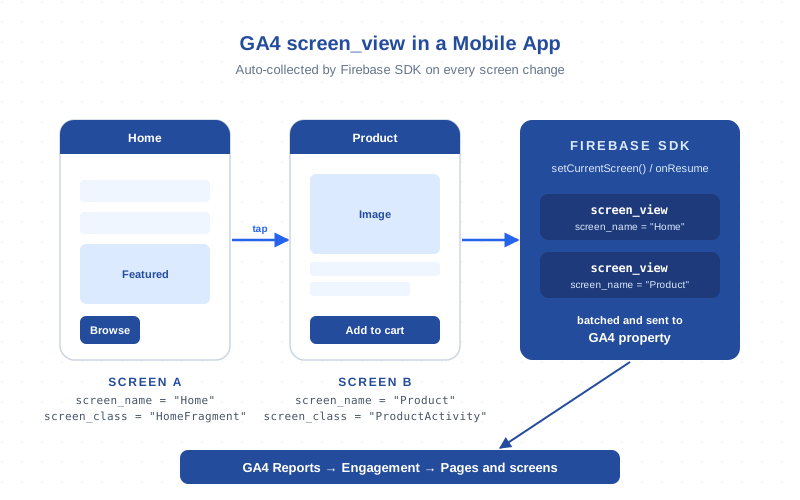
What screen_view Is — The Mobile-App Equivalent of page_view
In GA4 a screen_view event represents one render of an app screen, exactly the way page_view represents one render of a web page. Both events feed the same Views metric in standard reports, which is how Google mixes web and app data without forcing you to switch properties.
The event is part of the unified GA4 event model: auto-collected when the Firebase SDK is wired up on iOS, Android, Unity, Flutter, or React Native, and it carries a small set of parameters identifying which screen was shown. Because it is just an event, you can mark it as a conversion, exclude specific screens, or join it to other events in BigQuery using the same patterns as any other GA4 event.
screen_view vs page_view: When Each One Fires
Think about these two events by data stream. A GA4 property can have one or more web data streams (each fires page_view) plus one or more app data streams (each fires screen_view). The events never overlap. That distinction matters because parameters, auto-collection rules, and BigQuery shape differ even though the high-level intent is the same.
| Aspect | page_view (web) | screen_view (app) |
|---|---|---|
| Data stream | Web | iOS / Android / app |
| Auto-fires when | Page loads or history changes (Enhanced Measurement on) | Screen becomes visible (Firebase SDK lifecycle hook) |
| SDK | gtag.js / GTM web container | Firebase SDK (mobile) |
| Key parameters | page_location, page_title, page_referrer |
screen_name, screen_class, firebase_screen_id |
| Default identifier | URL | UIViewController / Activity / Fragment class name |
| Manual override | gtag('event','page_view', ...) |
logEvent(SCREEN_VIEW, ...) or setCurrentScreen() |
| BigQuery filter | event_name = 'page_view' |
event_name = 'screen_view' |
| Counts toward Views metric | Yes | Yes (combined) |
If you maintain both a web property and a native app inside the same GA4 property, every Views number is a sum of page_view and screen_view counts — by design. Getting screen_view configured correctly matters as much for app-heavy products as page_view tracking does for content sites.
screen_view Event Parameters: screen_name, screen_class, firebase_screen_id
Three parameters define the shape of the screen_view event. Every screen_view carries them automatically, and they are the dimensions you will use in every report involving app screens:
screen_name— a human-readable string for the screen:"Home","Product details","Checkout". Surface this in reports because it stays stable across refactors.screen_class— the technical class name:UIViewControllersubclass on iOS,ActivityorFragmentname on Android. Useful for debugging but noisy in reports.firebase_screen_id— a numeric ID the SDK assigns per session to disambiguate two visits to the same screen. The only reliable way to count distinct visits versus total renders.
Like every GA4 event, screen_view also carries engagement_time_msec and session_id (which groups events into a session). Engagement time on screens is the foundation for the Average engagement time per screen metric.
Auto-Collected screen_view via Firebase SDK (and How to Disable It)
When you initialize the Firebase SDK, screen_view is on by default. On iOS the SDK observes UIViewController lifecycle and fires on viewDidAppear; on Android it hooks Activity.onResume plus (for AndroidX users) the Fragment lifecycle. Flutter and React Native plugins map their navigators onto the same primitives.
The default captures roughly 80% of what teams need. To verify it is working:
- Build the app on a physical device or emulator with Firebase configured
- Enable DebugView via the
FIRDebugEnabledlaunch argument (iOS) oradb shell setprop debug.firebase.analytics.app <package>(Android) - Open GA4 → Admin → DebugView and watch
screen_viewappear as you navigate
To disable auto-collection (some apps use deep custom navigation where auto-fires generate noise), opt out via Info.plist on iOS (FIREBASE_ANALYTICS_AUTOMATIC_SCREEN_REPORTING_ENABLED = NO) or set google_analytics_automatic_screen_reporting_enabled = false in the Android manifest. After disabling, you must fire screen_view manually on every screen.
Manual screen_view Tracking — Overlays, Modals, and Deep Tabs
Auto-collection treats one Activity/Fragment/UIViewController as one screen. The moment your app diverges from that pattern, you need manual tracking:
- Modal overlays. A bottom sheet or modal opens on top of the current screen but does not push a new view controller — auto-collection misses it. Fire
logEventin the modal’sdidShowhandler. - Deep tabs. A
TabBarControllerwith five tabs is one Activity from the lifecycle’s perspective. Tab switches need a manualsetCurrentScreen()call from the tab delegate. - Carousels and paginated views. Onboarding slides, story-style screens, or horizontally paginated feeds do not trigger lifecycle methods.
- Custom navigation. Compose Navigation, SwiftUI
NavigationStackwith manual destinations, or fully custom routers may not fire the hooks Firebase listens for — drive screen_view from your router.
The manual API is small. On iOS:
Analytics.logEvent(AnalyticsEventScreenView, parameters: [
  AnalyticsParameterScreenName: "Filter modal",
  AnalyticsParameterScreenClass: "FilterSheet"
])
On Android:
val params = Bundle().apply {
  putString(FirebaseAnalytics.Param.SCREEN_NAME, "Filter modal")
  putString(FirebaseAnalytics.Param.SCREEN_CLASS, "FilterSheet")
}
firebaseAnalytics.logEvent(FirebaseAnalytics.Event.SCREEN_VIEW, params)
If you mix manual and auto firing, watch for double-counts. Pick one pattern: either disable auto-collection globally and own the firing, or leave auto on and only fire manually for cases the SDK misses.
screen_view in Cross-Platform GA4 Reports
The default home for screen_view data is Reports → Engagement → Pages and screens. By default it aggregates by Page title and screen class — which is why a poorly chosen screen_class clutters the top-pages list. Switch the primary dimension to Screen name for the human-readable labels you set.
Other reports that pull from screen_view:
- Realtime overview — the “Top screens (app)” card lists active screens by
screen_name. - Engagement → Events —
screen_viewappears with its own count, distinct from page_view. - Explore → Path exploration — pick “Page title and screen name” to see app navigation paths and drop-offs.
- Explore → Funnel — funnel steps can mix page_view and screen_view conditions, useful when a checkout starts on web and finishes in the app.
For products with both surfaces, cross-platform reporting is what makes screen_view valuable. A user reading on the web (page_view) and bookmarking in the app (screen_view) is the same user — assuming a unified user_id on both sides — and the web-read → app-bookmark funnel sits inside one Exploration.
screen_view in BigQuery Export
If you have BigQuery export enabled, every screen_view lands as one row in the daily events_* table with event_name = 'screen_view'. Parameters live inside the event_params RECORD as key-value pairs:
SELECT
  event_date,
  user_pseudo_id,
  (SELECT value.string_value FROM UNNEST(event_params) WHERE key = 'screen_name') AS screen_name,
  (SELECT value.string_value FROM UNNEST(event_params) WHERE key = 'screen_class') AS screen_class,
  (SELECT value.int_value    FROM UNNEST(event_params) WHERE key = 'firebase_screen_id') AS screen_id,
  (SELECT value.int_value    FROM UNNEST(event_params) WHERE key = 'engagement_time_msec') AS engaged_ms
FROM `project.analytics_XXXXXX.events_*`
WHERE event_name = 'screen_view'
  AND _TABLE_SUFFIX BETWEEN '20260101' AND '20260131';
This is the cleanest place to do screen-level analysis that the standard UI cannot handle: cohort retention by first screen, average engagement time per screen segmented by app version, sequence analysis of the first three screens of a session, or feature-flag analysis where each treatment renders a different screen_name. The official BigQuery Export schema reference documents every field including app-specific columns like device.mobile_brand_name and app_info.version.
Common screen_view Problems (Tab Switches, Fragments, Deep Links)
Recurring patterns that cause screen_view gaps in the apps I have audited:
- Tab switches missed. A bottom-tab UI fires one screen_view at launch and never again. Hook the tab delegate and call
setCurrentScreen()on each switch. - Fragment swaps not tracked. Replacing a Fragment inside one Activity does not always fire the hooks Firebase listens for. Use AndroidX Fragments on a recent SDK.
- Deep links not attributed. The entry screen often loads before the SDK finishes initializing — screen_view fires but lacks attribution. Defer deep-link handling until Firebase is ready, or fire manually in the deep-link handler.
- Same-screen double-counts. Back-button revisits fire screen_view again. Correct behavior, but use
firebase_screen_idas your dedup key in BigQuery instead ofscreen_name. - WebViews inside the app. A host Activity wrapping a WebView fires BOTH screen_view and page_view if Firebase + gtag are both wired. Pick which surface owns the metric and disable the other.
- Push notification opens. A transitional splash often fires a screen_view before routing to the destination. Either name the splash so you can filter it, or skip auto-firing on transient screens.
Most of these surface during a DebugView walk — open the panel, navigate, watch for missing or duplicated events. The official Firebase screen tracking documentation covers lifecycle integration on each platform.
Mapping screen_name to User-Friendly Labels in Reports
Two patterns to make screen-name data readable instead of debug-noise:
- Set screen_name explicitly on every screen, even auto-tracked ones. Override the default
screen_class-derived name with a clean string in everyviewDidAppear/onResume. Never let GA4 fall back on the class name. - Use a screen-name registry. A single
constfile with every screen’s analytics name imported everywhere. Without it, two engineers will name the same screen “Home” and “HomeView” and your reports fragment.
If you cannot rename at the SDK layer (legacy or third-party screens), rename at the report layer with Custom dimensions — register a screen_label dimension and populate it from a lookup table or via Measurement Protocol. Enhanced Measurement only covers web-side equivalents (page changes, scroll depth); app screen labels are your responsibility.
Combining page_view and screen_view in Unified GA4 Reporting
Once both events are configured cleanly, unified reporting unlocks four high-value views:
- Total Views (web + app) — the default Pages and screens report sums page_view and screen_view counts.
- Cross-surface funnel. Explore → Funnel with step 1 = “page_view where page_location contains /signup” and step 2 = “screen_view where screen_name = ‘Onboarding'” measures conversion across surfaces.
- Surface-aware engagement. Filter by Platform = web or app to compare engagement rate, time per session, and views per session.
- Unified journeys. With a stable
user_idon both surfaces, BigQuery joins onuser_idreconstruct the full journey including which surface discovered and which converted.
This only works if user_id is consistent and your event taxonomy is shared. The most common breakage I see in audits is two teams (web and mobile) shipping divergent screen_name and page_title conventions — reports look fine in isolation but fall apart on comparison. Lock the taxonomy in one document and route every rename through it. The official GA4 screen_view developer reference documents the full event spec for both iOS and Android.
Frequently Asked Questions
Is screen_view the same as page_view in GA4?
Conceptually yes — both record one render of a piece of content and both feed the unified Views metric. Mechanically they are different events: page_view fires on web data streams via gtag/Enhanced Measurement, screen_view fires on app data streams via the Firebase SDK with different parameters.
Does screen_view fire automatically?
Yes, when the Firebase SDK is initialized. On iOS it hooks UIViewController.viewDidAppear; on Android it hooks Activity.onResume plus AndroidX Fragment lifecycles. You can disable it with FIREBASE_ANALYTICS_AUTOMATIC_SCREEN_REPORTING_ENABLED = NO in Info.plist or the matching manifest setting on Android.
What is the difference between screen_name and screen_class?
screen_name is the human-readable label you control (“Home”, “Checkout”); screen_class is the SDK class name (HomeFragment, CheckoutActivity). Reports default to a mix of both — set screen_name explicitly so refactors do not break your dashboards.
How do I track modals and overlays as screen_view events?
Manually fire logEvent(SCREEN_VIEW, ...) in the modal’s didShow handler with a clear screen_name. Auto-collection only listens for full-screen lifecycle events, so modals, bottom sheets, and tab switches need explicit logging.
Do screen_view and page_view both count toward the GA4 Views metric?
Yes. The unified Views metric in standard reports sums page_view and screen_view counts across all data streams in the property. That is why apps and websites under the same property aggregate cleanly.
How do I query screen_view events in BigQuery?
Filter the events_* table on event_name = 'screen_view' and extract screen_name, screen_class, and firebase_screen_id from event_params via UNNEST. Use firebase_screen_id as the dedup key when counting unique screen visits within a session.
Why are my screen_view counts higher than expected?
Three usual culprits: a manual logEvent(SCREEN_VIEW) on top of auto-collection (double-fire), a transient splash screen firing on every app open, or back-button revisits being counted as new views. Use DebugView to confirm which one applies before changing code.
Related Terms
- Pageview — the web equivalent (page_view event)
- Event — every GA4 hit including screen_view
- Data stream — where screen_view auto-collection is configured
- Cross-platform tracking — combining web and app data
- Session — groups screen_views together
- DebugView — verify screen_view fires correctly
- BigQuery — raw screen_view export
- Measurement Protocol — server-side screen_view delivery
- Enhanced Measurement — auto-events for the web counterpart
