
Enhanced measurement is GA4’s set of seven auto-collected events that fire on every web data stream without a single line of custom code. When you create a stream, GA4 turns on page_view, scroll, click (outbound), view_search_results, video_start/progress/complete, file_download, and form_start/submit. The convenience is real, and so are the gotchas: scroll only fires once at 90%, “outbound” counts your own subdomains as external, and form tracking misses most JavaScript-driven submissions. This guide explains what each event captures, how to customize thresholds, when enhanced measurement is enough, and when to switch to manual GTM tagging.
What Enhanced Measurement Is in GA4
Enhanced measurement is a per-stream feature configured under Admin → Data Streams → [your web stream] → Enhanced measurement. It runs entirely inside the gtag.js (or GTM-loaded GA4) snippet and listens to DOM and history-API signals in the browser. No tag setup, no triggers, no variables — toggle a switch and events start flowing into your data stream.
The trade-off: enhanced measurement is opinionated. Google decides what counts as a scroll event (90% depth, single fire per page), what counts as an outbound click (any link to a domain not on your cookie_domain list), and what counts as a video play (only YouTube iframes that load with the JS API enabled). You get standardization across properties, at the cost of flexibility.
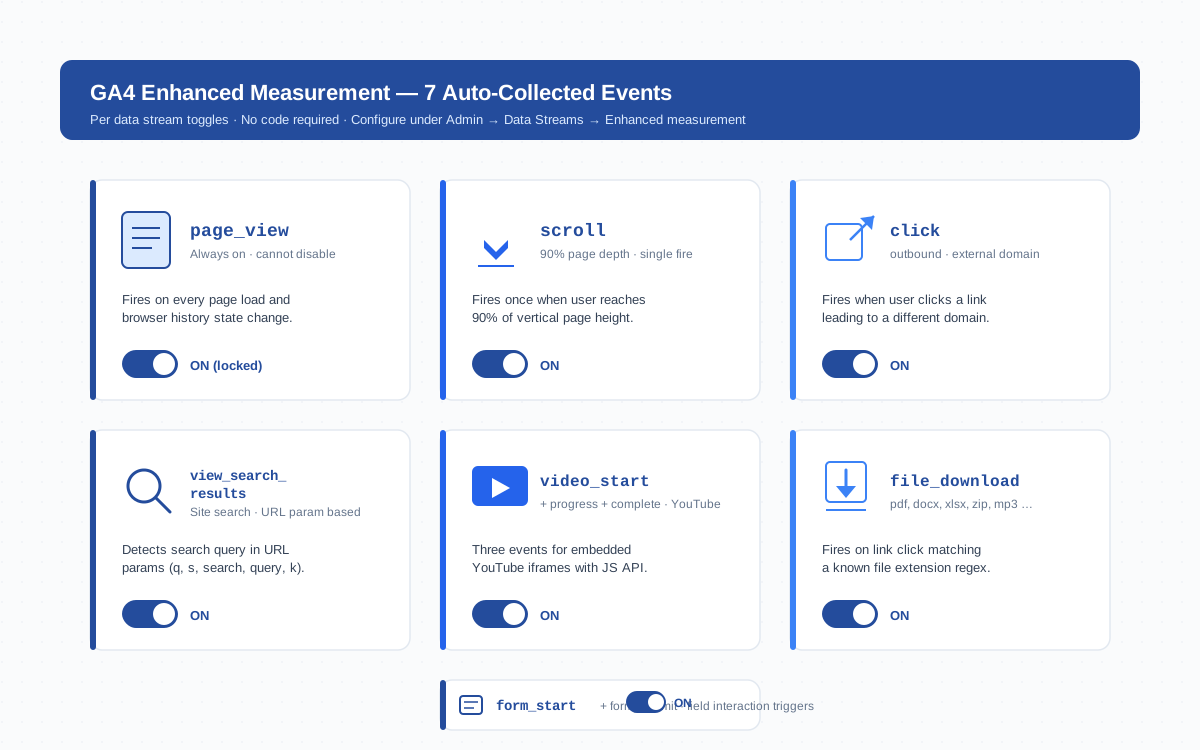
The Seven Enhanced Measurement Events
Each toggle controls one (or a small group of) auto-collected GA4 events. The table below summarizes what each captures, the default trigger behavior, and which override is available in the gear-icon settings.
| Event | Parameters captured | Default behavior | Override option |
|---|---|---|---|
page_view |
page_location, page_referrer, page_title, language |
Every page load + browser history change | Disable history-based fires only |
scroll |
percent_scrolled (always 90) |
Single fire at 90% page depth | None — disable entirely or use GTM |
click (outbound) |
link_url, link_domain, link_classes, outbound: true |
Fires on any external-domain link | None — define cross-domain list to suppress |
view_search_results |
search_term |
Detects URL params: q, s, search, query, keyword | Add custom URL parameter names |
video_start / progress / complete |
video_title, video_url, video_duration, video_provider, video_percent |
YouTube iframes with JS API at 0%, 10%, 25%, 50%, 75%, 100% | None — Vimeo/Wistia need custom events |
file_download |
file_extension, file_name, link_text, link_url |
Click on link with known extension (pdf, docx, xlsx, zip, mp3, mp4, …) | None — fixed regex of ~17 extensions |
form_start / form_submit |
form_id, form_name, form_destination |
First field interaction + native HTML submit event | None — disable entirely or use GTM |
Enabling and Disabling Enhanced Measurement Per Data Stream
Enhanced measurement is configured separately for every web stream — and only for web. Apps use the Firebase SDK, which collects different automatic events. To configure:
- Open GA4 → Admin → Data Streams
- Click your web stream (the one with the measurement ID like
G-XXXXXXX) - Find the Enhanced measurement card and toggle the master switch
- Click the gear icon to enable or disable individual events
- Save — changes apply within minutes (no tag deployment needed)
If you run multiple streams under one property (separate domains, staging vs production), each one carries its own enhanced measurement configuration. This matters when you’re testing: turning off scroll on staging doesn’t affect production.
Customizing Each Event
Customization is limited compared to a manual GTM trigger setup. Here is what you can actually change:
- Site search parameters — by default GA4 looks for
q,s,search,query,keyword. If your search uses a different parameter name (Shopify usesq, WordPress usess, but custom search may use anything), add it under Show advanced settings. - Page changes based on browser history events — for single-page apps that use the History API, GA4 fires a synthetic pageview on each route change. You can disable this if your SPA already pushes manual
page_viewevents. - Outbound click domains — there is no direct allowlist, but adding a domain to your cross-domain measurement list suppresses outbound clicks to that domain (because it counts as the same site).
For everything else — scroll thresholds at 25/50/75/100, Vimeo video tracking, AJAX form submission detection — you’ll need to disable the relevant enhanced measurement event and replace it with a custom GTM tag.
Parameter Visibility in Standard Reports
Enhanced measurement events arrive in GA4 with their parameters attached, but most of those parameters are not visible in standard reports until you register them as custom dimensions.
page_location, page_title, and search_term are exposed by default. percent_scrolled, video_title, file_extension, and form_id are collected but invisible in reports until you register them under Admin → Custom definitions → Custom dimensions. Without that step, you can see counts of scroll events but not breakdowns by depth, and counts of video_start events but not which videos played.
Register them as event-scoped custom dimensions, then wait 24 hours for the dimension to populate in reports. DebugView shows the parameters immediately during testing, even before registration.
When Enhanced Measurement Falls Short
The seven events handle blog and content sites well. They fall short for:
- E-commerce — there is no
purchase,add_to_cart, orview_itemin enhanced measurement. Ecommerce events require a manual implementation pushed via the data layer. - Granular scroll depth — you cannot get 25/50/75% in addition to 90%. GTM’s built-in Scroll Depth Trigger handles this in five minutes.
- Non-YouTube video — Vimeo, Wistia, JW Player, and HTML5
<video>elements all need custom listeners. - JavaScript form submissions — most modern forms (React, Vue, AJAX-submitted) don’t fire the native HTML
submitevent. Enhanced measurement capturesform_starton first field interaction but misses the actual submit. - Custom file types — the file_download regex covers ~17 extensions. CSV, TSV, JSON, EPUB, and many image formats are not in the list.
When any of these is core to your tracking, disable the relevant enhanced measurement toggle to avoid double-counting and replace it with a custom event.
Common Gotchas
Even on simple sites, enhanced measurement has predictable failure modes that quietly inflate or deflate metrics:
- Scroll fires on tall pages users barely engaged with. A user landing at the bottom of a page (deep link, anchor link) immediately fires the 90% scroll event. Combined with content sites where 90% is reached after one screen on mobile, scroll events overstate engagement.
- Outbound counts internal subdomains. If your site is
www.example.comand you link toblog.example.comorshop.example.comwithout configuring cross-domain measurement, every internal link fires an outbound click. Add subdomains to your list under Tagging settings → Configure your domains. - Video events fire on hidden tabs. Autoplay videos in inactive browser tabs still fire
video_startand progress events. There is no built-in visibility check. - File download misses CDN-served files. If your downloads go through a redirect URL (
/download?id=123) that ends without a file extension, the regex doesn’t match. Same for files served from a different subdomain or CDN. - page_view fires on hash changes in some SPA configurations, inflating pageview counts. Disable history-change fires if your SPA already handles manual pageviews.
Audit these in DebugView within the first week of every new GA4 property — especially for sites with session patterns that look anomalous.
Enhanced Measurement and Consent Mode
Enhanced measurement respects Google Consent Mode v2. When analytics_storage is denied, GA4 still receives ping events but without persistent cookies and with reduced parameters. Enhanced measurement events that depend on cookies — like page_view with full page_referrer — fall back to cookieless modeling.
If you use a consent management platform (CMP) and it blocks the GA4 tag entirely (rather than just denying storage), enhanced measurement collects nothing for non-consenting users. Verify your CMP’s behavior in DebugView with consent denied: events should still arrive in basic mode, just without user identifiers.
For regulatory regions (EU under GDPR, California under CCPA), the behavior of enhanced measurement is identical to manual events — GA4 doesn’t treat auto-collected events as exempt from consent rules. Same data, same compliance posture.
Cross-Domain Considerations
The biggest enhanced measurement footgun is the outbound click event firing on every link to your own subdomains. This is fixed by configuring cross-domain measurement under Admin → Data streams → Configure tag settings → Configure your domains.
Add every domain that should be treated as the same site: example.com, www.example.com, blog.example.com, shop.example.com. After saving:
- Outbound click events stop firing on those domains
- The UTM linker parameter (
_gl) appends automatically to outbound URLs in your list, preserving session continuity - Sessions span the configured domains as one (no new session on cross-domain hop)
Without this step, traffic from your blog subdomain to your shop subdomain shows as a new session with referrer = blog, breaking attribution and inflating session counts. Configure cross-domain measurement before you start trusting any enhanced measurement data.
Replacing Enhanced Measurement with Manual GTM Tagging
For teams that need precise control, the standard pattern is: disable the noisy enhanced measurement events, keep the well-behaved ones, and replace the disabled ones with GTM tags. A typical setup:
- Keep on:
page_view(or its history-change variant for SPAs),view_search_results,video(if you only embed YouTube) - Turn off:
scroll(replace with multi-threshold trigger),click(replace with outbound link trigger that excludes internal subdomains),file_download(replace with custom regex),form_start/form_submit(replace with form-specific listeners) - Configure GTM with built-in triggers: Scroll Depth (25/50/75/90), Click — Just Links (with regex filter), and Custom Event triggers for your specific form library
- Verify in DebugView — events should arrive once each, not duplicated between auto-collection and your manual tags
- For server-side enrichment, send the same events through the Measurement Protocol from your backend to backfill anything client-side tracking misses
The hybrid approach gives you the cleanliness of enhanced measurement for events Google handles well (page views, video) and the precision of manual tagging for events where the defaults don’t match your needs.
Frequently Asked Questions
What is enhanced measurement in GA4?
Enhanced measurement is a GA4 feature that automatically collects seven categories of events on every web data stream without custom code: page views, scrolls, outbound clicks, site searches, YouTube video engagement, file downloads, and form interactions. You toggle it on under Admin → Data Streams → Enhanced measurement.
Can I customize the scroll depth threshold in enhanced measurement?
No. Enhanced measurement fires scroll only at 90% page depth, with no settings to change the threshold. To track 25%, 50%, or 75% depth, disable enhanced measurement scroll and use Google Tag Manager’s built-in Scroll Depth Trigger with multiple percentage values.
Does enhanced measurement work with Vimeo or Wistia?
No. Enhanced measurement video tracking only supports YouTube iframes loaded with the JS API enabled. For Vimeo, Wistia, JW Player, or self-hosted HTML5 video, you need custom event listeners pushed to the dataLayer or implemented as GTM tags.
Why does enhanced measurement count internal subdomain links as outbound clicks?
By default GA4 treats any link to a different hostname as outbound. To stop subdomain links from firing the click event, configure cross-domain measurement under Admin → Data streams → Configure tag settings → Configure your domains and add every domain you consider part of the same site.
Does enhanced measurement respect Google Consent Mode v2?
Yes. When analytics_storage is denied, enhanced measurement events still send to GA4 in cookieless ping mode without user identifiers. If your consent management platform blocks the GA4 tag entirely, no enhanced measurement events are collected for non-consenting users.
How do I see scroll percentage or video title parameters in GA4 reports?
Enhanced measurement collects parameters like percent_scrolled, video_title, and file_extension, but they are not visible in standard reports until you register them as event-scoped custom dimensions under Admin → Custom definitions. After registration, allow 24 hours for the dimension to populate.
Should I disable enhanced measurement when using GTM?
Not entirely. Disable only the specific enhanced measurement events you replace with GTM tags to avoid double-counting. A common pattern: keep page_view and YouTube video tracking from enhanced measurement, but turn off scroll, file_download, and form events when implementing them through GTM with custom thresholds and selectors.
Related Concepts
- Event — the fundamental data unit collected by enhanced measurement
- Data Stream — where enhanced measurement is configured
- DebugView — verify enhanced measurement events fire correctly
- Trigger — GTM equivalent for replacing enhanced measurement events
- Measurement Protocol — backend complement to client-side auto-collection
For deeper reference see the official GA4 enhanced measurement documentation and the developer guide on enhanced measurement event parameters.
Bottom Line
Enhanced measurement gets a usable GA4 stream live in minutes — page views, scroll, clicks, search, video, downloads, forms — without a developer. The trade-off is rigidity: scroll only at 90%, no Vimeo, no AJAX form support, internal subdomains counted as outbound. For blogs and content sites, defaults are fine. For e-commerce, multi-domain setups, or anything beyond YouTube video, audit each event in DebugView, configure cross-domain measurement, and replace the noisy events with custom GTM tags before trusting the reports.
