
A tag management system (TMS) is a single piece of JavaScript that loads, governs, and fires every analytics, advertising, and marketing tag on your site — without touching the codebase. Instead of hardcoding ten vendor pixels into your templates, you embed one container snippet, then add and remove tags from a web UI. This guide explains what a TMS does, how the major platforms compare, when client-side and server-side make sense, and the deployment patterns I rely on for clean, performant tracking.
What a Tag Management System Is (and Why It Exists)
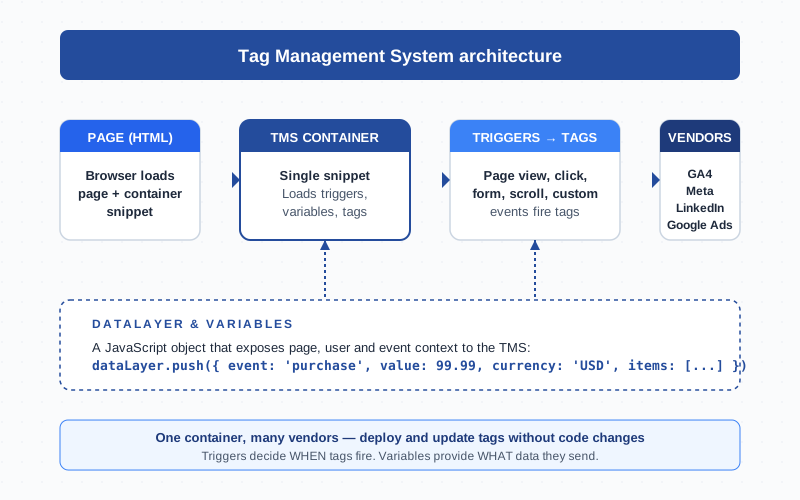
A TMS replaces a dozen manually placed snippets with one container loaded once per page. Marketing and analytics teams use it to deploy GA4, Meta Pixel, LinkedIn Insight, Google Ads conversions, Hotjar, and consent banners without filing a developer ticket for every change. The container reads the page, listens for events, and fires the right vendor tag at the right moment.
Before TMS existed, every new vendor meant a code release: edit templates, run QA, deploy. The result was tracking debt, stale pixels, and analytics teams that did not trust their own data. A TMS shifts ownership to the people who care about the data.
Anatomy of a TMS: Tags, Triggers, Variables
Every modern TMS is built on three primitives. Get these right and the rest of the platform makes sense:
- Tags — the snippets that send data to a vendor. A GA4 event tag sends a hit to Google. A Meta CAPI tag sends a server-side conversion to Facebook. Tags are the what.
- Triggers — rules that decide when a tag fires. Page views, clicks, form submissions, scroll depth, custom events, timer-based, history changes. Triggers are the when.
- Variables — named values pulled from the page, URL, cookies, or the data layer. They feed dynamic data into tags so a single purchase tag can serve every product. Variables are the what data.
The fourth concept — less obvious but equally important — is the data layer. It is a JavaScript object that the website pushes structured information into (event, value, currency, user_id) so the TMS can read it without scraping the DOM. Sites that skip the data layer end up with brittle tags broken by the next CSS refactor.
Major TMS Platforms Compared (GTM, Tealium, Adobe Launch, Segment)
I have shipped tracking on all four. They overlap in capability but target different buyers. Here is the honest read:
| Platform | Best For | Pricing | Strengths | Limitations |
|---|---|---|---|---|
| Google Tag Manager | Most teams, GA4-first stacks | Free (web), pay for server-side hosting | Massive community, native GA4 integration, free tier sufficient for 95% of sites | Limited enterprise governance, no native consent UI, weaker server-side ergonomics out of the box |
| Tealium iQ | Enterprise, regulated industries | $$$ (annual contracts) | Granular permissions, robust consent (Tealium Consent Manager), strong audit trail, EventStream for server-side | Heavy procurement cycle, opinionated workflow, learning curve |
| Adobe Experience Platform Tags (Launch) | Adobe Analytics shops | Bundled with Adobe Experience Cloud | Deep integration with Adobe Analytics, Target, AEM. Extension marketplace for vendors | Tight coupling to Adobe stack, smaller third-party community than GTM |
| Segment (Twilio) | Product-led teams, CDP-first stacks | $$ (volume-based MTUs) | Single API to 300+ destinations, strong developer ergonomics, identity resolution | Not a pure TMS — closer to a customer data platform; pricing scales with traffic |
For most teams, GTM is the right default. Move to Tealium or Adobe when consent governance, audit logging, or enterprise SSO become hard requirements. Segment fits when you need to ship one event taxonomy to dozens of destinations.
Client-Side TMS vs Server-Side TMS
Classic TMS is client-side: the container runs in the visitor’s browser, reads the page, and fires vendor pixels directly. Easy to set up, easy to debug. The trade-off: every tag is a third-party request exposed to ad blockers, ITP cookie restrictions, and inflated page weight.
A server-side TMS moves that work to your infrastructure. The browser sends one first-party hit to a server-side container (often https://gtm.yourdomain.com), which fans out to vendor APIs from your server. Benefits: better data quality, longer cookie lifetimes, less PII leakage, faster pages. Costs: hosting and more engineering effort.
Most mature teams now run a hybrid: client-side for tags that need DOM access (heatmaps, session replay) and server-side for the high-value conversion path. The Measurement Protocol and Meta’s Conversions API are the typical server-side endpoints.
Why Use a TMS Instead of Hardcoded Tags
You can still hardcode every pixel into your theme. People do. They regret it within a quarter. What a TMS gives you that hardcoded tags do not:
- Speed. Add a new vendor in 15 minutes, not a sprint.
- Versioning and rollback. Every change creates a version. Revert in one click.
- Environments. Dev, staging, and production containers separated.
- Centralized firing rules. One trigger fires twelve tags. Move a thank-you page URL? Update one variable, not twelve snippets.
- Consent gating. Block all marketing tags until the user opts in — enforced in one place.
- Audit trail. Who added the LinkedIn tag last Tuesday? The TMS knows.
The honest counter-argument: a poorly governed TMS becomes its own mess — orphan tags, mystery triggers, three GA4 configs firing at once. Tooling does not fix discipline.
Common TMS Deployment Patterns
Two patterns cover 80% of real-world TMS work:
Pattern 1: Consent gating. The container loads, reads consent state from a banner (OneTrust, Cookiebot, custom), and fires non-essential tags only after the user opts in. GTM’s Consent Mode v2 is the supported pattern for Google tags.
Pattern 2: Data-layer-driven tags. The site pushes a structured event to dataLayer (add_to_cart, purchase, form_submit) and the TMS reads it. Variables extract values, triggers listen for the event name, tags forward the payload to vendors. Everything decoupled, everything testable.
Anti-patterns I see often: scraping prices from the DOM with CSS selectors (breaks on every redesign), putting credentials in container variables (logged in version history forever), and firing tags on every page-view when only a subset of pages should report.
Performance Impact and Best Practices
A TMS is not free. The container is JavaScript that has to download, parse, and execute. With ten vendor tags firing on every page, you can easily add 200–400 KB and several hundred milliseconds of main-thread work — real Core Web Vitals impact.
The fixes are mechanical:
- Lazy-load non-critical tags (after page load, not before)
- Move heavy vendors server-side (Meta, TikTok, Google Ads conversions)
- Audit and delete unused tags every quarter
- Use template tags rather than Custom HTML wherever possible — they parse faster and are sandboxed
- Watch the debug view for tags that fire dozens of times per session unintentionally
The vendor docs — Google’s Tag Platform reference and Tealium’s JavaScript documentation — are good starting points for tuning.
TMS Workflow: Workspaces, Versions, Environments, Publishing
Mature TMS work is a software engineering practice in disguise. A typical change flow:
- Workspace. Branch off the live container so multiple users can work in parallel.
- Edit. Add or modify tags, triggers, variables. Use preview/debug to test on staging.
- Review. Have a teammate diff the workspace against live before publishing.
- Version. Save with a clear changelog (“Add LinkedIn Insight on /pricing”).
- Publish. Push to production. Most platforms support staging environments fed by separate container snippets.
- Roll back if needed. One click reverts to any previous version.
Treat the TMS like code: changelog discipline, peer review, never skip preview mode.
Common Pitfalls (Race Conditions, Double-Fires, Scope Leaks)
Three issues account for most broken TMS implementations:
- Race conditions. The page navigates before the tag finishes firing. Common on click handlers that do not delay navigation. Fix: use the
wait_for_tagssetting, or fire on a customcta_clickevent from the data layer that you push before navigation. - Double-fires. Two triggers match the same event, or the tag fires both client-side and server-side without deduplication. Fix: dedupe by transaction ID, audit triggers for overlap, never have two GA4 configs in one container.
- Scope leaks. A variable picks up data from a previous page-view and contaminates the next event. Common with single-page apps. Fix: explicitly reset data layer values on virtual page-view events, or use namespaced events (
checkout.start,checkout.complete). - UTM stripping. Server-side redirects strip UTM parameters, breaking attribution. The TMS sees a page-view without source. Fix: capture UTMs into a first-party cookie on first hit and read from the cookie thereafter.
- Lost data stream mapping. A new GA4 property gets created and the container still points at the old measurement ID. Audit measurement IDs after every property change.
When NOT to Use a TMS
A TMS is not always the right answer. Skip it when:
- One or two pixels that will never change. A static landing page with only GA4 does fine with hardcoded
gtag.js. - Strict CSP with no
unsafe-inline. Many TMS containers rely on inline scripts. You can work around it with Adobe’s strict CSP support or server-side, but hardcoded tags may be simpler. - Performance-critical pages with millisecond budgets. News sites, e-commerce checkouts where every 100ms costs revenue. Server-side TMS plus a single inline first-party tag often beats client-side here.
- Compliance teams reject any third-party JavaScript. Some regulated environments require server-side delivery via Measurement Protocol or first-party libraries.
For most marketing sites and product analytics use cases, a TMS is still the default. The discipline it forces — versioned changes, central governance, decoupled tags — pays back many times over the cost of getting it right.
Frequently Asked Questions
What is a tag management system in simple terms?
It is a single tool that lets you add, change, and remove tracking and marketing tags on your website without editing the site’s code. You install one container snippet once, then manage everything from a web interface.
Is Google Tag Manager free?
Yes — the standard web container is free with no traffic limits. Server-side GTM is also free as software, but you pay for the hosting (typically Google Cloud Run or App Engine, around $40–$120/month for moderate traffic).
What is the difference between client-side and server-side tag management?
Client-side TMS runs in the visitor’s browser and fires vendor pixels from there. Server-side TMS runs on your infrastructure: the browser sends one first-party request, and your server forwards events to vendors. Server-side improves data quality, cookie lifetimes, and page performance, but adds hosting and engineering overhead.
Do I still need a data layer if I use a TMS?
Yes — a data layer is what makes a TMS reliable. Without it, the TMS has to scrape the DOM with CSS selectors, which breaks every time the site is restyled. Pushing structured events to dataLayer decouples your tracking from your front-end markup.
Will a TMS slow down my website?
It can, if you let it. Each tag adds JavaScript and network requests. Best practices: lazy-load non-critical tags, move heavy vendors server-side, audit and delete unused tags every quarter, and prefer template tags over Custom HTML.
Can a TMS replace hardcoded gtag.js for GA4?
Yes. Adding a GA4 Configuration tag in your TMS is the recommended setup — it gives you the same functionality as gtag.js plus versioning, environments, and the ability to add other tags without further code changes.
How does consent management work with a TMS?
The TMS reads the consent state — usually from a Consent Management Platform (CMP) like OneTrust or Cookiebot — and only fires marketing tags after the user opts in. GTM’s Consent Mode v2 is the standard pattern for Google tags; other vendors integrate via custom triggers tied to consent variables.
Related Terms
- Container — the snippet you embed once
- Trigger — the rule that decides when a tag fires
- Data layer — the JavaScript object that feeds the TMS
- Event — the unit of data sent to vendors
- DebugView — real-time event verification
- Measurement Protocol — server-side delivery to GA4
