
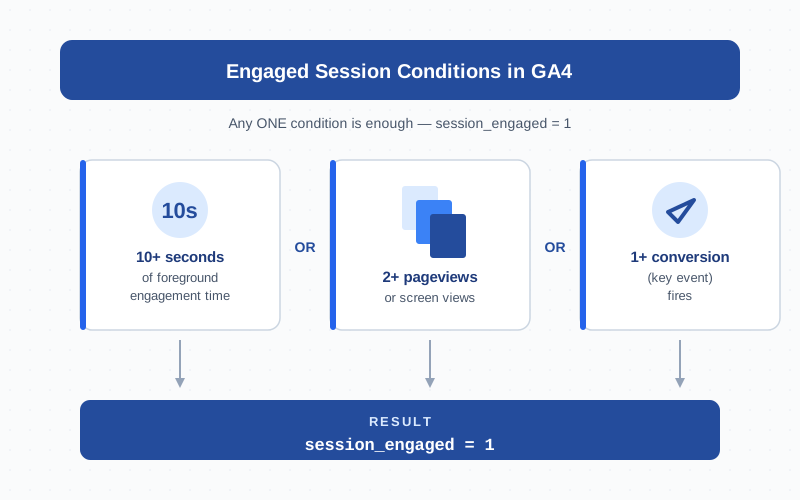
An engaged session in Google Analytics 4 (GA4) is a visit that lasted 10 seconds or longer, included two or more pageviews, or fired at least one conversion event. Any one of those three triggers is enough — the conditions are joined with OR. Engaged sessions are the absolute count behind GA4’s headline engagement rate metric, the official replacement for Universal Analytics’ bounce rate, and they appear as the session_engaged parameter on every event in the BigQuery export. This guide covers the three conditions, the configurable 10-second threshold, sessions vs engaged sessions vs engaged users, BigQuery, and the edge cases where the count looks wrong.
What an Engaged Session Is in GA4
An engaged session is a GA4 session that meets at least one of three criteria during its lifetime. GA4 stamps the decision on the session with the session_engaged event parameter, which equals 1 when engaged and 0 otherwise. A 12-second skim of an article counts. A two-page browse with no scrolling counts. A chat conversion in the first three seconds counts. The OR-gate logic is the whole point:
The Three Conditions in Detail
Each condition is checked independently. Any single match flips session_engaged from 0 to 1 for the rest of the session — there is no de-engagement.
| Condition | What GA4 measures | Configurable? |
|---|---|---|
| 10+ seconds duration | Foreground engagement time, not raw clock time. Tabs in the background or with the window minimized do not accrue time. | Yes — 10 to 60 seconds, per data stream |
| 2+ pageviews | Two or more page_view events (or screen_view in apps) in the same session, regardless of timing. |
No — fixed at 2 |
| 1+ conversion | Any event marked as a conversion (now called a “key event” in current GA4 terminology) firing inside the session. | Indirect — depends on which events you mark as conversions in Admin |
The duration condition is the dominant one for content sites — most informational visits never trigger a second pageview or conversion. For e-commerce or SaaS landing pages the 2-pageview rule does most of the work, since visitors browse before they buy.
The 10-Second Engagement Threshold and How to Customize It
The 10-second number is GA4’s default and minimum. The setting lives per data stream, not per property:
- GA4 → Admin → Data Streams → your web stream
- Configure tag settings → Show all → Adjust session timeout
- Set Adjust timer for engaged sessions between 10 (minimum) and 60 seconds (maximum)
In practice I raise the threshold rarely — once for a video-heavy portfolio site where auto-played hero loops padded engagement, once for a documentation site filtering reference lookups under 30 seconds. Otherwise leave it at 10. Raising the threshold lowers engagement rate retroactively in some aggregations — treat the change as a deliberate baseline reset.
Engaged Sessions vs Sessions vs Engaged Users
Three counts, same event stream, different grain:
- Sessions — total count of distinct
(user_pseudo_id, ga_session_id)pairs. Every session counts, engaged or not. - Engaged sessions — subset where
session_engaged = 1. - Engaged users — distinct users who had at least one engaged session. A user with three engaged sessions counts once.
The “Users” metric in GA4’s default reports actually refers to engaged users, which is why it often runs slightly lower than older Universal Analytics user counts. A drive-by visitor who bounces in 3 seconds shows up as a session but does not move the engaged-users counter.
The session_engaged Parameter
Every GA4 event carries automatic parameters: ga_session_id, ga_session_number, page_location, page_referrer, and others. session_engaged is one of them — a boolean expressed as the string "1" or "0".
The parameter is sticky in a specific way. Once a session crosses an engagement trigger, every subsequent event in that session carries session_engaged = 1. Earlier events in the same session, fired before the trigger, can carry session_engaged = 0. To count engaged sessions correctly in BigQuery, aggregate to the (user_pseudo_id, ga_session_id) level and check whether any event in the session had the flag set — do not just count rows where session_engaged = '1'.
Engagement Rate = Engaged Sessions / Total Sessions
Engagement rate is engaged sessions divided by total sessions, expressed as a percent:
engagement_rate = engaged_sessions / sessions × 100%If you have 1,000 sessions and 620 are engaged, engagement rate is 62%. The complement is bounce rate (100% − engagement rate, or 38% here). GA4 surfaces engagement rate by default; bounce rate is hidden behind the customise-report pencil icon. Both describe identical underlying data — engagement rate just frames it as a positive signal.
Why GA4 Replaced Bounce Rate with Engaged Sessions
Universal Analytics defined a bounce as any single-pageview session, regardless of duration. A reader who spent 12 minutes on an article and then closed the tab counted as a bounce, same as someone who hit back after half a second. The metric punished good content and rewarded dark patterns. The engaged-session model fixes both: the 10-second floor catches long-reads, the conversion trigger captures real intent, and the 2-pageview trigger captures browse-and-decide. Google’s official engagement metrics documentation covers the full rationale.
Reading Engaged Sessions in GA4 Reports
Engaged sessions appears as a default column in several standard reports:
- Reports → Acquisition → Traffic acquisition — engaged sessions per session source/medium. The most useful channel-quality view.
- Reports → Acquisition → User acquisition — engaged sessions per first-user source.
- Reports → Engagement → Pages and screens — engaged sessions per page.
- Reports → Engagement → Landing page — engaged sessions by entry page; often more useful than top-pages for SEO triage.
- Realtime — live engaged-sessions count in the last 30 minutes.
- Explorations → Free Form — add Engaged sessions as a metric, slice by any dimension.
If a report does not show the column, click the pencil icon → Customize report → Metrics → add Engaged sessions, then save.
Engaged Sessions in BigQuery
If you have BigQuery export turned on, engaged sessions are reconstructed from the raw events_* table:
SELECT
  COUNT(DISTINCT CONCAT(user_pseudo_id, '-', CAST(ga_session_id AS STRING)))
    AS engaged_sessions
FROM (
  SELECT
    user_pseudo_id,
    (SELECT value.int_value FROM UNNEST(event_params)
     WHERE key = 'ga_session_id') AS ga_session_id,
    MAX(
      (SELECT value.string_value FROM UNNEST(event_params)
       WHERE key = 'session_engaged')
    ) AS engaged_flag
  FROM `project.analytics_XXXXX.events_*`
  WHERE _TABLE_SUFFIX BETWEEN '20260401' AND '20260428'
  GROUP BY user_pseudo_id, ga_session_id
)
WHERE engaged_flag = '1';
Always partition with a _TABLE_SUFFIX filter — the events table is huge and unfiltered scans get expensive. session_engaged is stored as a string in value.string_value, not an integer. Google’s BigQuery basics for GA4 has more sample queries.
When Engaged Sessions Look Wrong
Several scenarios produce counts that look off — none are GA4 bugs, but each is easy to misread:
- Hidden tabs. Background tabs do not accrue engagement time, so a session may not cross 10 seconds even though the visitor was present.
- Prefetch / prerender. Browser prefetch can fire
page_viewon a page the user never sees. Engaged = 0, correctly. - SPAs without virtual pageviews. If your SPA does not fire
page_viewon route change, the 2-pageview trigger never fires. - Conversion misfires. A “phone click” or “form submit” that fires on hover or pageload makes every session engaged — engagement rate climbs to 99%.
- Bot traffic. Rendering crawlers execute the GA4 tag, inflate raw sessions, and depress engagement rate.
How to Debug and Validate Engaged Sessions
Work through these checks in order:
- Open DebugView and produce a test session. Stay 12 seconds, watch
session_engagedflip to1. If it does not, the tag or threshold setting is the problem. - Check the engagement-timer setting in Admin → Data Streams for every web stream. A threshold left at 60 seconds in a sub-property is a frequent culprit.
- Audit Admin → Events → Mark as conversion. Disable suspect conversions one at a time when engagement rate looks artificially high.
- Run the BigQuery query above and compare to the GA4 UI for the same day. Within ~1% is normal; larger gaps usually mean GA4 UI sampling.
- Compare engaged users to engaged sessions — engaged users should always be ≤ engaged sessions.
Bottom line: engaged sessions are the cleanest visit-quality count GA4 offers. Three OR-conditions, one configurable threshold, one event parameter. Keep the threshold at 10 seconds unless you have a specific reason to change it, pair the metric with engagement time when diagnosing content quality, and treat any sudden swing in engagement rate as a tracking-config event before assuming user behavior changed.
Frequently Asked Questions
What is an engaged session in GA4?
An engaged session in GA4 is a visit that lasted at least 10 seconds, included 2 or more pageviews, or fired at least one conversion event. Any single condition is enough — the three triggers are joined with OR, not AND. The engagement decision is recorded as the session_engaged event parameter and powers GA4’s headline engagement rate metric.
What is the difference between sessions and engaged sessions?
Sessions count every visit GA4 recorded. Engaged sessions count only the subset that met at least one engagement trigger (10+ seconds, 2+ pageviews, or 1+ conversion). Engaged sessions divided by total sessions gives engagement rate. The two metrics share the same underlying data — engaged sessions are always a subset of sessions.
Can I change the 10-second engagement threshold?
Yes, in GA4 Admin → Data Streams → choose your stream → Configure tag settings → Adjust session timeout → Adjust timer for engaged sessions. The minimum is 10 seconds, the maximum is 60 seconds. Most sites should keep it at 10. Raising the threshold lowers engagement rate retroactively in some aggregations, so document the change as a deliberate baseline reset.
What is the session_engaged parameter?
session_engaged is an automatic GA4 event parameter that equals 1 on events fired after the session crossed an engagement trigger and 0 on events fired before. The flag is sticky once it flips on. To count engaged sessions in BigQuery, aggregate to (user_pseudo_id, ga_session_id) and check whether ANY event in the session had the flag set.
Where do I find engaged sessions in GA4 reports?
Reports → Acquisition → Traffic acquisition for per-channel volume; Reports → Engagement → Pages and screens for per-page diagnostics; Reports → Engagement → Landing page for entry-page analysis; Realtime for the last 30 minutes; Explorations → Free Form for custom slicing. The metric is also available in the GA4 Data API as engagedSessions.
Why is my engagement rate suddenly 99%?
Almost always a misconfigured conversion event firing on every pageload — for example a “scroll” or “page_view” event accidentally marked as a conversion. Every session then qualifies as engaged via the conversion trigger. Audit Admin → Events → Mark as conversion and disable suspect conversions one at a time to find the culprit. Validate in DebugView before reverting any changes.
Are engaged sessions the same as engaged users?
No. Engaged sessions count visits that met any engagement trigger. Engaged users count distinct people who had at least one engaged session in the period. A user with three engaged sessions counts as one engaged user but three engaged sessions. The default “Users” metric in standard GA4 reports actually refers to engaged users, which is why it often runs slightly lower than older Universal Analytics user counts.
Related Terms
- Session — the GA4 session boundary and 30-minute timeout
- Engagement Rate — the percentage form of engaged sessions
- Engagement Time — the foreground-time signal behind the 10-second trigger
- Bounce Rate — the mathematical complement of engagement rate
- Event — what counts as a conversion trigger in GA4
- Pageview — the page_view event behind the 2-pageview trigger
- Data Stream — where the engagement timer setting lives
- DebugView — how to validate the session_engaged parameter live
- BigQuery — raw export of engaged-sessions data
