
Active Users in Google Analytics 4 (GA4) is the count of distinct users who had an engaged session on your site or app within a chosen lookback window — 1 day for DAU, 7 days for WAU, and 28 days for MAU. Unlike Universal Analytics, which counted any user that fired a hit, GA4 raises the bar: a visitor only becomes “active” if their session lasts longer than 10 seconds, contains 2+ pageviews, or includes a conversion event. This guide covers how GA4 actually counts active users, how DAU/WAU/MAU and the stickiness ratio relate, the migration story from UA, cross-platform tracking, BigQuery reconstruction, and the most common mistake — confusing active users with sessions.
What Are Active Users in GA4
An active user is a unique person who triggered at least one engaged session on your property within the report’s date range. The engagement filter is what separates GA4’s definition from older analytics tools. A drive-by visitor who lands, sits for two seconds, and bounces does not count as active in GA4 — even though they fired a page_view event. The data is still collected; it just doesn’t roll up into the “Users” headline number.
Identity for an active user is anchored to the client_id on web, the App Instance ID on mobile, or the user_id if you’ve configured one. GA4 deduplicates within the report window: one person who visits five times in a week is one weekly active user, not five. That deduplication runs across devices and platforms when User-ID or Google Signals is in play, otherwise it’s per-device.
“Active Users” is the default Users metric across most GA4 reports, including the home overview, Acquisition reports, and Realtime. When you see “Users” without a qualifier in GA4, it’s almost always Active Users — not Total Users.
Active Users vs Total Users vs New Users
GA4 actually exposes three distinct user metrics. Mixing them up causes a class of “GA4 numbers don’t add up” support tickets that has nothing to do with tracking errors.
| Metric | Definition | Engagement filter | Where it appears |
|---|---|---|---|
| Active Users | Users with at least one engaged session in the date range | Yes (10s / 2 pageviews / conversion) | Default “Users” metric in most reports |
| Total Users | All unique users who triggered any event | No | Explorations, BigQuery, custom reports |
| New Users | Users whose first_visit event fired within the date range |
No | Acquisition reports, Realtime |
| Returning Users | Active users who are not new | Yes | Retention report, Explorations |
Total Users is always greater than or equal to Active Users for the same window. The gap is your “drive-by ratio” — visitors collected but not engaged. A growing gap typically signals a bounce-rate problem, broken landing pages, or bot traffic slipping past automatic filtering. New Users is independent: a person can be both new and active in the same week.
How GA4 Counts Active Users
For a user to count as active, GA4 needs at least one session in the window that meets one of three engagement thresholds. The thresholds are evaluated per session, not per user, so a user with five trash sessions and one engaged session still counts as active.
- Session duration > 10 seconds — measured by the gap between
session_startand the last interaction event. The 10-second timer starts atsession_startand is checked when the next event arrives. - 2 or more pageviews or screen views — any combination of
page_viewandscreen_viewevents within the same session. - 1 or more conversion events — any event marked as a conversion in Admin → Events. Includes
purchase,generate_lead, custom conversions, and Enhanced Measurement events you’ve promoted to conversions.
If none of the three fire, the session is not engaged and the user does not count toward Active Users for that window. The session is still recorded with all its events — it just doesn’t pass the engagement gate. This is why GA4 typically reports 5-15% fewer “Users” than Universal Analytics did for the same traffic, and the difference is by design.
DAU, WAU, MAU — and How GA4 Implements Them
DAU, WAU, and MAU are product analytics conventions for measuring how often users come back. GA4 surfaces them through a built-in User activity over time report (Reports → Engagement → Retention) and as comparison cards in the home overview.
- DAU (Daily Active Users) = distinct users with an engaged session in the last 1 day.
- WAU (Weekly Active Users) = distinct users with an engaged session in the last 7 days, deduplicated.
- MAU (Monthly Active Users) = distinct users with an engaged session in the last 28 days, deduplicated. (Note: 28 days, not the calendar month — this is a sliding window.)
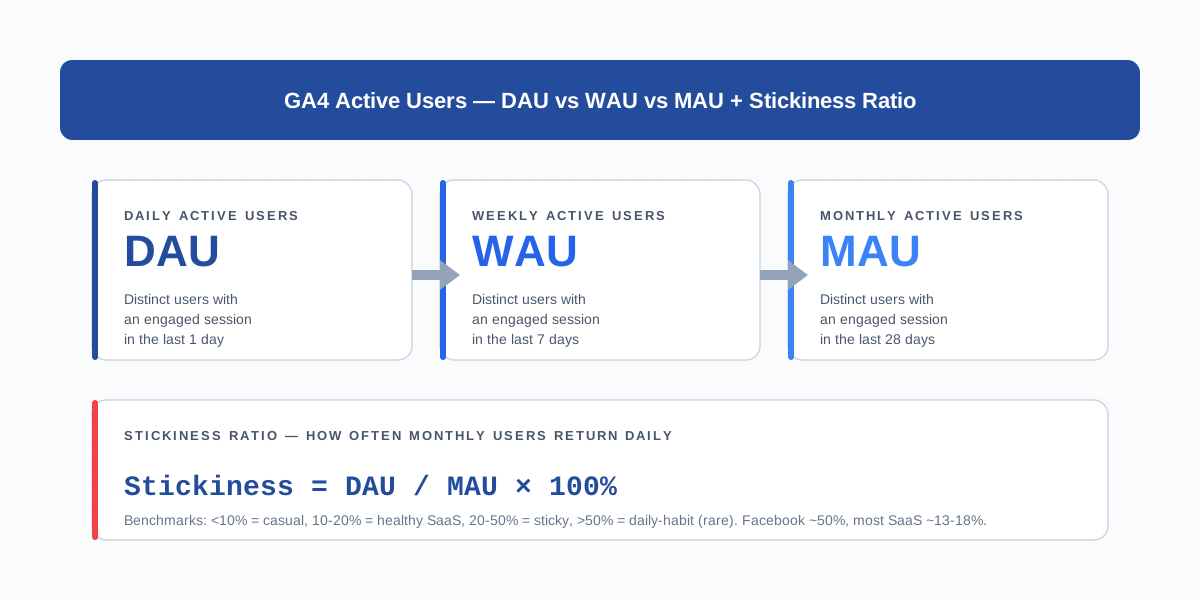
The relationship is always DAU ≤ WAU ≤ MAU because each larger window contains the smaller. Confusion arises when someone sums daily DAU values across a week and expects WAU — that gives total visits, not distinct weekly users. Always pull WAU from GA4’s report, not from a SUM() of DAU.
Active Users vs Universal Analytics Users — the Migration Story
If you migrated from Universal Analytics, your Users number probably dropped 5-15% on the day GA4 took over. That’s not a tracking regression — it’s a definition change.
UA’s “Users” metric counted any visitor whose browser fired at least one hit (pageview, event, transaction). There was no engagement filter. A bot, a 1-second bounce, a misfired tag — all counted. GA4 inherited the underlying telemetry but added the engagement gate, so the same population of visitors produces a smaller “Users” total.
Two practical implications. First, never compare GA4 Users directly to UA Users in a year-over-year report — the metrics measure different things. Second, if you need apples-to-apples retro analysis, use Total Users (no engagement filter) in GA4 explorations rather than Active Users. The comparison won’t be perfect (UA also handled bot filtering differently and had different cookie expirations), but it’s closer than Active Users to what UA reported.
Stickiness Ratio: DAU/MAU
The stickiness ratio is the single most important active-user metric for product analytics. It’s defined as DAU divided by MAU, expressed as a percentage:
Stickiness % = DAU / MAU × 100The ratio answers: of the people who used your product in the last 28 days, what fraction used it today? A higher ratio means users come back more frequently. Mixpanel’s stickiness benchmark and Amplitude’s analysis agree on rough bands:
- Below 10% — casual / occasional use. Typical for content sites, news, blogs, low-frequency tools.
- 10-20% — healthy SaaS or productivity app. Most workflow tools cluster here.
- 20-50% — sticky habit-forming product. Slack, Asana, daily-task tools.
- Above 50% — daily-habit territory. Facebook, WhatsApp, Instagram. Rare outside social and messaging.
To compute stickiness in GA4, build an exploration with DAU and MAU as metrics on the same date and divide. There’s no native stickiness card in standard reports — you’ll either calculate it manually or pipe the numbers into a dashboard. The metric becomes meaningful only after 28 days of clean data, since MAU’s window needs to fill.
Tracking Active Users by Platform
Active Users are platform-aware. GA4 distinguishes web, iOS, Android, and any custom platforms attached to the property — and it can report on them together or separately.
- Web active users are anchored to
client_idfrom the _ga cookie. A user clearing cookies or switching browsers becomes a new active user. - App active users are anchored to App Instance ID (Firebase). It survives app updates but resets if the user deletes and reinstalls.
- Cross-platform active users require User-ID: a consistent identifier (typically your authenticated user id) sent on at least one event per platform. GA4 stitches sessions from web and app into a single active user only when User-ID is present.
Without User-ID, a person who uses your iOS app and your website appears as two distinct active users in the same MAU window. With User-ID configured and the property’s Reporting Identity set to “By User-ID and device,” they collapse into one. Validate the setup in Admin → Reporting Identity and confirm user_id is firing in DebugView before trusting cross-platform numbers.
Active Users in Cohort Analysis
Active Users is the metric that powers cohort analysis in GA4 (Explore → Cohort exploration). A cohort is a group of users who share a starting event — typically first_visit — within a date range, and the cohort grid tracks how many of them remain active in subsequent periods.
The cells in a GA4 cohort table are active-user counts. Cell (week 0, week 4) reads “out of the users acquired in week 0, how many were active in week 4?” This is the foundation of retention curves: divide each cell by the week-0 acquisition count to get retention percentages. Falling retention by week 1 typically signals onboarding friction; a flat tail past week 4 is a sign of habituated users.
Practically, the cohort exploration only works if your engagement gate is well-defined. If your conversion-event setup is sloppy, sessions that should be “engaged” won’t be, and your cohorts will look more leaky than reality. Audit conversion events in cohort analysis before drawing conclusions about retention quality.
Active Users in BigQuery and the Data API
If you have BigQuery export configured, you reconstruct active users by filtering raw events to engaged sessions and counting distinct identities. There’s no pre-aggregated active-users table — it’s built per query.
-- Daily active users (DAU) for a given date range
SELECT
  event_date,
  COUNT(DISTINCT user_pseudo_id) AS dau
FROM `project.analytics_XXXXX.events_*`
WHERE _TABLE_SUFFIX BETWEEN '20260401' AND '20260428'
  AND EXISTS (
    SELECT 1 FROM UNNEST(event_params)
    WHERE key = 'session_engaged' AND value.string_value = '1'
  )
GROUP BY event_date
ORDER BY event_date
Two notes. First, the session_engaged parameter is the engagement flag on every event of an engaged session — it’s the truth source for who counts as active. Second, swap user_pseudo_id for user_id if you want User-ID-deduplicated counts, but then handle nulls (users with no User-ID still need to count somehow — typically by falling back to user_pseudo_id).
The Data API exposes activeUsers, active1DayUsers, active7DayUsers, active28DayUsers, and dauPerMau as first-class metrics. For dashboarding outside GA4, use the Data API rather than BigQuery — the metrics are pre-computed and free to query within the property’s quota. See the GA4 Data API metrics reference for the full list and definitions.
Common Mistakes: Confusing Active Users with Sessions
The single most common GA4 misread is treating Active Users as if it were sessions. The two metrics measure different things and routinely move in opposite directions.
- One user, many sessions. A user who visits Monday, Wednesday, and Friday produces three sessions but one weekly active user. If you’re optimizing for “more visits per user”, track sessions per user, not active users.
- Sessions don’t deduplicate across the report window. Active Users do. So sessions can grow while Active Users stays flat — that’s not a paradox, it’s higher visit frequency from the same audience.
- Engagement filter only applies to Active Users. A bounce-heavy traffic source can drive sessions through the roof while contributing zero to Active Users. The engagement rate exposes the gap.
- Active Users is window-specific. “Daily active users this month” is a phrase that needs unpacking — do you mean MAU (one number for the whole 28-day window) or daily DAU averaged across the month? They’re usually 5-10× apart.
- Realtime “Users” is 30-minute active users. The Realtime card shows distinct users in the last 30 minutes, not “currently online” — there’s no concept of a live presence in GA4.
- Sums of DAU don’t equal WAU or MAU. Adding 7 daily DAU values overcounts because returning users get counted each day. Always read WAU/MAU directly, never sum.
When in doubt, build a side-by-side exploration with Sessions, Total Users, Active Users, and Engaged Sessions. Watching them move together over a few weeks builds the right intuition for which metric answers which question.
Frequently Asked Questions
What’s the difference between Active Users and Total Users in GA4?
Active Users only includes users with at least one engaged session (10s+ duration, 2+ pageviews, or a conversion). Total Users includes everyone who triggered any event, including bounces. Total Users is always greater than or equal to Active Users for the same window.
Why does my GA4 Users count look lower than Universal Analytics?
GA4 applies an engagement filter that UA didn’t. Sessions shorter than 10 seconds with no conversion or second pageview don’t count toward Active Users. The 5-15% drop most properties see is a definition change, not a tracking regression. Use Total Users in explorations for an apples-to-apples comparison.
Is MAU in GA4 the calendar month or 28 days?
It’s a rolling 28-day window, not the calendar month. The MAU number on any given date counts distinct active users from that date minus 27 days. This makes month-over-month comparisons cleaner because every period has the same number of days.
What is a good DAU/MAU stickiness ratio?
Below 10% is casual use (content sites). 10-20% is healthy for SaaS and productivity tools. 20-50% indicates a sticky habit-forming product. Above 50% is rare and usually means social or messaging. Compare against your category, not Facebook.
How do I track active users across web and mobile app together?
Configure User-ID by sending a consistent user_id parameter on at least one event per platform (typically post-login). Then set the property’s Reporting Identity to “By User-ID and device”. GA4 deduplicates the same person across platforms only when User-ID is present.
Can I compute active users in BigQuery export?
Yes. Filter events to those with session_engaged = '1' in event_params, then COUNT(DISTINCT user_pseudo_id) within the date range. For DAU group by event_date; for WAU/MAU use 7- and 28-day rolling windows. Always filter _TABLE_SUFFIX to control query cost.
Why do my Active Users and Sessions move in different directions?
They measure different things. Sessions count visits and don’t deduplicate across the date range. Active Users count distinct people and do deduplicate. A returning audience that visits more often grows sessions without growing active users. A new traffic source that bounces inflates sessions but adds nothing to active users.
Related Terms
- Session — the unit grouped into engaged sessions that gate active-user status
- Engaged sessions — the engagement filter behind Active Users
- Engagement rate — engaged sessions ÷ sessions, related quality metric
- Engagement time — feeds the 10-second engagement threshold
- Client ID — identity anchor for web active users
- Cross-device tracking — when User-ID isn’t set
- Cross-platform tracking — unifies web and app active users
- Cohort analysis — uses active users as cell values
- Cohort — the user group whose active count is tracked over time
- Event — the underlying telemetry that triggers session engagement
- BigQuery — reconstruct active users from raw events
For Google’s official definition, see the GA4 Active Users help article.
