
The first_visit event in Google Analytics 4 (GA4) is the automatic event that fires the first time a browser loads a page on your site without an existing GA4 client identifier. It marks a brand-new user — distinct from a returning user, a fresh session, and the “New users” metric. Every visitor produces exactly one first_visit event per client_id, and that single event drives the New Users count, anchors first-touch attribution, and feeds new-user audiences for remarketing. This guide covers when GA4 fires first_visit, how it differs from session_start, its parameters, BigQuery patterns, the edge cases where it doesn’t fire, and the common confusions that distort new-user numbers.
What first_visit Is in GA4
The first_visit event is one of the automatic events GA4 fires without any setup — alongside session_start, user_engagement, and others on the reserved list. It records the first time a browser is seen by GA4. The event is a system marker that says “this client_id did not exist before this moment”.
The trigger is mechanical: GA4 looks for a cookie named _ga on your domain. If the cookie exists, GA4 reads the client_id and treats the visitor as known. If absent, GA4 mints a new client_id, writes it to the _ga cookie, and fires first_visit as part of that first hit. The event then never fires again for that browser as long as the cookie persists.
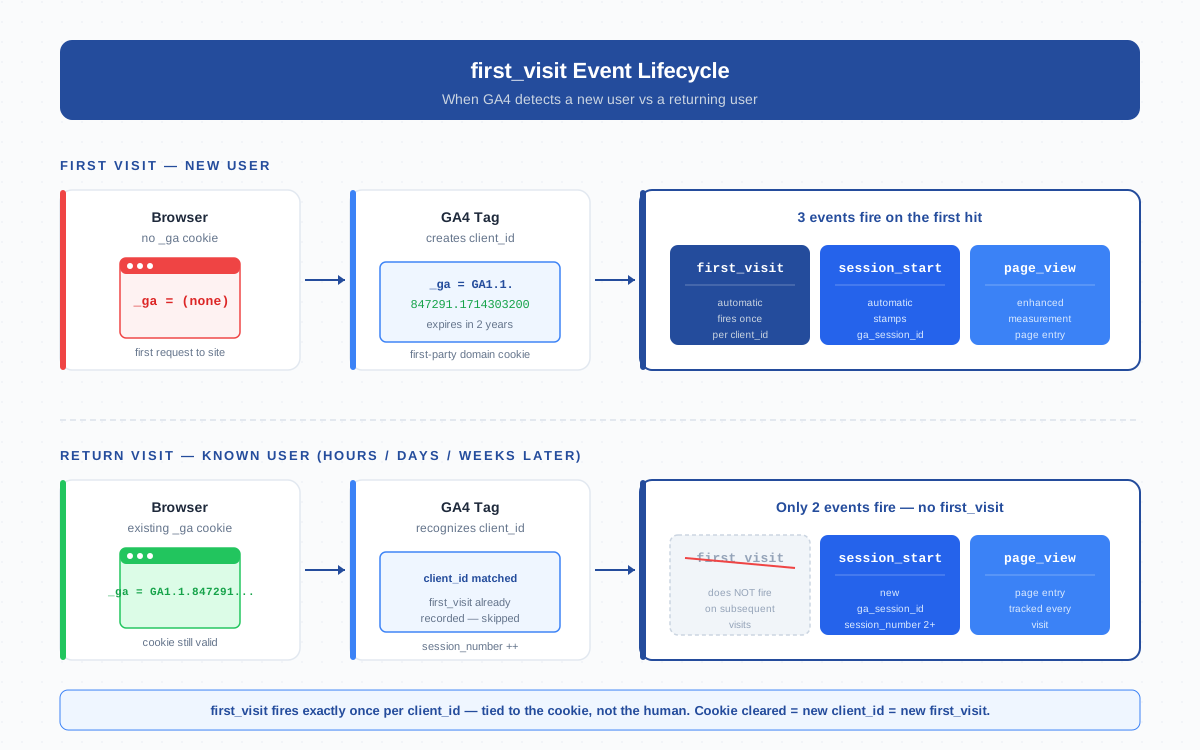
This matters because first_visit is the foundation of the “New users” metric. GA4 counts distinct first_visit events in the period. If the event doesn’t fire, the user doesn’t appear in New Users. If it fires twice (cookie reset), the same human appears twice.
How GA4 Detects a “First” Visit
GA4’s detection logic runs entirely on the client side, in the browser. The check is a single condition: does a valid _ga cookie exist for the property’s measurement ID?
- Cookie present. The client_id encoded in
_ga(formatGA1.1.<random>.<timestamp>) is read. The visit is treated as a return visit. Onlysession_start+page_viewfire. - Cookie absent. A new client_id is generated as a random integer plus a Unix timestamp. The cookie is written with a 2-year expiration on the eTLD+1.
first_visit+session_start+page_viewfire on the same hit. - Cookie blocked. Storage unavailable (Safari ITP after 7 days, Brave’s strict mode, incognito). Every page load looks like a new client_id, so every page load fires
first_visit.
The implication: first_visit is tied to the cookie, not to the human. A user who clears cookies, switches devices, or visits in a private window appears to GA4 as a brand-new identity each time. The persistence model is the same as any first-party cookie — useful, but not identity-stable.
first_visit Event vs New User vs session_start
These three concepts trip up almost everyone who reads GA4 reports for the first time, because they sound like synonyms and they aren’t:
| Concept | What it is | When it appears | Cardinality per client_id |
|---|---|---|---|
first_visit |
Automatic event | First page load without a _ga cookie |
Exactly 1 (per cookie lifetime) |
session_start |
Automatic event | First event of every session | Many (one per session) |
page_view |
Enhanced measurement event | Every page load with the GA4 tag | Many (one per page) |
| “New users” metric | Aggregated count in reports | Distinct first_visit events in date range |
Derived from events |
new_user property |
Custom — not built-in | Only if you set it via gtag/dataLayer | Whatever you implement |
The clean mental model: first_visit is the once-per-cookie marker. session_start is the start-of-visit marker. They fire together on the very first hit, then session_start keeps firing for every later session while first_visit stays silent. The “New users” report-level metric is a count of first_visit events bucketed by date.
The first_visit Parameters
Like every GA4 event, first_visit carries a set of parameters automatically attached by the tag:
engagement_time_msec— milliseconds of engagement at fire time. Usually0on the very first hit.ga_session_id— the unique session identifier shared with the matchingsession_start. Use it to joinfirst_visitwith the rest of the session’s events.ga_session_number— always1by definition.page_referrer— HTTP referrer for the landing hit. Critical for first-touch attribution.page_location,page_title,language,screen_resolution— standard page-level context.- Session source / medium / campaign — derived from UTM parameters or referrer parsing. They become the user’s first-touch attribution.
You cannot add custom parameters to first_visit — it is reserved. To capture a value at first contact, set a user property via gtag('set', 'user_properties', {...}) before the GA4 tag fires.
First-Visit Attribution — The Original Source/Medium for Life
The first_visit event freezes the source/medium/campaign that brought the user to the site. GA4 stores those values as first user source / first user medium / first user campaign — user-scoped dimensions that never change for the lifetime of the client_id. This is GA4’s first-touch attribution model. Practical consequences:
- If the user landed via a misconfigured ad URL with no UTM parameters, first user source is
(direct)forever — even though the actual first touch was paid. - Cross-domain navigation that doesn’t propagate the client_id creates a fresh
first_visiton the destination domain. - Cookie deletion gives the user a brand-new “first” — and any subsequent campaign click becomes their new first user source.
Audit URL tagging discipline first, cross-domain measurement second, and consent flows third. Those are the three places where first user source/medium goes wrong.
first_visit in BigQuery Export
If you have BigQuery export enabled, every first_visit event lands in the daily events table with event_name = 'first_visit'. Counting new users by first-touch channel:
SELECT
  (SELECT value.string_value FROM UNNEST(event_params)
   WHERE key = 'source') AS first_source,
  (SELECT value.string_value FROM UNNEST(event_params)
   WHERE key = 'medium') AS first_medium,
  COUNT(DISTINCT user_pseudo_id) AS new_users
FROM `project.analytics_XXXXX.events_*`
WHERE event_name = 'first_visit'
  AND _TABLE_SUFFIX BETWEEN '20260401' AND '20260428'
GROUP BY first_source, first_medium
ORDER BY new_users DESC;
Two notes. First, user_pseudo_id equals the GA4 client_id baked into the _ga cookie. Second, BigQuery New Users typically matches the UI count within ~1%; a 5%+ gap suggests a configuration problem.
When first_visit Doesn’t Fire
The event misses in several legitimate scenarios — knowing them prevents you from chasing tracking ghosts:
- User has a valid
_gacookie already. The most common case. The visit is a return visit by definition. - Consent denied. If your consent banner blocks GA4 storage (
analytics_storage = denied) before the tag loads, no cookie is written and no events leave the browser. - Tag failed to load. Ad blockers, network errors, or CSP violations that prevent
googletagmanager.comfrom loading also preventfirst_visitfrom firing. - Bot filter caught the visit. GA4 automatically excludes traffic identified by the IAB/ABC International Spiders & Bots List.
- Safari ITP cookie reset. First-party cookies set by JavaScript are capped at a 7-day lifetime in Safari with Intelligent Tracking Prevention. After 7 days the cookie is wiped — and the next visit fires a fresh
first_visit. Same human, new “first”. - Incognito / private browsing. Cookies don’t persist across windows. Every incognito session is a new “first” visitor.
- Cross-domain link without linker. Navigating from domain A to domain B without GA4’s cross-domain linker propagating the client_id produces a new client_id on domain B — and a new
first_visitthere.
Each of these cases inflates your New Users count above the real number of new humans. Solve consent gating and cross-domain measurement first; ITP and bot inflation are mostly unavoidable but small.
Using first_visit for New-User Audiences and Remarketing
Because first_visit fires exactly once and carries first-touch source/medium, it is the cleanest signal for building “new visitor” audiences in GA4. Common patterns:
- Recent new users. Include users who triggered
first_visitin the last 7 days. Useful for welcome-flow remarketing. - New users from a specific channel. Include users where
first_visit.source=googleANDmedium=cpc. - New users who didn’t convert. Include users with
first_visitin the last 30 days AND nopurchaseevent — the textbook lapsed-prospect audience. - New users on a campaign landing page. Include users where
first_visit.page_locationcontains/promo-april/.
Two cautions. Audiences refresh in 24-48 hours — GA4 is not real-time. Audiences exported to Google Ads need a 100-user minimum before they can be used for bidding.
Common Confusions With “New Users” and the new_user Property
1. “New users” in the report ≠ first_visit events count, exactly. The metric is “users whose first-ever session occurred in the date range” — anchored to first_visit timestamp, not session timestamp. A user whose first_visit fired in December and visited again in January does not count as new in January.
2. There is no built-in new_user user property. GA4 ships first-touch dimensions (first user source, first user campaign), but no out-of-the-box property called new_user with a true/false value. If you see one in custom definitions, someone added it manually via gtag('set', 'user_properties', { new_user: 'true' }). That’s a custom implementation, not a GA4 default.
3. “New users” and “First time users” are different metrics. “First time users” specifically counts users with first_visit events in the period. “New users” defaults to “first time users” in most reports but can mean “users in their first session” in some explorations.
For canonical definitions, cross-check the GA4 dimensions and metrics reference and the developer reference for first_visit.
Cross-Platform First Visit — Web vs App Fire Independently
If your property has both a web data stream and an app data stream, each platform fires its own first-contact event independently:
- Web fires
first_visitbased on the_gacookie. - App fires
first_openbased on the Firebase app instance ID. Same semantic role, different event name.
The same human installing your app and visiting your site produces two events: one first_open and one first_visit. To GA4, these are two distinct users. Stitching them into one identity requires the User-ID feature: pass a consistent user_id on at least one event from each platform (typically right after login). Without User-ID, treat web and app new-user counts as separate populations.
Frequently Asked Questions
When does GA4 fire the first_visit event?
GA4 fires first_visit on the first page load where the browser has no valid _ga cookie. The tag generates a new client_id, writes it to the cookie, and emits first_visit alongside session_start and page_view on the same hit. After that, first_visit never fires again for that browser as long as the cookie persists.
What is the difference between first_visit and session_start in GA4?
first_visit fires once per client_id — only on the very first hit of a brand-new browser. session_start fires once per session — at the start of every visit, including the first. They both fire on the first hit, but only session_start keeps firing on later visits.
Does first_visit fire in incognito mode?
Yes — and it fires every time. Incognito windows don’t persist cookies between sessions, so each new incognito visit starts without a _ga cookie and triggers a fresh first_visit. The same human in incognito appears as a new user on every visit.
How does first_visit relate to the New Users metric?
The “New users” metric in GA4 reports is a count of users whose first_visit event occurred within the report date range. It is derived directly from first_visit events, so anything that suppresses the event (consent denial, tag failure, bot filtering) reduces New Users; anything that inflates it (cookie resets, ITP) inflates New Users.
Can I add custom parameters to first_visit?
No. first_visit is a reserved automatic event and you cannot configure additional parameters on it. To capture a value at first contact, set a user property via gtag('set', 'user_properties', {...}) or push it to the dataLayer before the GA4 tag fires — the user property attaches to all subsequent events for that user.
Why does first_visit fire twice for the same person?
Because GA4 identifies users by the _ga cookie, not by the human. If the cookie is cleared, expired, blocked by Safari ITP after 7 days, deleted in a private window, or lost during a cross-domain hop without the linker, GA4 mints a new client_id and fires a new first_visit. Same person, new “first” from GA4’s perspective.
Does first_visit work the same way in mobile apps?
No — apps fire first_open instead of first_visit. The semantic meaning is identical (first contact with this client), but the event name and identifier differ: web uses the _ga cookie’s client_id, apps use the Firebase app instance ID. Web and app first-contact events fire independently, so the same human installing the app and visiting the site produces two new users.
Related Terms
- Event — the parent concept;
first_visitis one automatic event - Session — what
session_startopens;first_visitpiggybacks on the first one - Client ID — the value GA4 mints alongside
first_visitand writes to the cookie - Cookie — where the
_gaclient_id lives; cookie loss = newfirst_visit - First-party cookie — the storage type the
_gacookie uses - Attribution — the model that consumes first-touch source/medium frozen at
first_visit - UTM parameters — populate first user source/medium when present on the landing URL
- Data stream — web streams fire
first_visit, app streams firefirst_open - BigQuery — the export where
first_visitevents are queryable directly
