
A first-party cookie is a small piece of data set by the domain shown in the browser’s address bar — the site the user is actively visiting. When a user lands on example.com and the server (or a script on that page) issues a Set-Cookie header for example.com, the cookie is first-party. If the cookie’s domain belongs to a different site loaded inside the page, it is third-party. The distinction sounds bureaucratic, but it controls whether the cookie survives, gets blocked, or quietly degrades into a 7-day rolling token. This guide explains how the GA4 _ga cookie fits in, what ITP and ETP actually do, and why your “first-party” cookie may not be first-party at all.
What a First-Party Cookie Is
A first-party cookie is set by the domain the user is browsing. The browser checks the Set-Cookie header against the address bar: if the Domain attribute matches (or is omitted, defaulting to the request host), the cookie is filed under “first-party storage” for that origin. They are the workhorse of the web — login state, carts, consent, and returning-visitor identity for cookie-based tracking.
Two paths lead to a first-party cookie. The server issues Set-Cookie in an HTTP response — server-set. Or JavaScript writes document.cookie — client-set. Both are first-party in browser terminology, but they age very differently under modern privacy controls.
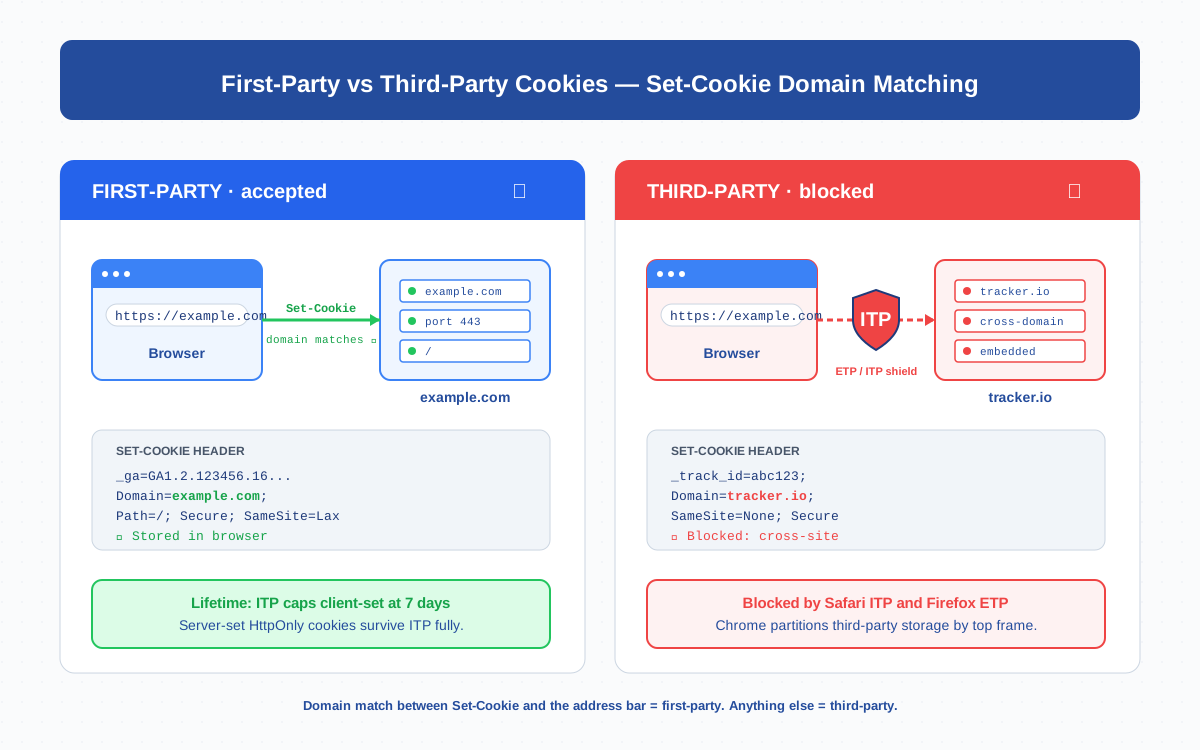
First-Party vs Third-Party Cookies
The browser does not care about your business relationships, only about domain matching. A cookie whose Domain matches the registrable domain of the page is first-party; everything else is third-party.
| Property | First-party cookie | Third-party cookie |
|---|---|---|
| Set-Cookie domain | Matches address bar (e.g., example.com) |
Different domain (e.g., tracker.io) |
| Safari (ITP) | Allowed; client-set capped at 7 days | Blocked since 2020 |
| Firefox (ETP) | Allowed | Blocked by default since 2019 |
| Chrome (2026) | Allowed | Partitioned per top-frame (CHIPS) |
| Typical lifetime | Server-set: up to 2 years; client-set in Safari: 7 days | Often deleted on every load |
| Common uses | Sessions, login, GA4 client_id, consent | Cross-site retargeting, ad measurement |
Third-party cookies are dying. Every modern browser blocks or partitions them so they cannot be linked across sites. First-party cookies remain — but they are squeezed too, especially when written from JavaScript.
The _ga Cookie and _ga_<MEASUREMENT_ID>
GA4 stores its identity in two first-party cookies on your domain, both written by gtag.js — which makes them client-set, and that classification matters for how long they survive in Safari.
_ga— durable user identifier holding the GA4 client ID in the formatGA1.2.123456789.1700000000. Default lifetime: 2 years._ga_<MEASUREMENT_ID>— per-stream session state. One per GA4 data stream; holds session count, start timestamp, engagement flags. Default lifetime: 2 years.
On the first visit, gtag.js generates a random client ID, writes _ga to document.cookie, and GA4 thereafter treats the user as returning. Every event includes the _ga value as cid. Lose the cookie and the next visit looks like a new user — “users” metric inflates and retention reports collapse.
Cookie Attributes: SameSite, Secure, HttpOnly, Path, Domain, Expires
A Set-Cookie header is more than a name and a value. The attributes determine when the cookie travels, who can read it, and how long it lives. Misconfigured attributes are the most common cause of cookies “disappearing” in production.
Domain— host the cookie is bound to. Omit it and the cookie defaults to the exact host. Setexample.comand it covers all subdomains.Path— restricts the cookie to URLs under this path. Default/covers the entire site.Expires/Max-Age— when the cookie is deleted. Without either, it dies on tab close.Secure— sent only over HTTPS. Required for any identity cookie.HttpOnly— JavaScript cannot read it. Critical for session cookies; impossible for_gabecause GA4’s tag needs to read it.SameSite— controls cross-site sending.Lax(default) sends on top-level navigations.Strictonly same-site.NonerequiresSecureand is the only value allowing third-party context.
Set-Cookie: _ga=GA1.2.123456789.1700000000;
            Domain=example.com; Path=/;
            Expires=Tue, 28 Apr 2028 12:00:00 GMT;
            Secure; SameSite=Lax
ITP and ETP Impact on First-Party Cookies
Apple’s Intelligent Tracking Prevention (ITP) and Mozilla’s Enhanced Tracking Protection (ETP) reshaped what “first-party” actually means. The most important rule, from WebKit’s 2020 update, is the 7-day cap on client-set first-party cookies in Safari.
When JavaScript writes a cookie via document.cookie, Safari files it under “client-side script-writeable storage” and starts a 7-day timer from the most recent write. If the user does not return within seven days, the cookie is deleted. The timer resets on each visit — but every visitor with a gap longer than a week looks brand-new to GA4. Server-set cookies issued via HTTP Set-Cookie are not subject to this cap. Firefox’s ETP focuses on cross-site tracking and generally leaves first-party storage alone.
The practical consequence: in Safari traffic, your “new users” number is structurally inflated. There is no client-side workaround. The fix is server-side.
Server-Set vs Client-Set First-Party Cookies
Browsers see both as first-party — same domain, same scope, same access rules. ITP sees them very differently. Knowing which one you have changes the lifetime estimate by a factor of 100.
| Aspect | Server-set cookie | Client-set cookie |
|---|---|---|
| Source | HTTP Set-Cookie response from origin |
document.cookie = "..." in JS |
| Safari ITP cap | Not capped at 7 days | Capped at 7 days from last write |
| HttpOnly possible | Yes — recommended for sessions | No — must be readable from JS |
GA4 _ga |
Set by server-side GTM if used | Set by gtag.js by default |
| Implementation cost | Higher — needs sGTM or backend route | Zero — drop in the snippet |
This is the engine behind every “first-party data infrastructure” pitch. Move the cookie write from gtag.js to a backend response and Safari treats it as a serious cookie instead of a 7-day token.
GA4 Cookie Behavior in 2026 (and How Server-Side GTM Helps)
By default GA4’s tag is JavaScript and writes cookies from document.cookie. Fine for Chrome and Firefox traffic, but every Safari user is on a 7-day clock. Google’s guidance recommends server-side tagging as the mitigation.
Server-side GTM (sGTM) proxies GA4’s hit collection through your own subdomain. Instead of sending events to www.google-analytics.com, the page sends them to tagging.example.com — a Cloud Run container running the sGTM image. The response includes a Set-Cookie for _ga on example.com; Safari’s 7-day cap no longer applies. Three details matter:
- The tagging endpoint must be a subdomain of the main site, not a third-party host.
- The cookie must use
Domain=example.comso all subdomains can read it. - SSL must cover the subdomain — sGTM will not function over plain HTTP.
You also gain debug visibility: DebugView shows the exact request the server forwards, instead of minified g/collect calls in DevTools.
Custom Domain / CNAME for First-Party Context
The CNAME setup is the budget version of sGTM. Point a subdomain (often analytics.example.com) at the analytics provider’s host via DNS CNAME — any Set-Cookie response is then issued for your registrable domain. Caveats: browsers fingerprint the IP and may still classify the host as third-party if the CNAME target is owned by a known tracker; you do not control the response; and you cannot use the Measurement Protocol the same way. For GA4 specifically the CNAME trick has limited utility because the GA4 collection endpoint is a Google domain. Server-side GTM with your own container is the supported path Google documents.
Cookie Consent: When to Set, When to Block
Privacy regulations like GDPR and the ePrivacy Directive treat analytics cookies as non-essential — they cannot be set before consent. Consent Mode v2 is the modern mechanism: the tag fires in a “denied” state that suppresses cookies and sends only modeled, cookieless pings. Three rules I follow:
- Default deny. Set
analytics_storage=deniedandad_storage=deniedon page load; update tograntedonly after the user accepts. - Block before, not after. The consent gate must execute before
gtag.jswrites cookies. Deleting after the fact violates the spirit of consent. - Document the lifetime. Your privacy policy should list every cookie GA4 sets, its lifetime, and its purpose — the
_ga,_ga_*, and_gidentries.
Troubleshooting: Why Your “First-Party” Cookie Isn’t Actually First-Party
I have debugged this scenario many times: a client swears their cookies are first-party, but Safari still shows a renewed client ID every visit. The domain looks correct, yet ITP treats it as ephemeral. The cause is almost always one of five things.
- Client-set under the hood. The
Domainmatches, but the cookie was written by JavaScript, not an HTTP response. The 7-day cap fires regardless. Confirm in DevTools → Network → Headers — noSet-Cookiein the response means it was written client-side. - Wrong subdomain on the tagging server. Your sGTM container is at
track-prod-xyz.a.run.app, nottagging.example.com. A CNAME-mapped subdomain is required. - Mixed protocols. The page is HTTPS but the cookie request goes to HTTP. Safari rejects silently.
- SameSite=None without Secure. Browsers reject the cookie outright. One attribute, but the symptom looks like ITP.
- Bounce-tracking heuristics. Safari’s Link Decoration caps cookies at 24 hours if it detects bounce-tracking — even on your own domain. Avoid query-string IDs in cross-domain redirects.
Fastest diagnostic: open DevTools → Application → Cookies → your domain. Right-click _ga → “Show request that set this cookie.” If the answer is “No request — set by JavaScript,” you have a client-set cookie. Combine GA4 with cross-device tracking via Google Signals to soften the data damage while migrating to server-side cookie writes.
Bottom Line
A first-party cookie is set by the visited domain, but how it was set — server header or JavaScript — decides whether Safari treats it as a 2-year identifier or a 7-day token. GA4’s _ga is first-party in name but client-set by default, which is why server-side GTM is now the standard answer for accurate user counts in privacy-strict browsers. Get the Domain, Secure, SameSite, and consent gating right, and your first-party cookies will actually be first-party.
Frequently Asked Questions
What is a first-party cookie?
A first-party cookie is set by the domain in the browser’s address bar — the Set-Cookie response (or JS writing document.cookie) specifies a Domain matching the visited site. Examples: session cookies, login state, GA4’s _ga, consent preferences.
Is the GA4 _ga cookie first-party?
Yes — _ga is set with Domain=example.com on your site. But by default gtag.js writes it from JavaScript, so Safari’s ITP caps it at 7 days from the last visit. Server-side GTM removes the cap by writing the cookie via an HTTP response.
How long does a first-party cookie last in Safari?
Server-set cookies follow Expires or Max-Age (up to 2 years for GA4). Client-set first-party cookies are capped at 7 days from the most recent write under ITP. The cap resets on each visit but deletes the cookie if the user does not return within a week.
First-party vs third-party cookies — what is the difference?
First-party cookies are issued by the domain in the address bar; third-party cookies come from other domains loaded inside the page. Modern browsers block or partition third-party cookies but allow first-party cookies, which is why first-party identity is the foundation of accurate analytics.
Can JavaScript read first-party cookies?
Only if the cookie is not flagged HttpOnly. JS reads cookies via document.cookie, which excludes HttpOnly entries. The GA4 _ga cannot be HttpOnly because the analytics tag must read it to keep the client ID stable across pages.
Do first-party cookies require user consent under GDPR?
Yes for non-essential cookies — analytics cookies like _ga require opt-in consent under GDPR and the ePrivacy Directive. Strictly necessary cookies (session, security, consent state) do not. Use Consent Mode v2 to gate GA4 cookies.
How does server-side GTM make cookies first-party?
sGTM proxies analytics requests through a subdomain you own, like tagging.example.com. The container responds with Set-Cookie bound to your domain, which the browser stores as server-set first-party. Safari does not apply the 7-day cap, so the cookie lives the full Expires lifetime.
Related Terms
- Cookie — base concept and types
- Client ID — identity stored in
_ga - Data Stream — endpoint that issues
_ga_<MEASUREMENT_ID> - Measurement Protocol — server-side hit delivery
- Cross-device tracking — re-stitching identity across cookie loss
- DebugView — verifying cookie and event behavior
- GDPR — consent requirements for cookies
External references: MDN — HTTP cookies, web.dev — SameSite cookies explained, Google — GA4 cookies and identifiers.
