
A cohort is a group of users who share a defining characteristic anchored to a specific moment in time — most often the date they first arrived, or the date they first did something meaningful like sign up or purchase. The whole point of a cohort is comparability: instead of averaging every user together, you isolate one starting condition, freeze the membership, and then watch what that fixed group does next. This page defines the cohort itself — the building block. For the technique that uses cohorts to chart retention curves and read heatmaps, see the dedicated guide on cohort analysis.
What a Cohort Is
A cohort is a closed set of users defined by a shared starting characteristic in a fixed time window. Three properties matter. First, membership is determined at the moment of inclusion — users who arrive later cannot retroactively join. Second, the starting condition is anchored to time or to a one-time event, not to an ongoing attribute. Third, the group only ever decays over time as users churn; it never refreshes.
The word comes from the Roman cohors — a unit of soldiers recruited together, fighting together, ageing together. The analytics meaning preserves that: a cohort is a recruitment class. Whatever happens to that class as it ages happens to a fixed roster, not a rotating cast.
How Cohorts Are Defined in Marketing and Analytics
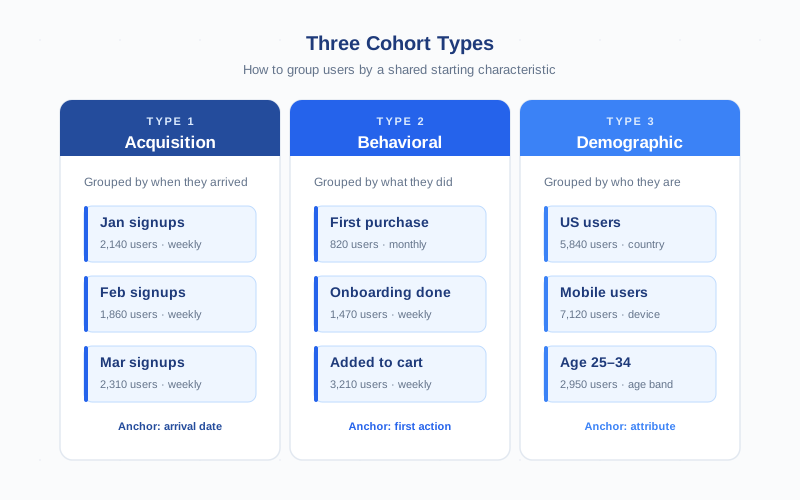
Three families of cohort cover almost every analytics question, and they differ in what serves as the anchor. Get the anchor right and the rest of the design follows.
- Acquisition cohorts are anchored to the date of first contact — first session, first visit, first signup. The grouping rule is purely temporal: everyone who arrived in the same week becomes one cohort. This is the default in most tools because it answers the most common question: are recent visitors better, worse, or the same as older ones?
- Behavioral cohorts are anchored to a specific action — first purchase, first conversion, completed onboarding, first time using a feature. The grouping rule is event-based: cohort membership is determined by whoever crossed that threshold in the window. These cohorts are smaller but cleaner — you’ve already filtered out bouncers and tire-kickers.
- Demographic cohorts are anchored to an attribute the user did not choose by acting — country, device class, age range, traffic source. The grouping rule is descriptive. These behave less like classic cohorts and more like persistent slices, but they are still cohort-style if you fix membership at a starting moment and track the same users forward.
Cohort vs Segment — The Time-Bound Difference
This is the distinction that trips people up. A cohort and a segment both narrow the audience, but they do it on opposite axes of time.
| Aspect | Cohort | Segment |
|---|---|---|
| Membership rule | Defined by a starting event in a fixed window | Defined by a condition that can match in any window |
| Group composition | Frozen at start, decays only | Refreshes every period |
| Time direction | Forward only — track this group’s future | Time-agnostic — applies to whichever period you query |
| Question it answers | Did this group’s behavior change as it aged? | How does this slice perform right now? |
| Example | Users who first visited in the week of August 18 | Users on mobile from paid traffic |
Treat them as complements. A common pattern is to define an acquisition cohort and then split it by a segment — the August signups, broken down by mobile versus desktop, gives you a cohort with internal slices you can compare cleanly.
Common Cohort Types You Will Build
Within the three families above, four cohort definitions cover the vast majority of practical work. Pick the one tied to the question you actually want answered:
- Signup-week cohorts. Users who registered in the same calendar week. The standard for SaaS retention measurement.
- First-purchase-month cohorts. Users who made their first transaction in the same month. The standard for e-commerce LTV and payback analysis.
- Channel cohorts. Users grouped by acquisition source — paid search, organic, referral, direct — typically combined with a date window. Best for comparing channel quality over time, paired with UTM parameters and attribution data.
- Country or device cohorts. Users sharing a fixed attribute like country or device category. Useful as overlays on top of one of the temporal cohort types.
Why Cohorts Matter for Retention Measurement
An aggregate retention chart is almost always misleading. If your March cohort had stellar week-2 retention but your April cohort collapsed, the blended number averages those two and shows you a flat line. You miss the regression entirely. Cohorts force you to compare like with like — same week-since-start, different recruitment class — and the moment you do, the signal jumps out.
This is why every product team that measures retention seriously builds cohort tables, not aggregate retention charts. A cohort table tells you whether a recent product change improved retention. An aggregate chart cannot. The difference is the difference between knowing your launch worked and guessing.
Cohort thinking also disciplines how you measure engagement. Engagement rates calculated across all users at once mix new arrivals (who haven’t had time to disengage) with old hands (who already proved sticky). Cohort-bucketed engagement is honest because every cell in the table compares users at the same age.
Defining Cohorts in GA4
Google Analytics 4 ships with a dedicated Cohort Exploration template inside the Explore module. You set four parameters and the tool builds the cohort table for you:
- Inclusion criterion. What defines membership in the cohort. First touch for acquisition cohorts, or a specific event like
purchaseorsign_upfor behavioral cohorts. - Return criterion. What counts as “active” in subsequent buckets. The default is any event, but for meaningful retention you should pick something that signals real value —
session_startat minimum, ideally a conversion event. - Granularity. Daily, weekly, or monthly. This decides both the cohort window and the time bucket on the heatmap.
- Metric. Active users, total users, event count, transactions, or revenue. Switch the calculation to per cohort user for averaged comparisons.
The result is a heatmap with cohorts as rows and periods-since-start as columns. For a step-by-step walkthrough including how to read the heatmap and apply breakdowns, see the cohort analysis guide. Google’s official documentation lives at Cohort exploration in GA4.
Cohorts in BigQuery — Querying by Acquisition Date
For analysts who need control beyond what the GA4 UI offers — custom cohort windows, longer history, joins to non-GA4 data — the BigQuery export is the answer. The pattern is straightforward: identify each user’s first event date, bucket users by that date into cohorts, then count their activity in subsequent windows.
A typical SQL skeleton looks like this:
WITH first_seen AS (
  SELECT
    user_pseudo_id,
    DATE(MIN(TIMESTAMP_MICROS(event_timestamp))) AS first_date
  FROM `project.analytics_XXXXX.events_*`
  WHERE _TABLE_SUFFIX BETWEEN '20260101' AND '20260331'
  GROUP BY user_pseudo_id
)
SELECT
  DATE_TRUNC(fs.first_date, WEEK) AS cohort_week,
  DATE_DIFF(DATE(TIMESTAMP_MICROS(e.event_timestamp)), fs.first_date, DAY) DIV 7 AS week_offset,
  COUNT(DISTINCT e.user_pseudo_id) AS active_users
FROM first_seen fs
JOIN `project.analytics_XXXXX.events_*` e USING (user_pseudo_id)
GROUP BY 1, 2
ORDER BY 1, 2;
The output of that query, pivoted, is a cohort retention table. BigQuery cohorts win when you need three things the GA4 UI cannot give you: cohort windows that are not aligned to whole days/weeks/months, history beyond the GA4 user-data retention window, and joins to first-party data like CRM revenue or product feature flags. For deeper SQL patterns, see Harvard’s overview of cohort analysis on HBR.
Cohort Sizes — What Is Statistically Meaningful
A cohort table built on too-small samples is just noise dressed up as a heatmap. The minimum sizes depend on the metric and the granularity, but as a working rule:
- Daily cohorts: aim for hundreds of users per cohort. With 50 users in a daily cell, a single user churning shifts retention by 2 percentage points — well inside the noise band.
- Weekly cohorts: aim for around 100 users per cohort minimum. This is the sweet spot for most B2C and SaaS products.
- Monthly cohorts: 50 users per cohort is tolerable, but you need 12+ months of history before trends are readable.
If your cohorts are smaller than these floors, two responses help. Widen the granularity (daily becomes weekly), or pool adjacent cohorts into a longer window (rolling 4-week cohorts instead of single-week). Both reduce noise at the cost of resolution. The wrong response is to keep the small cohorts and pretend the table is signal — that path leads to false-positive product decisions.
Common Cohort Mistakes
Five mistakes account for most of the bad cohort analysis I see in the wild. They are easy to spot once you know to look for them:
- Overlapping cohorts. If a user can belong to multiple cohorts in the same table — for example, “first purchase” and “second purchase” cohorts overlapping the same months — your retention numbers double-count. Cohorts should be mutually exclusive within a single analysis.
- Attribution leakage. A cohort labelled “users from paid search” that includes anyone whose last session was paid is not an acquisition cohort. Anchor to first-touch attribution explicitly when building acquisition cohorts, or you mix freshly-acquired and long-tenured users into the same row.
- Sample bias. Cohorts built on logged-in users only, or only on users who completed onboarding, are conditional on a behavior that already filters out churners. The retention numbers will look great. They will not generalize.
- Mixing session and user metrics. A cohort table where the metric is sessions and the unit is users will tell you nothing coherent. Pick one level of analysis and stick to it across the table.
- Reading partial cohorts as final. The latest cohort in the table is always partial — its members have not had time to age. Treating its week-4 retention as final and comparing it to fully-aged older cohorts is a classic trap. Hide partial cells or mark them clearly.
Cohorts vs Cohort Analysis — Members vs Method
The two terms are constantly conflated, but the distinction is clean. A cohort is the group of users — the noun, the membership list, the recruitment class. Cohort analysis is the technique — the verb, the act of charting the cohort’s behavior over time and reading the resulting heatmap.
You build the cohort first; then you analyze it. The cohort definition determines who is in the table. The analysis determines what you measure and how you read it. Defining the cohort badly will sink any analysis you build on top, no matter how sophisticated the heatmap reading. The full technique — heatmap conventions, retention curve shapes, GA4 setup, granularity choices, BigQuery patterns — lives in the dedicated cohort analysis guide. This page is the prerequisite: get the membership rules right before you reach for the heatmap.
Frequently Asked Questions
What is a cohort in simple terms?
A cohort is a group of users who share a defining starting characteristic — most often the date they first arrived, or the date they first did something specific like sign up or purchase. Membership is fixed at the moment of inclusion. The group only decays as users churn; it never refreshes with new arrivals.
What is the difference between a cohort and a segment?
A cohort is anchored to a starting moment in time and its membership is frozen — only those users who shared that starting condition belong, forever. A segment is a filter that applies to whoever matches right now, and its membership refreshes every period. Cohorts answer “did this group change over time?”; segments answer “how does this slice perform right now?”.
What are the main types of cohorts in analytics?
Three families. Acquisition cohorts are grouped by the date or channel of first arrival. Behavioral cohorts are grouped by a specific first action like first purchase or completed onboarding. Demographic cohorts are grouped by a fixed attribute like country, device, or age band. Acquisition is the default in most tools; the other two cover specialized questions.
How big does a cohort need to be to give reliable signal?
For weekly cohorts, around 100 users per cohort is the practical minimum. Daily cohorts need hundreds per cell because each user is a larger share of the total. Monthly cohorts can be smaller per cohort but need 12+ months of history before trends are readable. Below those floors, single-user churn moves the numbers more than real behavior change does.
How do I define a cohort in GA4?
Open Explore, pick the Cohort exploration template, and set four parameters. Inclusion criterion (what defines membership — first touch for acquisition cohorts). Return criterion (what counts as active later — pick a meaningful event, not the default “any event”). Granularity (daily, weekly, monthly). Metric (active users, transactions, revenue). The heatmap renders inline and respects breakdowns you drag in.
Can I build cohorts in BigQuery instead of GA4?
Yes, and you should when you need custom cohort windows, history beyond the GA4 user-data retention limit, or joins to non-GA4 data like CRM revenue. The pattern is to find each user’s first event date, bucket users by that date, then count subsequent activity. BigQuery gives you control the GA4 UI cannot — non-aligned windows, multi-year history, and full SQL flexibility.
Is a cohort the same as a cohort analysis?
No. A cohort is the noun — the group of users defined by a shared starting characteristic. Cohort analysis is the verb — the technique of tracking that group’s behavior over time, usually as a heatmap of retention or revenue. You define the cohort first; then you run the analysis on it. Bad cohort definitions sink any analysis built on top, no matter how sophisticated the technique.
