
Correlation measures how two variables move together. In analytics, it’s the math behind every “X drives Y” hypothesis you’ve ever debated in a meeting — and the source of nearly every flawed conclusion drawn from a dashboard. A correlation coefficient between -1 and +1 quantifies the strength and direction of a linear relationship, but it does not prove causation, and that distinction is where most marketers get burned.
This guide explains correlation the way a working analyst uses it: when to compute it, which method to pick, how to run it in BigQuery and Google Sheets, why “spurious” correlations explode when you scale up data, and why an A/B test is the only honest way to upgrade a correlation into a causal claim.
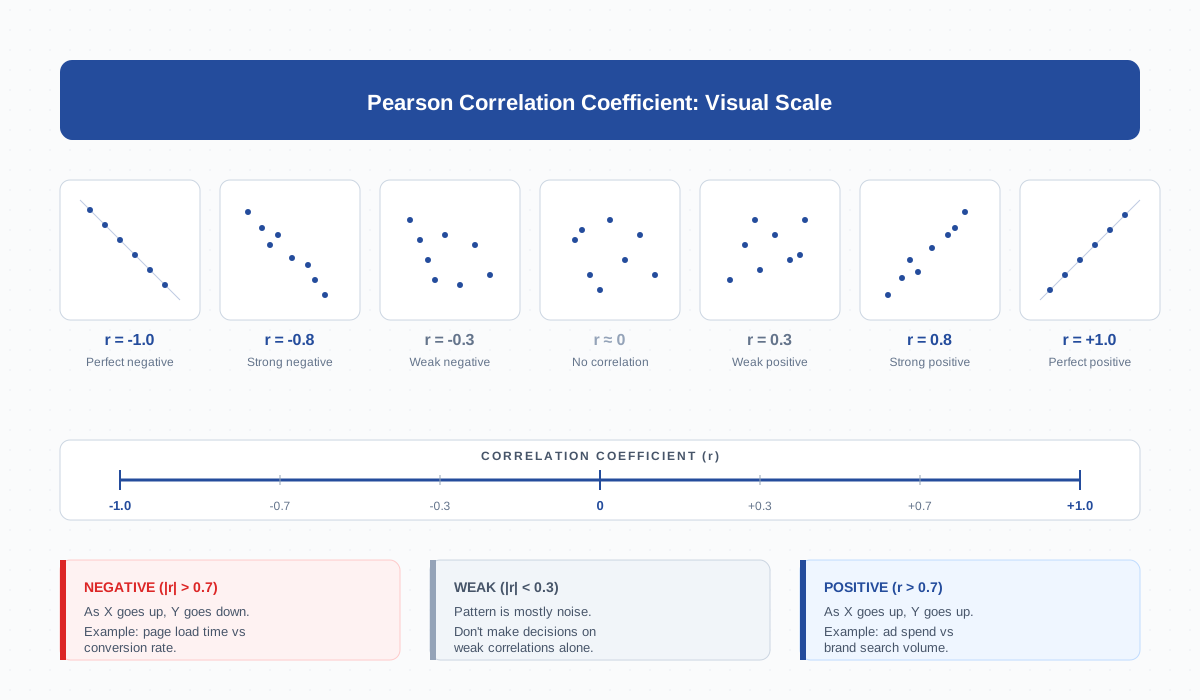
What Is Correlation in Analytics
Correlation is a statistic that summarises how two numerical variables co-vary. If clicks tend to rise when impressions rise, the correlation is positive. If bounce rate falls when page speed improves, it’s negative. If there’s no consistent pattern, the correlation is near zero.
Marketers see correlation everywhere — sessions vs revenue, ad spend vs leads, time-on-page vs conversions. The number compresses thousands of data points into a single value between -1 and +1, which makes it useful for quick screening but dangerous when treated as evidence on its own.
Three things matter when you compute one: the direction (positive or negative), the strength (how close to ±1), and the method (Pearson, Spearman, or Kendall). Skip any of these and you’ll misread the result.
Correlation Coefficient (Pearson) Explained: -1 to +1
The Pearson correlation coefficient, written as r, is the default metric most analytics tools report. It measures the strength of a linear relationship between two continuous variables.
The formula divides the covariance of X and Y by the product of their standard deviations. You don’t need to compute it by hand — every analytics platform has it built in — but the interpretation is what matters:
| Coefficient (r) | Strength | What it means |
|---|---|---|
| ±0.9 to ±1.0 | Very strong | Variables move almost perfectly together. Rare in marketing data — usually a sign of double-counting. |
| ±0.7 to ±0.9 | Strong | Reliable directional pattern. Worth investigating as a hypothesis. |
| ±0.4 to ±0.7 | Moderate | Real but noisy. Useful for segmenting, not for forecasting. |
| ±0.2 to ±0.4 | Weak | Mostly noise. Don’t build campaigns on it. |
| 0 to ±0.2 | None | No meaningful linear relationship. |
Pearson assumes both variables are roughly normally distributed and the relationship is linear. If revenue jumps in clusters around paydays, or if traffic spikes on Black Friday distort everything, Pearson will mislead you.
Pearson vs Spearman vs Kendall: When to Use Each
The three correlation methods you’ll see in stats packages each answer slightly different questions. Picking the wrong one is a common mistake, especially when working with conversion-rate data where outliers and skew are normal.
| Method | What it measures | Best for | Watch out for |
|---|---|---|---|
| Pearson (r) | Linear relationship between continuous variables | Sessions × revenue, ad spend × clicks, when data is normally distributed | Outliers; non-linear curves |
| Spearman (ρ) | Monotonic relationship using ranks | Skewed data, ordinal scales (NPS, position 1–10), small samples | Loses magnitude info — only direction of order |
| Kendall (τ) | Concordance of pairs, also rank-based | Very small samples, many tied values, robust to outliers | Computationally heavier on large datasets |
Practical rule: when in doubt with marketing data, try both Pearson and Spearman. If they disagree, your data is probably non-linear or has outliers — investigate before publishing the number.
Correlation vs Causation: The Critical Distinction
This is the single most important sentence in the article: correlation does not prove causation. The two variables can move together for at least four reasons.
- X causes Y — what we usually want to claim.
- Y causes X — reverse causation. High-revenue users get retargeted more, not the other way around.
- A third variable causes both — known as a confounder. Black Friday boosts both ad spend and revenue.
- Pure coincidence — especially likely when scanning many variables (see “spurious correlations” below).
Treating a strong correlation as proof of causation is how teams end up cutting paid social spend after seeing it correlates negatively with organic, only to watch organic crater because paid was actually driving brand search. The cure is an experiment, not a bigger dataset.
Common Correlations in Marketing Analytics
Some pairs of metrics correlate so reliably that analysts treat the patterns as defaults. Understanding these baselines helps you spot when something is genuinely off.
- Sessions × conversions — strongly positive (r ≈ 0.7–0.95). Almost tautological since sessions feed the funnel. Watch for unusually weak correlation: it signals a tracking break or a traffic source that doesn’t convert.
- Ad spend × revenue — moderately positive (r ≈ 0.4–0.7) for performance channels, weak for brand campaigns. Use it for trend monitoring, not attribution.
- Time-on-page × engagement rate — moderate to strong positive on content sites. But pages that load slowly inflate time-on-page artificially, so always cross-check with scroll depth.
- Page load time × conversion rate — negative (r ≈ -0.3 to -0.6). Slower page = lower conversion, well-documented across e-commerce studies.
- New users × bounce rate — typically positive. New users browse less context-aware than returning users, especially on cold paid traffic.
Calculating Correlation in BigQuery (CORR Function)
BigQuery exposes correlation directly via the CORR() aggregate function. It returns Pearson’s r between two numeric columns. This is the fastest way to screen relationships in raw event-level GA4 data exported via the BigQuery link.
-- Sessions vs conversions per day, last 90 days
SELECT
  CORR(sessions, conversions) AS r
FROM (
  SELECT
    event_date,
    COUNTIF(event_name = 'session_start') AS sessions,
    COUNTIF(event_name = 'purchase')      AS conversions
  FROM `project.analytics_XXXXX.events_*`
  WHERE _TABLE_SUFFIX BETWEEN
    FORMAT_DATE('%Y%m%d', DATE_SUB(CURRENT_DATE(), INTERVAL 90 DAY))
    AND FORMAT_DATE('%Y%m%d', CURRENT_DATE())
  GROUP BY event_date
);
The query first builds a daily aggregate, then computes r across the 90 daily pairs. BigQuery’s official docs also expose CORR, COVAR_POP, and COVAR_SAMP. There’s no built-in Spearman in standard SQL — for rank-based correlation you’ll need to join the data to its RANK() window output and run CORR on the ranks.
Calculating in Google Sheets, Looker Studio, R/Python
For ad-hoc analysis without leaving the browser, every tool you already use can compute correlation. Pick based on the size of the dataset and how repeatable the analysis needs to be.
- Google Sheets —
=CORREL(A2:A100, B2:B100)returns Pearson’s r.=PEARSON()is identical. There’s no built-in Spearman; rank both columns with=RANK.AVG()first, then runCORRELon the ranks. - Looker Studio — no native correlation function. Build a calculated field with the Pearson formula, or pull from BigQuery with
CORR()already computed. - Python (pandas) —
df[['x','y']].corr(method='pearson'). Switch to'spearman'or'kendall'by changing one argument. Usescipy.stats.pearsonr()when you also need a p-value. - R —
cor(x, y, method = "pearson")orcor.test()for confidence intervals.
Whichever tool you pick, always plot the scatter before trusting the number. A single outlier can swing r by 0.3 or more, and a perfect U-shape will return r ≈ 0 even though the relationship is obvious visually.
Spurious Correlations: Why Big Data Makes This Worse
The more variables you scan, the more accidental correlations you’ll find. With 100 metrics in GA4, you have 4,950 possible pairs. At a 5% statistical significance threshold, roughly 247 of them will appear “significant” purely by chance.
Tyler Vigen’s Spurious Correlations project documents this beautifully — US cheese consumption correlates 0.95 with deaths from bedsheet entanglement, for example. The pattern is real in the data and meaningless in the world.
The marketing version of this trap: scanning every channel × every device × every region until something correlates with revenue, then publishing the finding. To defend against it:
- Pre-register your hypothesis. State which correlation you expect to see before looking at the data.
- Apply a multiple-comparisons correction (Bonferroni, Benjamini-Hochberg) when scanning many pairs.
- Replicate. If the correlation holds on a fresh time window or a different cohort, it’s probably real.
- Demand a mechanism. If you can’t explain why X would cause Y, treat the correlation as coincidence until proven otherwise.
Confounding Variables and Hidden Causes
A confounder is a third variable that influences both of the variables you’re measuring, creating a correlation that vanishes (or reverses) once you control for it. Confounders are the silent killer of marketing analyses.
Classic example: ice cream sales correlate with drownings. Both are caused by hot weather. Removing the temperature variable from the analysis would lead you to ban ice cream cones at the beach.
In analytics, common confounders include:
- Seasonality — Black Friday boosts every metric simultaneously, manufacturing strong correlations between unrelated channels.
- Audience selection — retargeted users are already high-intent, so their conversion rate would be high regardless of the retargeting touch.
- Device or platform — mobile users behave differently from desktop, and mixing them silently confounds session-level metrics.
- Time-of-day — most ad spend lands during peak hours; so does most organic traffic. They’re not causing each other.
The fix is segmentation: compute the correlation within a fixed segment (one device, one campaign, one week) and see whether it survives. If it disappears, the original correlation was driven by the confounder. Cohort analysis is one of the cleanest ways to control for time-based confounders.
From Correlation to Insight: A/B Test as the Causal Bridge
Correlation can generate hypotheses; only experiments can confirm them. An A/B test deliberately randomises which users see the change, breaking the link between the variable you’re testing and any confounder. That’s why a properly powered A/B test is the gold standard for causal claims in marketing.
The workflow looks like this in practice:
- Observe a correlation worth investigating (e.g., pages with video correlate with higher conversion).
- Form a causal hypothesis (“video causes higher conversion”) and predict its direction.
- Run a randomised test: half of users see video, half don’t, with traffic split at the user level — not the page level.
- Measure the effect. If the test arm outperforms the control by a statistically significant margin, you have evidence of causation.
- Replicate on a second cohort before scaling.
If you can’t run an experiment — for example, a brand campaign you can’t randomise — fall back on quasi-experimental methods like difference-in-differences or geo holdout tests. They’re not perfect, but they’re far better than naked correlation. Khan Academy has a clear primer on correlation and bivariate data if you want to brush up on the underlying statistics.
Frequently Asked Questions
What’s the difference between correlation and covariance?
Covariance measures how two variables move together in their original units, so its scale depends on the data. Correlation is covariance divided by the product of standard deviations, which standardises it to a value between -1 and +1. Use correlation when comparing relationships across different metric pairs; use covariance only inside larger statistical formulas.
Is a correlation of 0.5 strong enough to act on?
Generally no — 0.5 indicates a moderate relationship with significant noise. Treat it as a hypothesis worth testing, not a finding worth deploying. For business decisions, you typically want |r| above 0.7 backed by a plausible causal mechanism, or a successful A/B test that confirms the direction.
Can correlation be negative and still meaningful?
Absolutely. Negative correlation simply means the two variables move in opposite directions. Page load time vs conversion rate is a famous negative correlation: slower pages convert worse. Strength matters more than sign — an r of -0.8 is just as informative as +0.8.
Why does my GA4 correlation differ from BigQuery’s?
GA4’s reporting interface applies sampling, thresholding, and modelling on top of the raw events. BigQuery exports the unmodelled event stream. Differences usually come from sampling or from GA4 attributing conversions to a different session boundary. For analytical work, always compute correlations on the BigQuery export, not on the GA4 UI.
How many data points do I need before correlation is reliable?
For Pearson, at least 30 paired observations is the rough minimum, and 100+ is more defensible. With fewer than 20 points, a single outlier can completely flip the result. For rank-based methods (Spearman, Kendall) you can get useful direction with 15–20 points, but always report a p-value or confidence interval alongside r.
Does correlation work for categorical variables?
Pearson and Spearman both expect numeric inputs. For two categorical variables use Cramér’s V or a chi-squared test. For one categorical and one numeric, use a point-biserial correlation (a special case of Pearson) or compare group means with ANOVA. Don’t shoehorn categories into Pearson — the result will be misleading.
What’s the relationship between R-squared and correlation?
R-squared (the coefficient of determination) is literally Pearson’s r squared. So r = 0.8 means R² = 0.64, which translates to “64% of the variance in Y is explained by X” in a simple linear regression. R² is always between 0 and 1 and loses the directional sign that r preserves.
Related Terms
- A/B Testing — the experimental method that turns correlations into causal claims.
- Cohort Analysis — segmentation technique that controls for time-based confounders.
- Cohort — the group definition behind cohort analysis.
- Conversion Rate — frequently the dependent variable in correlation studies.
- Attribution — assigning credit, where causation matters more than correlation.
- BigQuery — where the
CORR()function lives. - Looker Studio — for visualising the scatter behind every correlation number.
- Engagement Rate — common left-hand side in marketing correlations.
Bottom line: correlation is a screening tool, not an answer. Compute it to spot hypotheses worth investigating, then control for confounders, run an A/B test, and only then act. Confusing correlation with causation is the most expensive mistake in analytics — and the easiest one to avoid once you’ve seen it named.
