
Power BI is Microsoft’s business intelligence platform — a Desktop modeller, a cloud Service, and a Mobile viewer that together turn raw data into governed dashboards. For GA4 teams it lives in the same conversation as Looker Studio: both visualize web analytics, but Power BI is the heavier, more flexible choice when GA4 data has to mix with CRM revenue, ad spend, or warehouse-scale event tables. This guide compares Power BI to Looker Studio and Tableau, walks through the three real ways to push GA4 data into Power BI, and explains the DAX patterns and refresh limits that decide whether the project is worth the licence.
What Power BI Is — Desktop, Service, and Mobile
Power BI is not a single app. It is a family of three products that share one data model format (.pbix) and one DAX query language. Most users never touch all three; understanding what each piece does saves weeks of confusion when an analyst says “publish to Power BI”.
- Power BI Desktop — free Windows app where reports are built. You connect to GA4 (via BigQuery or a custom connector), shape data with Power Query, write DAX measures, and design pages.
- Power BI Service — the cloud at
app.powerbi.com. Reports built in Desktop are published here, refreshed on schedule, shared via workspaces, and embedded in Teams or SharePoint. - Power BI Mobile — iOS and Android apps that render the same reports on a phone with touch interactions and alerts.
Pricing is per-user and tiered: Pro at $14/user/month is the entry point for sharing dashboards with named users; Premium Per User at $24/user/month adds AI features and larger datasets; Premium Capacity (formerly P-SKU, now F-SKU under Microsoft Fabric) starts around $5,000/month for organisation-wide capacity. The free Desktop tier alone is fine for a solo analyst building .pbix files locally — sharing requires at least Pro.
Power BI vs Looker Studio vs Tableau — Decision Matrix
The three tools cover overlapping ground, but their natural homes differ. Power BI dominates Microsoft shops with Office 365 and Azure stacks. Looker Studio dominates marketers who already live in GA4 and Google Ads. Tableau dominates analytical teams who treat dashboards as a craft. Here is how the three stack up for a GA4-centric project:
| Capability | Power BI | Looker Studio | Tableau |
|---|---|---|---|
| Entry price | $14/user/mo (Pro) | Free | $15/user/mo (Viewer) |
| Free desktop authoring | Yes (Desktop) | Yes (web) | No (Public only) |
| Native GA4 connector | No — third-party / custom | Yes — Google built-in | No — third-party |
| BigQuery connector | Native, certified | Native | Native |
| Modelling language | DAX + Power Query M | Calculated fields | Tableau calc + LOD |
| Refresh frequency | 8/day (Pro), 48/day (Premium) | 12-hour cache | Live or extract |
| Custom visuals | 200+ marketplace + R/Python | Community connectors | Industry-leading |
| Learning curve | Days to weeks (DAX) | Hours | Days to weeks |
| Best for | Microsoft-shop BI + GA4 mix | Marketing dashboards, free | Deep analytical viz |
Pick Power BI when the company already pays for Microsoft 365, the GA4 data has to join CRM or ERP tables, or governance and row-level security matter. Pick Looker Studio for fast, free, GA4-only dashboards. Pick Tableau when the analysts demand visual flexibility and the budget allows the higher price tag.
How to Connect GA4 Data to Power BI — Three Paths
Microsoft does not ship a native GA4 connector. That is the single biggest pain point for analysts moving from Looker Studio to Power BI, and it forces a choice between three architectures. Each has a clear use case, a clear cost, and a clear ceiling.
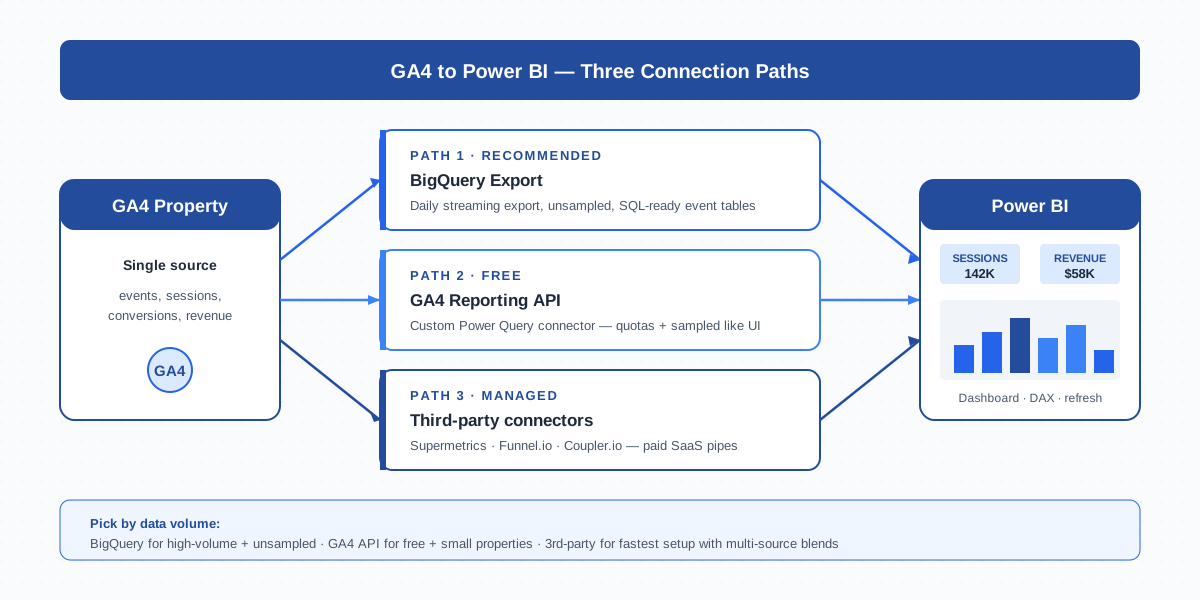
- BigQuery export — turn on GA4’s free BigQuery link, then connect Power BI Desktop to BigQuery via the certified Google BigQuery connector. Best for serious analytics with unsampled event-level data.
- GA4 Reporting API + custom connector — open-source Power Query connectors hit the GA4 Data API directly. Free, but inherits GA4’s UI sampling and quotas.
- Third-party SaaS connectors — Supermetrics, Funnel.io, or Coupler.io take the GA4 ETL off your plate and feed Power BI on a schedule. Paid, but fastest to set up.
The pipeline diagram above maps the three options. None is “best” in isolation — the right choice depends on data volume, refresh cadence, and how much engineering time you can spend on connector maintenance.
The BigQuery to Power BI Pipeline — Recommended for Serious Analytics
This is the architecture the GA4 product team itself recommends, and it is what most enterprise teams end up running after they outgrow Looker Studio. The flow is simple in principle but has three real configuration decisions.
- Enable the BigQuery link in GA4. In Admin → Product links → BigQuery Links, create a project, choose Daily (free) or Streaming (paid, sub-hourly). Tables appear as
events_YYYYMMDDshards under your project. - Build a SQL view that flattens events. GA4 BigQuery tables are nested —
event_paramsanduser_propertiesare repeated records. Write aUNNESTview that materialises page_path, session_id, transaction_id, and the metrics you actually use. This view is what Power BI queries. - Connect Power BI Desktop to BigQuery. Get Data → Google BigQuery, sign in with the Google account that has BigQuery Data Viewer permission, pick the project + dataset + view. Choose Import mode for fast dashboards or DirectQuery for live reports.
- Publish to the Service and schedule refresh. Once the report is in Desktop, Publish to a workspace, configure the BigQuery data source credentials in Dataset settings, and set up to 8 daily refreshes (Pro) or 48 (Premium).
The BigQuery path is the only one that gives you raw, unsampled event-level data. It costs cents per query for typical SMB volumes — a million-row query against a flattened view is usually under $0.05. Combine it with attribution tables from your CRM and you have the full customer journey in one model.
The GA4 API to Power BI Custom Connector — Free Option
If BigQuery export is too much engineering or your GA4 property is small, you can hit the GA4 Data API directly from Power BI using a custom Power Query connector. The catch: this path inherits the same sampling and the same per-property API quotas the GA4 web UI uses.
The two practical routes:
- Power Query OData / Web call — write a query in Get Data → Web that posts to
analyticsdata.googleapis.com/v1beta/properties/PROPERTY_ID:runReport. Authenticate with an OAuth client or a service account JSON. Manageable for one or two reports. - Open-source
.mezcustom connector — community-built connectors (such as the popular MIT-licensedPowerBI-GA4on GitHub) wrap the API into a clean Get Data → Google Analytics 4 entry. Drop the.mezfile into%USERPROFILE%\Documents\Power BI Desktop\Custom Connectorsand enable custom connectors in Options → Security.
Hard limits to plan around: the Data API allows ~10,000 tokens of compute per project per day on the free tier, requests with high cardinality dimensions get sampled exactly like the UI, and refresh in the Service requires a Personal Gateway on a Windows machine because Microsoft’s cloud cannot relay custom connector OAuth without one. The free path works for one or two GA4 properties under 500K monthly events. Beyond that, you are fighting quotas — switch to BigQuery.
Third-Party Connectors — Supermetrics, Funnel.io, Coupler.io
The third option is to pay a SaaS to handle the GA4 ETL and present a clean schema to Power BI. The trade-off is monthly cost in exchange for zero connector maintenance and built-in handling of API quotas, schema changes, and historical backfills.
| Connector | Starting price | Best for | Power BI delivery |
|---|---|---|---|
| Supermetrics | $39/mo (Marketer plan) | Marketers blending GA4 + Ads + Facebook + LinkedIn | Native Power BI connector, hourly refresh |
| Funnel.io | $399/mo (Standard) | Mid-market, multi-property, governance | Direct dataset feed via Power BI service |
| Coupler.io | $49/mo (Starter) | SMBs needing scheduled flat-file delivery | CSV / Excel / BigQuery → Power BI |
I have shipped projects on all three. For a single GA4 property feeding one Power BI dashboard, Coupler.io’s per-source pricing is the cheapest. For agencies running 20+ client GA4 accounts in one model, Supermetrics scales better. Funnel.io is overkill for SMBs but the right call for compliance-heavy enterprises that need data lineage and audit trails.
Power BI DAX Basics for GA4 Metrics
DAX (Data Analysis Expressions) is the formula language that turns rows into metrics in Power BI. You will not get past a basic dashboard without three core patterns. Here are the GA4-relevant ones, written against a flattened BigQuery view called fact_events:
// Total sessions
Sessions = DISTINCTCOUNT(fact_events[ga_session_id])

// Conversion rate (purchases / sessions)
Conversion Rate =
  DIVIDE(
    CALCULATE(COUNTROWS(fact_events), fact_events[event_name] = "purchase"),
    [Sessions]
  )

// Revenue with time-intelligence — last 28 days vs prior 28
Revenue 28d = CALCULATE(SUM(fact_events[ecommerce_purchase_revenue]),
  DATESINPERIOD('Date'[Date], MAX('Date'[Date]), -28, DAY))

Revenue Prior 28d = CALCULATE(SUM(fact_events[ecommerce_purchase_revenue]),
  DATESINPERIOD('Date'[Date], MAX('Date'[Date]) - 28, -28, DAY))
Two rules save weeks of debugging. First, build a proper Date dimension table and mark it as date table — without one, time-intelligence functions silently return wrong numbers. Second, prefer DIVIDE() over the / operator; DIVIDE handles divide-by-zero gracefully and returns blank, which charts render as no-data instead of error icons.
Common Power BI + GA4 Reporting Patterns
Three dashboard archetypes cover ~80% of real-world GA4 + Power BI work. Each has a clear audience and a clear data model:
- Executive dashboard. Top-of-funnel scorecards (sessions, users, conversions, revenue) plus a 13-week trend line and a YoY comparison. One page, four widgets, refresh nightly. Built off the BigQuery flattened view; runs on Pro licences.
- Channel attribution. Sessions and revenue by
session_default_channel_grouping, broken down by campaign, with first-touch vs last-touch toggle. Often blended with ad-spend tables from Google Ads or Meta. Best on BigQuery + a CRM revenue join. - Cohort retention. Users acquired in week N and the share who returned in weeks N+1 through N+12. Heavy on DAX (use cohort analysis patterns with
EARLIER()or modernWINDOW()functions). Requires unsampled data — BigQuery only.
For e-commerce specifically, the Power BI + GA4 stack shines when you join GA4 conversion events with the order table from Shopify or WooCommerce by transaction_id. That single join lets you reconcile reported revenue against bank-confirmed revenue and surface the gap — usually 5-15%, depending on cookie-block rates and UTM tagging hygiene.
Performance Considerations — Refresh, Dataset Size, Incremental Refresh
Power BI feels fast on a 1M-row toy dataset and slow on a real GA4 export. Three settings make or break performance once data crosses tens of millions of rows:
- Refresh limits. Pro datasets refresh up to 8 times per day; Premium up to 48. Streaming or near-real-time is not possible without DirectQuery, and DirectQuery against BigQuery hits cost ceilings fast for high-traffic dashboards.
- Dataset size caps. Pro caps a single dataset at 1 GB compressed. Premium Per User raises that to 100 GB. Cross either limit and refresh fails — you must aggregate upstream in BigQuery before importing.
- Incremental refresh. Configure under Dataset → Incremental refresh: keep the last 2 years archived in the dataset, refresh only the last 7 days. This is the single most important optimisation for GA4 BigQuery sources because it stops Power BI re-pulling years of static history every refresh.
For datasets approaching the 1 GB cap, use Power Query to drop unused columns (GA4 BigQuery exports include 60+ event-param columns most reports never touch), aggregate to daily granularity if hourly is not required, and disable auto date/time in Options → Data Load — that single setting can shave 20-40% off file size by killing hidden date hierarchies.
Power BI vs Looker Studio for GA4 — Practical Decision Matrix
The two tools answer different questions. Looker Studio is “I have GA4, give me a free dashboard by Friday”. Power BI is “I have GA4, CRM, ad spend, and ERP, and I need a governed model my finance team trusts”. Use this matrix as a quick gut-check:
| Situation | Pick | Why |
|---|---|---|
| Solo marketer, GA4 + Ads only | Looker Studio | Free, native connectors, fastest setup |
| Microsoft shop, GA4 + CRM blend | Power BI | Office 365 SSO, native Excel + SQL Server |
| Need unsampled event-level data | Power BI on BigQuery | DirectQuery handles 100M+ row tables |
| Dashboard for 3 stakeholders, weekly | Looker Studio | Free public sharing, scheduled email PDFs |
| Row-level security across 20 clients | Power BI | RLS via DAX, per-user filtering |
| Cohort retention with multi-touch | Power BI | DAX time-intelligence beats Looker calc fields |
| Embed in client-facing portal, free | Looker Studio | Free public iframe embed |
| Embed in internal portal, governed | Power BI | Embedded analytics + Azure AD SSO |
The honest verdict: Looker Studio gets you 80% of GA4 reporting needs at zero cost. Power BI is worth the licence cost only when GA4 data has to mix with non-Google sources, governance is a real requirement, or the dataset crosses Looker Studio’s performance ceiling. Both are valid — match the tool to the data complexity, not the brand preference.
Frequently Asked Questions
Does Power BI have a native GA4 connector?
No. Microsoft has not shipped a native GA4 connector for Power BI. The three working paths are: connect via the GA4 BigQuery export using the certified Google BigQuery connector (recommended), build a custom Power Query connector against the GA4 Reporting API (free but quota-limited), or pay for a third-party SaaS like Supermetrics, Funnel.io, or Coupler.io. Power BI’s certified Google connector is for GA Universal Analytics, which is now sunset.
Is Power BI free for GA4 reporting?
Power BI Desktop is free for building reports locally on Windows. Sharing dashboards with named users requires a Power BI Pro licence at $14/user/month. The GA4 side is free as well — both the BigQuery export and the GA4 Reporting API are no-cost — so the only real spend is the Power BI licence and any third-party connector you add.
Should I use Power BI or Looker Studio for GA4?
For marketing-only dashboards on GA4, Google Ads, and Sheets, Looker Studio wins on cost, native connectors, and time-to-first-dashboard. For Microsoft shops, multi-source models that blend CRM and ERP data, governed access with row-level security, or unsampled BigQuery analytics at scale, Power BI is the better choice. Match the tool to data complexity, not brand preference.
How often can Power BI refresh GA4 data?
Power BI Pro datasets refresh up to 8 times per day on a schedule. Premium Per User and Premium Capacity allow up to 48 refreshes per day. True real-time requires DirectQuery — the report queries the source live every interaction. DirectQuery works well against BigQuery but adds query cost; for high-traffic dashboards, schedule hourly imports instead.
Does the GA4 BigQuery export work with Power BI?
Yes — this is the recommended pipeline. Enable the BigQuery link in GA4 Admin, build a flat view that unnests event_params, then connect Power BI Desktop via Get Data → Google BigQuery. The export is free for daily delivery; streaming sub-hourly delivery is paid. Power BI sees the BigQuery view as a normal table, supports both Import and DirectQuery, and refreshes via the Service.
Is Supermetrics or Funnel.io better for GA4 to Power BI?
Supermetrics starts at $39/month and ships with a native Power BI connector — best for solo marketers and small agencies blending GA4 with Google Ads and social platforms. Funnel.io starts at $399/month and offers governance, data lineage, and audit logs — best for mid-market and enterprise teams that need compliance and multi-property management. Coupler.io at $49/month is the cheapest option for simple scheduled CSV or BigQuery delivery.
What DAX functions matter most for GA4 metrics in Power BI?
Three patterns cover most GA4 dashboards: DISTINCTCOUNT for sessions and users, DIVIDE for safe ratios like conversion rate and bounce rate, and CALCULATE plus DATESINPERIOD for rolling-window metrics like Revenue 28d versus prior 28d. Always build a proper Date dimension and mark it as the date table — without one, time-intelligence functions silently return wrong values.
Related Terms
- Looker Studio (Data Studio) — the free Google alternative to Power BI for GA4 dashboards
- BigQuery — the warehouse that powers the recommended GA4 to Power BI pipeline
- Measurement Protocol — server-side event delivery into GA4
- Data Stream — how GA4 collects events Power BI ultimately visualizes
- Attribution — model used to assign revenue across channels
- Cohort analysis — retention pattern that fits Power BI DAX better than Looker Studio
- Conversion — the GA4 event Power BI joins to CRM revenue
- UTM parameters — campaign tagging that drives channel grouping in dashboards
Pulling this data into a report is a separate job from defining it. Our guide to connecting GA4 to Power BI covers the three routes available and the quota and cardinality limits each one runs into.
