
Direct traffic in GA4 is the bucket Google Analytics 4 uses when it cannot find any other signal of where a visit came from. The source is logged as (direct) and the medium as (none). On most sites, half of “direct” is real — bookmarks, typed URLs, brand recall — and the other half is misclassified referral, social, or email traffic that lost its Referer somewhere along the path. This guide covers how GA4 decides a visit is direct, why the bucket is usually inflated by dark social and policy headers, the difference between (direct)/(none) in reports and $direct in BigQuery, how to reduce false direct, and the diagnostic baselines you can use to tell whether your direct percentage is healthy or hiding a tracking gap.
What “Direct” Traffic Means in GA4
In Google Analytics 4, direct traffic is the channel assigned to a visit when GA4 receives no campaign tag, no carry-over campaign cookie, and no usable referring URL. The default channel group is Direct, the source dimension shows (direct), and the medium shows (none). Together they form the famous (direct) / (none) source/medium pair you see at the top of most acquisition reports.
The textbook examples are a returning visitor who typed your URL into the address bar, clicked a browser bookmark, or restored a closed tab. In practice, those clean cases account for a fraction of what GA4 reports as direct. The rest is what analysts call dark traffic — referrals from privacy-strict browsers, in-app links, untagged messaging clicks, and HTTPS-to-HTTP transitions that strip the Referer header before GA4 can read it.
Treat direct as a residual bucket, not as an acquisition channel. Real users do show up there, but the overall volume tells you more about your tagging discipline and your audience’s tooling than about brand strength.
How GA4 Decides Traffic Is Direct
GA4 evaluates every incoming visit against a short ordered set of rules. The visit becomes direct only if all of them fail to produce a recognized source/medium pair:
- Tagged URL parameters. If the landing URL contains UTM parameters (
utm_source,utm_medium,utm_campaign) or a Google Adsgclid, GA4 uses those values and stops. The tag wins over everything that follows. - Active campaign cookie. GA4 stores the most recent non-direct source in the user’s session. If the visitor came from
google / organictwenty minutes ago and returned untagged within the same session window, GA4 carries that source forward instead of writing direct. - Referer header check. If the browser sends a
Refererheader from an external domain, GA4 matches it against the search-engine list, the social-network list, and the unwanted-referrals list. Anything that survives those checks becomes a referral; matches become organic search or organic social. - Fallback to direct. When none of the three signals produces a source, GA4 writes
session_source = (direct)andsession_medium = (none).
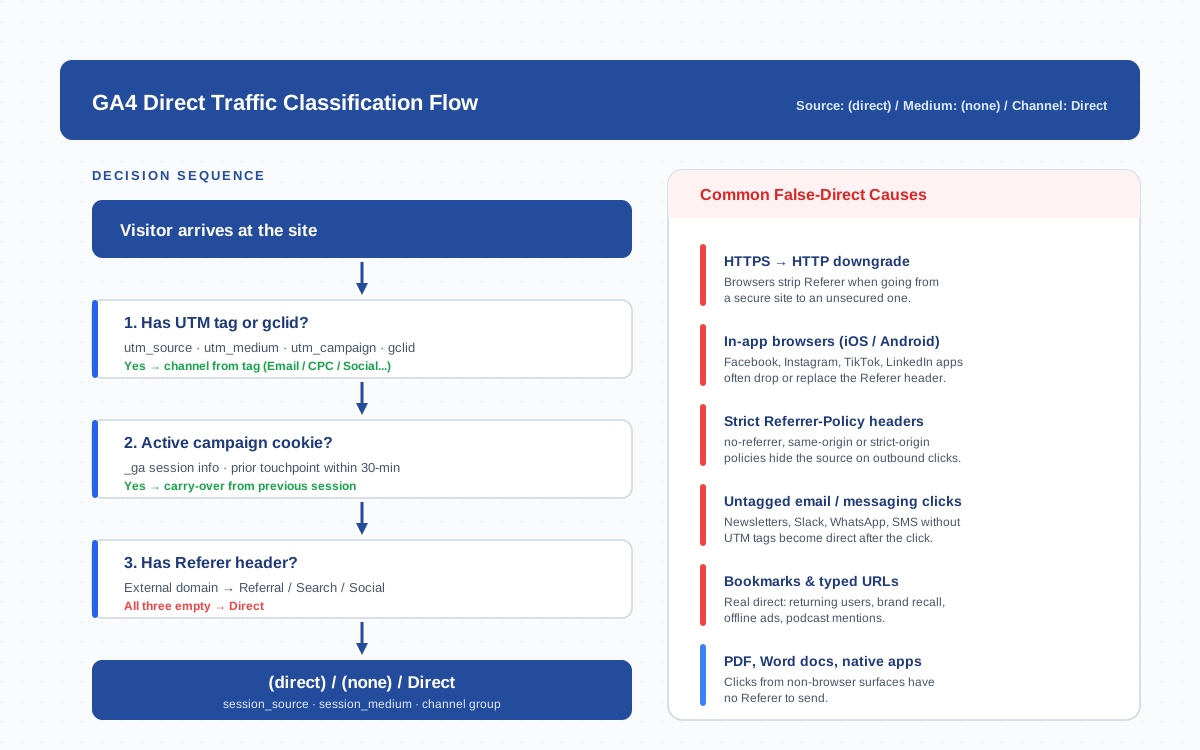
One implication catches teams off guard: a visit can be technically untagged and still avoid the direct bucket if the user has a recent campaign cookie. That’s why a tagged email click followed by a typed URL ten minutes later still shows up as Email rather than Direct in last-non-direct attribution.
Real Direct Traffic vs Dark Social Misclassified as Direct
Real direct traffic is a meaningful signal. It tells you that people remember your brand well enough to come back without a search or a click on someone else’s link. Common sources:
- Returning visitors using browser bookmarks or autocomplete.
- People who typed your URL after seeing it offline — billboards, podcasts, business cards, conference slides.
- Internal company traffic from intranets and private wikis (unless excluded via data stream filters).
Dark social is the opposite — it’s referral traffic that looks direct because the Referer never reached GA4. The category is named after the channels that strip it most aggressively: shares in private messengers, Slack channels, WhatsApp groups, iMessage, Discord, in-app browsers on Facebook and Instagram. People share content there constantly, but the click arrives at your site as direct.
The two are impossible to separate at the row level — GA4 has no flag that says “this would have been referral if the browser had played fair.” But you can estimate the ratio by isolating new users with no prior touchpoint in the direct bucket. Real direct skews heavily toward returning visitors; dark social produces a steady stream of brand-new users that landed on a deep URL nobody types from memory.
Common Reasons Direct Is Inflated
Five technical conditions account for nearly all the false direct I’ve seen across analytics audits. Each has a known root cause and a known fix:
| Cause | What happens | Fix | Expected impact |
|---|---|---|---|
| HTTPS → HTTP downgrade | Browsers strip Referer when navigating from a secure to an unsecured page. Common when an external HTTPS partner links to your HTTP page or a redirect drops to HTTP mid-chain. | Force HTTPS site-wide, fix mixed-content redirects, audit canonical URLs. | 2–8% direct reduction |
| In-app browsers | Facebook, Instagram, TikTok, LinkedIn, Twitter/X apps render pages in embedded WebViews that often drop or replace Referer with the app’s own host. | Tag every social link with utm_medium=social at publish time. Don’t rely on Referer detection. |
5–20% reclassified to social |
| Strict Referrer-Policy | Sites that set Referrer-Policy: no-referrer, same-origin, or strict-origin hide the source from your analytics on every outbound click. |
Use strict-origin-when-cross-origin (the modern default) so the origin is preserved on cross-site clicks. |
1–5% restored to referral |
| Untagged email & messaging | Newsletters and direct messages without UTM tags lose all attribution as soon as the user clicks. Apple Mail’s privacy proxy strips Referer too. | Tag every campaign link with utm_source=newsletter&utm_medium=email. Make tagging a publishing step, not a hope. |
3–15% reclassified to email |
| Server-side redirects that drop UTMs | Redirector services, branded short links, or non-www to www redirects sometimes truncate query strings, killing tags before the page loads. | Use 301 redirects that preserve query strings end-to-end. Test critical paths with curl -I -L on tagged URLs. |
2–10% recovered |
| PDFs, native apps, IDEs | Clicks from non-browser surfaces (PDFs, MS Word, Slack desktop, mobile apps) carry no Referer at all. | Tag every link inside documents and apps with UTMs. Use shortened, traceable links for sales decks. | 1–5% reclassified |
Stack these fixes together and a typical 35% direct share drops into the 18–25% band — much closer to the genuine brand-and-bookmark traffic you’re trying to measure.
The (none)/(direct) Source/Medium Combo in Reports
In every GA4 acquisition report, direct traffic appears with the literal source/medium pair (direct) / (none). The parentheses aren’t formatting — they’re part of the value GA4 writes into the dimension and the value you must use when you build filters or audiences.
Three reports surface direct cleanly:
- Reports → Acquisition → Traffic acquisition. Group by Session default channel group, find the Direct row. Click through and switch the secondary dimension to Landing page to see which URLs catch the most direct visits.
- Reports → Acquisition → User acquisition. Same channel breakdown, but attributed to first-touch. New users showing up first as direct on deep URLs are usually dark social — homepage entries are usually genuine direct.
- Explore → Free Form. Use Session source / medium as the row dimension. Apply a filter Session source = (direct) exactly — including the parentheses — to isolate the bucket.
One reporting subtlety: GA4’s last-non-direct attribution for events and conversions deliberately ignores direct touchpoints when a prior non-direct source exists in the lookback window. So a user who first arrived from organic search, then returned via direct to convert, will credit the conversion to organic in the standard reports — even though the most recent visit shows as direct in the session-level dimensions. That’s intentional. It prevents direct from absorbing credit from earlier acquisition channels.
Direct in Attribution Models — Last-Click vs Data-Driven
Different attribution models treat direct traffic differently. Knowing which model you’re looking at is the difference between blaming SEO for a drop and realizing the dark-social channel doubled.
- Last-click (legacy). Credits the most recent touchpoint, including direct. A path of organic → email → direct credits direct with the conversion.
- Last non-direct (GA4 default for standard reports). Skips direct touchpoints when a non-direct touch exists in the lookback window. The same path credits email instead.
- Data-driven (GA4 default for the Advertising section). Distributes credit fractionally across all touchpoints based on observed contribution, including direct when it’s the only signal. Direct usually loses share to earlier non-direct touches under this model compared to last-click.
Cross-reference both views. If direct shows 30% of conversions in last-click but 12% in data-driven, the takeaway is “direct is rarely the actual source — it’s the residual” — and it tells you the upstream channels (search, email, referral) deserve more credit than the standard reports show.
“(direct) (none)” vs “$direct” in BigQuery
If you export GA4 to BigQuery, the values look slightly different from the GA4 UI and that throws off SQL filters every time. The conventions to memorize:
| Surface | Source value | Medium value | Notes |
|---|---|---|---|
| GA4 UI (Reports / Explore) | (direct) |
(none) |
Parentheses included in the literal string |
BigQuery export — traffic_source.source |
(direct) |
(none) |
Same parentheses, but in a separate field structure |
BigQuery export — collected_traffic_source.manual_source |
NULL |
NULL |
Direct visits have no manual source/medium values |
| BigQuery legacy notation | $direct |
(none) |
Older Universal Analytics export used the dollar prefix; you may still see it in archived datasets |
The practical SQL pattern for filtering direct sessions in BigQuery exports:
WHERE traffic_source.source = '(direct)' AND traffic_source.medium = '(none)'Make sure you query the right field. traffic_source.source is the user-acquisition source — first-touch. For session-level direct, use the session_traffic_source_last_click array fields and filter the same way. The dollar-prefix $direct appears mainly in legacy Universal Analytics datasets and in Measurement Protocol request payloads, not in modern GA4 BigQuery exports.
Reducing Direct Inflation
Direct cannot be eliminated — there will always be real bookmark traffic and a baseline of policy-stripped clicks. But you can typically halve the inflated portion by addressing four things in this order:
- Tag every outbound link your team controls. Newsletter buttons, social posts, partner placements, podcast show notes, ad creatives. Build a UTM convention and enforce it at publish time. This single fix pulls 5–15% of direct into its proper bucket.
- Set
Referrer-Policy: strict-origin-when-cross-originas your default. The MDN Referer reference documents the header and the Referrer-Policy spec details the policy values.strict-origin-when-cross-originsends the origin (not the full path) on cross-site requests, which is enough for GA4 to detect the source while protecting URL-level privacy. - Server-redirect every HTTP entry to HTTPS with a 301 and preserve the query string. Audit redirect chains with
curl -ILand confirm UTMs survive the hop. - Configure cross-domain tracking for all subdomains and partner hosts that bounce users back to you. Self-referrals from payment providers and auth flows are a huge source of fake direct on multi-domain setups.
Tagging discipline does more for direct accuracy than any redirect or header tweak. If your team treats UTM tagging as optional, no amount of server configuration will fix the bucket.
Diagnosing Your Direct Percentage — Industry Baselines
“Is my direct too high?” is one of the most common GA4 questions, and the honest answer is: it depends on your industry, your audience’s tooling, and your tagging discipline. Some directional ranges from properties I’ve audited and from the GA4 channel grouping documentation:
- SaaS & B2B tools: 20–35% direct is normal. Enterprise audiences come back to bookmarks and login pages constantly.
- Content sites & publishers: 10–20% direct. Most traffic discovers content through search and social; high direct usually means dark social.
- E-commerce: 15–30% direct. Returning shoppers and email-driven repeat purchases inflate the bucket.
- News & media: 25–45% direct. App opens, push notifications, and habitual browsing drive heavy direct, much of it real.
- Local services: 30–50% direct. Word-of-mouth, business cards, and offline ads dominate.
If your direct percentage exceeds these ranges by 10+ points, treat it as a tagging audit signal. Pull the top direct landing pages — if they’re deep URLs nobody would type from memory, you have dark social hiding in the bucket. If they’re the homepage and login URL, the share is mostly real.
Direct in Cross-Domain and Dark-Social Contexts
Two specific contexts produce more direct distortion than any other and deserve their own diagnostic checklists.
Cross-domain setups. When users move between www.example.com and app.example.com without configured cross-domain tracking, every transition starts a new session and writes direct as the source — your own domain effectively self-attributes. Configure cross-domain tracking under Admin → Data Streams → Configure tag settings → Configure your domains, and add payment providers (Stripe, PayPal) plus auth providers (Auth0, Okta) to the List unwanted referrals screen on the same path.
Dark-social diagnostics. The cleanest test is to compare new users in the direct bucket landing on deep URLs (deep being anything other than the homepage and a handful of canonical URLs). Run an Explore with rows: Landing page, filtered by Session source = (direct) and New users > 0. If you see a spike on a specific blog post or product page, that page is being shared in messengers and apps that drop the Referer. Tag the social embeds for that page with UTMs; the share will collapse once the same clicks reclassify into Social.
Direct is best understood as a diagnostic dimension, not a marketing channel. Watch its trend more than its absolute number, and reconcile against the upstream channels that should be sending tagged traffic. When direct drops without a corresponding rise elsewhere, you’ve fixed a tagging gap. When it rises with no campaign change, something in your stack just stopped passing referrers — find it before the next reporting cycle.
Frequently Asked Questions
What is direct traffic in GA4?
Direct traffic in GA4 is the channel assigned to a visit when no UTM parameters, no active campaign cookie, and no usable Referer header are detected. The source is recorded as (direct) and the medium as (none). The bucket mixes real direct visits (bookmarks, typed URLs) with dark social and untagged campaign clicks that lost their referrer.
Why is my direct traffic so high in GA4?
Five causes account for most direct inflation: HTTPS-to-HTTP downgrades that strip the Referer, in-app browsers (Facebook, Instagram, TikTok) that drop or replace it, strict Referrer-Policy headers on the source site, untagged email and messaging links, and server-side redirects that drop UTM parameters. Tag every campaign link, set Referrer-Policy: strict-origin-when-cross-origin, force HTTPS, and the inflated portion typically drops by half.
What is dark social traffic?
Dark social is referral traffic that arrives without a Referer header and gets misclassified as direct. It comes from private messengers (WhatsApp, Slack, iMessage, Discord), in-app browsers on social platforms, and any context where the source is hidden. Estimate it by isolating new users in the direct bucket landing on deep URLs nobody would type from memory.
How do I reduce direct traffic in GA4?
Tag every link your team publishes with UTM parameters, set Referrer-Policy: strict-origin-when-cross-origin, force HTTPS site-wide with 301 redirects that preserve query strings, and configure cross-domain tracking plus an unwanted-referrals list for payment and auth providers. Tagging discipline produces the biggest single reduction.
What is the difference between (direct) (none) and $direct?
(direct) / (none) is the source/medium pair GA4 writes into the UI and the traffic_source field in BigQuery exports. $direct is a legacy notation from Universal Analytics and Measurement Protocol payloads that you may still see in archived datasets. Use (direct) with parentheses for any GA4 filter or BigQuery query on modern data.
How does GA4 handle direct in attribution models?
Last-click credits direct when it’s the most recent touchpoint. Last non-direct (GA4’s standard-report default) skips direct touches when an earlier non-direct source exists in the lookback window. Data-driven attribution distributes credit fractionally and usually shifts share away from direct toward earlier acquisition channels. Compare both views to see how much of your direct is residual rather than acquisition.
What is a normal direct traffic percentage?
Typical ranges by industry: SaaS and B2B 20–35%, content sites 10–20%, e-commerce 15–30%, news and media 25–45%, local services 30–50%. If your direct percentage exceeds these by 10+ points and top direct landing pages are deep URLs rather than the homepage, you likely have dark social or untagged campaigns hiding in the bucket.
Related Terms
- Referral traffic — the channel direct steals from when Referer is stripped
- Referrer — the underlying HTTP header GA4 reads to detect source
- UTM parameters — the tags that override Referer-based detection
- Attribution — how GA4 distributes credit across touchpoints
- Organic search — what direct often masks when search engines strip referrers
- Cookie — the campaign cookie that prevents direct misclassification within sessions
- Data stream — where unwanted-referrals and cross-domain configuration live
- Cross-domain tracking — prevents self-referrals that inflate direct on multi-domain setups
