
AOV (Average Order Value) is one of the most actionable metrics in any e-commerce conversion program. The formula is deliberately simple: divide total revenue by the number of orders in the same period. The interesting part is what you do with the number — how you read it in GA4 Monetization reports, how you slice it by channel, device, or geography, and which levers you pull to push it up. This guide covers the AOV definition, its place in GA4, the difference from Revenue per User and ARPU, BigQuery calculation, the tactics that reliably move it, and the reporting mistakes that make AOV trends look fake.
What Average Order Value (AOV) Is
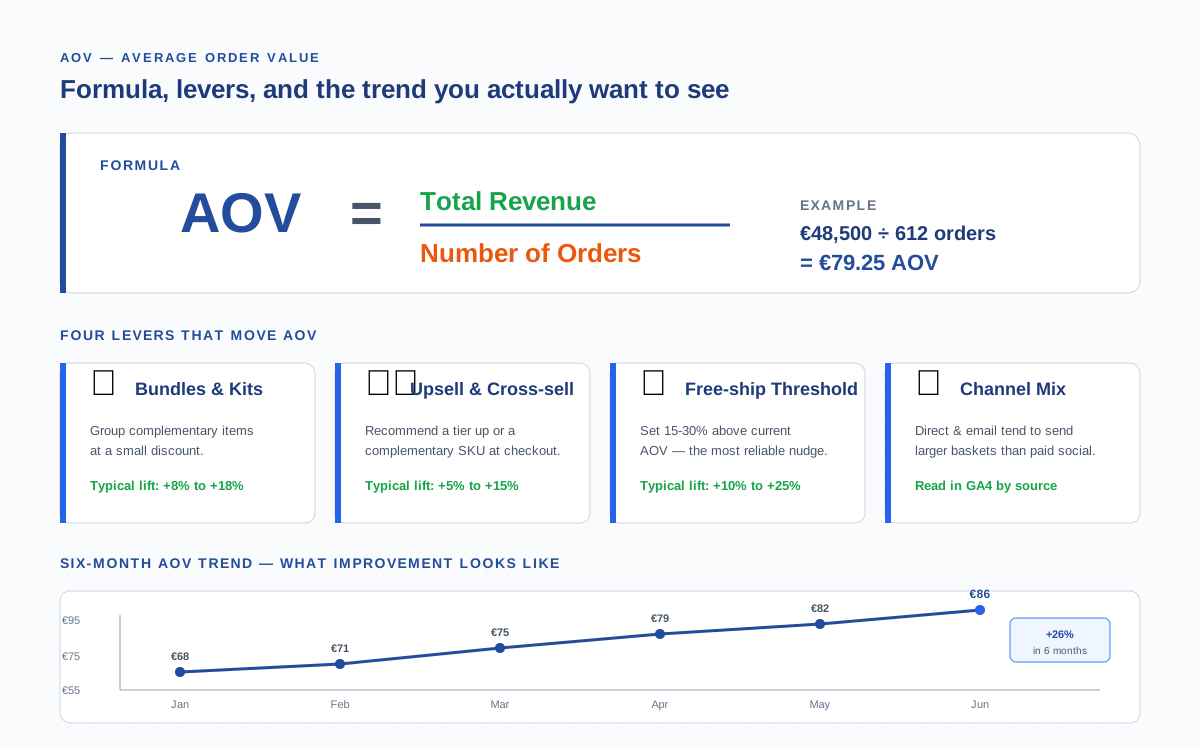
Average Order Value measures the average revenue generated per completed order. The formula is one line:
AOV = Total Revenue ÷ Number of OrdersIf your store earned €48,500 from 612 orders last month, your AOV is €79.25. The metric only counts completed transactions — abandoned carts, refunded orders, and failed payments are excluded once you clean the data. AOV is calculated at the order level, never the user level. Two orders from the same customer count as two orders, not one.
Why AOV Matters for Profitability and Ad Spend
AOV is the bridge between traffic, revenue, and unit economics. Doubling AOV is mathematically equivalent to doubling traffic in terms of revenue — but cheaper, because you keep the same acquisition cost. That is why retailers obsess over the metric.
Three downstream metrics depend directly on AOV:
- Customer Lifetime Value (CLV / LTV) compounds from average order value times purchase frequency times retention horizon. Push AOV up by 15% and LTV moves in lockstep.
- Return on ad spend (ROAS) is revenue divided by ad cost. With CPA roughly fixed, higher AOV converts the same click into more revenue.
- Contribution margin per order rises faster than AOV because fixed per-order costs (payment processing minimums, packaging, picking labour) get amortised across a larger basket.
In my experience, paid-acquisition channels become profitable a quarter sooner when an AOV initiative runs in parallel — the margin uplift covers the acquisition cost during the new-customer phase.
How AOV Appears in GA4
Google Analytics 4 calculates AOV automatically once purchase events are firing correctly. You will find it in Reports → Monetization → Ecommerce purchases, listed as Average purchase revenue per user on the user dashboard and as a derived metric in any exploration that joins purchase_revenue and transactions.
To check the metric quickly, open Reports → Monetization → Ecommerce purchases and add the metrics column “Average purchase revenue.” For a per-order rather than per-user view, build a free-form exploration with the dimensions Item name or Session source / medium, and the metrics Total revenue and Transactions. GA4 will compute AOV by dividing them.
One caveat: GA4 sometimes labels the figure “average revenue per user” rather than “average order value.” They are not the same. The user-level metric divides revenue by the number of unique purchasers; AOV divides revenue by the number of orders. We will untangle that in the next section.
AOV vs Revenue per User vs ARPU
Three metrics get conflated in GA4 dashboards. Mixing them up is the single most common reporting mistake — every metric is “average revenue divided by something,” but the something matters.
| Metric | Formula | Denominator | What it answers |
|---|---|---|---|
| AOV (Average Order Value) | Total revenue ÷ orders | Completed transactions | How big is a typical basket? |
| Revenue per User | Total revenue ÷ purchasing users | Unique buyers | How much does a buyer spend over the period? |
| ARPU (Avg. Revenue per User) | Total revenue ÷ all active users | All users including non-buyers | How much revenue does an average visitor produce? |
If 1,000 users visit your store, 120 buy something, and they place 150 orders worth €12,000 total, you will see three different numbers: AOV €80, Revenue per Purchaser €100, and ARPU €12. All three are correct; each answers a different question. Decide which question you are answering before you cite a number in a board deck.
Calculating AOV in BigQuery from Purchase Events
For anything beyond a quick GA4 read-out — segmenting by cohorts, joining with backend data, or rebuilding history — you want the raw events in BigQuery. The events_* table holds one row per event; revenue lives in the ecommerce nested fields on the purchase event.
This SQL returns AOV per day for the last 30 days, deduplicated by transaction_id:
SELECT
  DATE(TIMESTAMP_MICROS(event_timestamp)) AS day,
  COUNT(DISTINCT ecommerce.transaction_id) AS orders,
  ROUND(SUM(ecommerce.purchase_revenue), 2) AS revenue,
  ROUND(SUM(ecommerce.purchase_revenue) /
        COUNT(DISTINCT ecommerce.transaction_id), 2) AS aov
FROM `your-project.analytics_XXXXXX.events_*`
WHERE event_name = 'purchase'
  AND ecommerce.transaction_id IS NOT NULL
  AND _TABLE_SUFFIX BETWEEN
    FORMAT_DATE('%Y%m%d', DATE_SUB(CURRENT_DATE(), INTERVAL 30 DAY))
    AND FORMAT_DATE('%Y%m%d', CURRENT_DATE())
GROUP BY day
ORDER BY day;
Three details that bite people the first time:
- Always deduplicate by
transaction_id. Page refreshes on the thank-you page and dual client/server fires create duplicate purchase rows.COUNT(DISTINCT)is the cheap fix. - Filter to
event_name = 'purchase'. Some teams send custom event names likeorder_completed— if so, swap the literal. - Use
purchase_revenue, notvalue. GA4 surfaces both, butpurchase_revenueis the canonical revenue field that excludes shipping and tax (depending on your tagging) and matches the Monetization report.
AOV by Traffic Source — Which Channels Drive Bigger Baskets
Not every channel sends shoppers with the same wallet. Direct traffic and email almost always have the highest AOV — the visitor already trusts the brand and arrives with intent. Paid social typically lands the lowest AOV because it captures impulse buyers at the top of the funnel.
To split AOV by source in GA4, open an exploration with these settings:
- Dimension: Session source / medium
- Metrics: Total revenue, Transactions, Average purchase revenue
- Filter: Transactions > 0
If your AOV gap between channels exceeds 30%, two actions usually help: reduce paid-social spend on entry-level SKUs and reroute that budget to retargeting, where AOV climbs back to direct-traffic levels. Pair the analysis with the attribution model you trust — last-click hides assist value from email and organic.
AOV by Product Category, Device, and Geography
Channel is the most useful slice, but three more dimensions deserve a regular look:
- Product category. Adding the
item_categorydimension shows which catalog branches drag AOV down. Bundles and accessories often suppress AOV when used as standalone hero products; flag categories where AOV runs below 60% of the site average. - Device. Mobile AOV runs roughly 15–25% lower than desktop in most catalogs. The gap signals checkout friction — large carts get abandoned on small screens. Test express checkout (Apple Pay, Shop Pay) to compress that gap.
- Geography. Currency and purchasing power create real differences. Convert all figures to a single base currency before comparing — see the currency mixing pitfall below.
Strategies to Increase AOV
Tactics fall into four buckets, ranked by deployment effort versus expected lift. Run them sequentially — chaining all four creates compounding gains.
| Tactic | How it works | Effort | Typical AOV lift |
|---|---|---|---|
| Free-shipping threshold | Set 15–30% above current AOV; banner shows shopper how close they are | Low | +10% to +25% |
| Product bundles & kits | Pre-package complementary items at a 5–10% discount | Medium | +8% to +18% |
| Cross-sell at add-to-cart | “Frequently bought together” widget, three SKUs max | Medium | +5% to +12% |
| Upsell on PDP | Recommend the next tier; show €/feature delta | Medium | +5% to +15% |
| Volume discount | “Buy 3, save 10%” pricing tiers on consumables | Low | +12% to +20% |
| Gift-with-purchase | Free add-on above a target cart value | Medium | +5% to +10% |
The free-shipping threshold deserves the top spot for one reason: it requires no merchandising effort, only a banner and a calculation. Cross-sell and upsell come second once your add-to-cart tracking is reliable enough to feed a recommendation engine. Shopify has good benchmark data if you want to compare your lift against industry medians.
AOV Trend Monitoring and Alerts
AOV is a slow-moving metric. Daily fluctuations are mostly noise — most retailers monitor a 7-day or 28-day rolling average and only raise alarms when the trend breaks. Two monitoring patterns work well:
- GA4 Custom Insights. Admin → Custom Insights → Create. Set the metric to “Average purchase revenue per user,” choose “anomalous changes,” and pick a daily evaluation. GA4 will email you when the value drifts more than two standard deviations from its baseline. This is free and good enough for 80% of stores.
- BigQuery + scheduled query. Run the SQL from the previous section daily, push the result to a Google Sheet or a Looker Studio dashboard, and overlay a 28-day rolling average. Alert if the latest day falls below the rolling average minus 1.5 standard deviations for three consecutive days.
Pair AOV monitoring with order-volume monitoring. AOV alone hides the case where revenue is flat but orders are crashing; you need both signals to catch that pattern.
Common AOV Reporting Mistakes
The four mistakes below account for most of the “why is AOV lying?” questions I get. Each is easy to fix once you know to look.
- Excluding refunds. Most stores subtract refunded orders only on the dashboard layer, not in the source events. If a refund is logged as a separate
refundevent but the originalpurchaseevent stays, AOV is inflated. Fix: subtractecommerce.refund_revenuefrompurchase_revenuein your SQL, or send a negatedpurchasewith the sametransaction_id. - Currency mixing. If you sell in multiple currencies and your
currencyparameter ships GBP from one storefront and EUR from another, GA4 sums them as if they were the same unit. Fix: configure currency conversion in GA4’s data settings, or pre-convert to a base currency in BigQuery using daily exchange rates. - Attribution mismatch. AOV “by channel” depends on which session you attribute the order to. GA4’s data-driven attribution may report a different AOV per channel than your last-click view. Pick one model for the report, document it, and stay consistent.
- Including failed payments. If your tag fires
purchaseon the order-confirmation route before payment finalises, declined transactions inflate the order count and depress AOV. Fix: only fire the event after the payment-gateway callback confirms success, or filter byorder_status = 'paid'in the source data. - Reporting AOV without the unit. An AOV number without the time window and currency is meaningless. Always cite “AOV €82, last 28 days, USD-base” rather than “AOV is €82.” Tiny detail, large credibility difference.
For more detail on revenue accuracy, the official GA4 ecommerce guide documents which fields participate in revenue calculations. HubSpot has a clear primer on the business interpretation of AOV across industries.
Frequently Asked Questions
What is a good AOV for an e-commerce store?
A good AOV is whatever beats your own previous quarter and exceeds your unit-economics break-even point. Industry medians are useful but vary wildly: home goods sit around €120–€180, apparel €60–€90, beauty €40–€60. Compare yourself to your own trend, not to a random benchmark.
How is AOV different from average revenue per user in GA4?
AOV divides total revenue by the number of completed orders. Average revenue per user (ARPU) divides total revenue by the number of active users, including non-buyers. The two numbers can differ by an order of magnitude — AOV measures basket size, ARPU measures monetisation per visitor.
Where do I find AOV in Google Analytics 4?
Reports → Monetization → Ecommerce purchases. The metric is labelled “Average purchase revenue” in the report. For per-order rather than per-user views, build an exploration with Total revenue and Transactions, and GA4 will derive AOV automatically.
Should AOV include shipping and tax?
Pick one method and stay consistent. Most analysts exclude shipping and tax to compare merchandising performance fairly across channels and geographies. If you include them, your AOV will swing whenever VAT rates or shipping rules change — that is rarely the signal you want.
How quickly can I move AOV with a free-shipping threshold?
Within two to four weeks once the banner is live and the threshold is set 15–30% above current AOV. The lift comes from shoppers adding one more low-margin item to qualify for free shipping. Calibrate the threshold so the marginal item still leaves contribution margin positive.
Can I track AOV separately for new vs returning customers in GA4?
Yes. Use the dimension “New / returning” or “First user source” in a free-form exploration alongside Total revenue and Transactions. Returning customers usually post 20–40% higher AOV, which justifies email and loyalty investment relative to top-of-funnel paid acquisition.
Why does my GA4 AOV not match my Shopify or backend AOV?
Three causes account for almost every mismatch: GA4 excludes orders the script never saw (ad blockers, server-side payments without Measurement Protocol), refund handling differs between platforms, and currency conversion is applied at different layers. Reconcile against the backend monthly and document the expected delta.
Related Terms
- Purchase event — the GA4 event that supplies revenue and order count
- Conversion — purchase is the canonical primary conversion
- Add-to-cart — the upstream event that feeds cross-sell logic
- Macro conversion — how purchase events get classified in GA4
- Attribution — controls which channel gets credit for the order
- BigQuery — raw events for custom AOV calculations
- CPA — pairs with AOV to measure unit economics
- CTR — upstream funnel signal that feeds order volume
