
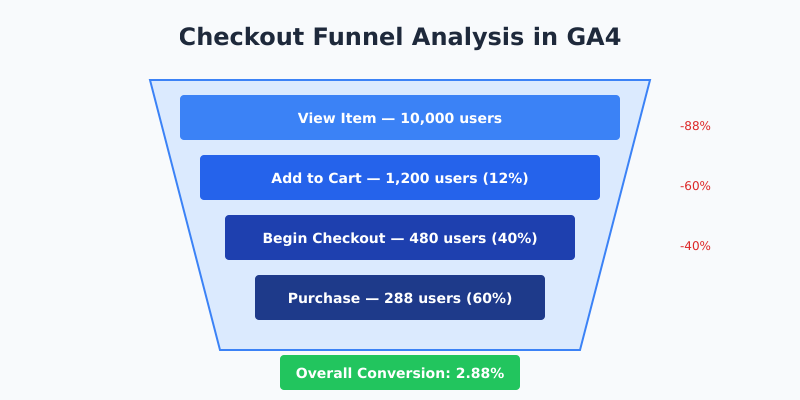
Your checkout funnel leaks money. Every step between “Add to Cart” and “Thank You” loses customers — some to friction, some to distrust, some to plain confusion. GA4’s Funnel Exploration shows exactly where.
This isn’t about vanity metrics. It’s about finding the 70% drop-off between cart and checkout, diagnosing why it happens, and fixing it before your competitors do.
What Is Checkout Funnel Analysis?
Checkout funnel analysis tracks user progression through purchase steps: product view → add to cart → begin checkout → payment → purchase. Each transition point has a drop-off rate. Your job is to minimize it.
GA4 handles this through the event-based model. No pageviews required. The funnel tracks events:
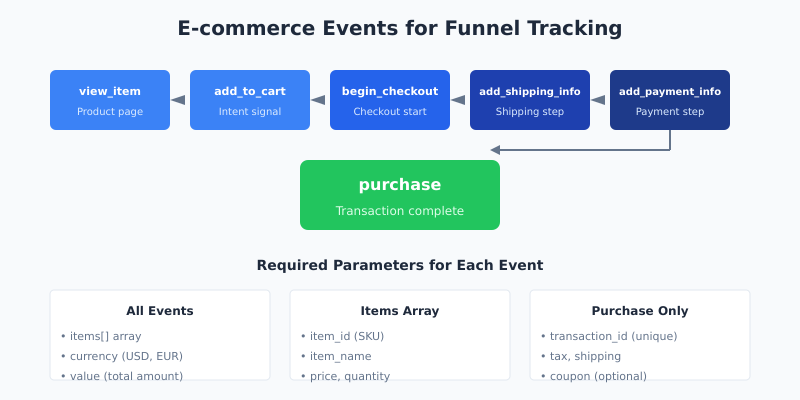
view_item— user sees product detailsadd_to_cart— intent signal, product goes to cartbegin_checkout— user starts checkout processadd_shipping_info— shipping details enteredadd_payment_info— payment method selectedpurchase— transaction complete
Miss any event? Your funnel has blind spots. Print out the E-commerce Event Flow cheatsheet to keep the full event sequence visible while you configure your tracking.
Setting Up Funnel Exploration in GA4
The Funnel Exploration report lives in Explore, not standard reports. Here’s the setup:
- Navigate to Explore in the left sidebar
- Click Funnel exploration template (or create blank and add funnel visualization)
- In Tab Settings, find the Steps section
- Click pencil icon to edit steps
- Add each e-commerce event as a step
Recommended Funnel Configuration
| Step | Event | What It Measures |
|---|---|---|
| 1 | view_item |
Product page engagement |
| 2 | add_to_cart |
Purchase intent |
| 3 | begin_checkout |
Checkout initiation |
| 4 | add_shipping_info |
Shipping form completion |
| 5 | add_payment_info |
Payment method entry |
| 6 | purchase |
Completed transaction |
Open vs. Closed Funnels
GA4 offers two funnel types:
- Closed funnel — users must complete steps in exact order. Step 1 is required entry point. Use for strict checkout flows.
- Open funnel — users can enter at any step. Better for exploratory analysis or sites with multiple entry points.
For checkout analysis, closed funnels typically provide cleaner data. Toggle this in the funnel settings.
Reading Drop-Off Data
The funnel visualization shows bars for each step. Between bars: abandonment rates. This is where it gets useful.
Key Metrics to Watch
| Metric | What It Tells You | Action Threshold |
|---|---|---|
| Cart-to-Checkout Rate | How many cart users start checkout | <30% = critical problem |
| Checkout Completion Rate | How many finish after starting | <50% = friction issues |
| Payment Drop-off | Users abandoning at payment | >20% = trust or UX problem |
| Overall Funnel Conversion | View to purchase rate | Benchmark: 2-4% for e-commerce |
Interpreting the Numbers
A 70% drop between add_to_cart and begin_checkout? Common culprits:
- Shipping costs revealed too late
- Required account creation
- Missing payment options
- Cart page UX issues
- No guest checkout option
Sharp decline at add_payment_info? Look for:
- Gateway errors (check server logs)
- Missing trust signals (SSL, badges)
- Limited payment methods
- Form validation issues
- Mobile keyboard problems
Segmentation: Finding the Real Problems
Aggregate data hides segment-specific issues. Use breakdowns to expose them.
Essential Segments to Analyze
- Device Category — mobile often has 2x higher drop-off than desktop. If mobile checkout abandonment exceeds 80%, your mobile UX needs work.
- Traffic Source — paid traffic may convert differently than organic. High-intent organic search visitors typically have better funnel completion.
- New vs. Returning — first-time buyers face more friction. Returning customers know the process.
- Geography — international visitors may drop at shipping or payment due to currency/method limitations.
Adding Breakdowns in Funnel Exploration
In Tab Settings, drag a dimension to the Breakdown section. Start with Device category. The funnel splits into separate paths per segment.
Compare completion rates across segments. A 15% mobile vs. 45% desktop completion rate isn’t normal variance — it’s a mobile-specific problem demanding immediate attention.
The Built-In Checkout Journey Report
GA4 includes a pre-built checkout report. Find it at Reports → Monetization → Checkout journey.
This report requires proper e-commerce event implementation. If you see no data, your tracking is incomplete.
Checkout Journey vs. Funnel Exploration
| Feature | Checkout Journey Report | Funnel Exploration |
|---|---|---|
| Setup Required | None (pre-built) | Manual configuration |
| Customization | Limited | Full control |
| Segments | Basic comparisons | Advanced breakdowns |
| Date Ranges | Standard | Flexible |
| Best For | Quick overview | Deep analysis |
Use Checkout Journey for daily monitoring. Use Funnel Exploration for diagnosing specific problems.
Common Drop-Off Patterns and Fixes
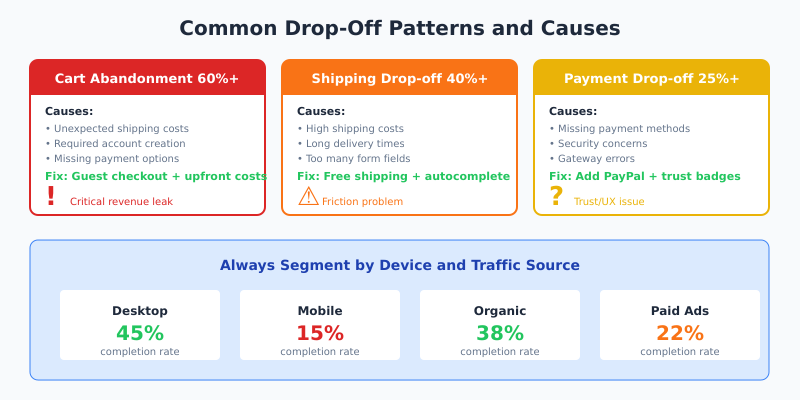
Pattern 1: Massive Cart Abandonment (60%+)
Symptoms: Users add products but never start checkout.
Likely causes:
- Unexpected costs (shipping, taxes) shown only in cart
- No clear path to checkout
- Cart page loads slowly
- Required login before checkout
Fixes:
- Show estimated shipping on product pages
- Add prominent checkout button
- Implement guest checkout
- Add cart abandonment email recovery
Pattern 2: Shipping Step Abandonment (40%+)
Symptoms: Users start checkout but leave at shipping info.
Likely causes:
- Shipping costs higher than expected
- Delivery time too long
- No shipping to user’s location
- Too many form fields
Fixes:
- Offer free shipping threshold
- Add express shipping options
- Expand shipping zones
- Reduce form fields, use address autocomplete
Pattern 3: Payment Step Abandonment (25%+)
Symptoms: Users enter shipping but abandon at payment.
Likely causes:
- Preferred payment method missing
- Security concerns
- Payment errors
- Final price surprise
Fixes:
- Add PayPal, Apple Pay, Google Pay
- Display security badges prominently
- Monitor payment gateway errors
- Show order total throughout checkout
Tracking Implementation Checklist
Funnel analysis is only as good as your tracking. Verify these events fire correctly:
| Event | Required Parameters | Verification Method |
|---|---|---|
view_item |
item_id, item_name, price | Visit product page, check Debug View |
add_to_cart |
items array, value, currency | Add item, verify in Debug View |
begin_checkout |
items array, value, currency | Start checkout, check events |
add_shipping_info |
shipping_tier, items | Complete shipping step |
add_payment_info |
payment_type, items | Enter payment details |
purchase |
transaction_id, value, items | Complete test purchase |
Missing parameters mean incomplete data. If events are not firing or showing incorrect values, walk through our Fix My Tracking decision tree to pinpoint the cause. Check your data layer implementation.
Advanced Analysis Techniques
Time Between Steps
Enable Show elapsed time in funnel settings. Long delays between steps indicate friction points. If users spend 5+ minutes on shipping info, your form is too complex.
Trended Funnel Analysis
Plot conversion rates over time. A sudden drop often correlates with:
- Site changes or deployments
- Payment gateway issues
- Promotional campaigns ending
- Seasonal patterns
Combining with User Explorer
Identify users who abandoned at specific steps. Use User Explorer to see their full journey. What pages did they visit before leaving? Did they return later?
Benchmarks: What’s Normal?
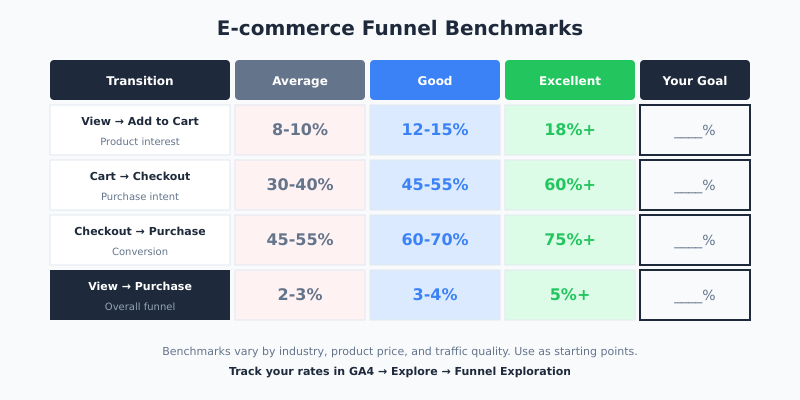
Industry averages for e-commerce funnels:
| Transition | Average Rate | Good Rate | Excellent Rate |
|---|---|---|---|
| View → Add to Cart | 8-10% | 12-15% | 18%+ |
| Add to Cart → Checkout | 30-40% | 45-55% | 60%+ |
| Checkout → Purchase | 45-55% | 60-70% | 75%+ |
| Overall (View → Purchase) | 2-3% | 3-4% | 5%+ |
These vary by industry, product price, and traffic quality. Use them as starting points, not absolutes. For benchmarks tailored to your industry, try the KPI Dictionary — it generates conversion and revenue KPIs with GA4-specific benchmarks for e-commerce and eight other verticals.
Action Plan: From Data to Decisions
- Audit your tracking — confirm all e-commerce events fire with correct parameters
- Build your funnel — create Funnel Exploration with all checkout steps
- Identify the biggest leak — find the step with highest drop-off
- Segment the data — check if the problem is device or source-specific
- Hypothesize causes — use the patterns above to diagnose
- Test fixes — implement changes and monitor funnel metrics
- Repeat — optimization is continuous
Bottom Line
Checkout funnel analysis reveals where customers abandon purchases. GA4’s Funnel Exploration provides the visibility; your job is to act on it. Start with the biggest drop-off, segment by device and source, diagnose using the common patterns, and test fixes systematically. A 10% improvement in checkout completion often means more revenue than a 50% traffic increase.
