

Last-click attribution lied to you for a decade. Now it can’t even do that. With third-party cookies blocked in Safari and Firefox, restricted in Chrome, and consent-gated everywhere in the EU, the deterministic chain that connected an ad impression to a conversion is broken. Cookieless attribution is what fills the gap — partly with statistical models, partly with first-party identifiers, partly with server-to-server signals you control.
This guide is the attribution-focused companion to our pillar on cookieless analytics strategies that actually work. We’ll cover what modeled conversions are, how GA4 fills journey gaps, why Data-Driven Attribution beats last-click in a cookieless world, and how to set up cookieless tracking in Google Analytics so the numbers in your reports stay defensible.
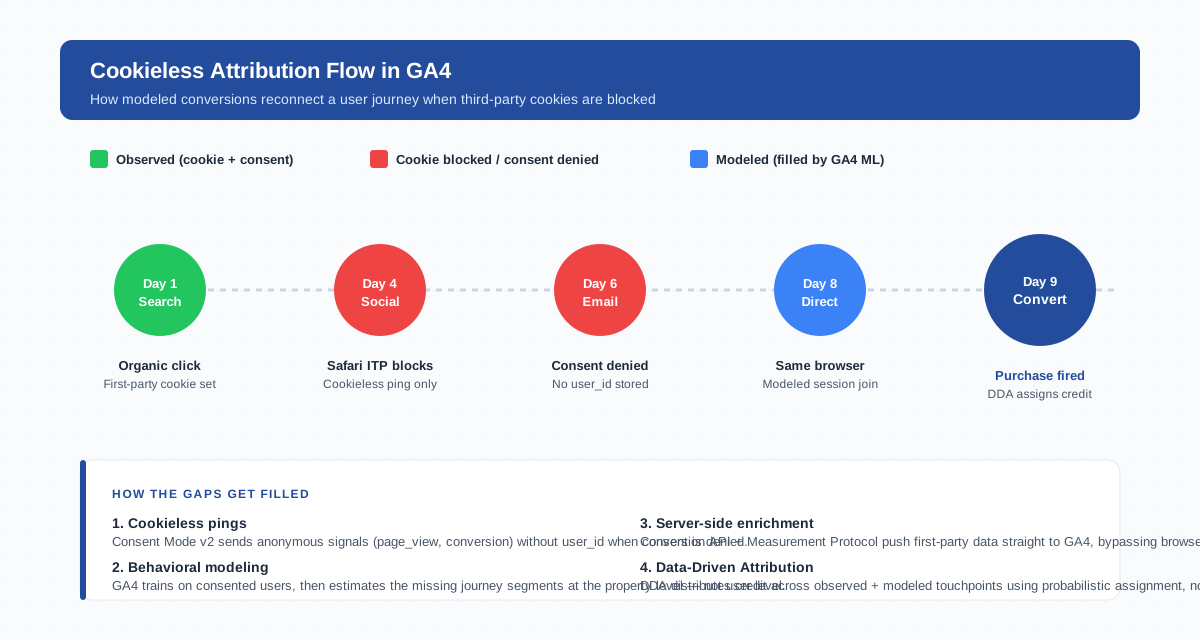
What is Cookieless Attribution
Attribution is the practice of assigning credit for a conversion to the marketing touchpoints that influenced it. Cookieless attribution is the same practice executed without leaning on third-party cookies to stitch a user’s journey together across sites.
The mechanism shifts. Instead of a persistent identifier traveling with the user from ad network to advertiser site to checkout, cookieless attribution combines several signals: first-party cookies set under your domain, server-side events sent through Google’s Conversion API, deterministic logins where they exist, and machine-learned models that estimate the journey for users you can’t see directly.
That last piece — modeled conversions — is where most of the data recovery happens. Google reports modeling rates between 5% and 40% of total conversions in GA4 properties using Consent Mode, depending on traffic volume and consent rates.
Why Last-Click Attribution Breaks Without Third-Party Cookies
Last-click attribution assigns 100% of the conversion credit to the most recent marketing touchpoint. It only works if you can reliably identify the user at every step. Take that identification away and last-click degrades fast.
Consider a user who clicks a Google Ad on Monday, browses the site, leaves, sees a Facebook retargeting ad on Wednesday in Safari, clicks through, then converts on Friday after typing the URL directly in Chrome.
- Safari’s Intelligent Tracking Prevention deletes the first-party cookie after seven days.
- Facebook’s third-party pixel can’t read its own cookie inside Safari.
- The Friday session has no user identifier linking back to Monday.
Last-click attribution will credit the Friday session as “Direct / None.” Three real touchpoints, zero credit. First-touch attribution fares no better — it relies on the same broken cookie chain in reverse.
The structural problem is that last-click is deterministic. It demands certainty. Cookieless tracking can rarely provide certainty, only probability. Models that work with probability (attribution models based on machine learning) outperform deterministic models the moment data quality drops below ~80%.
Modeled Conversions in GA4: How They Work
Modeled conversions are GA4’s machine-learning estimate of conversion events that happen but can’t be directly observed because of consent denial, cookie blocking, or cross-device gaps.
The model trains on observed behavior — users who consented and were tracked end-to-end — and applies the patterns to unconsented or untracked traffic. It doesn’t fabricate users. It estimates how unobserved traffic would have converted based on observed conversion rates, time of day, page sequence, device class, and dozens of other behavioral features.
Three conditions must be met before GA4 starts modeling:
- The property must have Consent Mode active and configured to send cookieless pings on consent denial.
- The property needs at least 1,000 daily events with consent denied for 7+ consecutive days.
- The property must collect at least 1,000 daily users with consent granted per country to provide a training baseline.
Below that threshold, GA4 reports observed-only metrics and you’ll see the gap directly in your reports. Above the threshold, the modeled and observed numbers blend silently in the standard reports — to see them separated you need the BigQuery export or the Reports Identity toggle.
Data-Driven Attribution (DDA) in a Cookieless World
GA4’s Data-Driven Attribution uses a Shapley-value algorithm — borrowed from cooperative game theory — to fairly distribute credit across every touchpoint in a converting journey, weighted by how much each touchpoint actually moved the probability of conversion.
This is structurally well-suited to cookieless attribution because Shapley values handle missing data gracefully. When a touchpoint can’t be observed, the algorithm redistributes the expected credit across the touchpoints it can see, rather than collapsing to “Direct / None” the way last-click does.
Since 2023, DDA has been the default in GA4 for new properties. Rule-based models (last-click, first-click, linear, time-decay, position-based) are still available as comparison views, but they’re explicitly deprecated for primary reporting.
In my own GA4 implementations, switching from last-click to DDA typically reallocates 15-25% of conversion credit away from “Direct” and back to upper-funnel paid and organic touchpoints — the touchpoints that cookie loss had been silently devaluing.
Modeled vs Observed Conversions
The distinction matters because the two metrics have different reliability profiles. Confusing them produces decisions based on noisy estimates as if they were direct measurements.
| Aspect | Observed Conversions | Modeled Conversions |
|---|---|---|
| Source | Direct event from browser with consent + cookie | ML estimate based on cookieless pings + behavioral patterns |
| Granularity | User-level, joinable with user_id | Property-level aggregate, not user-level |
| When it fills in | Always (when tracking works) | Only when training thresholds met (1K consented + 1K unconsented daily) |
| Accuracy at scale | Near-perfect for tracked users | ±5-10% on aggregate volume; not reliable per-user |
| Available in Explore | Yes, all dimensions | Only with “Blended” reporting identity |
| Available in BigQuery | Yes, raw events table | No — modeling happens at report query time |
| Use case | Operational reporting, audience building, debugging | Top-line trend analysis, channel comparisons |
| Don’t use for | — | Per-user troubleshooting, financial reconciliation, audience activation |
The pragmatic rule: use observed conversions for operational decisions and audience activation, use modeled conversions for trend analysis and channel mix evaluation. Never reconcile modeled GA4 numbers against your CRM or payment processor — the modeled portion can’t be tied back to individual transactions.
Server-Side Tracking + Conversion API for Better Signal Recovery
The most reliable way to reduce dependence on modeling is to recover signal at the source. Server-side tracking moves the data collection from the browser to your server, then forwards events to GA4 via the Measurement Protocol or the Conversion API.
The signal flow looks like this:
- Browser fires a first-party event to your server endpoint (e.g.
analytics.yourdomain.com). - Your server enriches the event with backend data — order_id, customer_lifetime_value, logged-in user_id.
- The server sends a single, authenticated payload to GA4’s Measurement Protocol.
- GA4 ingests the event with your server as the source of truth, not the browser.
This bypasses the entire third-party cookie problem. Browser-side ad blockers, Safari’s ITP, and Firefox’s ETP only see a request to your own domain, which they don’t block. Consent Mode still gates the event before it leaves the browser, so user privacy choices are respected — but every consenting user is captured cleanly, with no third-party leakage.
For ad platforms specifically, the analogous mechanism is the Google Ads Enhanced Conversions API and the equivalent Conversion APIs from Meta and TikTok. They take hashed user identifiers (email, phone) from your server and match them server-to-server with the ad network — no browser cookie required.
Privacy-Preserving Attribution Methods (Privacy Sandbox Roundup)
Google’s Privacy Sandbox is a set of browser APIs designed to enable advertising and attribution use cases without cross-site tracking. Three are most relevant for attribution:
- Attribution Reporting API — lets ad platforms record an impression on one site and a conversion on another, then receive an aggregated, noised report at the network level. No user-level data leaves the browser.
- Topics API — replaces interest-based cookies with browser-derived topic categories (e.g. “Sports”, “Travel”). Useful for upper-funnel targeting; not directly useful for last-touch attribution.
- Protected Audience API (formerly FLEDGE) — enables remarketing without third-party cookies through on-device auctions. Conversion attribution back to the original audience requires the Attribution Reporting API.
The Privacy Sandbox approach is fundamentally different from cookies: data stays on-device, only aggregated reports leave. Per-user attribution becomes structurally impossible. AdRoll’s analysis of cookieless attribution methods covers the marketer-side implications well — expect coarser cohort-level reporting and longer feedback loops on optimization.
For most analytics teams, Privacy Sandbox APIs are not yet a primary data source. They’re a planning input. Google has stated Sandbox APIs will become the production replacement for third-party cookies in Chrome over the next several years; building reports around them now is premature, but ignoring them on roadmaps is risky.
Cross-Device Attribution Without Cookies: User ID Strategy
Cookies never solved cross-device attribution well. The same user on iPhone Safari, MacBook Chrome, and a work Windows machine looks like three different users to a cookie-based system. Cross-device tracking always required either a graph (Google’s signed-in users) or a deterministic identifier you control.
In a cookieless world, the user_id strategy becomes the primary cross-device mechanism. The pattern:
- When a user logs in, authenticates, or completes a form, capture an internal stable identifier (database user_id, hashed email, customer GUID).
- Set the
user_idfield in every GA4 event for that session. - In GA4 admin, set Reports Identity to “Blended” so user_id, Google Signals, device_id, and modeling all contribute.
- Use BigQuery export to do your own user-stitching where the GA4 UI doesn’t expose enough fidelity.
The honest constraint: this only works for users who identify themselves to you. Anonymous browsers across devices remain three separate users. Most B2B sites and account-based products will recover 60-80% of cross-device journeys this way; pure content sites will recover almost none, because most visitors never log in.
Reporting Cookieless Attribution: GA4 Reports + BigQuery
Three places matter for reporting cookieless attribution accurately. Each shows a different slice.
Standard GA4 reports blend observed and modeled data automatically when modeling thresholds are met. The Acquisition reports and Advertising > Attribution > Model comparison views are the operational dashboards. Look for the small “Modeled” indicator in the data quality column to see when modeling is active.
The Reports Identity setting (Admin > Property > Reporting Identity) toggles between Blended (default), Observed (user_id + device_id only), and Device-based (device_id only). Switching between these views on the same date range is the fastest way to see how much modeling is actually happening — the delta between Blended and Observed is the modeled volume.
The BigQuery export is where you take control. Raw events arrive without modeling, joinable on user_id and device_id, with full event_params. For attribution work specifically:
- Use
events_*for all touchpoint events with full source/medium parameters. - Use
collected_traffic_sourcenested fields to reconstruct the campaign chain. - Run cohort analysis queries directly in SQL where the GA4 UI’s cohort tools fall short.
- Build your own attribution model (Shapley, Markov, custom rule-based) on the raw event stream when GA4’s DDA is too opaque for stakeholders.
Bounteous published a strong reference on how DDA actually computes credit in GA4 — useful background when you start replicating or auditing the model in BigQuery.
Future of Attribution: 2026 and Beyond
Three structural shifts will define the next two years of attribution work.
First-party data becomes table stakes. Without third-party cookies, the only reliable cross-site identifier is one the user voluntarily gives you. Loyalty programs, account creation incentives, gated content, and email capture move from optional growth tactics to attribution infrastructure.
Server-side becomes the default. The infrastructure cost of running a server-side container has dropped enough (Google Tag Manager Server, Stape, JENTIS, plain Cloud Run) that “browser-only” GTM is now the legacy configuration. Expect new GA4 implementations to start server-side from day one.
Modeled metrics become the primary number. As consent rates settle in the 30-50% range and cookie loss approaches the 60% mark in Chrome, observed-only data becomes too sparse for trend analysis. Reports will quietly transition to modeled-first, with observed data relegated to debugging and audience activation. The skill of distinguishing the two — knowing when to trust the model and when to dig into raw events — becomes the new attribution literacy.
Cookieless attribution isn’t a downgrade from cookie-based attribution. It’s a different problem: less precision per user, more rigor in aggregate, and a far stronger incentive to build first-party data relationships that compound over time. The teams who move first on server-side tracking, Consent Mode v2, and BigQuery-native modeling will spend the next decade ahead of the ones still trying to recover last-click reports.
FAQ
What is cookieless attribution in simple terms?
Cookieless attribution assigns marketing credit to touchpoints (ads, emails, organic visits) without relying on third-party cookies to identify the user across sites. It uses a mix of first-party identifiers, server-side events, and machine-learned models that estimate the parts of the journey that can’t be directly observed.
How do modeled conversions work in GA4?
GA4’s behavioral modeling trains on users who consented to cookies, then applies the learned conversion patterns to estimate conversions from users who declined consent or whose cookies were blocked. The output is a property-level conversion count, not a per-user attribution. Modeling activates only when the property has at least 1,000 daily consented users and 1,000 daily unconsented events for 7+ days per country.
Is Data-Driven Attribution better than last-click for cookieless tracking?
Yes, structurally. Data-Driven Attribution uses Shapley-value math that handles missing touchpoints gracefully, redistributing credit when a touchpoint can’t be observed. Last-click collapses to “Direct / None” the moment the cookie chain breaks, which over-credits direct traffic and under-credits paid and organic upper-funnel touchpoints. DDA is the GA4 default for new properties since 2023.
How do I set up cookieless tracking in Google Analytics?
Three steps. First, deploy Google Consent Mode v2 with cookieless pings enabled on consent denial. Second, set up server-side Google Tag Manager and route conversions through the Measurement Protocol so server-to-server signals supplement browser data. Third, in Admin > Reporting Identity, set the property to Blended so observed, modeled, Google Signals, and user_id data all contribute to reports.
Can I do attribution without cookies at all?
Partially. Pure cookieless attribution relies on server-side events tied to logged-in users (deterministic), aggregated browser APIs like the Privacy Sandbox Attribution Reporting API (probabilistic), and modeled estimates from GA4. For unauthenticated, cross-device traffic you cannot eliminate cookies entirely without losing significant accuracy — but you can reduce dependency to the point where consent denial and Safari/Firefox blocking only affect modeling rates, not core reporting.
Why don’t modeled conversions show up in BigQuery export?
BigQuery export contains raw event-level data only. Modeling happens at report query time inside GA4, using aggregate signals that aren’t tied to individual users. There’s no row to export because modeled conversions don’t exist as discrete events — they’re statistical estimates layered on top of the observed event stream. To replicate modeling in BigQuery, you’d build your own attribution model (Shapley, Markov, etc.) on the raw events.
Do I still need third-party cookies for any attribution use case?
For practical purposes, no. Every major use case — multi-touch attribution, retargeting, frequency capping, view-through — has a cookieless replacement: Conversion APIs, Privacy Sandbox APIs, Customer Match with hashed identifiers, server-side attribution. Third-party cookies still work today in Chrome for users who opted in, but planning new implementations around them is a dead end. Treat them as a degraded supplemental signal, not a foundation.
Related Reading
- Pillar: Cookieless Analytics Strategies That Actually Work — the full landscape of cookieless analytics, beyond just attribution.
- Attribution — definition and core concepts.
- Attribution Model — comparison of model types.
- Conversion — what counts and how it’s measured in GA4.
- Measurement Protocol — server-to-server event ingestion for GA4.
- Back to the cookieless analytics pillar.