
Open any GA4 acquisition report and the first thing you see is a list of channels: Organic Search, Direct, Paid Social, Referral. Those buckets shape every conclusion you draw about where your traffic comes from — and most of the time, nobody knows exactly how GA4 decides which bucket a visit lands in. Get that wrong and your “Direct traffic is huge” panic is really a tagging problem in disguise. This guide explains how GA4 builds channel groups, why traffic gets misclassified, and how to make sure your reports tell the truth.
If you want to skip ahead and see how GA4 will classify a specific link, our GA4 Channel Group Predictor shows you the result before you ever publish the campaign. But understanding the rules behind it is what lets you fix problems at the source.
What Is a Channel Group?
A channel group is GA4’s way of bucketing every session into a high-level category that describes how the visitor arrived — Organic Search, Direct, Email, Paid Social, and so on. Instead of forcing you to read hundreds of individual sources and mediums, GA4 rolls them up into a dozen or so channels you can actually reason about.
The Default Channel Grouping is the rule set GA4 applies automatically. It’s not arbitrary: each channel has a precise definition, and GA4 checks every session against those definitions in order. The first rule that matches wins. Understanding that order is the whole game.
How GA4 Decides the Channel
GA4 doesn’t guess. It reads a handful of fields attached to each session and matches them against fixed rules. The most important inputs are the source, the medium, and the campaign name.
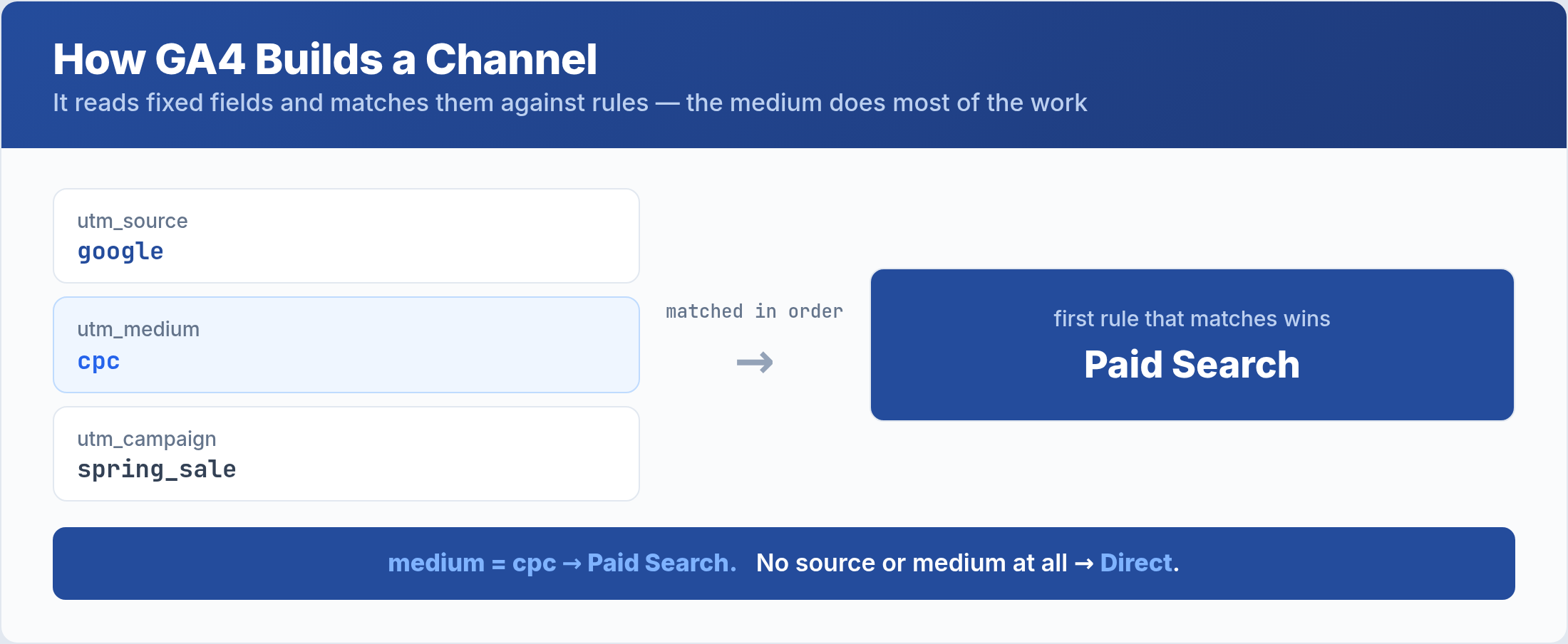
The medium does most of the work. A medium of organic points toward Organic Search; cpc or ppc points toward Paid Search; email points toward Email; referral points toward Referral. GA4 then looks at the source and, for social and search channels, checks it against a known list of search engines and social networks. When a visit has no source or medium at all, it falls through to Direct. This is why your UTM parameters matter so much: they are the source and medium GA4 reads.
The Default Channels and Their Rules
Here are the channels you’ll see most often and the simplified logic GA4 uses to assign them. The exact definitions are detailed, but this captures the practical core.
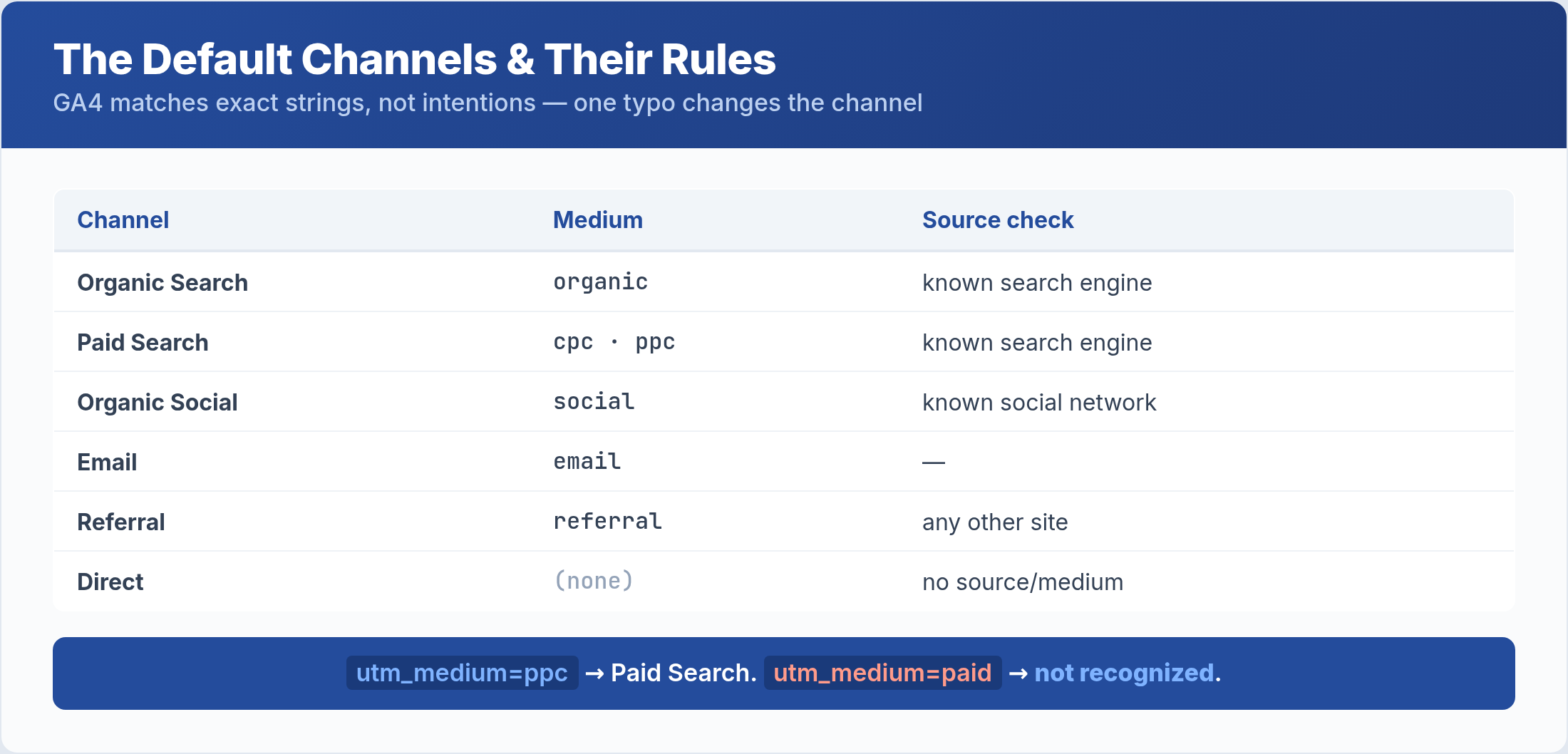
Notice how tightly each channel depends on exact medium values. A campaign tagged utm_medium=ppc lands in Paid Search, but the same campaign tagged utm_medium=paid may not — because paid isn’t one of the values GA4 recognizes for that channel. The platform is matching strings, not intentions. That precision is exactly why a single typo in a UTM can send a visit to the wrong channel, as we’ll see next.
Why Traffic Ends Up “Unassigned”
The most common channel problem isn’t traffic in the wrong bucket — it’s traffic in no bucket. When GA4 can’t match a session to any channel rule, it labels it Unassigned, and a growing Unassigned slice is a clear signal something is broken upstream.
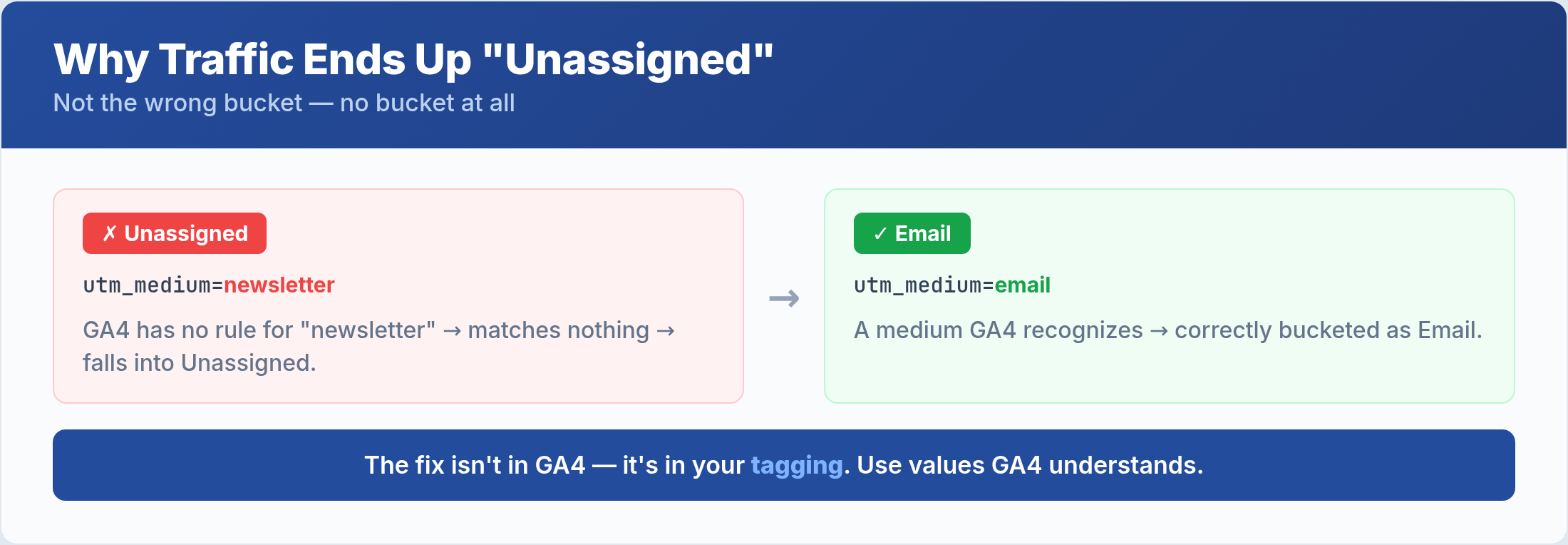
Unassigned almost always traces back to a medium value GA4 doesn’t recognize. Tag a newsletter with utm_medium=newsletter and GA4 has no rule for “newsletter,” so the visit matches nothing and falls into Unassigned instead of Email. The fix isn’t in GA4 — it’s in your tagging. Use the medium values GA4 actually understands (email, cpc, organic, referral, social), and Unassigned shrinks back to noise.
How to Check a Link Before You Publish
The reliable way to avoid misclassification is to check a tagged URL before it goes live, not after the data is already polluted. You don’t want to discover a tagging mistake three weeks into a campaign.
This is exactly what the Channel Group Predictor is for: paste a URL with its UTM parameters and it tells you which GA4 channel that link will land in. If a newsletter link shows up as Unassigned instead of Email, you fix the medium before the campaign launches. Building this check into your campaign workflow — predict, then publish — is the single most effective habit for keeping channel data clean. Pair it with the UTM Builder to generate correct tags from the start.
Custom Channel Groups
The default grouping works for most sites, but sometimes your business needs a view GA4 doesn’t provide out of the box. That’s what custom channel groups are for.
In Admin, you can create a custom channel group that re-buckets traffic to match how you think about it — splitting “Paid Social” into individual platforms, or grouping several mediums into a “Partnerships” channel. Custom groups can even be applied retroactively to historical data, which the default grouping cannot. Reach for them when the standard channels blur a distinction that matters to your reporting, but don’t over-engineer: most teams are better served by clean tagging within the default grouping than by a maze of custom rules.
Common Channel Grouping Mistakes
A few recurring errors cause most channel confusion. Avoid these and your acquisition reports become trustworthy.
- Inventing medium values.
newsletter,paid,qr— if GA4 doesn’t recognize the medium, the visit goes Unassigned. Stick to the standard values. - Blaming “Direct” for everything. A spike in Direct often means missing UTMs or stripped parameters, not a surge of people typing your URL.
- Inconsistent capitalization.
Emailandemailcan be treated differently. Standardize on lowercase across every campaign. - Tagging internal links. Adding UTMs to links between your own pages overwrites the real source and corrupts attribution. Never tag internal links.
- Ignoring a rising Unassigned share. It’s the smoke alarm of channel data. Investigate the moment it grows.
Frequently Asked Questions
Why is my Direct traffic so high?
Usually it’s not real direct traffic. Direct is GA4’s catch-all when no source or medium is present, so a high Direct share often means missing UTMs, links stripped of parameters, or app-to-web transitions losing their tags. Audit your tagging before assuming people are typing your URL.
What’s the difference between Unassigned and Direct?
Direct means GA4 saw no source or medium and applied its default. Unassigned means GA4 saw a source or medium but couldn’t match it to any channel rule. Direct is “nothing to go on”; Unassigned is “something, but unrecognized” — and the latter is almost always a tagging error you can fix.
Can I change how GA4 assigns past traffic?
Not with the default grouping — it applies its rules at collection time and won’t reclassify history. Custom channel groups, however, can be applied retroactively, letting you re-bucket historical sessions under your own rules. That’s one of the main reasons to build a custom group.
Which medium values does GA4 recognize?
The reliable ones include organic, cpc and ppc for paid search, email, referral, social and cpc variants for paid social, and affiliate. When in doubt, run the link through the Channel Group Predictor to confirm the channel before you publish.
The Bottom Line
GA4 channel groups aren’t magic — they’re a fixed set of rules matching exact source and medium values, in order, with the first match winning. Most channel problems are really tagging problems: an invented medium sends traffic to Unassigned, a missing UTM inflates Direct. Learn the standard medium values, never tag internal links, watch your Unassigned share like a smoke alarm, and check every campaign URL with the Channel Group Predictor before it goes live. Do that, and your acquisition reports stop lying to you about where your traffic really comes from.
