

Every marketing campaign needs tracking. Without it, you’re guessing which channels drive results. UTM parameters solve this — simple tags added to URLs that tell Google Analytics exactly where traffic comes from.
The problem? Most marketers use them wrong. Inconsistent naming, missing parameters, broken links. This guide covers UTM fundamentals and the implementation details that actually matter.
What Are UTM Parameters?
UTM parameters (Urchin Tracking Module) are query strings appended to URLs that pass campaign data to analytics platforms. When someone clicks a UTM-tagged link, GA4 captures the parameter values and attributes the session to your campaign.
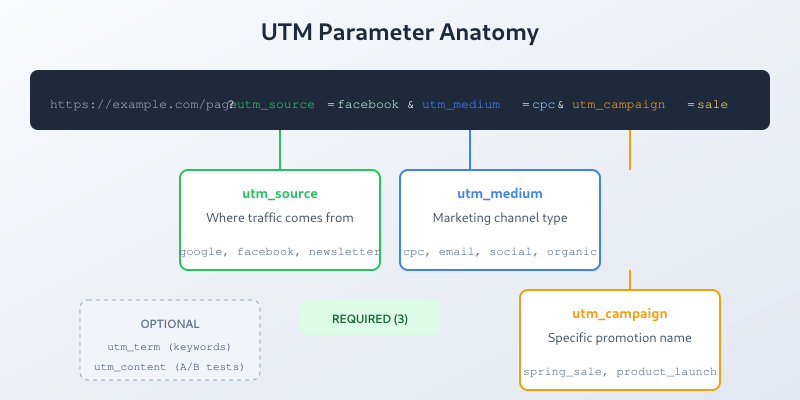
A tagged URL looks like this:
https://example.com/landing-page?utm_source=facebook&utm_medium=cpc&utm_campaign=spring_saleGA4 reads these parameters automatically. No additional configuration required.
The Five UTM Parameters
Google recognizes five standard UTM parameters. Three are essential, two are optional but useful.
Required Parameters
| Parameter | Purpose | Example Values |
|---|---|---|
utm_source |
Identifies the traffic source | google, facebook, newsletter, linkedin |
utm_medium |
Identifies the marketing medium | cpc, email, social, referral, organic |
utm_campaign |
Identifies the specific campaign | spring_sale, product_launch, weekly_digest |
Optional Parameters
| Parameter | Purpose | Example Values |
|---|---|---|
utm_term |
Identifies paid search keywords | running+shoes, analytics+tools |
utm_content |
Differentiates similar content/ads | logo_link, text_link, banner_v2 |
Skip utm_term unless you’re manually tagging paid search (Google Ads auto-tags handle this). Use utm_content for A/B testing ad creatives or distinguishing multiple links in the same email.
UTM Naming Conventions
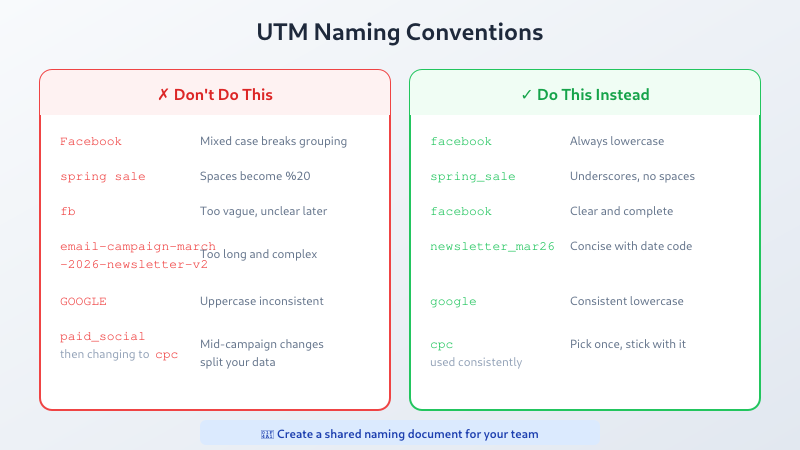
Consistency determines whether your UTM data is useful or chaotic. Establish conventions before your first campaign.
Rules That Prevent Headaches
- Lowercase everything — GA4 treats “Facebook” and “facebook” as different sources. Always use lowercase.
- Use underscores, not spaces — Spaces become %20 in URLs. Use underscores:
spring_salenotspring sale. - Be specific but concise —
fbis too vague,facebook_paid_retargeting_campaign_march_2026is excessive.facebookworks. - Document your conventions — Create a shared reference for your team. The UTM Parameter cheatsheet provides a printable reference of standard values and naming rules. Update it when adding new sources or campaigns.
- Never change mid-campaign — Switching from
facebooktofbhalfway through splits your data.
Recommended Naming Structure
| Parameter | Convention | Examples |
|---|---|---|
utm_source |
Platform name, lowercase | google, facebook, linkedin, newsletter |
utm_medium |
Channel type, match GA4 defaults | cpc, email, social, display, affiliate |
utm_campaign |
campaign_type_date or campaign_name | spring_sale_2026, product_launch_shoes |
utm_content |
ad_variant or link_position | banner_a, header_cta, footer_link |
Building UTM Links
You have three options for creating UTM-tagged URLs.
Option 1: Google’s Campaign URL Builder
Google provides a free Campaign URL Builder. Enter your URL and parameters, copy the result. Simple but manual.
Option 2: Spreadsheet Template
For teams running multiple campaigns, a spreadsheet works better:
- Create columns for each UTM parameter
- Add a formula column that concatenates the full URL
- Include columns for campaign owner, launch date, status
- Share with your team for consistent tracking
Formula example:
=A2&"?utm_source="&B2&"&utm_medium="&C2&"&utm_campaign="&D2Option 3: URL Shorteners with UTM Support
Tools like Bitly, Rebrandly, or short.io can append UTM parameters automatically and provide click analytics. Useful for social media where long URLs look messy.
Or use our UTM Builder with live GA4 channel prediction — it generates the URL, saves your history, and shows which GA4 channel group your link will land in before you launch.
UTM Parameters by Channel
Different channels need different approaches. Here’s what works.
Email Marketing
utm_source=newsletter
utm_medium=email
utm_campaign=weekly_digest_jan20
utm_content=header_cta
Use utm_content to track which links in the email get clicks. Header CTA vs. footer link vs. inline text — the data reveals what works.
Paid Social (Facebook, LinkedIn, Twitter)
utm_source=facebook
utm_medium=cpc
utm_campaign=retargeting_cart_abandoners
utm_content=carousel_ad_v2
Match utm_medium to the billing model: cpc for cost-per-click, cpm for impressions. This aligns with GA4’s default channel groupings — use the predictor to verify your UTM values map to the right channel before launching.
Organic Social
utm_source=linkedin
utm_medium=social
utm_campaign=thought_leadership
utm_content=analytics_article
Use social as medium for organic posts. This separates paid from organic in your reports.
Influencer/Affiliate
utm_source=influencer_jane
utm_medium=affiliate
utm_campaign=product_review
utm_content=bio_link
Put the influencer name in utm_source to track individual performance.
QR Codes and Offline
utm_source=qr_code
utm_medium=offline
utm_campaign=store_flyer_jan
utm_content=checkout_counter
QR codes need UTM tags too. Track which physical locations or materials drive traffic.
Common UTM Mistakes
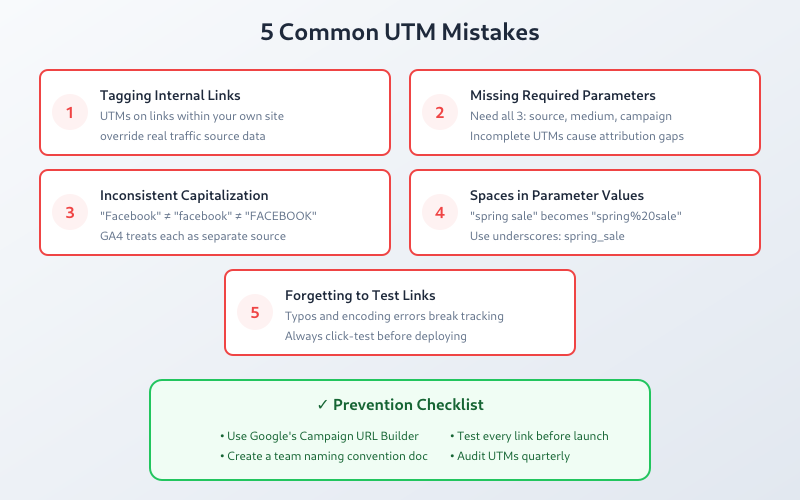
1. Inconsistent Capitalization
Wrong: Some campaigns use Facebook, others use facebook, others use FB.
Result: Three separate sources in your reports. Fragmented data.
Fix: Lowercase everything. Always.
2. Tagging Internal Links
Wrong: Adding UTM parameters to links within your own site.
Result: Each internal click starts a new session. Your session count inflates, attribution breaks.
Fix: Never use UTM parameters for internal navigation. They’re for external traffic only. If you run several connected domains and need sessions to survive the jump between them, reach for cross-domain tracking instead of UTMs.
3. Missing Parameters
Wrong: Using only utm_source without utm_medium and utm_campaign.
Result: Incomplete data. GA4 may misclassify the traffic.
Fix: Always include all three required parameters.
4. Using UTMs for Google Ads
Wrong: Manually adding UTM tags to Google Ads destination URLs.
Result: Conflicts with auto-tagging. Duplicate or missing data.
Fix: Enable auto-tagging in Google Ads. It handles attribution automatically via the gclid parameter.
5. Exposing UTMs in Redirects
Wrong: Redirecting example.com/sale to example.com/products?utm_source=...
Result: Users see the messy URL. They might share it, polluting your data.
Fix: Keep UTMs on the original link. Let redirects pass them through cleanly.
Viewing UTM Data in GA4
GA4 captures UTM parameters in several dimensions:
| UTM Parameter | GA4 Dimension | Report Location |
|---|---|---|
utm_source |
Session source | Acquisition → Traffic acquisition |
utm_medium |
Session medium | Acquisition → Traffic acquisition |
utm_campaign |
Session campaign | Acquisition → Traffic acquisition |
utm_term |
Session manual term | Exploration reports |
utm_content |
Session manual ad content | Exploration reports |
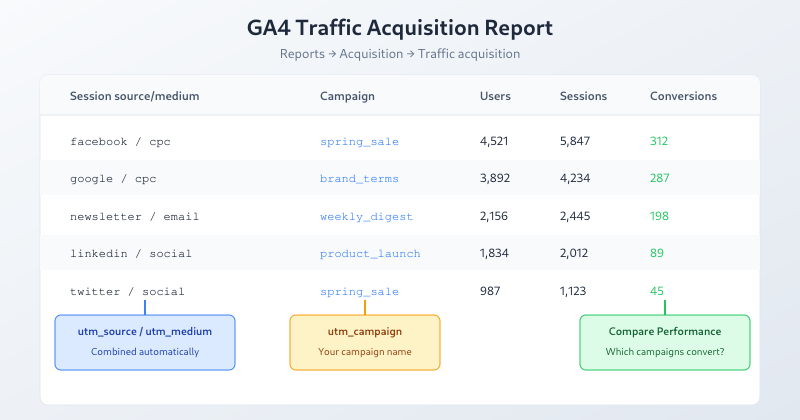
For utm_term and utm_content, you’ll need to create custom reports in Explore — they don’t appear in standard reports by default.
UTM Tracking Checklist
Before launching any campaign:
- Verify all three required parameters are present
- Confirm lowercase naming throughout
- Test the link — click it and check GA4 Realtime report
- Document the campaign in your tracking spreadsheet
- Share shortened/clean URLs for public-facing content
Bottom Line
UTM parameters are simple in concept but require discipline in execution. Use all three required parameters, maintain consistent lowercase naming, never tag internal links, and document everything. The payoff is clear attribution data that shows exactly which campaigns drive results — no guessing required.
