
Google Consent Mode v2 is the signal layer that tells Google what your tags can and cannot store. Without it, EEA traffic stops feeding Google Ads remarketing audiences and GA4 conversion modeling — silently, with no error in the console.
This guide walks through every piece of a working consent mode implementation: the four required signals, default state, banner update, GTM and gtag.js variants, CMP wiring, and verification. By the end you’ll know how to set up cookieless tracking in Google Analytics the right way and how to confirm the signals actually reach Google.
This is part of the cookieless analytics strategy series. Consent Mode is the foundation — modeling, server-side tracking, and first-party data collection layer on top.
What is Google Consent Mode v2 (and Why It Replaced v1 in 2024)
Consent Mode is a JavaScript API that adjusts how Google tags behave based on user consent. Tags don’t just fire or not fire — they receive granular signals telling them which categories of storage are allowed. v2 expanded the signal set to support the EU Digital Markets Act and the updated IAB TCF v2.2 framework.
v1 had two signals: ad_storage and analytics_storage. v2 adds ad_user_data and ad_personalization — separating “can you store an ad cookie” from “can you send the user’s data to Google” from “can Google personalize ads with this data.” Without these new signals, Google Ads remarketing audiences stop refreshing for EEA users.
The change wasn’t optional. Starting March 6, 2024, advertisers running Google Ads campaigns to EEA, UK, or Switzerland traffic must collect and forward all four v2 signals. Sites still on v1 see audiences shrink, modeled conversions disappear, and personalization data dry up.
Basic Mode vs Advanced Mode: What Each Sends With No Consent
Consent Mode has two operating modes, and the choice affects how much data you keep when users decline.
| Behavior | Basic Mode | Advanced Mode |
|---|---|---|
| Tags loaded before consent | No — tags blocked entirely | Yes — tags load with denied state |
| Cookieless pings on denial | Not sent | Sent (no identifiers) |
| Conversion modeling input | Zero | Aggregated behavior signal |
| Remarketing audience refresh | Only consenting users | Only consenting users |
| Implementation effort | Lower (CMP blocks tags) | Higher (default state required) |
| Data loss on decline | ~100% of declining users | ~30-50% recovered via modeling |
Advanced Mode is what Google recommends, and the difference matters. With a 50% banner reject rate, Basic Mode loses half your conversions while Advanced Mode recovers a meaningful share through modeling. The trade-off: Advanced Mode loads tags before consent — you have to defend that as essential infrastructure under GDPR, not as tracking that requires opt-in.
The Four Required Signals: ad_storage, ad_user_data, ad_personalization, analytics_storage
Every Consent Mode v2 implementation must declare four signals. Each maps to a specific tag behavior.
| Signal | Controls | Granted behavior | Denied behavior |
|---|---|---|---|
ad_storage |
Advertising cookies (Google Ads, Floodlight) | Sets first-party cookies for ad targeting | No ad cookies set; cookieless pings only |
ad_user_data |
Sending user data to Google for advertising | User data flows to Google Ads | No user data sent — required for EEA |
ad_personalization |
Personalized advertising and remarketing | User can be added to remarketing lists | No remarketing audiences populated |
analytics_storage |
Analytics cookies (GA4) | Standard GA4 tracking with client_id |
Cookieless pings to GA4; modeling fills gaps |
You can also declare functionality_storage, personalization_storage, and security_storage, but they don’t affect Google tags directly. Most CMPs send all seven; only the four above gate Google’s behavior.
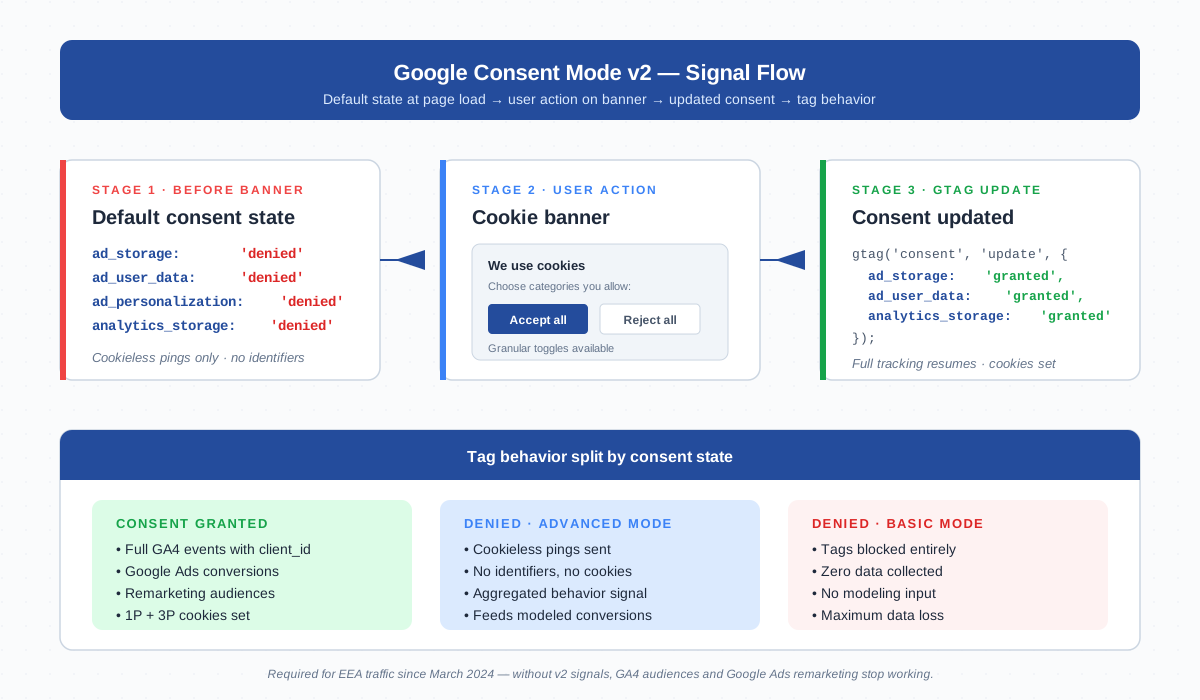
gtag('consent', 'update', ...) call that switches signals from denied to granted.Implementation via GTM (Default Consent State + Update on Banner Action)
GTM is the cleanest path because Google Tag Manager has a native Consent Initialization trigger that fires before everything else. The container handles signal management at the trigger level — tags only fire when their declared consent requirements are met.
Open your GTM container and add a Consent Mode default tag:
- In GTM, go to Templates → Tag Templates → Search Gallery and import the official “Consent Mode (Google tags)” template by Google.
- Create a new tag using this template. Set every signal —
ad_storage,ad_user_data,ad_personalization,analytics_storage— to Denied. - Tick Region: EEA + UK + Switzerland if you want stricter defaults for European traffic only. For one-size-fits-all, leave region empty.
- Set the trigger to Consent Initialization — All Pages. This trigger fires before any other event in the data layer.
- Configure each downstream tag (GA4, Google Ads) under Advanced Settings → Consent Settings → Require additional consent for tag to fire. Add the relevant signals.
For the update step, your CMP pushes a dataLayer event when the user makes a choice. Create a custom HTML tag triggered on that event:
<script>
gtag('consent', 'update', {
  'ad_storage': 'granted',
  'ad_user_data': 'granted',
  'ad_personalization': 'granted',
  'analytics_storage': 'granted'
});
</script>
If the user declines, push the same call with 'denied' values. Most modern CMPs handle this automatically when you enable their Google Consent Mode integration — the manual tag is the fallback for custom banners.
Implementation via gtag.js (Raw JS Approach)
If you’re not using tag management and gtag.js sits directly on the page, you declare consent inline before the GA4 snippet loads. Order matters: gtag('consent', 'default', ...) must come before gtag('config', 'G-XXXX').
<script async src="https://www.googletagmanager.com/gtag/js?id=G-XXXXXXX"></script>
<script>
  window.dataLayer = window.dataLayer || [];
  function gtag(){dataLayer.push(arguments);}

  // Default state — runs before any tag fires
  gtag('consent', 'default', {
    'ad_storage': 'denied',
    'ad_user_data': 'denied',
    'ad_personalization': 'denied',
    'analytics_storage': 'denied',
    'wait_for_update': 500
  });

  gtag('js', new Date());
  gtag('config', 'G-XXXXXXX');
</script>
The wait_for_update parameter tells Google to hold tag execution for up to 500ms while waiting for the CMP to call update. Without this, fast-loading pages may fire tags with denied state even when the user has already consented.
When the user acts on your banner, fire the update:
// User clicked "Accept all"
gtag('consent', 'update', {
  'ad_storage': 'granted',
  'ad_user_data': 'granted',
  'ad_personalization': 'granted',
  'analytics_storage': 'granted'
});
Region targeting works the same way — pass a region: ['EEA'] parameter inside the default object to scope stricter defaults to European users only.
Connecting Consent Mode to a CMP (Cookiebot, OneTrust, Iubenda, Termly)
Building your own cookie banner is fine for simple sites, but a managed CMP handles regional rules, audit logs, and IAB TCF integration. Each major CMP has a Google Consent Mode v2 toggle you flip in the dashboard.
| CMP | v2 setup path | Notes |
|---|---|---|
| Cookiebot | Settings → Google Consent Mode → enable v2 | Pushes signals automatically; supports advanced mode out of the box |
| OneTrust | Cookie Compliance → Google Consent Mode integration | Requires GTM template install; fires consent.default and consent.update events |
| Iubenda | Configurator → Google Consent Mode v2 toggle | Includes IAB TCF v2.2 stack; per-region defaults supported |
| Termly | Banner settings → Advanced → Consent Mode v2 | Free tier covers basic mode; advanced mode requires paid plan |
| Custom | Manual gtag('consent', 'update', ...) on banner click |
You own the audit trail and proof-of-consent |
When I set this up for a client running Cookiebot, the v2 toggle alone wasn’t enough — the GTM container had downstream tags missing the consent settings, so signals reached Google but tags ignored them. Always check both sides: CMP fires the signals, and tags respect them.
EEA Mandate: What Changed in March 2024
March 6, 2024 was the deadline. Google announced that advertisers serving ads to users in the EEA, UK, or Switzerland must implement Consent Mode v2 — including the two new signals (ad_user_data, ad_personalization) — to keep using personalization, audiences, and modeled conversions in Google Ads.
The driver is the EU Digital Markets Act, which designated Google as a “gatekeeper” platform. Under the DMA, Google needs explicit user consent before combining ad data across services. Without v2 signals, Google can’t legally personalize ads in the EEA — so it stops, and your remarketing lists go cold.
If you’re outside the EEA, v2 is still recommended. The four-signal model is forward-compatible with future regional regulations (Brazil’s LGPD, Switzerland’s revFADP, India’s DPDP Act). Privacy enforcement bodies like NOYB have shown an appetite for cross-border complaints — a signal architecture built for the strictest jurisdiction is cheaper than rebuilding later.
Sites that ignored the deadline saw measurable damage. Remarketing audiences that should refresh weekly stagnated. Conversion reporting in Google Ads dropped 30-40% for EEA traffic because modeling stopped accepting their data as input. The fix is straightforward, but the lost period of audience decay is unrecoverable.
Modeled Conversions: How GA4 Fills Gaps With No-Consent Data
Modeled conversions are statistical estimates GA4 generates when consent is denied but cookieless pings are still arriving (Advanced Mode only). The system observes patterns from consented users — time-of-day, page sequence, device, geo — then estimates how many declined-consent users probably converted based on similar paths.
Modeling kicks in when:
- Consent Mode is in Advanced Mode (cookieless pings flow on denial)
- Property has at least 1,000 daily ad-clicks in a country over a 7-day window
- Property has a conversion rate above the modeling threshold Google sets internally
Smaller properties don’t get modeling — there isn’t enough signal for the model to converge. For high-traffic e-commerce sites, modeled conversions typically recover 15-30% of “lost” conversions from declining users. The recovered numbers appear in GA4 with the same conversion names, and Google Ads automatically uses them for Smart Bidding.
You can verify modeling is active in GA4 by going to Admin → Data display → Reporting identity and selecting Blended. The Acquisition reports will then show modeled traffic source separately. Modeled data is also reflected in the Measurement Protocol output, so you can verify it server-side.
Verifying Consent Mode is Working: Tag Assistant + Network Tab + DebugView
Three tools give you complementary views of whether signals reach Google.
1. Google Tag Assistant. Install the Tag Assistant Companion extension and visit your site. The Tag Assistant panel shows a Consent tab that lists every signal’s current state and history of changes. If you see all four signals start at “denied” and switch to “granted” after clicking Accept, the basic flow works.
2. Browser Network tab. Open DevTools → Network, filter by collect. Look at outgoing requests to www.google-analytics.com/g/collect. The gcs parameter encodes the consent state:
gcs=G100— analytics_storage and ad_storage both deniedgcs=G101— analytics_storage denied, ad_storage grantedgcs=G110— analytics_storage granted, ad_storage deniedgcs=G111— both granted
The gcd parameter encodes the v2-specific signals (ad_user_data, ad_personalization). Seeing gcd=11l1l1l1l1 patterns confirms v2 is live; missing gcd means you’re still on v1.
3. GA4 DebugView. Enable debug mode (Tag Assistant Companion does this automatically) and watch DebugView in real time. Each event shows up with its consent state. Cookieless pings appear with no user_id and no persistent client_id — that’s how you confirm Advanced Mode is feeding the modeling pipeline.
For automated monitoring, the Measurement Protocol can replay events server-side with explicit consent flags, useful for staging-environment regression tests after CMP updates.
Common Implementation Mistakes
Most broken Consent Mode implementations come from one of five patterns. Knowing them up front saves a lot of debugging.
- Default state set to “granted” instead of “denied”. Some teams flip defaults to granted to avoid the data hit. This violates GDPR — consent must be opt-in, not opt-out — and triggers regulator complaints. NOYB has filed cases on exactly this pattern.
- No EEA region match. If you set defaults to denied globally but your CMP only fires update events for EEA traffic, US/Asia traffic stays denied forever. Either scope defaults with
region: ['EEA', 'GB', 'CH']or ensure the CMP fires updates for all regions. - Banner action doesn’t fire update. The banner closes, the user thinks they consented, but the CMP didn’t push
gtag('consent', 'update', ...). Tags stay in denied state. Always test by clicking Accept and watching forgcsto flip in the network tab. - v1 signals only. Old setups send
ad_storageandanalytics_storagebut notad_user_dataorad_personalization. Google treats this as v1 and applies EEA restrictions — your remarketing lists won’t refresh. Check thegcdparameter to confirm v2 is live. - Tags fire before Consent Initialization. If a custom HTML tag has no consent settings and triggers on Page View, it can fire before the consent default tag has a chance to set state. Always use the Consent Initialization — All Pages trigger for the default tag, and add consent settings to every other tag.
The deepest pitfall is treating Consent Mode as “set and forget.” CMP versions change, GTM templates update, and Google adds signals (a fifth or sixth signal isn’t unthinkable). Audit the full flow quarterly using the verification tools above. Cookie and consent compliance is a moving target — the cost of a stale implementation is paid in shrinking audiences and missing conversions you may not even notice. Reference the official Google Consent Mode documentation after every major release.
Frequently Asked Questions
Is Google Consent Mode v2 mandatory worldwide?
No. The mandate applies to advertisers running Google Ads campaigns to users in the EEA, UK, or Switzerland. Outside those regions, v2 is recommended but not required. Most teams implement globally because regional gating adds complexity and other jurisdictions are tightening privacy law.
Does Consent Mode v2 work without a CMP?
Technically yes — you can call gtag('consent', 'default', ...) and gtag('consent', 'update', ...) from a homemade banner. Practically, a managed CMP handles audit logs, IAB TCF integration, regional rules, and proof-of-consent for regulator inquiries. For any site with EEA traffic, a CMP is strongly recommended.
What’s the difference between v1 and v2 of Consent Mode?
v1 had two signals (ad_storage, analytics_storage). v2 adds ad_user_data and ad_personalization. The new signals separate “can data flow to Google” from “can Google personalize with that data” — required by the EU Digital Markets Act and IAB TCF v2.2.
Do modeled conversions work in Basic Mode?
No. Modeling requires cookieless pings to flow on denial — only Advanced Mode sends those pings. Basic Mode blocks tags entirely, so Google has no behavioral input to model from. If conversion recovery matters, choose Advanced Mode.
How do I confirm Consent Mode v2 is live, not v1?
Open DevTools, filter network requests by “collect,” and inspect outgoing GA4 requests. The gcd parameter is v2-specific. If you see only gcs and no gcd, you’re still on v1. Tag Assistant also shows the active version in its Consent panel.
What happens to old GA4 data if I switch to Consent Mode v2 mid-year?
Historic data is unaffected. Going forward, declining users in EEA will start contributing to modeled conversions instead of being lost entirely. Expect a noticeable bump in reported conversions for high-traffic properties — that’s modeling backfilling the gap, not a tracking duplication.
Does Consent Mode replace a cookie banner?
No. Consent Mode is the technical layer that translates banner choices into tag behavior. You still need a banner to ask for consent in the first place — GDPR and the ePrivacy Directive require it. The banner collects the choice; Consent Mode applies it.
Related Reading
- Cookieless Analytics: Strategies That Actually Work — pillar guide covering the full cookieless landscape
- Cookie Banner glossary — what banners need to comply with GDPR
- GDPR glossary — consent rules that drive the banner requirement
- First-Party Cookie glossary — what stays after Consent Mode kicks in
- Tag Management glossary — why GTM is the cleanest implementation path
