

Third-party cookies are gone in Safari and Firefox, restricted in Chrome, and stripped by ad blockers and privacy tools across every browser. First-party data — information you collect directly from your audience on your own properties — is what’s left. If your GA4 stack still depends on third-party identifiers to recognize returning users, attribute conversions, or build audiences, you’re rebuilding on sand.
This guide walks the full first-party data collection stack — from authentication and Client ID through CDP and warehouse — and shows how to make GA4 the durable measurement core of a cookieless analytics architecture. It’s spoke 3 of the cookieless analytics pillar; pair it with the pillar for the broader strategy view.
What is First-Party Data and Why It Matters in 2026
First-party data is data you collect directly from your users through your own websites, apps, products, CRM, or customer service interactions. You own it. Users gave it to you (ideally with consent). No intermediary stands between collection and storage.
This is the opposite of third-party data, which a separate company collects across many sites and resells. That model is collapsing — Apple and Mozilla blocked third-party cookies years ago, and Chrome’s user-choice prompt now sees opt-out rates above 60%. Forrester’s 2024 marketing data report found that brands with mature first-party data programs report 2.9× better customer retention and 1.5× higher marketing ROI than brands still dependent on cross-site tracking.
For analytics specifically, first-party data answers four questions third-party tracking is no longer reliable for: who came back, what they did across sessions, which campaigns drove revenue, and what audiences look like for retargeting. Without a first-party foundation, GA4 becomes a session counter — not a customer intelligence system.
First-Party vs Second-Party vs Third-Party Data
The three data types differ on origin, consent path, accuracy, and what you can legally do with them. Marketers conflate them constantly — clearing this up first is worth the paragraph.
| Type | Origin | Consent | Accuracy | Examples |
|---|---|---|---|---|
| First-party | Collected by you directly | You own the consent record | Highest — you control collection | Logged-in events, purchases, email signups, GA4 data stream hits, app SDK events |
| Second-party | Another company’s first-party data, shared with you under contract | Inherited via data-sharing agreement | High — single known source | Co-marketing partner audience exports, retailer-sharing programs, publisher-DSP clean room data |
| Third-party | Aggregated from many sources you don’t control | Murky — often broken in practice | Lowest — staleness and identity drift | DMPs, cross-site tracking pixels, third-party cookies, purchased audience segments |
Your goal is to maximize first-party collection, supplement with second-party where partnerships make sense, and treat third-party as legacy you’re winding down. GA4’s architecture pushes you in this direction by default — the question is whether you’re using it that way.
The First-Party Data Collection Stack: Auth → CDP → Warehouse
A modern first-party data stack has four layers. Each solves a problem the layer above it can’t:
- Identity sources — auth, email, CRM, app SDK, loyalty programs. This is where users hand you a stable identifier.
- Collection layer — GA4 web stream, GA4 app stream, server-side Measurement Protocol. Captures behavior tied to identifiers from layer 1.
- Customer Data Platform (CDP) — stitches anonymous sessions to known identities, applies governance, distributes to downstream tools.
- Warehouse — BigQuery or Snowflake. Long-term truth source, joinable with billing/support/product data, activated through reverse-ETL.
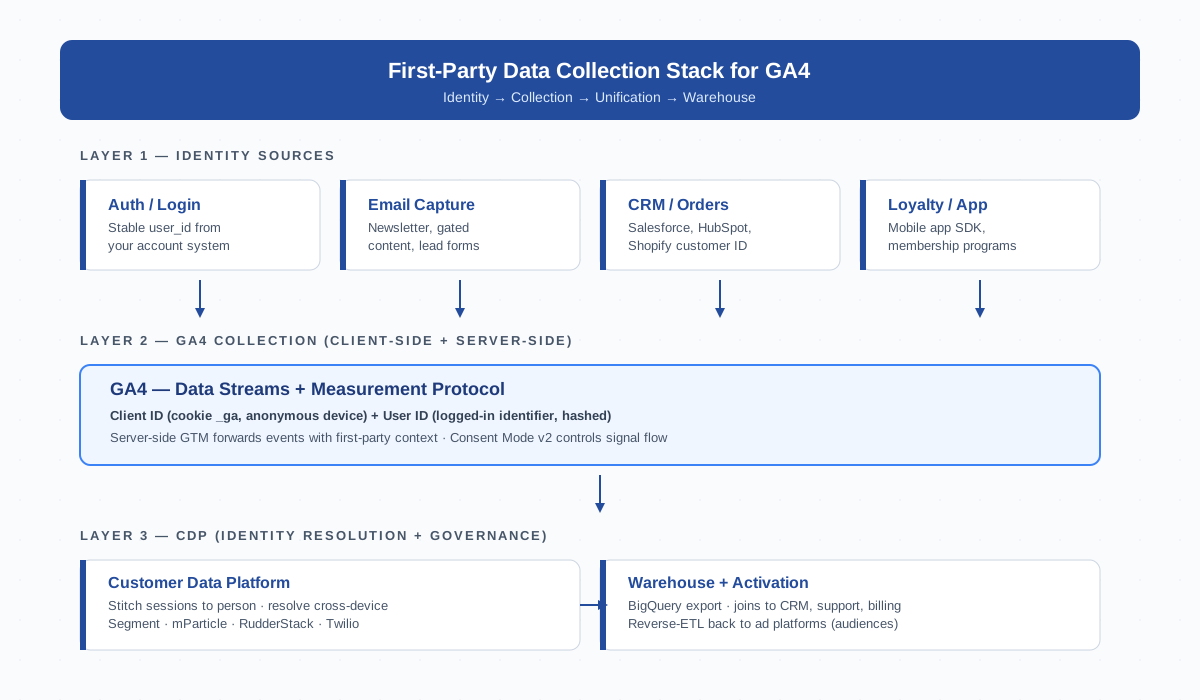
Most mid-market companies skip layers 3 and 4 and pretend GA4 alone is the system. It isn’t. GA4 stores 14 months of events and aggregates them into reports — it’s not a customer database. The CDP and warehouse exist because you need joinable, persistent, governance-ready records that outlive any single analytics tool.
GA4 as a First-Party Source: Client ID + User ID Strategy
GA4 has two identifiers, and most implementations only use one of them. That’s the single biggest first-party gap you can close in an afternoon.
Client ID is the anonymous device identifier stored in the _ga first-party cookie. It survives until the cookie expires (default 2 years, but Safari ITP caps script-set cookies at 7 days). One person on three devices = three Client IDs.
User ID is your stable login identifier — typically a hashed customer ID — that you push to GA4 when a user is authenticated. One person on three devices, all logged in, = one User ID. This is how GA4 supports cross-device tracking in a privacy-respecting way.
Set User ID server-side or via gtag('set', { user_id: hashedId }) immediately after login. Hash with SHA-256 before sending — never push email addresses or raw customer IDs into GA4. In the GA4 UI, switch the reporting identity to “Blended” so reports use User ID where available and fall back to Client ID otherwise.
This pairing is what turns GA4 from a session tracker into a person-level analytics tool — without depending on any third-party cookie, fingerprint, or shared identifier graph. For a deeper walkthrough see the pillar’s cookieless strategies guide.
Server-Side Capture for First-Party Resilience
Even with Client ID + User ID configured, browser-side collection leaks data. iOS Safari strips the first-party cookie on cross-domain navigation. Firefox’s ETP blocks known analytics endpoints. Roughly 30% of users run an ad blocker that drops the GA4 request before it ever leaves the browser.
Server-side GA4 collection — typically through a server-side GTM container on your own subdomain — fixes most of this. The browser sends events to analytics.yourdomain.com, your server processes them, and your server forwards to GA4. The request looks like a first-party call to the user, the cookie is server-set (extending its lifetime past Safari’s 7-day cap), and ad blockers can’t pattern-match the endpoint.
Server-side capture is the pragmatic ceiling for first-party resilience inside GA4. It doesn’t solve consent — you still need a working cookie banner and Consent Mode v2 — but it does eliminate most accidental data loss. If you’re running GA4 client-side only in 2026, you’re seeing 60-75% of the picture at best.
Customer Data Platforms (CDPs): When You Need One
A CDP is a system whose entire purpose is unifying customer data from many sources into one queryable, person-centric store. The big three commercial CDPs are Twilio Segment, mParticle, and RudderStack (open-source-friendly).
You need a CDP when:
- You have more than two systems generating customer events (web, app, email, support, product) and need them stitched.
- You need omnichannel analytics — connecting offline purchase or call-center data to digital behavior.
- You’re activating audiences in multiple ad platforms and rebuilding them in each is consuming engineering time.
- Your privacy team needs centralized consent enforcement across every downstream tool.
You don’t need a CDP if you have one site, one product, GA4, and an email tool. Adding one would be over-engineering — start with GA4 + BigQuery export and reassess at the next scale jump. The CDP investment makes sense around the point where engineers are writing the same identity-stitching code in three places.
Consent and First-Party Data: GDPR-Compliant Collection
First-party data is not consent-free data. GDPR applies to any personal data you process — origin doesn’t matter. The compliance pattern is:
- Collect explicit consent through a TCF-aligned cookie banner before firing analytics or ad tags.
- Pass the consent state into GA4 via Consent Mode v2 so denied users send only cookieless pings.
- Honor the consent record downstream — your CDP and warehouse must enforce the same boundaries that the banner promised.
- Provide a working “withdraw consent” path — usually a banner re-open link in the footer.
Companies treating consent as a one-time popup tend to fail audits at the warehouse level. The data lake remembers everything; if the user opted out yesterday, every downstream activation needs to reflect that today. Build the consent signal into the CDP’s identity record, not just the banner.
Identity Resolution: Stitching Sessions Without Third-Party Cookies
Identity resolution is the technical problem of recognizing the same person across devices, sessions, and channels — without third-party cookies and without violating privacy law. The deterministic-then-probabilistic ladder is the standard approach:
| Method | Match Quality | Coverage | Privacy Posture |
|---|---|---|---|
| Authenticated user_id | Deterministic (perfect) | Logged-in users only — typically 5-30% | Excellent — explicit identifier |
| Hashed email match | Deterministic when hashes align | Email-collected users — 20-50% | Good with consent |
| First-party cookie (Client ID) | Probabilistic (per device, time-limited) | Most users for short windows | Good if first-party |
| IP + UA fingerprint | Weakly probabilistic | All users | Risky — fingerprinting laws apply |
Lean hard on the top two rows. Use Client ID as a fallback for fresh anonymous sessions, then upgrade to User ID the moment authentication occurs (this is what GA4’s User ID feature is designed for, and it works hand-in-hand with cross-platform tracking when your app and web both stream into the same GA4 property). Never build a customer system on fingerprinting — you’ll get fined or break with the next browser update.
Common First-Party Data Mistakes
Most “we have a first-party data strategy” claims fall apart on inspection. The patterns repeat:
- Treating it as “all logged-in users.” Logged-in users are a subset. A real first-party strategy also captures pre-auth behavior tied to anonymous Client ID and stitches it on login.
- Missing consent layer. If your banner sends opt-out users into the same pipeline as opt-in users, you’re not compliant — you’re a lawsuit waiting to happen.
- No warehouse. GA4’s 14-month retention is not your customer database. Without BigQuery export you lose your own history every fiscal year.
- Hashing inconsistency. Email hashed in your CRM doesn’t match email hashed differently in GA4 doesn’t match the hash your ad platform expects. Standardize: lowercase, trim, SHA-256, hex output. Pick one and document it.
- One-shot collection. Capturing email at signup and never refreshing means stale identity within 12 months. Re-prompt on key actions.
- Treating Client ID as User ID. They’re different. Client ID is per-device-per-browser; User ID is per-person. Mixing them up corrupts cohort and retention reports.
Building a Phased First-Party Roadmap: Quarter-by-Quarter
A first-party data stack is a 12-month build for most mid-market companies. Trying to do it in a single sprint produces a fragile result that nobody trusts. Phase it:
Q1 — Foundation. Audit current tracking. Verify GA4 Client ID is firing on all pages. Implement Consent Mode v2 with a TCF-compliant banner. Decide on hash standard (SHA-256 lowercase email is fine). Document who owns each data source.
Q2 — Identity. Push User ID to GA4 on every authenticated session. Capture hashed email at signup, checkout, and key form submissions. Enable BigQuery export so warehouse work can begin. Switch GA4 reporting identity to Blended.
Q3 — Server-side + warehouse. Stand up server-side GTM on a first-party subdomain. Move the highest-value events (purchase, signup, lead) server-side first. Build the first warehouse models that join GA4 events to CRM customer records.
Q4 — Activation. Reverse-ETL warehouse audiences to ad platforms (Google Ads, Meta CAPI). Evaluate whether a CDP is justified by the volume of activation work. Build retention/cohort dashboards on warehouse data, not GA4 UI.
By the end of year one, GA4 is a measurement endpoint inside a broader first-party system — not a tracking dependency. That’s the durable position.
Bottom Line
First-party data is the only sustainable foundation for analytics in a post-cookie web. GA4 supports it well — Client ID + User ID, server-side collection, Consent Mode v2, BigQuery export — but only if you implement those pieces deliberately. The companies that finish 2026 with a working first-party stack will outperform those still patching third-party leaks. Start with the foundation, phase the build, and treat consent as an architectural concern rather than a checkbox.
FAQ
What’s the difference between first-party data and zero-party data?
Zero-party data is a subset of first-party data that the user proactively volunteers — preferences, intent, survey answers. First-party data includes both volunteered data and observed behavior (page views, clicks, purchases). All zero-party data is first-party, but not all first-party data is zero-party.
Can GA4 work without any cookies at all?
Partially. With Consent Mode v2 set to denied, GA4 sends cookieless pings that contain only aggregate signals — no Client ID, no user identifier. Google uses behavioral modeling to estimate gaps. Reports work in aggregate but lose per-user detail like cohort retention or cross-session paths.
Do I need a CDP if I’m already using GA4 + BigQuery?
Often no. GA4 with BigQuery export covers measurement and warehouse layers for many mid-market companies. A CDP becomes worth its cost when you have multiple event-generating systems (web, app, support, product) that need stitching, or when you’re activating audiences across many ad platforms simultaneously.
How do I send User ID to GA4 without violating GDPR?
Hash the user ID with SHA-256 before sending — never raw email or customer ID. Only send it after the user has granted analytics consent through your banner. Set it server-side or via gtag('set', { user_id }) immediately on login. Document the hashing process in your privacy policy.
What happens to my first-party data when a user opts out?
You stop processing their personal data going forward. For GA4, Consent Mode v2 sends only cookieless pings. Your CDP and warehouse should propagate the opt-out signal so downstream activations exclude the user. Existing data must be deleted or anonymized within the timeline your consent record promised — usually 30 days.
Is server-side tracking required for first-party data collection?
No, but it materially improves data quality. Browser-side GA4 still loses 25-40% of events to ad blockers, ITP, and ETP. Server-side collection on your own subdomain bypasses most of those losses and extends first-party cookie lifetimes past Safari’s 7-day cap. Treat it as a Q3 upgrade in a phased roadmap, not a blocker.
How long should I retain first-party data?
Retention depends on legal basis and purpose. GA4 caps event-level data at 14 months by default. BigQuery export has no Google-imposed cap, but GDPR requires retention to be limited to what’s necessary for the stated purpose. Two to three years is common for analytics; financial records may require seven. Document retention per data category and enforce it with scheduled deletion jobs.
Related Reading
- Pillar: Cookieless Analytics Strategies That Actually Work
- Client ID — how GA4’s anonymous device identifier works
- Measurement Protocol — the API behind server-side GA4 collection
- Data Stream — GA4’s web/app collection endpoints
- BigQuery — the warehouse layer for first-party analytics
- GDPR — the European privacy framework that shapes consent design
