
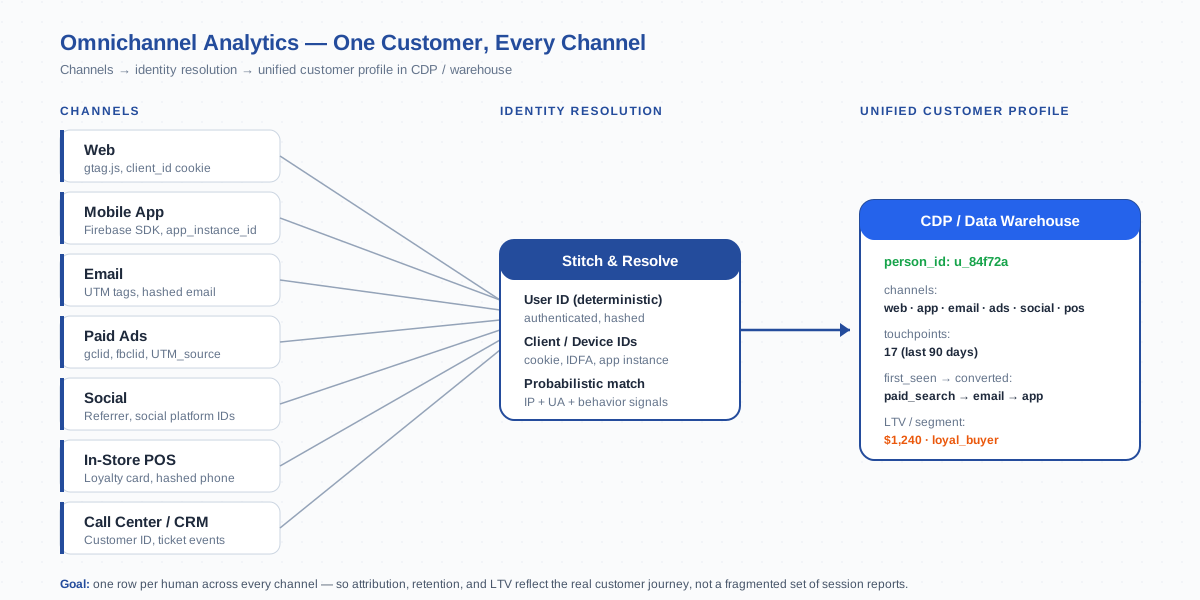
Omnichannel analytics unifies every customer interaction — web, mobile app, email, paid ads, social, in-store, and call center — into one view of the customer. It goes a level deeper than cross-platform tracking (web + iOS + Android) by also folding in offline and non-digital touchpoints. The result is a single profile per human, with every channel’s events stitched against one identity, so attribution, retention, and lifetime value reflect the real journey instead of a fragmented set of session reports.
What Is Omnichannel Analytics
Omnichannel analytics is the discipline of collecting, identity-resolving, and analyzing customer behavior across every channel a business operates — digital and physical, paid and organic, online and offline. The defining trait is unification: one customer record per human, regardless of how they interacted. A user who saw a Facebook ad on Tuesday, opened your email on Wednesday, browsed the website on Thursday, and bought in the iOS app on Friday should appear as one customer with four touchpoints, not four anonymous strangers.
The two core technical problems it solves are data unification (getting all channel data into one place) and identity resolution (knowing which events belong to the same person). On top of that sits the analytics layer — funnels, attribution, segments, and lifetime value — that runs on the unified data. Without unification you can’t ask “which channel drove this customer’s first conversion” or “what’s the average path length from first touch to purchase across all surfaces.” With it, those questions become routine SQL queries.
Omnichannel is also a business posture, not just a tech stack. It assumes that customers expect continuity: the cart they built on the web should still be there when they open the app, the loyalty card swiped at the till should be linked to their email subscription, and a support call should know the same customer who just clicked a link in last week’s newsletter. The analytics has to support that experience — and prove whether it works.
Omnichannel vs Multichannel vs Cross-Channel
These three labels show up in vendor decks interchangeably, but they describe meaningfully different setups. Picking the right one matters because each implies a different architecture and a different reporting capability.
| Approach | What it means | Identity model | Reporting capability |
|---|---|---|---|
| Multichannel | Operating multiple channels independently | Each channel has its own identifier; no stitching | Per-channel reports only — no unified user view |
| Cross-channel | Channels share campaign tags and some attribution credit | Partial stitching via campaign IDs (UTM, gclid) | Source/medium reports across channels; conversion paths exist but users may double-count |
| Omnichannel | Channels feed one unified customer record | Full identity resolution: User ID + Client ID + deterministic + probabilistic | Single-customer view with every touchpoint, real LTV, true incrementality |
The difference between cross-channel and omnichannel is the most subtle. Cross-channel attribution can tell you that paid search assisted a conversion that closed on email. Omnichannel can tell you that the same customer has interacted with your brand 17 times across 5 surfaces over 90 days, what their first touch was, what their second purchase looks like, and which segment they belong to today. The first is campaign-centric; the second is person-centric.
Why Omnichannel Matters: Customer Journey Reality
Modern customer journeys are noisy. Google’s research consistently shows the typical B2C buying decision involves between 5 and 20 touchpoints, spread across an average of 3 to 5 channels, often over weeks. A B2B journey is even longer — 27 touchpoints across 7+ channels is normal for considered purchases. Single-channel analytics fundamentally can’t see this. It cuts the journey into disconnected slices, attributes credit to whichever surface happened to capture the conversion event, and ignores the rest.
Three concrete consequences of staying single-channel:
- Inflated user counts. Without stitching, the same person counts as a separate user on every device or surface. Your “monthly active users” number is roughly 1.5x to 2.5x the real figure.
- Underweighted upper funnel. Channels that introduce customers but rarely close (display, social, content) lose all credit to last-touch channels (paid search, direct, email). Marketing budget shifts toward closers and starves the discovery layer.
- Broken retention metrics. If a returning customer logs in on a new device, single-channel tracking sees a “new user.” Cohort retention curves under-report by 20–40% in most setups I’ve audited.
Omnichannel analytics fixes all three by tying every event to a stable customer identity. The downstream effect on decisions is large: attribution shifts toward the channels that actually matter, retention reports stop lying, and lifetime value calculations become trustworthy enough to drive bid strategies and acquisition caps.
Components of Omnichannel Analytics
Every omnichannel stack has four layers, regardless of which vendors you pick:
- Collection layer. SDKs, tags, and connectors that emit events from each channel. On the web that’s gtag.js or a server-side container; on mobile it’s Firebase; for email it’s webhook integrations from your ESP; for in-store it’s POS data exports or loyalty card APIs.
- Identity layer. The component that resolves “which events belong to the same person.” This is the hardest part. It uses authenticated User IDs where available, falls back to deterministic device identifiers (Client ID, app_instance_id), and sometimes uses probabilistic matching (hashed email, IP+user-agent fingerprinting) to fill gaps.
- Storage layer. A central place where unified events live. Could be a CDP (Segment, mParticle, RudderStack), a data warehouse (BigQuery, Snowflake, Redshift), or both — CDP for activation, warehouse for analysis.
- Activation and analysis layer. Reports, dashboards, and audiences. This is where attribution models, cohort analysis, segment exports, and LTV models run.
The collection and identity layers are usually where 80% of implementation effort goes. Storage is mostly a vendor pick. The analysis layer is whatever your team is already comfortable with — Looker Studio, Power BI, dbt models, or notebook-style exploration. Get the first two layers right and the rest follows.
GA4 + BigQuery as an Omnichannel Foundation
For organizations already on Google’s stack, GA4 plus its BigQuery export is a serviceable starting point for omnichannel — particularly for the digital channels. GA4’s event schema is uniform across web, iOS, and Android via Firebase, and the BigQuery export gives you raw event rows with user_id, user_pseudo_id, and platform columns ready for joining.
The strengths of GA4 + BigQuery for omnichannel:
- Free for standard properties (1M events/day BQ export ceiling, sampled above that)
- Native cross-platform via Firebase + a single property with multiple data streams
- SQL-queryable raw events — every parameter, every user property, every session preserved
- Built-in Source/Medium/Campaign attribution dimensions across all streams
The honest limits:
- Email and paid-ads data only enter via UTM tags and ad-platform integrations, not as native streams
- Offline data must be pushed in via the Measurement Protocol or BigQuery side-table joins — not seamless
- Identity resolution is “good enough” for digital but doesn’t have a probabilistic fallback when User-ID is missing
- Activation (audience exports, real-time triggers) is weaker than dedicated CDPs
The pragmatic path I recommend for most mid-market sites: ship GA4 + BigQuery first, get the digital channels stitched correctly via user_id, then add a CDP only when you have proven offline / email volume that justifies it. Don’t pay for a CDP before your GA4 setup is clean — you’ll just propagate broken identity into a more expensive system.
Customer Data Platforms (CDPs): mParticle, Segment, RudderStack
A Customer Data Platform is purpose-built infrastructure for omnichannel. It collects events from every source, runs identity resolution on them, persists a unified profile per customer, and pushes audiences and events out to downstream tools (ad platforms, ESPs, support tools, analytics). The big three for most teams are Segment, mParticle, and RudderStack.
| CDP | Sweet spot | Identity model | Pricing posture |
|---|---|---|---|
| Segment | Mid-market SaaS, fast time-to-value | User ID + anonymous ID + Identity Resolution add-on | Per MTU; gets expensive past 100k users |
| mParticle | Mobile-first apps, regulated industries | Multi-identity priority list, deterministic + probabilistic | Enterprise contracts, custom |
| RudderStack | Warehouse-first teams, cost-conscious | Routes to your warehouse first; identity in dbt or SQL | Open-source core + managed cloud; cheaper at scale |
The right CDP depends on where your data already lives and what you’ll activate. Segment is the easiest to ship — its Sources catalog covers most SaaS tools out of the box. mParticle is the strongest on mobile and on identity rules complexity. RudderStack is the right pick if you already invested in a warehouse and want the CDP to be a thin pass-through rather than another walled garden.
One thing to verify before signing any CDP contract: how the platform handles a customer who exists across an authenticated session and several anonymous sessions. The merging behavior — does it merge on first User ID seen, or wait for explicit confirmation, or use probabilistic signals — varies by vendor and significantly affects how your reports read. Ask for documentation, not just a sales demo.
Online + Offline Data: GA4 Offline Conversions, Measurement Protocol
Offline data is what separates true omnichannel from “digital cross-channel.” A retailer with brick-and-mortar stores, a SaaS company that closes deals over phone, a service business with a call center — none of them can do real omnichannel without folding offline events into the same customer profile.
Two reliable mechanisms for getting offline data into GA4:
- Offline Conversions Import. A scheduled CSV upload of conversions that happened off-platform — phone sales, in-store purchases, sales-rep-closed deals — keyed by
gclid(for Google Ads) orclient_id(for organic). Useful for attribution. Works for Google Ads but limited for general analysis. - Measurement Protocol. Server-side HTTP POSTs that fire arbitrary events into a GA4 data stream. You provide the
client_idorapp_instance_idplus an optionaluser_id, and the event lands in the same property as web/app events. This is the right tool for real-time offline events like POS purchases or call-center outcomes.
The challenge with both is the join key. To send an in-store purchase as a Measurement Protocol event tied to a specific customer, you need to know that customer’s client_id or user_id at the time of the in-store transaction. Loyalty cards, login at checkout, or hashed-email lookups against your CRM are the usual ways to solve this. The friction is upfront — once the customer-identity-to-online-identity map exists, every subsequent offline event flows in cleanly.
Identity Resolution: User ID, Client ID, Deterministic vs Probabilistic
Identity resolution is the engine of omnichannel analytics. Done well, it merges fragmentary signals into one stable customer record. Done poorly, it merges different humans into one record (privacy disaster) or fails to merge a single human’s events (analytics failure). The discipline has three identifier tiers, applied in priority order.
- Deterministic — User ID. The strongest signal. Set when a user authenticates, stable across all platforms, and explicitly matched to your CRM. The hash of an internal user_id (SHA-256 is standard) is the canonical implementation. See the Client ID entry for the related per-device identifier.
- Deterministic — device identifiers.
client_idon web (in the_gacookie),app_instance_idon mobile, IDFA / GAID on advertising contexts. Stable per-device, but a single user can have multiple — laptop browser, work phone, personal phone, tablet. Resolving them requires a User ID join or probabilistic stitching. - Probabilistic. Hashed email match (across email opens and authenticated logins), IP + user-agent fingerprint, geo + behavior similarity. Lower confidence, but fills gaps where deterministic identifiers are missing. Modern CDPs apply confidence scores and only merge above a threshold.
The single most impactful implementation choice: set user_id as early as possible in the funnel. If you only set it at checkout, the entire pre-checkout journey is split by device. If you set it at first authenticated visit (a logged-in homepage view, a returning visitor cookie that decrypts to a known user), the entire customer history fuses into one profile. The difference between “user_id at checkout” and “user_id at first auth” can be a 50% increase in correctly attributed touchpoints.
Privacy note: probabilistic matching is increasingly regulated. GDPR treats high-confidence fingerprinting as personal data. Apple’s ATT and Mail Privacy Protection actively defeat IP-based matching for iOS users. The trend is toward deterministic-only resolution (User ID + first-party identifiers), with probabilistic matching reserved for explicit consent contexts.
Tools and Stack Comparison
Three common omnichannel architectures, ranked by complexity and capability:
| Stack | Best for | Strengths | Limits |
|---|---|---|---|
| GA4 + BigQuery | Digital-first, mid-market | Free, fast to ship, native cross-platform via Firebase | Weaker offline + email; identity resolution is User-ID-only |
| CDP + Warehouse (Segment / mParticle / RudderStack + BQ/Snowflake) | Multi-channel growth teams, mobile-heavy products | Strong identity rules, real-time activation, audience exports | $$$ at scale; another vendor to operate |
| Adobe Experience Platform | Enterprise, regulated industries | Deepest identity graph, real-time CDP, customer journey orchestration | Implementation cost (6+ months), enterprise-only pricing |
For a 10–500-employee company, the GA4 + BigQuery stack handles 80% of omnichannel use cases at zero license cost. Add a CDP when you genuinely need real-time activation (push notifications based on web behavior, email triggers from app events, audience exports to ad platforms) — not before. Adobe Experience Platform is enterprise-only and rarely the right answer outside the Fortune 1000.
One stack pattern I see working consistently: GA4 for measurement, RudderStack as the open-source CDP layer, BigQuery as the warehouse, dbt for identity resolution and modeling, Looker Studio or a notebook environment for analysis. Total license cost stays under $1k/month at moderate volume, and the team owns the data flow end-to-end.
Common Omnichannel Pitfalls
The mistakes I see most often in omnichannel implementations:
- Buying a CDP before fixing GA4. A CDP propagates whatever identity model you feed it. If GA4 is misconfigured (no User ID, separate properties per platform, inconsistent UTM tagging), the CDP just makes the broken state more expensive.
- User ID set too late. Identity should be established at the moment of authentication, not at checkout. Pre-auth events on the same session won’t be retroactively merged in most platforms.
- Inconsistent UTM tagging. Email blasts use one source name, social posts use another, paid ads a third. Source/Medium reports become noise. Standardize on a UTM convention document and enforce it via build-time linters or campaign management tools.
- Ignoring cross-domain tracking. Omnichannel without cross-domain means a checkout on a separate domain shows up as a referral from your main site. Configure the linker before you worry about offline data.
- No data layer on the web. Hard-coding event parameters into gtag calls makes every change a developer ticket. A clean data layer makes the omnichannel collection layer easy to extend.
- Treating offline as an afterthought. Most retailers and service businesses leave 30–60% of customer revenue outside the analytics. The Measurement Protocol path is real work but unlocks the largest single bucket of “missing” attribution.
- Probabilistic matching without consent gating. Fingerprint-based stitching that runs before consent is a GDPR risk. Tie probabilistic resolution to consent state explicitly.
- Trusting vendor “unified user count” without validating the math. Every tool dedupes differently. Pull a known test user’s events from raw BigQuery and verify they collapse to one row before you trust UI numbers.
The audit pattern: pick a known test customer, log them in across web, mobile app, and (if you have offline data) a simulated POS event. Then query the underlying tables — BigQuery for GA4, the warehouse for CDP — and confirm one canonical user_id appears across all rows. If you can’t see one identity, the analytics layer above it is producing fiction.
Frequently Asked Questions
Is omnichannel analytics the same as cross-platform tracking?
No. Cross-platform tracking covers web + iOS + Android within one analytics property. Omnichannel is broader — it adds email, paid ads, social, in-store POS, call center, and any other channel into the same unified customer profile. Cross-platform is a subset of omnichannel.Can I do omnichannel analytics with only GA4 and BigQuery?
Yes for digital channels (web + iOS + Android + UTM-tagged email and paid ads). You can extend to offline data via the Measurement Protocol or scheduled BigQuery side-table joins. The setup handles 80% of mid-market omnichannel use cases at zero license cost. Add a CDP only when real-time activation or non-Google channels become critical.What’s the difference between a CDP and a data warehouse?
A CDP (Customer Data Platform) is purpose-built for real-time identity resolution and downstream activation — pushing audiences to ad platforms, triggering emails, segmenting users live. A data warehouse (BigQuery, Snowflake, Redshift) is for SQL-based batch analysis. Modern stacks use both: warehouse for analysis, CDP for activation, sometimes with the warehouse as the source of truth feeding the CDP.How does identity resolution actually work?
It applies identifiers in priority order: User ID (deterministic, set at authentication), then deterministic device IDs (Client ID, app_instance_id), then probabilistic signals (hashed email, IP + user-agent fingerprint). Each event is stamped with the highest-confidence identifier available, and the resolution engine merges events sharing identifiers into one customer profile.Do I need offline data for omnichannel analytics?
Only if your business has meaningful offline channels — physical stores, call centers, sales-rep-closed deals, postal mail. A pure SaaS company with no offline footprint can get a complete omnichannel view from GA4 + email + ads. A retailer with stores or a B2B company with phone sales must include offline; otherwise 30–60% of revenue stays outside the analytics.How does GDPR affect omnichannel implementations?
GDPR requires consent for tracking, transparency about identity resolution, and a legal basis for combining data sources. Practical implications: (1) tie identity resolution to consent state — don’t probabilistically merge users who declined tracking; (2) hash personal identifiers like email before storing them in the analytics stack; (3) provide a customer-data-deletion path that propagates across CDP, warehouse, and analytics platform within 30 days.What’s the single most impactful step I can take to improve omnichannel reporting?
Setuser_id on every authenticated session, on every platform, using the same canonical hash of your internal user identifier — and set it as early in the session as possible. This single change usually fixes 60–80% of the “fragmented user” problem in a typical mid-market setup, before any CDP or extra tooling is involved.