

Server-side tracking moves the heavy lifting of analytics out of the browser and into your own infrastructure. The browser sends one request to a domain you control, your server processes the event, and only then does data flow to GA4 and other destinations. This single architectural change recovers data lost to ad blockers, extends cookie lifetimes past Safari’s ITP cap, and gives you actual control over what leaves your domain.
If you’ve already read our pillar on cookieless analytics strategies that actually work, you know server-side is the infrastructure-grade option. This guide covers the implementation: which stack to pick, what it costs in real dollars, how to wire it to GA4, and the failure modes nobody warns you about.
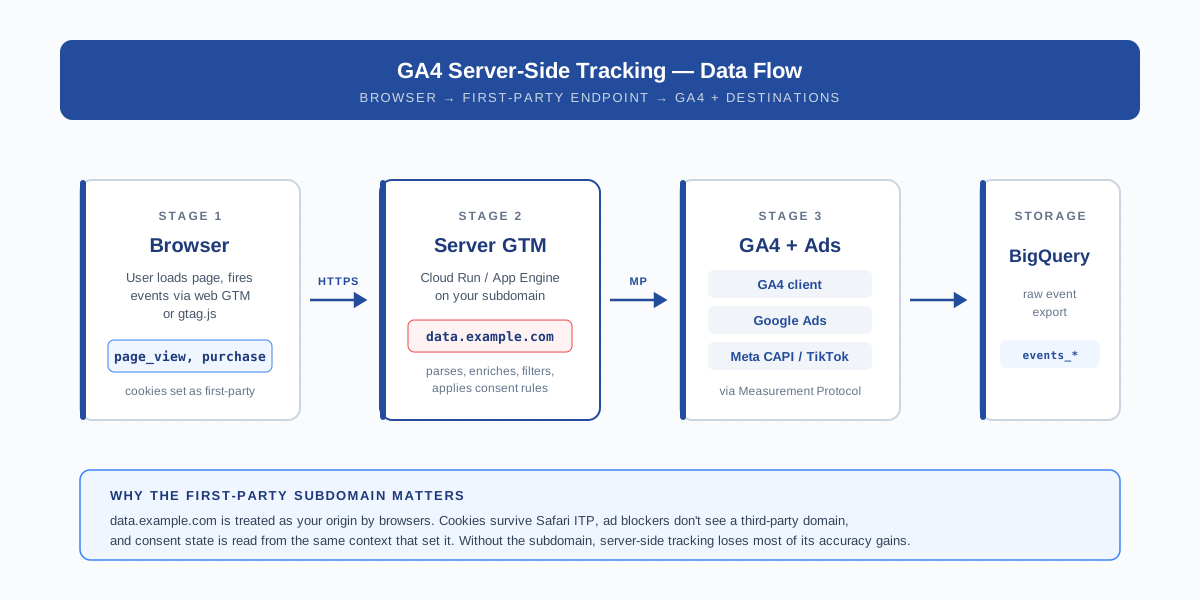
What is Server-Side Tracking (SST)
Server-side tracking is a tagging architecture where analytics events are processed on a server you control before being forwarded to vendors. Instead of the browser firing requests directly to google-analytics.com, it sends them to a subdomain like data.example.com. That endpoint runs a tagging engine — usually Server Google Tag Manager — which then talks to GA4, Google Ads, Meta, and anything else over the Measurement Protocol.
The key word is intermediary. SST doesn’t replace GA4. It changes who sends the data. In a client-side setup, the browser is both collector and shipper. In a server-side setup, the browser becomes a thin collector and your server becomes the shipper. That separation is what unlocks every other benefit on the list.
Three things make SST architecturally distinct from regular client-side tag management:
- The endpoint runs on your DNS. Browsers treat it as first-party. Cookies set there survive ITP. Ad blockers don’t recognize the subdomain.
- Tags execute server-side. The vendor SDKs that used to live in the page now run inside your sGTM container. The browser never loads them.
- You own the payload. The server can strip PII, hash emails, drop fields, or block events entirely before any third party sees them.
Why GA4 Implementations are Moving Server-Side in 2026
The push to server-side isn’t theoretical. Three forces are making it the default for any GA4 implementation that cares about data quality.
Ad blocker penetration is at 30%+ on desktop. Most blocklists kill googletagmanager.com and google-analytics.com on sight. A first-party subdomain isn’t on those lists. When I migrated a SaaS site last year, recovered events jumped 22% the day we cut over — and that was before we added Meta CAPI.
Safari’s ITP caps client-set first-party cookies at 7 days. A returning visitor on day 8 looks brand new. Server-set cookies don’t have that limit. For any business with sales cycles longer than a week, this alone justifies the migration.
Consent and PII handling are getting audited. Under GDPR and increasingly under state-level US laws, sending raw IPs and email hashes to ad platforms without explicit consent is a problem. SST lets you enforce redaction in one place instead of hoping every client-side tag respects the cookie banner state.
SST vs Client-Side Tagging
The trade-offs are not subtle. Server-side wins on data quality and privacy control. Client-side wins on simplicity and cost. Pick based on traffic volume and how much that data actually matters to revenue.
| Dimension | Client-Side | Server-Side |
|---|---|---|
| Ad-blocker resilience | Loses 20–35% of events | Recovers most blocked events |
| Cookie lifetime (Safari) | 7 days max (ITP) | 2 years (server-set, HTTP-only) |
| Page weight | +50–200 KB of vendor SDKs | Single small loader |
| Privacy / PII control | Per-tag, brittle | Centralized at the server |
| Setup complexity | Low — paste a snippet | Medium — DNS + cloud + container |
| Monthly cost (small site) | $0 | $10–60 (Cloud Run + bandwidth) |
| Monthly cost (high traffic) | $0 | $200–1500 |
| Vendor support | Universal | GA4 + most major ad platforms |
| Debugging | Browser DevTools | sGTM Preview + server logs |
Notice what’s not in the table: a “more accurate” claim. SST is more accurate only when configured correctly. A broken server container produces zero events instead of slightly fewer. That’s the trade for the upside.
The Two Common SST Stacks: GTM Server Container vs Custom Endpoint
Almost every production SST deployment falls into one of two camps. Pick the wrong one and you’ll either over-engineer or hit a ceiling within six months.
Stack A: Server-Side GTM (sGTM)
Google’s official offering. You spin up a Docker image on Cloud Run, App Engine, or any container host. The image runs Google’s tagging server, configured through the same tagmanager.google.com UI you already know. Tag templates exist for GA4, Google Ads, Meta CAPI, Floodlight, and dozens of community-built integrations.
Use sGTM if: you want a maintained, vendor-supported path; you need GA4 + Google Ads + at most 3-4 other destinations; your team already knows web GTM.
Stack B: Custom Endpoint (Cloudflare Worker, Lambda, etc.)
You write a tiny server that accepts events and forwards them to wherever you want via the Measurement Protocol. No container template, no GUI — just code. Hosted solutions like Stape and Addingwell sit in between, offering managed sGTM with extras.
Use a custom endpoint if: you have unusual destinations sGTM can’t reach; you want sub-millisecond edge processing; you have engineers who’d rather maintain 200 lines of code than a Docker container.
Setting Up GA4 Server-Side: Step-by-Step
The setup looks intimidating until you do it once. End-to-end this is a 60–90 minute job for a fresh site. Existing sites take longer because of consent and data layer migration work.
Step 1 — Create the Server Container in GTM
In Google Tag Manager, click “Create container”, choose type Server, and name it after the property. GTM will prompt you to provision tagging server infrastructure. Pick “Manually provision” if you want full control, or let GTM auto-deploy to App Engine for the first iteration.
Step 2 — Deploy the Tagging Server
If you chose manual, the recommended target is Cloud Run. The Docker image is gcr.io/cloud-tagging-10302018/gtm-cloud-image:stable. Set CONTAINER_CONFIG to the value GTM gave you, set min instances to 1 (cold starts will eat your data otherwise), and let it deploy. Allocate at least 1 vCPU and 512 MB RAM per instance.
Step 3 — Map Your Subdomain
Create a DNS A or CNAME record pointing data.yoursite.com (or whatever subdomain you pick) to the Cloud Run service. Add the custom domain in Cloud Run, wait for the certificate to provision, then update the GTM container settings with that hostname. Test by visiting https://data.yoursite.com/healthz; you should get ok.
Step 4 — Add the GA4 Client
Inside the server container, go to Clients and add the Google Analytics: GA4 client. This client listens for incoming GA4 hits and parses them into events the rest of the container can consume. Without this, the server has no idea how to interpret what the browser sends.
Step 5 — Add the GA4 Tag
Add a Google Analytics: GA4 tag (the server-side one). Set the Measurement ID, the trigger to “All Events”, and that’s it for the minimum viable version. The tag will forward incoming events to GA4 over the Measurement Protocol from your server’s IP.
Step 6 — Point the Web Container at the Server
In your web GTM container, open the GA4 Configuration tag. Under Fields to Set, add server_container_url = https://data.yoursite.com. Now the gtag.js loader on the page will send hits to your server instead of google-analytics.com.
Step 7 — Verify in Preview Mode
Open the server container’s Preview, then trigger an event on the site. You should see the request hit the server, the GA4 client parse it, and the GA4 tag fire. Cross-check in GA4 DebugView. If both show the event with the same parameters, you’re live.
Cost Reality: Free Tier, Cloud Run, Bandwidth — What You Actually Pay
Cost is the question that derails most SST projects. The honest answer: it depends on traffic, but the floor is much lower than vendors imply and the ceiling is higher than the calculators suggest.
| Traffic / month | Cloud Run instances | Estimated monthly cost | Notes |
|---|---|---|---|
| < 100k pageviews | 1 min, 3 max | $10–25 | Mostly free tier; bandwidth dominates |
| 100k–1M | 2 min, 5 max | $40–120 | Free tier exhausted; egress matters |
| 1M–10M | 3 min, 10 max | $200–600 | Consider regional placement |
| 10M+ | 10 min, 30+ max | $800–2500 | Look at App Engine flex or k8s |
Three line items drive 90% of the bill: Cloud Run vCPU-seconds, egress bandwidth, and logging. Set log sampling to 10% in production unless you actively need every entry — Cloud Logging at full volume will silently double your bill. Bandwidth is per-GB out; Meta CAPI pixels are tiny, but BigQuery streaming inserts add up if you also enable raw event mirroring.
The free tier on Google Cloud (2M requests/month on Cloud Run, 200k MAU on App Engine) covers genuinely small sites. Stape starts at $20/mo with bundled bandwidth, which is cheaper than DIY for sites under 500k pageviews if you value the operational handoff.
Privacy and Consent in SST
Server-side doesn’t make you compliant by accident. It just gives you the controls. The default sGTM behavior still passes user IPs and full URLs to GA4. You have to actively enforce the limits.
Consent Mode v2 still applies. The browser sends consent state in the request payload (gcs, npa, dma parameters). The server must read these and adjust tag behavior accordingly. If consent for analytics_storage is denied, the GA4 tag should still fire but with anonymized payload — not skip entirely. Skipping breaks behavioral modeling.
IP anonymization happens server-side. Add a transformation that drops the last octet of ip_override before the GA4 tag fires. The same transformation can hash emails, strip query parameters, or remove referrer host data depending on your privacy posture.
Cookies become first-party automatically. When the GA4 client writes _ga from the server, it’s set on your domain with HTTP-only and Secure flags by default. You still need to disclose this in your cookie policy. Reviewers care less about the technical first-party-ness than about whether you told the user.
Common SST Pitfalls
Every SST migration I’ve debugged has hit at least two of these. Going in blind makes the first month painful.
- Hostname mismatch. The web GTM container sends to
data.example.combut the server container’s “default URLs” lists only the auto-provisioned App Engine domain. Hits get rejected. Fix: add your custom subdomain to the server container settings explicitly. - Cold-start data loss. Cloud Run min-instances=0 saves a few dollars and loses 0.5–2 seconds of events on each cold start. For analytics, that’s hundreds of events per day. Always set min-instances ≥ 1 in production.
- Broken consent enforcement. The server forwards events to ad platforms even when
ad_storageis denied because the consent check was wired into the GA4 tag only, not the Meta CAPI tag. Audit every destination tag separately. - Cache TTL on the loader. The web GTM snippet caches the gtag library aggressively. Changing
server_container_urldoesn’t take effect for users with the old script cached. Bump the container version and wait for the rolling refresh. - Double-counting. Both the client-side GA4 tag and the new server-side GA4 tag are firing in parallel during the cutover. Conversion counts double overnight. Always remove the client-side tag in the same release where you enable server-side.
- Cross-domain breakage. If you do cross-domain tracking, the linker parameter must be re-validated on the server because the client may have stripped it. Test with a manual click between domains.
SST and GA4 Limits
Server-side doesn’t get you out of GA4’s published limits. It just changes what hits them first.
- Event QPS. The Measurement Protocol allows up to ~20 events per request and roughly 100,000 hits/property/day on the standard tier. High-traffic sites batch events on the server before forwarding; sGTM does this automatically per session.
- Event parameter cap. 25 custom parameters per event, 100 per property. Server transformations can add parameters easily; it’s still the same cap on the GA4 side.
- Sampling thresholds. Standard GA4 properties sample explorations above 10M events in the date range. SST routes more events into GA4 (because fewer are blocked), so sampling can kick in earlier than expected.
- BigQuery export quirks. The free GA4-to-BigQuery export caps at 1M events/day. SST sites breach this faster. Either upgrade to GA4 360 or stream a parallel raw copy from the server (cheaper).
- Data stream attribution. Hits forwarded from the server still need a Measurement ID. If you operate multiple data streams, the server must route each event to the correct one — a single misconfigured tag will dump all traffic into the default stream.
When NOT to Use Server-Side Tracking
SST is the right call for many sites. It’s the wrong call for some. Be honest about which you are.
Skip SST if your site does fewer than 10,000 monthly sessions. The data quality gain from recovered events is real but small in absolute terms. The infrastructure overhead and the risk of breaking analytics during the migration outweighs the benefit. Stick with consent mode and call it done.
Skip if you don’t have anyone who can debug a Docker container. When sGTM breaks at 2 a.m. — and it will, eventually — somebody has to read Cloud Run logs and roll back a container version. If that person doesn’t exist, use Stape, Addingwell, or another managed provider rather than DIY.
Skip if your only destination is GA4 and consent is your only concern. GA4 with Consent Mode v2 client-side is genuinely good now. The marginal accuracy gain from SST is small for a single-vendor setup. SST shines when you’re sending to GA4 + Google Ads + Meta + TikTok and want consistent server-side enforcement across all of them.
Skip during a major site migration. If you’re replatforming the front end in the next quarter, do that first. Layering SST onto a moving target turns one debug session into three.
FAQ
Does server-side tracking work without GTM?
Yes. You can write a custom endpoint in any language, accept JSON events, and forward them to GA4 via the Measurement Protocol. sGTM is just the most popular path because it’s free and has GUI tag templates. For analytics-only setups, a 100-line Cloudflare Worker is often enough.
How much does sGTM cost on Google Cloud Run?
For under 100k pageviews per month, expect $10–25 in Cloud Run + bandwidth. Between 100k and 1M, $40–120. The bill is dominated by min-instances (always-on cost) and egress bandwidth, not by event volume itself. Always set min-instances ≥ 1; cold starts lose data.
Will SST recover all data lost to ad blockers?
No. Most blocklists target the third-party domains (google-analytics.com, googletagmanager.com); a first-party subdomain bypasses them. But aggressive blockers like uBlock Origin’s “annoyances” filter can catch generic patterns. Realistically, expect to recover 70–90% of what was being blocked, not 100%.
Does SST replace Consent Mode?
No. Consent Mode v2 is still required and still runs in the browser to capture user choices. SST receives the consent state as part of the event payload and enforces it on the server. Think of Consent Mode as the user’s voice and SST as the place where you actually act on it.
Can I run client-side and server-side GA4 in parallel?
Briefly, for testing. Long-term, no — you’ll double-count every event. The standard cutover pattern is: enable server-side, verify in DebugView for 24–48 hours, then disable the client-side GA4 tag in the same web container release.
What’s the difference between sGTM and a reverse proxy?
A reverse proxy just passes requests through to google-analytics.com from your domain. sGTM parses incoming hits into structured events, applies transformations, and re-emits them via the Measurement Protocol. Reverse proxying is simpler and gives you first-party cookie persistence, but you lose the ability to filter, anonymize, or fan out to multiple destinations.
Does server-side tracking violate GDPR?
Server-side tracking by itself is neutral — what you do with it determines compliance. SST actually makes GDPR easier because you can centrally enforce IP anonymization, PII redaction, and consent-driven destination blocking. The legal obligation to obtain consent, disclose cookies, and honor data subject requests is unchanged.
Bottom Line
Server-side tracking is no longer the exotic option. For any GA4 implementation that drives revenue decisions, it’s the default architecture in 2026. The migration costs an afternoon of engineering and somewhere between $10 and $200 a month. In return you get cookie lifetimes that survive Safari, event volumes that survive ad blockers, and one clean place to enforce consent for every destination at once. The pillar guide on cookieless analytics strategies covers the wider data-collection picture; this article was the implementation chapter for the GA4 server-side piece specifically.
Start small: spin up sGTM on Cloud Run with default settings, point one data stream at it, and run a week of side-by-side comparison with your existing client-side setup. The numbers will tell you whether to migrate the rest.
