
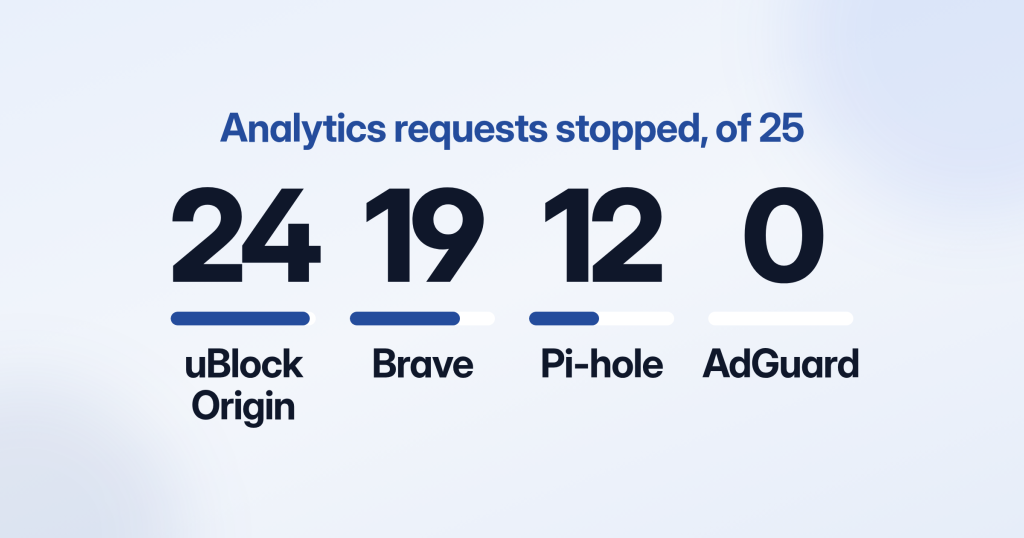
Two ad blockers, the same 25 analytics requests, opposite answers.
On its default lists, uBlock Origin stopped 24 of them, every Google Analytics request included. AdGuard’s browser extension, on the filters it installs with, stopped none. Brave Shields and a Pi-hole landed in between, at 19 and 12.
I didn’t expect a zero.
I ran this test to find out what blocks Google Analytics, and I expected to finish with a percentage. That’s how the question usually gets answered. About a third of people run an ad blocker, so about a third of your data must be gone.
I don’t trust that sentence anymore.
“Runs an ad blocker” covers a visitor who hides nearly everything your site sends and a visitor who hides nothing. No survey can tell you which one reads your pages.
The test itself is small. I took 25 requests. Nineteen go to the vendors a normal marketing stack uses: GA4, Google Tag Manager, the Meta Pixel, Mixpanel, Heap, PostHog, Amplitude, FullStory and Hotjar. The other six put the same paths on the site’s own domain.
On 16 November 2026 I matched all of them against nine public blocklists and four blockers set up exactly as they install.
The zero is real, by the way. One setting explains it, and that setting ships switched off.
What I Found, in Five Lines
- uBlock Origin’s default lists stopped 24 of 25 requests, including 5 of the 6 served from the site’s own domain.
- Brave Shields in its default mode stopped all 19 requests to the vendors’ domains and none of the 6 on the site’s own.
- A Pi-hole on its default list stopped 12 of 19 and never touched the Meta Pixel, PostHog or FullStory.
- AdGuard’s extension stopped 0 of 25 until its “Block trackers” option is switched on. The filter behind that option stops 23.
- None of the five hosts and DNS lists I tested blocks the Meta Pixel.
Why uBlock Origin Scored 24 and AdGuard Scored 0
A zero from an ad blocker needs checking. I went to the extension’s source code before I believed it.
Every blocker is an engine plus a set of lists. The score depends almost entirely on which lists are switched on the day it’s installed. Out of the box, uBlock Origin turns on its own filters plus EasyList, EasyPrivacy, Peter Lowe’s list and a malware list.
EasyPrivacy does the analytics work. On its own it stopped 23 of the 25 requests, while EasyList, the famous ad list, stopped none.
AdGuard’s extension starts with ad filters only. Analytics blocking sits behind an option called “Block trackers,” which uses the AdGuard Tracking Protection filter, and in the extension’s source code that protection ships switched off.
Turn it on and the filter stops the same 23 requests EasyPrivacy does.
One checkbox separates 0 from 23.
The grid lines up the requests where the four blockers part ways. A filled square is a stopped request, and the two rows marked Own are the same GA4 requests served from the site’s own domain.
Blocklist test
Each blocker stops a different set of the same requests
StoppedGets through
Model of default lists, 16 Nov 2026
Read down the columns and “ad blocker user” stops being one kind of visitor. A survey still puts all four columns in the same bucket.
A caveat on method. I modeled this offline and didn’t drive real browsers: each request was matched with adblock-rust, the engine Brave ships, as if a page on example.com had made it. Hosts files were matched on exact names, wildcard DNS lists on a name and its subdomains.
The list copies are dated 14 to 16 November 2026. Every cell, with its rule and line number, is in the matrix CSV, free to reuse under CC BY 4.0 with a link back.
The full table opens below.
Full tableAll 25 requests, list by listShow the tableHide the table
Same paths on your own domain
Same paths on your own domain
Same paths on your own domain
StoppedGets through
Tap a square for its rule. Default lists modeled on the adblock-rust engine, not run in a browser.
I didn’t model Firefox or Safari. That’s the biggest hole in the test.
Why a Pi-hole Stops GA4 and Lets the Meta Pixel Through
The extensions were the easy part. The network blockers gave me the result I understood least: they stop Google’s hits and wave Facebook’s through.
The reason is that a network blocker never sees more than a name.
A hosts file, a Pi-hole on a home network and a DNS ad blocker like NextDNS all step in at the name lookup. The browser asks where region1.google-analytics.com lives, the blocker answers with nothing usable, and the request is never sent.
There’s no path to look at.
That leaves one way to stop a tracker: block the entire name it lives on.
The Meta Pixel loads from connect.facebook.net and reports to www.facebook.com. None of the five hosts and DNS lists carries either name, and none carries PostHog’s.
I’d guess the reason is practical. Block www.facebook.com for a whole household and Facebook itself goes dark, and the list’s maintainer hears about it.
OISD prints the philosophy in its header: “Block. Don’t break.”
Here is the Meta Pixel’s request as each blocker sees it.
Blocklist test
Pi‑hole can't see the path, so the Meta Pixel gets through
Pi-hole sees only the name
Gets through
www.facebook.com/tr/
Brave and uBlock Origin see it all
Stopped
Swap the pixel for a GA4 hit and the Pi-hole answer flips. The name region1.google-analytics.com is on its list, so the request is gone before a path comes into it.
I expected the DNS lists to agree at least on Google. They don’t.
StevenBlack’s list, the one Pi-hole’s installer offers, blocked four of the five GA4 requests and missed region1.analytics.google.com. OISD big blocked only the two analytics.google.com hosts.
AdGuard DNS and HaGeZi let the gtag.js loader through and stop every collect request.
The tag loads, runs and reports to nobody.
This is also where I got my own test wrong the first time. My first run treated a hosts file like a wildcard list, where a line for google-analytics.com also covers region1.google-analytics.com.
A hosts file matches whole names and nothing else.
Peter Lowe’s list names google-analytics.com and googletagmanager.com as bare domains. In that first run it blocked 11 of the 18 vendor requests I had then.
Read the way a real hosts file is read, it blocks 3 of today’s 19.
Only one of those three is a GA4 request. Load the same file into uBlock Origin, which treats each entry as a domain plus all its subdomains, and it stops all five.
Does Serving the Tag From Your Own Domain Help?
If blockers match names, the obvious move is to stop using Google’s name. That’s the promise of a first-party analytics setup: the loader and the hits travel under your own domain.
It works against everything that only reads names. No blocklist names your domain. All six own-domain requests passed all five hosts and DNS lists.
Brave lets them through as well. In Standard mode, the default, its blocking policy says Brave “does not apply network-level filter list blocking to first-party requests.”
One blocker ignored the new name. The blue numbers are the requests on your own domain.
Blocklist test
Own‑domain tags pass Pi‑hole and Brave. uBlock Origin stops 5 of 6.
uBlock Origin
Brave
Pi-hole
Service's domainYour own domain
uBlock Origin still stopped 5 of the 6, because its lists match the path as well as the name.
Line 1204 of the EasyPrivacy copy I tested reads /gtag/js?, with no domain attached, and it matches that path on any host.
The one own-domain request that got past every list was the Meta beacon’s short /tr/ path. PostHog’s /ingest/e/ was caught only by uBlock’s own small privacy list.
The pass through the DNS lists has limits too.
A dedicated tracking subdomain is still a name, and AdGuard’s DNS filter carries more than 50,000 site-specific subdomains filed under Stape, a server-side tagging host.
Pi-hole follows CNAME records by default (its configuration docs list CNAMEdeepInspect as true), which catches a friendly subdomain that points at a listed tracker.
Brave’s exemption covers Standard mode only. That’s worth knowing before a move to server-side GA4.
The Lists Don’t Ask What You Collect
So should you rename the paths as well?
I wouldn’t.
EasyPrivacy describes itself as a list that “completely removes all forms of tracking from the internet, including web bugs, tracking scripts and information collectors.” Every request in my test fits that description, whatever the tool does with the data.
Rename /g/collect today and it works until somebody reports the new path. After that you’re in a race against volunteers who update the list daily.
And the visitor running that list has told you quite clearly what they want.
Brave is the only product in the test that draws a line inside analytics. Its policy says it “allows first-party analytics scripts as long as the script does not engage in clear cases of user-harmful behaviour.”
That sentence sent me back to my own tags. What do they carry about the person on the other end?
I can see what a tag sends. What happens to it afterwards only the vendor can say, and I went looking for one that says it in writing.
Statable does, on a page about what it collects and what it never does. The first thing I noticed is what it refuses to count: visitors whose browsers send Do Not Track or Global Privacy Control are left out on purpose.
The page sums the design up as five decisions with a cost attached. They are “no cookies, no fingerprinting, only the fields a report needs, a visitor ID that expires overnight, and reports that are aggregates rather than lists of people.”
The same page says it runs with no cookie banner for analytics.
None of this takes a tool off a blocklist. To EasyPrivacy a cookieless script on someone else’s domain is still a tracking script. It does change what you’re asking visitors to accept.
And on a site with a cookie banner, a large part of the missing data was never about blockers. It’s people who clicked no.
How Many People Use Ad Blockers, and Why That Isn’t Your Number
The “about a third” I started with has a source. The company behind Adblock Plus, eyeo, estimates 1.1 billion ad-blocking users at the end of 2025, about 30% of everyone online.
Its 2026 report builds that from vendor data such as Opera’s financial statements and AdGuard’s statistics. It also carries a country table of GWI survey data.
WPP Media surveyed 1,400 Belgians aged 18 to 59 in June and July 2025 and found that 34% had at least one ad blocker on at least one device.
Here are six of the published figures on one scale.
Published figures
Published ad‑block rates count people, and they run from 15% to 34%
Sources: eyeo 2026 report, WPP Media survey
They sit closer together than I expected. Japan’s 15% aside, the other five fall between 27% and 34%.
Someone with a blocker on the work laptop and none on the phone is one ad-block user in a survey. In your reports that’s maybe half a missing visitor.
Someone running AdGuard’s extension on its defaults is an ad-block user in every one of these studies, and all 25 of my requests got through.
And a site about Linux tooling draws a different crowd from a recipe blog.
How different, I can’t tell you. Neither can anyone who hasn’t measured your site.
How to Measure Your Own Gap
You need two counts of the same thing: the one your analytics reports and one that a blocker can’t touch.
The gap between them is your answer.
See Google Analytics blocked in your own browser
Start by watching it happen. Open your site with your usual extensions on, then open the Network tab in Chrome DevTools.
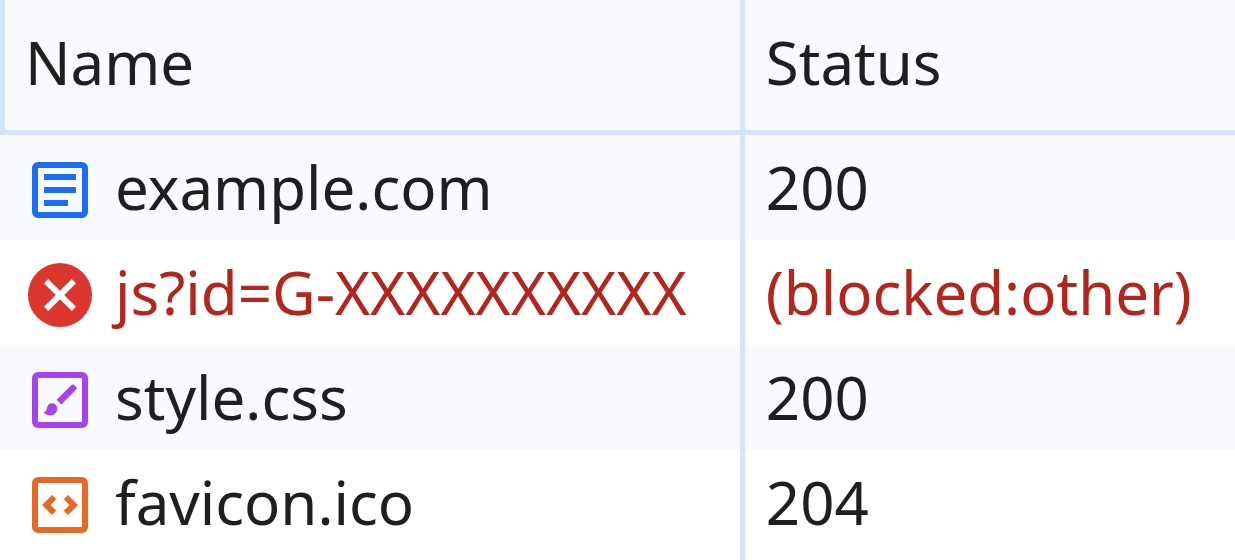
Here’s a blocked gtag.js request on my test page.
Chrome DevTools
Blocked by an extension: ERR_BLOCKED_BY_CLIENT
Network
Console

Chrome 147, test page on example.com
A request blocked by an extension shows a blocked status in the Network list, and the console names the reason: net::ERR_BLOCKED_BY_CLIENT.
Don’t expect that error every time.
uBlock Origin’s own privacy list swaps gtag.js for a harmless stand-in (line 21 in my copy). Then the loader looks redirected, the page shows no error and GA4 quietly never sends a hit.
A DNS block looks different again. The request dies with a name or connection error, because the browser never got an address.
If you run a Pi-hole, its query log shows each blocked name and its list search tells you which blocklist contains it.
Search Console clicks against analytics sessions
Search Console counts clicks on Google’s side, where no blocker on your page can hide them.
- Pick ten landing pages that get most of their traffic from Google.
- For the same dates, put Search Console clicks next to the organic sessions that start on those pages in your analytics.
- Look for a gap that holds steady across all ten.
- Ignore one odd page. That’s usually time zones or session counting.
Server logs against pageviews
Your web server logs every page it serves, blocked or not. Count the HTML page requests from real browsers for a day and compare them with the pageviews your analytics recorded.
Bots push that count up, so strip the bot traffic first. A CDN pulls it down, because pages served from its cache never reach your server. If you use one, take the count from the CDN’s request log.
Is it blockers or the cookie banner?
If your site shows a cookie banner, part of the gap is people who clicked no. Consent Mode v2 fills part of those refusals back in with modeled data.
The two groups don’t separate cleanly. Brave blocks cookie notices by default, so some visitors never see your banner at all. A visitor who refuses consent and also runs a blocker belongs to both groups.
The calculator opens on an example: 10,000 visits in a count you trust, 6,400 in analytics, and 80% of visitors accepting the banner.
Calculator
Where your gap comes from
3,600missing, 36%
- Seen by analytics6,400
- Declined consent2,000
- Blocked or lost1,600
Nothing you type leaves this page
Of the 3,600 missing visits, refusals account for 2,000: the count you trust times the share who decline. The other 1,600 is blocking plus every other loss.
In this example, more than half the gap has nothing to do with blockers.
It’s the half that analytics without a consent banner doesn’t lose in the first place.
To scale a report back up, divide what you see by one minus the missing share. With 36% missing, 6,400 becomes 10,000, a multiplier of 1.56.
Write your number down with the date, because the lists change daily.
The line numbers I quoted will have moved by the time you read this, and I’ll rerun the test every quarter.
Should You Close the Gap at All?
I started with “what blocks Google Analytics” and ended on a different question: which of these visitors do I have any business counting?
Some of them chose. A person who installed uBlock Origin made a decision, and eyeo’s own report describes ad-block users as “highly suspicious of being tracked.”
I’d leave them alone.
Others never chose anything. Their browser or their home network filters by default, and for those visits a first-party setup is a reasonable fix.
A first-party setup happens to split along that line.
In my test it got past Brave’s default mode and all five DNS lists, while uBlock Origin still stopped 5 of the 6 requests.
Then there’s what your server already knows. Purchases and sign-ups can go to GA4 through Google’s Measurement Protocol without a browser in the loop, but it won’t rebuild pageviews for a visitor whose tag never ran.
Its documentation is blunt about that: “You must use tagging (gTag, Tag Manager, or Google Analytics for Firebase) to use this protocol,” and its intent “is to augment automatic collection.”
I still quote the 30% when someone asks how many people use ad blockers. I’ve stopped using it to correct a report. That takes two counts from your own site.
FAQ
Does uBlock Origin block Google Analytics?
Yes. On its default lists it blocked or replaced the gtag.js loader, all four GA4 collect endpoints and the Tag Manager container in my test. EasyPrivacy’s path rules also caught gtag.js, collect and gtm.js on the site’s own domain under their default names.
Does Pi-hole block Google Analytics?
Mostly, and it depends on the list. With the StevenBlack list its installer offers, Pi-hole blocked four of the five GA4 requests (region1.analytics.google.com got through) and missed the Meta Pixel, PostHog and FullStory entirely. With OISD big, only the two analytics.google.com hosts were blocked.
Does a hosts file block Google Analytics?
Only if it lists the exact names GA4 uses. A hosts file matches whole names, and a line for google-analytics.com does nothing for region1.google-analytics.com. Ready-made files like StevenBlack’s list each name separately, and even that one misses a GA4 host.
What does net::ERR_BLOCKED_BY_CLIENT mean?
Chrome stopped the request because something inside the browser, usually an ad-blocking extension, told it to. It’s a strong sign that requests carrying your GA4 Measurement ID are being blocked. Extensions that swap the script for a stand-in don’t trigger it.
How many people use ad blockers?
The 2026 report from eyeo estimates 1.1 billion ad-blocking users at the end of 2025, about 30% of internet users. That counts people. It doesn’t tell you what share of your pageviews goes missing.
Can I stop ad blockers from blocking my analytics?
Partly. Own-domain tags with default paths got past DNS blockers and Brave’s default mode in my test, while uBlock Origin’s defaults still blocked 5 of 6. Before you try, decide which of those visitors you want to count, and measure before and after.